giriiş
The STRONG Leap-UNA TV Streaming Stick is a compact and powerful device designed to transform your television into a smart TV, providing instant access to a vast array of streaming content. Powered by Android TV 11, it offers seamless 2K resolution streaming with Wi-Fi 5 connectivity. This manual provides detailed instructions for setting up, operating, and maintaining your Leap-UNA streaming stick to ensure an optimal entertainment experience.
Güvenlik Bilgileri
- Cihazı kullanmadan önce tüm talimatları okuyun.
- Cihazı yağmura, neme veya aşırı sıcaklıklara maruz bırakmayın.
- Aşırı ısınmayı önlemek için cihazın çevresinde uygun havalandırma olduğundan emin olun.
- Yalnızca cihazla birlikte verilen güç adaptörünü kullanın.
- Cihazı kendiniz sökmeye veya onarmaya çalışmayın. Tüm bakım işlemlerini yetkili personele yaptırın.
- Cihazı doğrudan güneş ışığından ve ısı kaynaklarından uzak tutun.
Paket İçeriği
Lütfen tüm ürünlerin mevcut ve iyi durumda olduğundan emin olun:
- STRONG Leap-UNA 2K Android TV Streaming Stick
- Uzaktan kumanda
- Power Adapter (or USB cable for power)
- HDMI Extender (if included)
- Kullanım Kılavuzu (bu belge)
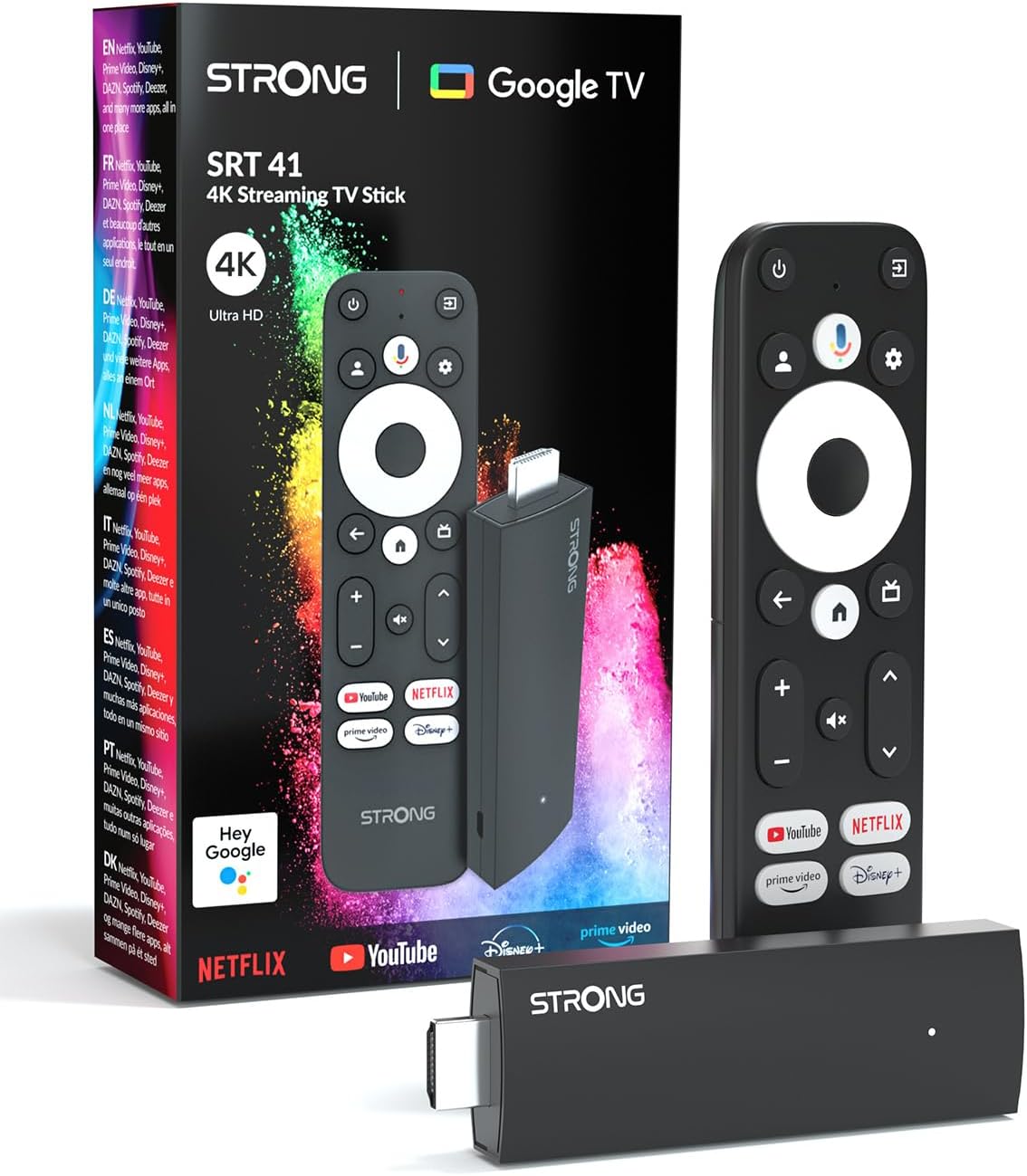
Image: The STRONG Leap-UNA streaming stick, its remote control, and the product packaging. This shows the main components included in the box.
Ürün Bittiview
The Leap-UNA stick is designed for ease of use and portability. It connects directly to your TV's HDMI port.
Cihaz Bileşenleri:
- Streaming Stick: Compact device with an HDMI connector for TV and a Micro USB port for power.
- Uzaktan kumanda: Features dedicated buttons for power, navigation, volume, Google Assistant, and quick access to popular streaming services like Netflix and YouTube.

Image: A close-up of the STRONG Leap-UNA streaming stick, highlighting its compact design and connectivity options including HDMI and Micro USB ports.
Kurmak
Follow these steps to set up your STRONG Leap-UNA streaming stick:
- Televizyona bağlanın: Plug the STRONG Leap-UNA streaming stick directly into an available HDMI port on your television. If space is limited, use an HDMI extender (if provided).
- Güç Açık: Connect the power adapter to the Micro USB port on the streaming stick and then plug the adapter into a power outlet. The device will power on automatically.
- HDMI Girişini Seçin: Use your TV's remote control to select the correct HDMI input source to which the Leap-UNA stick is connected.
- Uzaktan Kumandayı Eşleştir: Follow the on-screen instructions to pair your remote control. This usually involves pressing and holding specific buttons on the remote close to the stick.
- Wi-Fi'ye bağlanın: On the screen, select your Wi-Fi network from the list and enter the password. Ensure you have a stable internet connection for optimal streaming.
- Google Hesap Kurulumu: Sign in with your Google account. This is necessary to access the Google Play Store, Google Assistant, and other Google services. If you don't have one, you can create one.
- Uygulamaları Yükle: After initial setup, you can download and install your favorite streaming applications like Netflix, Amazon Prime Video, YouTube, and Disney+ from the Google Play Store.

Image: Visual representation of the simple setup process: 1. Connect the stick to your TV. 2. Connect to your internet box (Wi-Fi). 3. Start streaming your content.
Kullanım Talimatları
Uzaktan Kumandanın Kullanımı:
The included remote control allows you to navigate the Android TV interface and control your streaming experience.
- Navigasyon Pedi: Use the circular pad to move through menus and select items.
- Geri Düğmesi: Önceki ekrana döner.
- Ana menü tuşu: Android TV ana ekranına döner.
- Google Asistan Düğmesi: Press to activate voice commands.
- Ses Düğmeleri: TV'nin ses seviyesini ayarlayın.
- Özel Uygulama Düğmeleri: Quickly launch Netflix, YouTube, Prime Video, and Disney+ (if available).

Image: The remote control for the STRONG Leap-UNA, highlighting its dedicated app buttons and the wide range of applications available through Google Play.
Google Asistan ile Ses Kontrolü:
The integrated Google Assistant allows you to control your device and search for content using your voice. Press the Google Assistant button on your remote and speak your command. ExampBunlar şunları içerir:
- "Netflix'i aç"
- "Aksiyon filmleri bulun"
- "[Film Adı]'nı Oynat"
- "Hava nasıl?"

Image: The STRONG Leap-UNA remote control positioned in front of a TV screen, illustrating the use of Google Assistant for voice commands, such as "Avvia Netflix" (Start Netflix).
Chromecast Yerleşik:
With Chromecast built-in, you can cast content directly from your smartphone, tablet, or computer to your TV. Simply open a compatible app on your mobile device and tap the Cast icon ▶ to send the content to your TV.

Image: A TV screen displaying content being cast via Google Cast, with a smartphone in the foreground demonstrating the casting functionality.
Bakım
To ensure the longevity and optimal performance of your STRONG Leap-UNA streaming stick, follow these maintenance guidelines:
- Temizlik: Cihazı temizlemek için yumuşak ve kuru bir bez kullanın. Sıvı temizleyiciler veya aerosoller kullanmayın.
- Havalandırma: Ensure the device is placed in a well-ventilated area and that its vents are not blocked.
- Yazılım Güncellemeleri: Cihaz otomatik yazılım güncellemeleri alabilir. Performansı artıran ve yeni özellikler ekleyen bu güncellemeleri alabilmek için cihazın internete bağlı olduğundan emin olun.
- Depolamak: Uzun süre kullanılmayacaksa, cihazı serin ve kuru bir yerde saklayın.
Sorun giderme
If you encounter issues with your STRONG Leap-UNA streaming stick, refer to the following common problems and solutions:
| Sorun | Olası Neden | Çözüm |
|---|---|---|
| Güç yok/Cihaz açılmıyor | Power cable not connected properly; Faulty power adapter; Power outlet issue. | Check all power connections. Try a different power outlet. Ensure the power adapter is working. |
| Televizyonda resim yok | Incorrect HDMI input selected; Loose HDMI connection; TV compatibility issue. | Ensure your TV is on the correct HDMI input. Reconnect the HDMI cable. Try a different HDMI port on your TV. |
| Uzaktan kumanda yanıt vermiyor | Batteries are low or dead; Remote not paired; Obstruction between remote and stick. | Replace batteries. Re-pair the remote control (refer to Setup section). Ensure no obstructions. |
| Ara belleğe alma veya düşük yayın kalitesi | Weak Wi-Fi signal; Internet speed issues; Network congestion. | Move the stick closer to your Wi-Fi router. Restart your router. Check your internet speed. Reduce other network activity. |
| Uygulamalar çöküyor veya donuyor | App error; Insufficient memory; Software glitch. | Restart the app. Clear the app's cache (Settings > Apps > [App Name] > Clear cache). Restart the streaming stick. |
Özellikler
| Özellik | Detay |
|---|---|
| Marka | Güçlü |
| Model Adı | Leap-UNA |
| İşletim Sistemi | Android TV 11 |
| Çözünürlük | 2K |
| Bağlantı Teknolojisi | Bluetooth, HDMI, IR, Wi-Fi (Wi-Fi 5) |
| Desteklenen İnternet Hizmetleri | Netflix, Amazon Prime Video, Disney+, YouTube |
| RAM Boyutu | 1 GB |
| Boyutlar | 9U x 3G x 1.5Y santimetre |
| Uyumlu Cihazlar | TV, smartphone, tablet, personal computer, laptop |
| Renk | Siyah |
Garanti ve Destek
STRONG products are designed for reliability and performance. For warranty information and technical support, please refer to the warranty card included with your product or visit the official STRONG website. You can also contact customer support through the details provided on the packaging or website for assistance with any issues not covered in this manual.
En güncel bilgiler ve destek için lütfen şu adresi ziyaret edin: www.strong.tv