Ürün Bittiview
The ZENTALITY B220 is a compact 2G keypad mobile phone designed for essential communication. It features dual-SIM capability, a 2.4-inch display, a basic camera, and a wireless FM radio. This manual provides instructions for setting up, operating, and maintaining your device.
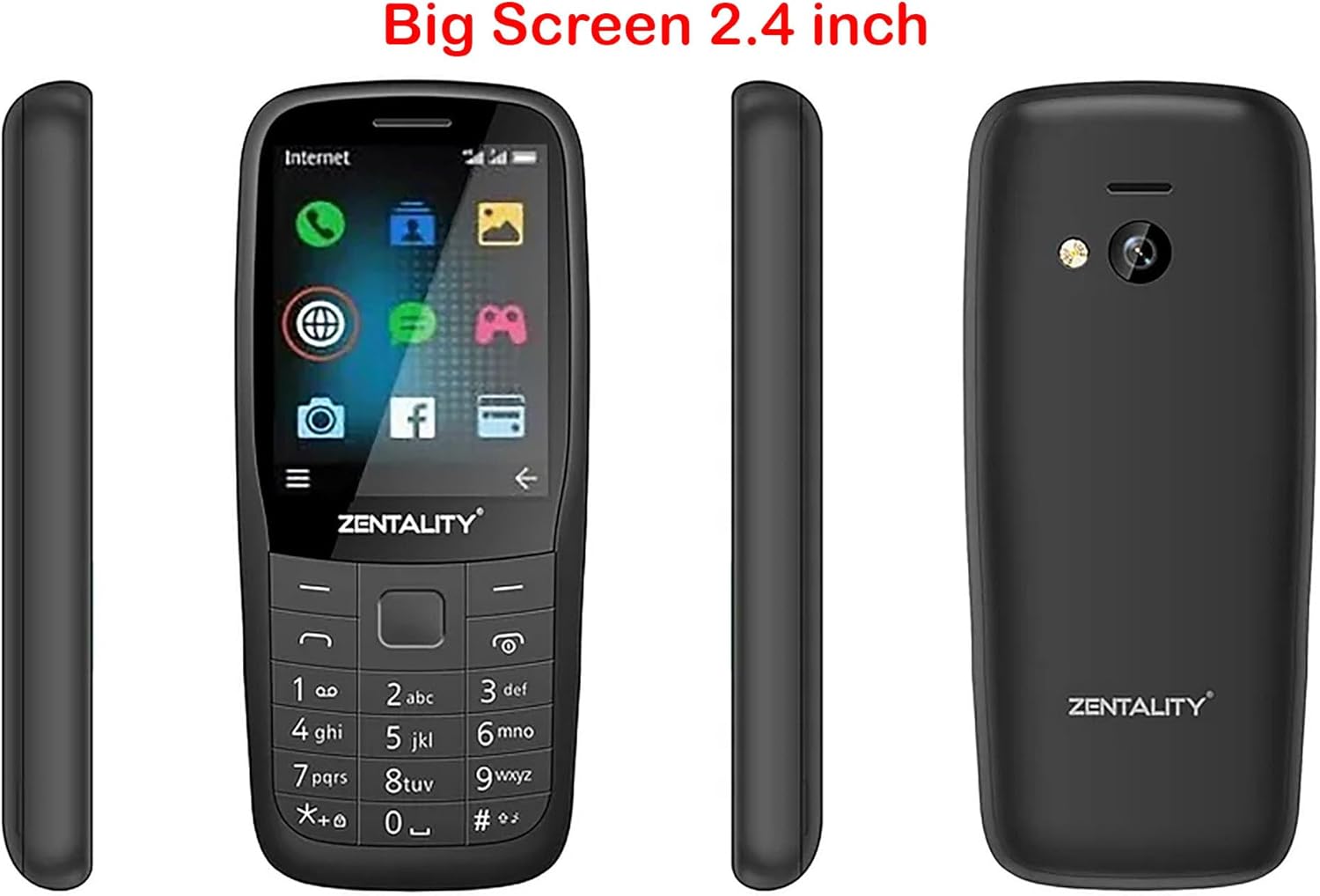
Figure 1: ZENTALITY B220 Mobile Phone - Multiple Views. This image displays the front, back, and side profiles of the ZENTALITY B220 mobile phone, illustrating its compact design and 2.4-inch screen.
1. Kurulum
1.1 Paket İçeriği
Paketinizin aşağıdaki öğeleri içerdiğinden emin olun:
- ZENTALITY B220 Mobile Phone
- Pil
- Şarj cihazı
- Kullanım Kılavuzu (bu belge)
1.2 Installing the SIM Card(s) and Battery
- Arka Kapağı Çıkarın: Gently pry open the back cover of the phone using the notch provided, typically at the bottom or side.
- SIM kart(lar)ı takın: Locate the SIM card slots. This phone supports dual SIM cards. Carefully insert your standard or micro SIM card(s) into the designated slots with the gold contacts facing down, ensuring they are correctly oriented as indicated by the diagrams on the phone.
- Mikro SD kart takın (İsteğe bağlı): If you wish to expand storage, insert a Micro SD card (up to 16GB) into its dedicated slot.
- Pili takın: Pil temas noktalarını telefonun terminalleriyle hizalayın ve pili nazikçe yerine bastırın.
- Arka Kapağı Değiştirin: Arka kapağı hizalayın ve yerine güvenli bir şekilde oturana kadar kenarlarından sıkıca bastırın.

Figure 2: ZENTALITY B220 Back View. This image shows the rear of the phone, including the camera lens and flashlight, where the back cover can be removed for SIM and battery installation.
1.3 Pilin Şarj Edilmesi
İlk kullanımdan önce telefonun pilini tamamen şarj edin.
- Connect the charger to the Micro 5pin USB port on the phone.
- Şarj cihazını standart bir elektrik prizine takın.
- The charging indicator on the phone will typically show charging status.
- Tamamen şarj olduktan sonra şarj cihazının bağlantısını kesin.
A full charge provides approximately 12 hours of talk time or 22 hours of standby time.
2. Kullanım Talimatları
2.1 Güç Açma/Kapatma
- Açmak İçin: Press and hold the Power/End Call button (usually marked with a red phone icon) until the screen lights up.
- Kapatmak İçin: Press and hold the Power/End Call button until the power-off options appear, then select "Power Off" or confirm.
2.2 Temel Gezinme
Use the keypad and navigation keys to interact with the phone.
- Yön Tuşu: Use the up, down, left, and right keys to navigate through menus and options.
- Merkez Tuşu: Typically used to select an option or confirm an action.
- Yazılım Tuşları: The keys directly below the screen (left and right) perform functions indicated by the text on the screen above them.
- Çağrı Anahtarı: Press the green phone icon to make a call or answer an incoming call.
- Çağrıyı Sonlandır/Güç Tuşu: Press the red phone icon to end a call or power the phone on/off.

Figure 3: ZENTALITY B220 Front View. This image displays the phone's screen and physical keypad, illustrating the layout for navigation and input.
2.3 Arama Yapma ve Alma
- Telefon çağrısı yapmak: Tuş takımını kullanarak telefon numarasını girin ve Arama tuşuna basın.
- Bir Aramayı Cevaplamak için: Telefon çaldığında, Arama tuşuna basın.
- Aramayı Bitirmek İçin: Çağrıyı Sonlandır tuşuna basın.
2.4 İletişim
The phone supports storing up to 2000 contacts.
- Kişi Ekleme: Navigate to the "Contacts" menu, select "Add New Contact," enter the name and number, then save.
- Searching Contacts: In the "Contacts" menu, use the search function or scroll through the list.
2.5 Mesajlaşma
Access the "Messages" menu to send and receive SMS text messages.
- Yeni Mesaj: Select "Write Message," enter the recipient's number or select from contacts, type your message, and send.
2.6 Kamera
Telefon 0.08 megapiksel kameraya sahip.
- Fotoğraf çekmek: Navigate to the "Camera" application. Frame your shot and press the center key to capture.
- El feneri: The phone includes a built-in flashlight. Access it through the shortcuts or utilities menu.
2.7 FM Radyo
Enjoy wireless FM radio without needing a headset.
- Activating FM Radio: Go to the "FM Radio" application. The phone will automatically scan for available stations.
- Dinleme: Farklı radyo istasyonlarına geçmek için navigasyon tuşlarını kullanın.
2.8 Kulaklık Girişi
A 3.5mm headphone jack is provided for private listening of music or radio.
3. Bakım
3.1 Cihazınızı Temizleme
Telefonun görünümünü ve işlevselliğini korumak için:
- Ekranı ve gövdeyi silmek için yumuşak, kuru bir bez kullanın.
- Avoid using liquid cleaners, aerosols, or harsh chemicals.
- Bağlantı noktalarını toz ve kalıntılardan uzak tutun.
3.2 Pil Bakımı
- Aşırı sıcaklıklardan kaçının, çünkü bu pil ömrünü kısaltabilir.
- Pili delmeyin veya hasar vermeyin.
- Telefon uzun süre kullanılmayacaksa, saklamadan önce yaklaşık %50'ye kadar şarj edin.
3.3 Depolama
Store the phone in a cool, dry place away from direct sunlight and moisture when not in use.
4. Sorun Giderme
If you encounter issues with your ZENTALITY B220, refer to the following common solutions:
| Sorun | Olası Çözüm |
|---|---|
| Telefon açılmıyor | Pilinin doğru takıldığından ve tamamen şarj olduğundan emin olun. Telefonu en az 30 dakika şarj etmeyi deneyin. |
| Ağ sinyali yok | Check if the SIM card is correctly inserted. Ensure you are in an area with 2G network coverage. Restart the phone. |
| Arama yapılamıyor veya alınamıyor. | Verify network signal. Check if your SIM card is active and has sufficient balance/credit. Ensure call barring is not enabled. |
| Pil şarj olmuyor | Check the charger and USB cable for damage. Ensure the charging port is clean. Try a different power outlet. |
| Ekran tepkisiz veya donmuş | Sert sıfırlamayı gerçekleştirmek için pili çıkarıp tekrar takın. |
Bu çözümleri denedikten sonra sorun devam ederse lütfen müşteri desteğiyle iletişime geçin.
5. Özellikler
| Özellik | Detay |
|---|---|
| Örnek | B220 |
| Görüntülemek | 2.4-inch QQVGA LCD (128x160 pixels) |
| SIM Desteği | Çift SIM |
| Ağ | 2G (GSM 850/900/1800/1900MHz) |
| Kamera | 0.08 Megapiksel |
| El feneri | Evet |
| FM Radyo | Wireless FM (no headset required) |
| Kişiler Kapasite | 2000 kişiye kadar iletişim bilgisi |
| Veri deposu | 32 MB |
| Genişletilebilir Depolama | 16GB'a kadar Micro SD kartı |
| Pil Ömrü | 12 saate kadar konuşma süresi / 22 saate kadar bekleme süresi |
| Bağlantı | 3.5mm headphone jack, Micro 5pin USB |
| Boyutlar | 113x49.5x15.1 mm |
6. Garanti ve Destek
6.1 Garanti Bilgileri
The ZENTALITY B220 Mobile Phone comes with an International Warranty. For specific terms, conditions, and duration of your warranty, please refer to the warranty card included with your product or contact your retailer. Keep your purchase receipt as proof of purchase.
6.2 Müşteri Desteği
For further assistance, technical support, or service inquiries, please contact the retailer where you purchased the device or the ZENTALITY customer service department. Contact information can typically be found on the product packaging or the manufacturer's official webalan.
Note: As per product information, if tax issues arise, please contact KzaMiza-Technology, not Amazon.


