giriiş
The Grandstream GRP2613W is a powerful 6-line carrier-grade IP phone designed for efficient deployment and easy management. It integrates advanced features such as a 2.8-inch color display, built-in Wi-Fi 6, dual Gigabit Ethernet ports with Power-over-Ethernet (PoE), and enterprise-level security. This manual provides essential information for setting up, operating, maintaining, and troubleshooting your GRP2613W IP Phone.
Kurmak
1. Paket İçeriği
Başlamadan önce paketinizde tüm öğelerin mevcut olduğundan emin olun:
- GRP2613W IP Phone Unit
- Ahize ve Ahize Kablosu
- Telefon Standı
- 5V Güç Adaptörü
- Ağ Kablosu (Ethernet)
- Hızlı Kurulum Kılavuzu
2. Fiziksel Bağlantı
Follow these steps to connect your IP phone:
- Telefon standını takın: Securely attach the phone stand to the back of the GRP2613W unit. The stand allows for adjustable viewaçıları.
- Telefonu bağlayın: Plug one end of the coiled handset cord into the handset and the other end into the handset port on the phone unit.
- Şebekeye ve Güce Bağlanın:
- PoE (Ethernet Üzerinden Güç) Kullanımı: Connect one end of the Ethernet cable to the LAN port on the GRP2613W and the other end to a PoE-enabled switch or injector. The phone will power on automatically.
- Güç Adaptörünü Kullanma: If PoE is not available, connect the 5V power adapter to the power port on the GRP2613W and then plug the adapter into a power outlet. Connect one end of the Ethernet cable to the LAN port on the GRP2613W and the other end to your network router/switch.

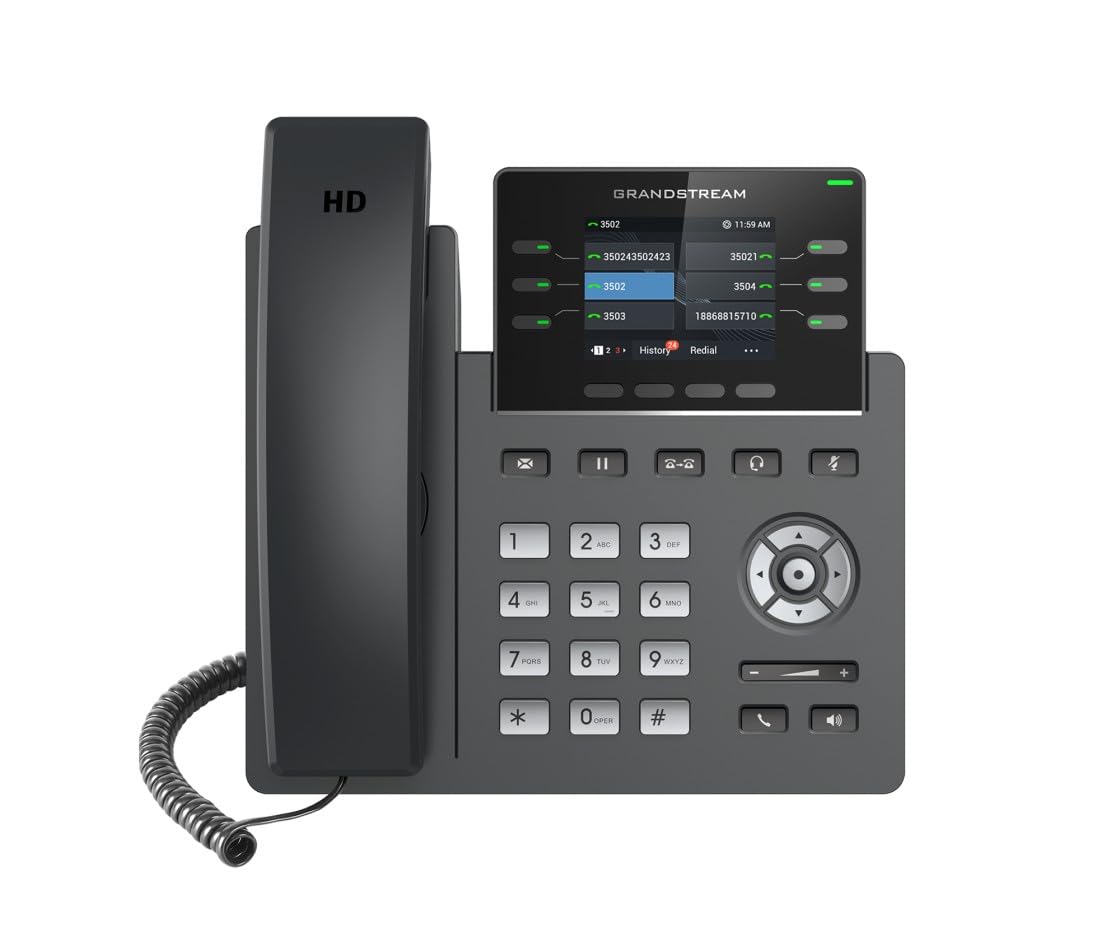
Image: Grandstream GRP2613W IP Phone, showing the main unit with the handset attached and the phone stand.
3. İlk Önyükleme
Upon successful connection, the phone will boot up. The LCD screen will display Grandstream's logo, followed by network information and the main idle screen. The phone will attempt to obtain an IP address via DHCP by default. If successful, the IP address will be displayed on the screen.
Temel Özellikler
The GRP2613W IP Phone offers a robust set of features for enhanced communication:
- SIP Hesapları: Supports up to 6 SIP accounts and 6 versatile line keys.
- Ağ Bağlantısı: Dual 10/100/1000 Mbps Gigabit Ethernet ports with auto-sensing and integrated PoE.
- Görüntülemek: 2.8-inch (320x240) color LCD display.
- Özelleştirme: Replaceable faceplate for easy logo customization.
- Ses kalitesi: HD audio compatible with major codecs (G.722, Opus broadband) and noise cancellation technology.
- Programlanabilir Tuşlar: Up to 24 digital BLF (Busy Lamp Field) keys.
- Kablosuz bağlantı: Built-in dual-band Wi-Fi (2.4GHz and 5GHz, 802.11a/b/g/n/ac/ax) and Bluetooth.
- Güvenlik: Enterprise-level protection including secure boot, dual firmware images, and encrypted data storage.
Kullanım Talimatları
1. Arama Yapma
You can make a call using the handset, speakerphone, or a connected headset:
- Pick up the handset, press the Speakerphone button
 , or press the Headset button .
 - Tuş takımını kullanarak istediğiniz numarayı çevirin.
- Press the Send button or a Line key to initiate the call.
2. Bir Aramayı Cevaplamak
Telefon çaldığında:
- Ahizeyi kaldırın.
- Hoparlör düğmesine basın .
- Kulaklık düğmesine basın .
- Yanıp sönen Hat tuşuna basın.
3. Çağrı Yönetimi
- Tutmak: During an active call, press the Hold button . Press it again to resume the call.
- transferi: During an active call, press the Transfer button , dial the new number, and press the Transfer button again.
- Konferans: During an active call, press the Conference button , dial the third party's number, and then press the Conference button again to join all parties.
- Sesini kapatmak: Sessiz düğmesine basın to mute your microphone during a call. Press it again to unmute.
4. Ses Ayarı
Use the Volume Up (+) and Volume Down (-) buttons on the phone to adjust the ringtone volume when idle, or the call volume during an active call.
5. Wi-Fi ve Bluetooth
The GRP2613W supports built-in dual-band Wi-Fi and Bluetooth. These features can be configured via the phone's menu or web interface for wireless network connectivity and pairing with Bluetooth headsets.
Bakım
1. Temizlik
To clean your GRP2613W IP Phone, use a soft, dry cloth. Avoid using liquid cleaners or aerosol sprays directly on the device. Ensure the phone is powered off before cleaning.
2. Ürün Yazılımı Güncellemeleri
Firmware updates are crucial for maintaining optimal performance and security. The GRP2613W supports updates over the air (OTA) and can be managed centrally via Grandstream's Device Management System (GDMS). Consult your network administrator or Grandstream's official documentation for the latest firmware and update procedures.
Sorun giderme
If you encounter issues with your GRP2613W, try the following common troubleshooting steps:
- Güç Yok: Ensure the power adapter is securely connected to both the phone and a working power outlet, or that the Ethernet cable is connected to a PoE-enabled port.
- Çevir Sesi Yok: Check network cable connections. Verify that the phone has obtained a valid IP address (check the LCD screen). Contact your VoIP service provider to confirm SIP account registration.
- Kötü Ses Kalitesi: Check network connection stability. Ensure the handset cord is securely connected. Adjust the call volume.
- Wi-Fi Bağlantı Sorunları: Verify Wi-Fi settings in the phone's menu. Ensure the phone is within range of your Wi-Fi network.
- Telefon Kayıt Olmuyor: Confirm SIP account details (username, password, server address) are correctly configured. Check network firewall settings.
For more complex issues, refer to the comprehensive online documentation or contact Grandstream support.
Özellikler
| Özellik | Detay |
|---|---|
| SIP Hesapları | 6 |
| Hat Tuşları | 6 versatile line keys |
| Görüntülemek | 2.8 inch (320x240) color LCD |
| Ethernet Bağlantı Noktaları | Dual 10/100/1000 Mbps Gigabit Ethernet with PoE |
| Wifi | Built-in dual-band Wi-Fi (802.11a/b/g/n/ac/ax) |
| Bluetooth | Dahili Bluetooth |
| Ses | HD audio, noise cancellation, G.722, Opus codecs |
| BLF Keys | Up to 24 digital BLF keys |
| Boyutlar | 1.1 x 9.7 x 6.5 inç |
| Ağırlık | 2.1 pound |
Garanti Bilgileri
Grandstream products typically come with a limited manufacturer's warranty. Please refer to the warranty card included in your product packaging or visit the official Grandstream website for detailed warranty terms and conditions specific to the GRP2613W model.
Destek
For technical assistance, product documentation, or further inquiries, please visit the Grandstream support portal on their official website. You can find FAQs, firmware downloads, and contact information for customer service.


