Majority Darwin Bluetooth Alarm Clock with 10W Wireless Charging
Model: Darwin | Brand: Majority
giriiş
This manual provides detailed instructions for the operation and maintenance of your Majority Darwin Bluetooth Alarm Clock. This device integrates an FM radio, dual alarm clock, 10W wireless charging, and ambient lighting to enhance your bedside experience.
Güvenlik Bilgileri
- Kullanmadan önce tüm talimatları dikkatlice okuyunuz.
- Cihazı su ve nemden uzak tutunuz.
- Aşırı sıcaklıklara maruz bırakmayın.
- Cihazı kendiniz sökmeye veya onarmaya çalışmayın. Yetkili servis personeline başvurun.
- Kablosuz şarj özelliğini kullanırken yeterli havalandırmayı sağlayın.
Paket İçeriği
Kutunun içindeki tüm öğelerin eksiksiz olduğundan emin olun:
- Majority Darwin Bedside Clock
- Şebeke Güç Adaptörü
- Kullanıcı Kılavuzu

Image: Package contents of the Majority Darwin alarm clock, including the clock, power adapter, and user manual.
Ürün Bittiview
Familiarize yourself with the main components and control buttons of your Darwin alarm clock.
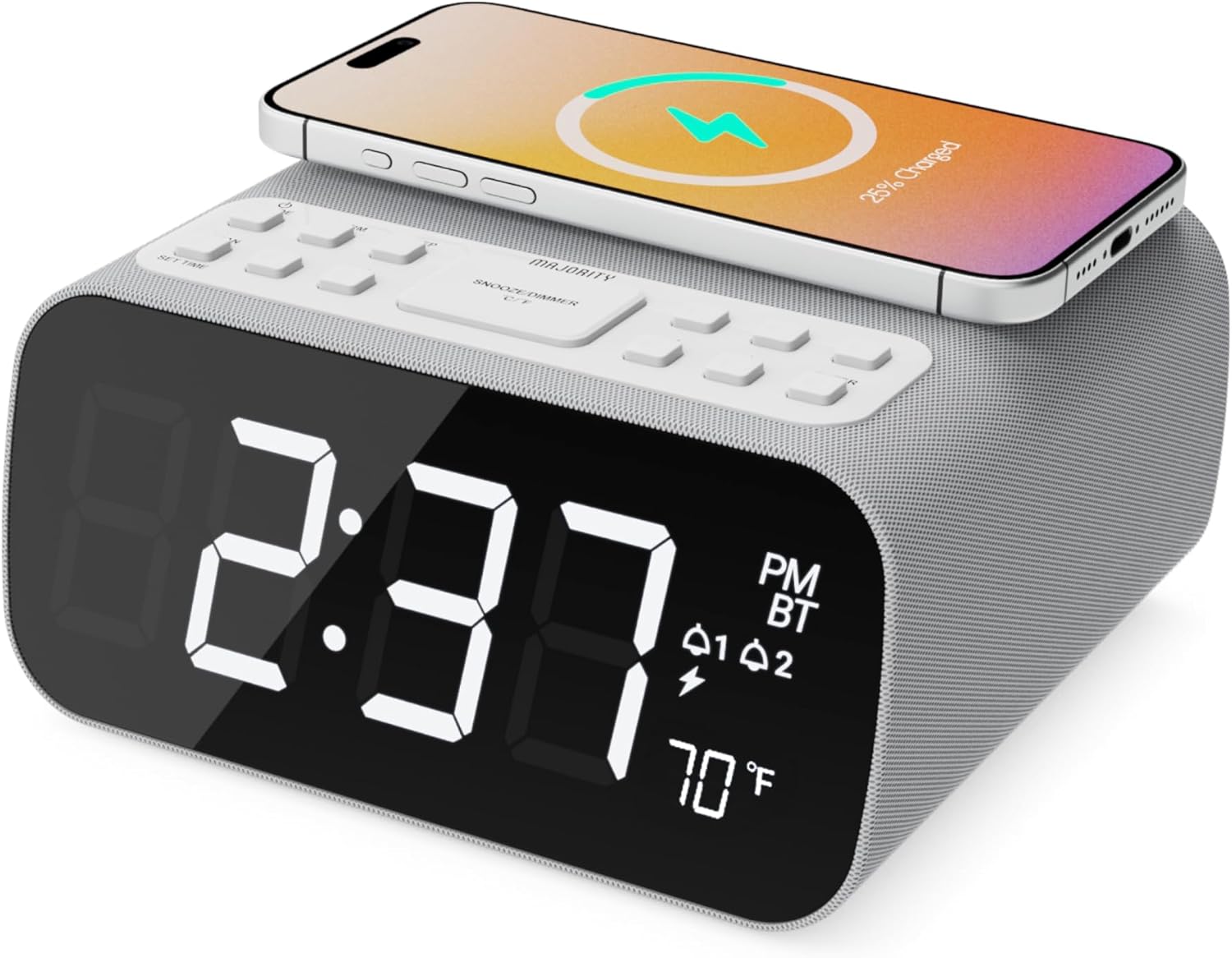
Resim: Ön view of the Majority Darwin alarm clock showing the large digital display, wireless charging pad on top, and control buttons.

Resim: Yan view of the Majority Darwin alarm clock highlighting the control panel with buttons for time, alarm, volume, and light settings.
Üst Panel Kontrolleri
- Kablosuz Şarj Pedi: Place compatible devices here for 10W wireless charging.
- Erteleme/Işık Düğmesi: Short press to snooze alarm; long press to adjust display brightness or cycle through ambient light colors.
- Time/Date Set Button: Press to enter time/date setting mode.
- Alarm 1/2 Buttons: Press to activate/deactivate Alarm 1 or Alarm 2. Long press to set alarm time.
- Volume/Tune Buttons: Adjust volume or tune FM radio stations.
- Mod Düğmesi: Switch between FM Radio, Bluetooth, and White Noise modes.
Rear Panel Controls & Ports
- DC 12V Girişi: Connect the mains power adapter here.
- USB Şarj Noktası: For charging additional devices via USB cable.
- Pil Bölmesi: For backup batteries (not for primary power).
- Ekran Parlaklığı Ayar Sürgüsü: Manually adjust the brightness of the main time display.
- Night Light Dimmer: Adjust brightness of the ambient light.
Kurmak
Güç Bağlantısı
Connect the provided mains power adapter to the DC 12V input port on the rear of the alarm clock and plug it into a wall outlet. The display will light up.
For battery backup, open the battery compartment on the bottom and insert 2 x AAA batteries (not included). This will retain time settings during a power outage but will not power the display or charging functions.
Resim: Arka view of the Majority Darwin alarm clock with the power adapter connected to the DC 12V input.
Başlangıç Zamanı Ayarı
- Uzun basın Saat/Tarih Ayarı button on the top panel. The hour digits will start flashing.
- Kullanın Volume/Tune Saati ayarlamak için düğmeler.
- Basın Saat/Tarih Ayarı Saati onaylamak ve dakika ayarına geçmek için düğmeye tekrar basın.
- Kullanın Volume/Tune Dakikaları ayarlamak için düğmeler.
- Repeat this process for setting the year, month, and day.
- Basın Saat/Tarih Ayarı button one last time to save all settings.
Kullanım Talimatları
Time Display & Dimmer
The large LED display shows the current time.
Manuel Karartma: Kullanın Ekran Karartma Kaydırıcısı on the rear panel to manually adjust the brightness of the time display.
Otomatik Karartma: The device features an auto-dimming function that adjusts display brightness at fixed time intervals (e.g., dimming at night, brightening during the day).

Resim: Ön view of the Majority Darwin alarm clock displaying time, AM/PM, and temperature, highlighting the dual alarm icons.
Alarm Ayarı
The Darwin alarm clock supports two independent alarms (Alarm 1 and Alarm 2).
- Long press either the Alarm 1 or Alarm 2 button. The hour digits for that alarm will flash.
- Kullanın Volume/Tune İstediğiniz alarm saatini ayarlamak için butonlara basın.
- Karşılık gelen Alarm Saati onaylamak ve dakika ayarına geçmek için düğmeye tekrar basın.
- Kullanın Volume/Tune İstenilen alarm dakikasını ayarlamak için düğmeler.
- Basın Alarm button again to select the alarm source (FM radio or built-in tone). Use Volume/Tune seçmek için düğmeleri kullanın.
- Basın Alarm button again to set the alarm volume.
- Basın Alarm button one last time to activate the alarm. An alarm icon will appear on the display.
Deactivating an Alarm: Short press the corresponding Alarm 1 or Alarm 2 button to turn it off. The alarm icon will disappear.
Erteleme Fonksiyonu
When an alarm sounds, short press the Erteleme/Işık button on the top panel to temporarily silence the alarm for 9 minutes. The alarm will sound again after the snooze period.
FM Radyo İşlemi
- Basın Mod Ekranda "FM" görünene kadar düğmeye basın.
- Kullanın Volume/Tune buttons to manually tune to your desired FM station.
- Auto Scan & Store Presets: Uzun basın Mod button to automatically scan and save available FM stations as presets.
- Kısa basın Mod Kaydedilmiş ön ayarlar arasında geçiş yapmak için kullanılan düğme.
Bluetooth Pairing & Playback
- Basın Mod button until "BT" appears on the display and the Bluetooth indicator starts flashing.
- On your smartphone or other Bluetooth device, enable Bluetooth and search for "Majority Darwin".
- Select the device to pair. Once connected, the Bluetooth indicator on the alarm clock will stop flashing.
- You can now play audio from your device through the alarm clock's speaker. Use the Volume/Tune buttons on the alarm clock or your device to adjust volume.

Image: A smartphone displaying music playback, connected via Bluetooth to the Majority Darwin alarm clock.
Kablosuz Şarj
The top surface of the alarm clock features a 10W wireless charging pad.
- Place your Qi-compatible smartphone directly onto the wireless charging pad.
- Ensure the phone is centered on the charging symbol for optimal charging.
- A charging indicator (e.g., a lightning bolt icon) may appear on your phone's screen or the alarm clock's display to confirm charging.
USB Şarj Noktası: An additional USB port on the rear allows you to charge other devices using a USB cable.
Image: The Majority Darwin alarm clock with a smartphone placed on top, indicating active wireless charging.
Night Light / Ambient Light
The alarm clock features an ambient light ring around its base.
- Uzun basın Erteleme/Işık button to turn the ambient light on/off.
- Kısa basın Erteleme/Işık button to cycle through different color modes (e.g., red, green, blue, purple, white, color cycle).
- Kullanın Gece Lambası Dimmer on the rear panel to adjust the brightness of the ambient light.

Image: The Majority Darwin alarm clock illuminated with a vibrant ambient light from its base.
Beyaz Gürültü Fonksiyonu
The device includes various white noise sounds to aid relaxation and sleep.
- Basın Mod button until the white noise mode is activated (indicated by a specific icon or text on the display).
- Kullanın Volume/Tune buttons to adjust the volume of the white noise.
- Kısa basın Mod button again to cycle through different white noise sounds (e.g., nature sounds, fan noise).
Bakım
- Cihazı yumuşak ve kuru bir bezle temizleyin. Aşındırıcı temizleyiciler veya çözücüler kullanmayın.
- Havalandırma açıklıklarını açık tutun.
- If not in use for an extended period, disconnect from power and remove backup batteries.
Sorun giderme
Güç Yok / Ekran Kapalı
- Güç adaptörünün hem cihaza hem de çalışan bir elektrik prizine güvenli bir şekilde bağlandığından emin olun.
- Elektrik prizinin çalışıp çalışmadığını kontrol edin.
Kablosuz Şarj Çalışmıyor
- Cihazınızın Qi uyumlu olduğundan emin olun.
- Make sure your phone is centered on the charging pad.
- Remove any thick phone cases or metallic objects between the phone and the charging pad.
Bluetooth Eşleştirme Sorunları
- Ensure the alarm clock is in Bluetooth pairing mode (BT flashing).
- Make sure your device's Bluetooth is enabled and searching.
- Cihazın eşleştirmesini kaldırıp yeniden eşleştirmeyi deneyin.
- Ensure no other devices are currently connected to the alarm clock via Bluetooth.
Alarm Çalmıyor
- Alarmın etkinleştirildiğini doğrulayın (ekranda alarm simgesi görünmelidir).
- Alarm ses ayarını kontrol edin.
- Ensure the correct alarm time is set.
Özellikler
| Özellik | Detay |
|---|---|
| Marka | Çoğunluk |
| Model Adı | Darvin |
| Kablosuz Şarj Çıkışı | 10W |
| Hoparlör Çıkış Gücü | 12 Watt |
| Bağlantı Teknolojisi | Bluetooth |
| Güç Kaynağı | Mains Power (Battery Backup) |
| Ürün Boyutları | 13.07 x 8.22 x 6.09 inç |
| Ürün Ağırlığı | 1.42 pound (645 Gram) |
| Özel Özellikler | Adjustable Volume, Dual Alarm, Bluetooth, Wireless Charging, FM Radio, Dimmable Display, Ambient Night Light, White Noise |
Garanti ve Destek
The Majority Darwin Bluetooth Alarm Clock comes with a standard manufacturer's warranty. Please refer to the warranty card included in your package for specific terms and conditions.
For technical support, troubleshooting, or warranty claims, please visit the official Majority websitesine gidin veya müşteri hizmetleriyle iletişime geçin.
Online resources and FAQs may also be available on the product support page.


