1. Giriş
The Tenlamp X3 Gaming Audio Mixer is an all-in-one USB audio mixer station designed to streamline your audio production for podcasting, streaming, gaming, and content creation. It offers intuitive controls for microphone, music, headphone, 3-band EQ, reverb, and voice changing, eliminating the need for complex software or drivers. This manual provides detailed instructions for setting up, operating, and maintaining your X3 audio mixer to enhance your audio experience.

Şekil 1.1: Ön view of the Tenlamp X3 Gaming Audio Mixer, showcasing its vibrant control panel and intuitive layout.

Figure 1.2: The Tenlamp X3 mixer integrated into a streaming setup, demonstrating its role as a comprehensive audio solution.
2. Paket İçeriği
Lütfen aşağıda listelenen tüm öğelerin paketinizde yer aldığından emin olun:
- 1 x Tenlamp X3 Ses Mikseri
- 1 x USB A-C Charging Data Cable
- 1 x 3.5mm TRRS Audio Cable
- 1 x Kullanım Kılavuzu (bu belge)
3. Ürün Bittiview
Familiarize yourself with the various controls and ports on your Tenlamp X3 audio mixer.
3.1 Ön Panel Kontrolleri
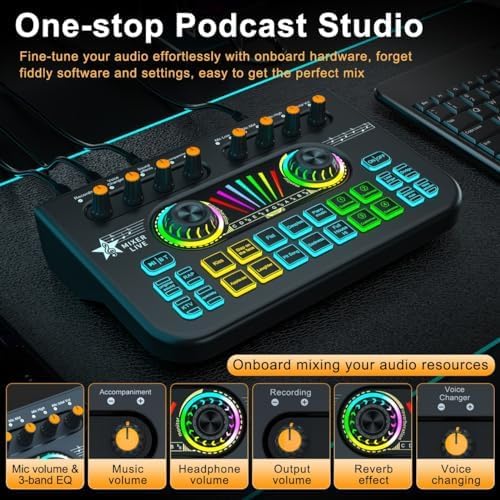
Şekil 3.1: Üzeriview of the X3 mixer's front panel, highlighting key control knobs for various audio parameters.
- Microphone Volume & 3-band EQ Knobs: Adjust microphone input level and fine-tune low, mid, and high frequencies.
- Müzik Ses Düğmesi: Controls the volume of background music or accompaniment.
- Kulaklık Ses Düğmesi: Adjusts the monitoring volume for your headphones.
- Çıkış Ses Düğmesi: Controls the overall output volume to your streaming/recording device.
- Reverb Effect Knob: Yankı efektinin yoğunluğunu ayarlar.
- Ses Değiştirme Düğmesi: Cycles through various voice modulation effects.
- Soundpads: 4 customizable and 10 preset sound effect buttons for adding fun elements.
- Fonksiyon Düğmeleri: Includes ON/OFF, Loopback, Auto Ducking, Lead Singer, Dodge, Noise Reduction, and Electronic Music.

Şekil 3.2: Ayrıntılı view of the X3's control knobs and the central LED display for reverb and monitoring.
3.2 Arka Panel Bağlantı Noktaları

Figure 3.3: Rear panel connections of the Tenlamp X3 mixer, detailing input and output ports.
- Dynamic Microphone Input: 6.35mm jack for dynamic microphones.
- XLR-3.5mm Microphone Input: For condenser microphones with a 3.5mm connector.
- Headset Input & Monitoring Headphone Output: 3.5mm ports for headset and monitoring headphones.
- Eşlik Girişi: 3.5mm port for connecting external music sources.
- Live Streaming Ports (1 & 2): 3.5mm TRRS ports for connecting to mobile devices for live streaming.
- Type-C OTG Port: USB-C port for digital audio I/O with PC or mobile devices.
- Type-C Charge Port (5V/1A): USB-C port for charging the built-in battery or powering the device.
Not: The Type-C OTG port does not support connecting USB microphones directly.
4. Kurulum Kılavuzu
Follow these steps to set up your Tenlamp X3 audio mixer for various applications.
4.1 İlk Güç Açma ve Şarj Etme
- Connect the provided USB A-C charging data cable to the Type-C Charge port on the mixer and a 5V/1A power adapter or a computer USB port.
- The mixer has a built-in 1200mAh rechargeable battery, offering up to 6 hours of continuous use. Ensure it is sufficiently charged before portable use.
- Press the "ON/OFF" button on the front panel to power on the device.

Figure 4.1: The Tenlamp X3 mixer highlighting its internal 1200mAh rechargeable battery for portable use.
4.2 Çevre Birimlerini Bağlama
- Mikrofon: Connect your condenser microphone to the XLR-3.5mm Microphone Input or a dynamic microphone to the Dynamic Microphone Input.
- Headphones/Headset: Plug your monitoring headphones or headset into the Headset Input or Monitoring Headphone Output.
- Music Source (Accompaniment): Connect an external audio device (e.g., phone, tablet) to the Accompaniment Input using a 3.5mm audio cable if you wish to play background music.
4.3 Connecting to PC/Mobile Devices for Streaming/Recording

Figure 4.2: The X3 mixer demonstrating its plug-and-play compatibility with PCs, mobile devices, and various streaming/recording platforms.
- For PC/Mac (Digital I/O): Use the USB A-C charging data cable to connect the mixer's Type-C OTG port to your computer's USB port. The mixer will be recognized as an audio input/output device.
- For Mobile Devices (Analog Streaming): Use the provided 3.5mm TRRS audio cable to connect one of the Live Streaming Ports (1 or 2) to your smartphone or tablet's headphone jack.
- Multi-device Streaming: You can connect up to two mobile devices for live streaming simultaneously using both Live Streaming Ports.
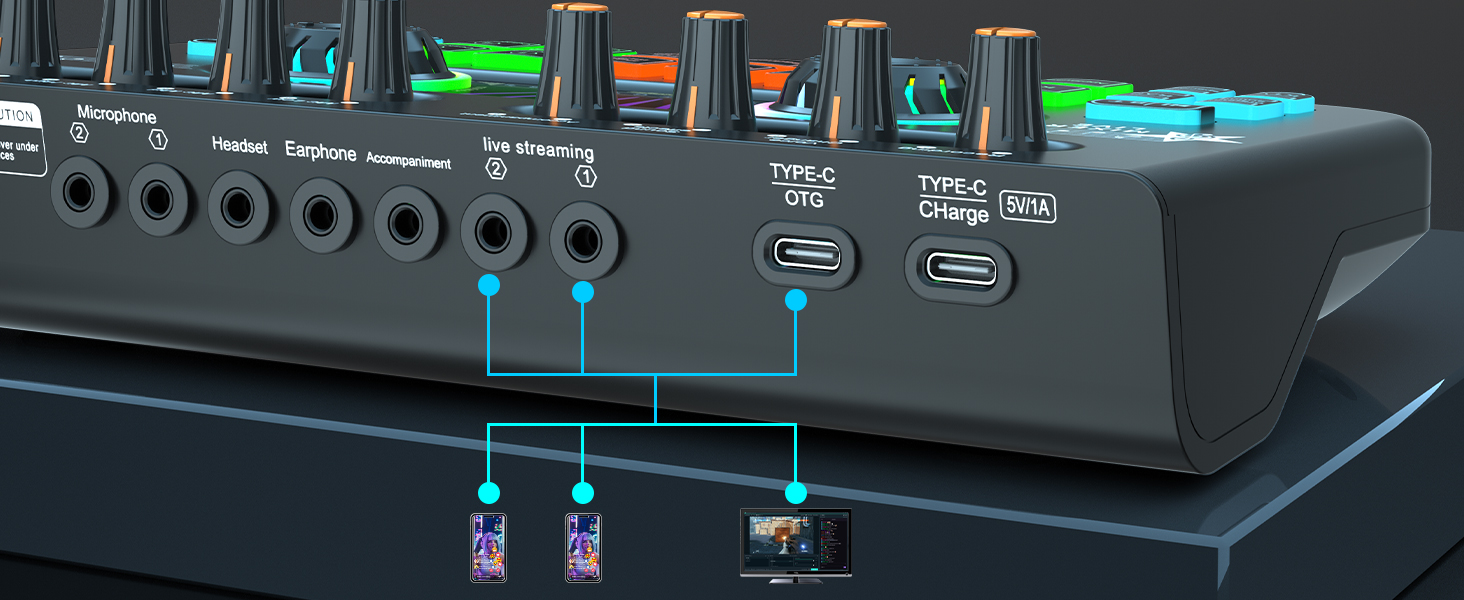
Figure 4.3: Connection diagram illustrating how to connect the X3 mixer to multiple mobile devices and a PC for diverse streaming setups.
5. Kullanım Talimatları
This section details how to use the various features of your Tenlamp X3 audio mixer.
5.1 Temel Ses Kontrolü
- Mikrofon Ayarı: Use the "Mic Low", "Mic Mid", and "Mic High" knobs to adjust the microphone's bass, midrange, and treble frequencies. The "Mic total Vol" knob controls the overall microphone volume.
- Music/Accompaniment Volume: Adjust the "Accompaniment" knob to control the volume of background music.
- Monitoring Volume: Use the "Monitor" knob to adjust the volume you hear through your headphones.
- Kayıt Sesi: Use the "Recording" knob to adjust the output volume sent to your recording or streaming device.
5.2 Sound Effects and Voice Changing

Figure 5.1: The X3 mixer's soundpad section, illustrating both customizable and preset sound effect buttons.
- Preset Sound Effects: Press any of the 10 preset soundpad buttons (e.g., Kiss, Slap on the face, Applause, Laughter) to instantly play sound effects.
- Customizable Soundpads: The 4 "Customize" buttons allow you to record and play your own sound effects. To record, press and hold a customize button until it blinks, record your sound, then press it again to save. Press briefly to play.
- Ses Değiştirici: Rotate the "Voice Changer" knob to cycle through different voice effects such as female, male, baby, or robot.

Figure 5.2: The X3 mixer's voice changer and reverb controls, enabling dynamic vocal effects.
5.3 Singing and Accompaniment Modes

Figure 5.3: Explanation of the three accompaniment modes available on the X3 mixer for singing and music streaming.
- Yankı Modları: The mixer offers 4 reverb modes. Adjust the "Reverb" knob to select and control the intensity of the reverb effect.
- 12-Step Auto Tune: Use the "Electronic Music" button to activate and cycle through 12 different auto-tune keys, helping you stay in tune while singing.
- BT Accompaniment: Activate Bluetooth (BT) mode to wirelessly connect your phone or tablet and stream accompaniment music directly to the mixer.
- Lead Singer Mode: This mode eliminates the vocal part from the music input for the first 60 seconds, retaining only the accompaniment and microphone sounds in your monitoring headphones. After 60 seconds, the original vocals return.
- Dodge İşlevi: When activated, this feature automatically lowers the background music volume when you speak into the microphone, and raises it again when you stop.
5.4 Gürültü Azaltma
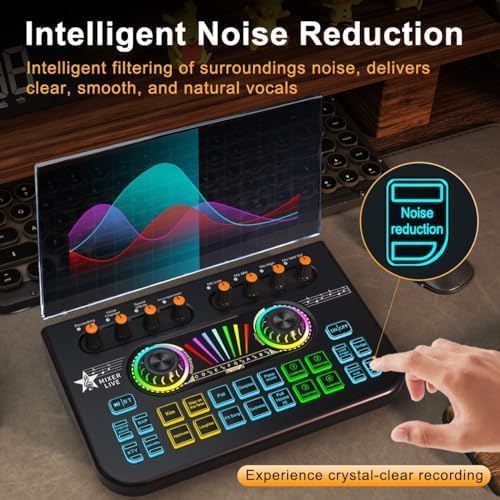
Figure 5.4: The X3 mixer's noise reduction feature, designed to deliver clear and natural vocals by filtering out ambient noise.
Press the "Noise reduction" button to activate the intelligent noise filtering feature. This helps to reduce surrounding background noise, ensuring clear, smooth, and natural vocals for your recordings or streams.
6. Bakım
Proper care and maintenance will ensure the longevity and optimal performance of your Tenlamp X3 audio mixer.
- Temizlik: Use a soft, dry cloth to wipe down the surface of the mixer. Avoid using abrasive cleaners or solvents, as they may damage the finish.
- Depolamak: Mikseri serin, kuru ve doğrudan güneş ışığından ve aşırı sıcaklıklardan uzak bir yerde saklayın.
- İşleme: Handle the mixer with care. Avoid dropping it or exposing it to excessive shock or vibration.
- Bağlantı: Always insert and remove cables gently to prevent damage to the ports.
7. Sorun Giderme
If you encounter any issues with your Tenlamp X3 audio mixer, please refer to the following table for common problems and their solutions.
| Sorun | Olası Neden | Çözüm |
|---|---|---|
| Ses çıkışı yok |
|
|
| Mikrofon çalışmıyor |
|
|
| Ses efektleri oynatılmıyor |
|
|
| Echo or feedback |
|
|
| Bluetooth bağlanmıyor |
|
|
8. Teknik Özellikler
| Özellik | Şartname |
|---|---|
| Model Numarası | X3-B6443 |
| Boyutlar (U x G x Y) | 8.2 x 5.1 x 2 inç (20.8 x 13 x 5.1 cm) |
| Ürün Ağırlığı | 11.5 ons (326 gram) |
| Bağlantı Teknolojisi | BT, Auxiliary (3.5mm), USB (Type-C), XLR (via 3.5mm adapter) |
| Kanal Sayısı | 5 |
| Güç Kaynağı | Battery Powered (Built-in 1200mAh Lithium Polymer) / USB-C (5V/1A) |
| Pil Ömrü | Up to 6 hours (continuous working) |
| Uyumluluk | Windows, Mac OS, Android, iOS (Supports OBS, Twitch, YouTube, TikTok, Spotify, Discord, Zoom, etc.) |
9. Garanti ve Destek
Your Tenlamp X3 Gaming Audio Mixer comes with a 12 Ay Garanti Satın alma tarihinden itibaren geçerlidir. Bu garanti, üretim hatalarını kapsar ve ürününüzün normal kullanımda amaçlandığı gibi çalışmasını sağlar.
For technical support, troubleshooting assistance, or warranty claims, please contact us directly through Amazon's messaging system. Our support team will endeavor to resolve your issue as quickly as possible.
We recommend reading this user manual thoroughly before setting up and operating the device to ensure the best user experience.


