1. Giriş
This manual provides essential information for the safe and effective use of your Magcubic HY300pro+ Mini Projector. Please read it thoroughly before operating the device and retain it for future reference.
The Magcubic HY300pro+ is a portable mini projector featuring 4K support, Android 11.0 operating system, WiFi6, and Bluetooth 5.4 connectivity. It is designed for versatile use in various environments, offering a flexible 180-degree rotation and an integrated 5W speaker.

Image 1.1: Magcubic HY300pro+ Mini Projector and Remote Control.
2. Kutuda Neler Var?
Paketinizde aşağıdaki tüm öğelerin bulunduğunu doğrulayın:
- Magcubic HY300pro+ Mini Projector
- Güç Adaptörü
- Uzaktan kumanda
- Kullanıcı Kılavuzu
3. Ürün Bittiview ve Özellikler
The HY300pro+ projector is designed for ease of use and portability, offering a range of features for an enhanced viewDeneyim.
Temel Özellikler:
- Enhanced Clarity and Brightness: 8000 lumens and an 8000:1 contrast ratio for clear visuals.
- Entegre Ses: 5W SoundBase speaker for rich audio without external speakers.
- Versatile and Portable Design: Lightweight (0.4 kg) with 180-degree rotation for flexible placement.
- Sezgisel Kontrol: Advanced Air Mouse remote control with voice command support.
- Ekran Çözünürlüğü: Native 720p resolution with 4K support.
- İşletim Sistemi: Android 11.0 (or later, as indicated by Android 14 in some visuals) for direct app access.
- Bağlantı: WiFi6 and Bluetooth 5.4 for seamless wireless connections.

Image 3.1: Key features of the HY300pro+ Projector.

Image 3.2: The compact and portable design of the projector.
4. Kurulum
4.1 Yerleştirme
The projector offers flexible placement options due to its 180-degree rotation capability. It can be used for ceiling mounting, tabletop projection, or tripod installation.
- Masaüstü Kullanımı: Projeksiyon cihazını sabit, düz bir yüzeye yerleştirin.
- Tripod Dağı: Secure the projector to a compatible tripod for adjustable height and angle.
- Tavan montalama: Install the projector upside down on a ceiling mount (sold separately) for overhead projection.
En iyi sonuç için viewing experience, a projection distance of 1.6 meters is recommended for an 80-inch screen. Adjust the distance to achieve your desired screen size.

Image 4.1: Projector placement options and recommended distances.

Image 4.2: 180-degree rotation for flexible projection on walls or ceilings.
4.2 Güç Bağlantısı
- Güç adaptörünü projektörün güç giriş portuna bağlayın.
- Güç adaptörünü uygun bir elektrik prizine takın.
- Cihazı açmak için projektördeki veya uzaktan kumandadaki güç düğmesine basın.
5. Operasyon
5.1 Initial Power On and Android System
Upon first power-on, the projector will boot into its integrated Android operating system (Android 11.0 or later). You can navigate the interface using the provided remote control.

Image 5.1: Android 14 Integrated System Interface.
5.2 Using the Air Mouse Remote Control
The projector comes with an advanced Air Mouse remote control for precise navigation and control.
- Eşleştirme: Press and hold the two designated buttons on the remote (refer to remote diagram) to enter pairing mode.
- Bluetooth Ayarları: Open the Bluetooth settings on the projector's interface.
- Bağlamak: Select the remote control icon or the remote's name from the list of available devices to pair.
- Hava Fare İşlevi: Once paired, move your wrist to control the on-screen cursor.
The remote also supports voice commands for hands-free adjustments and content search.
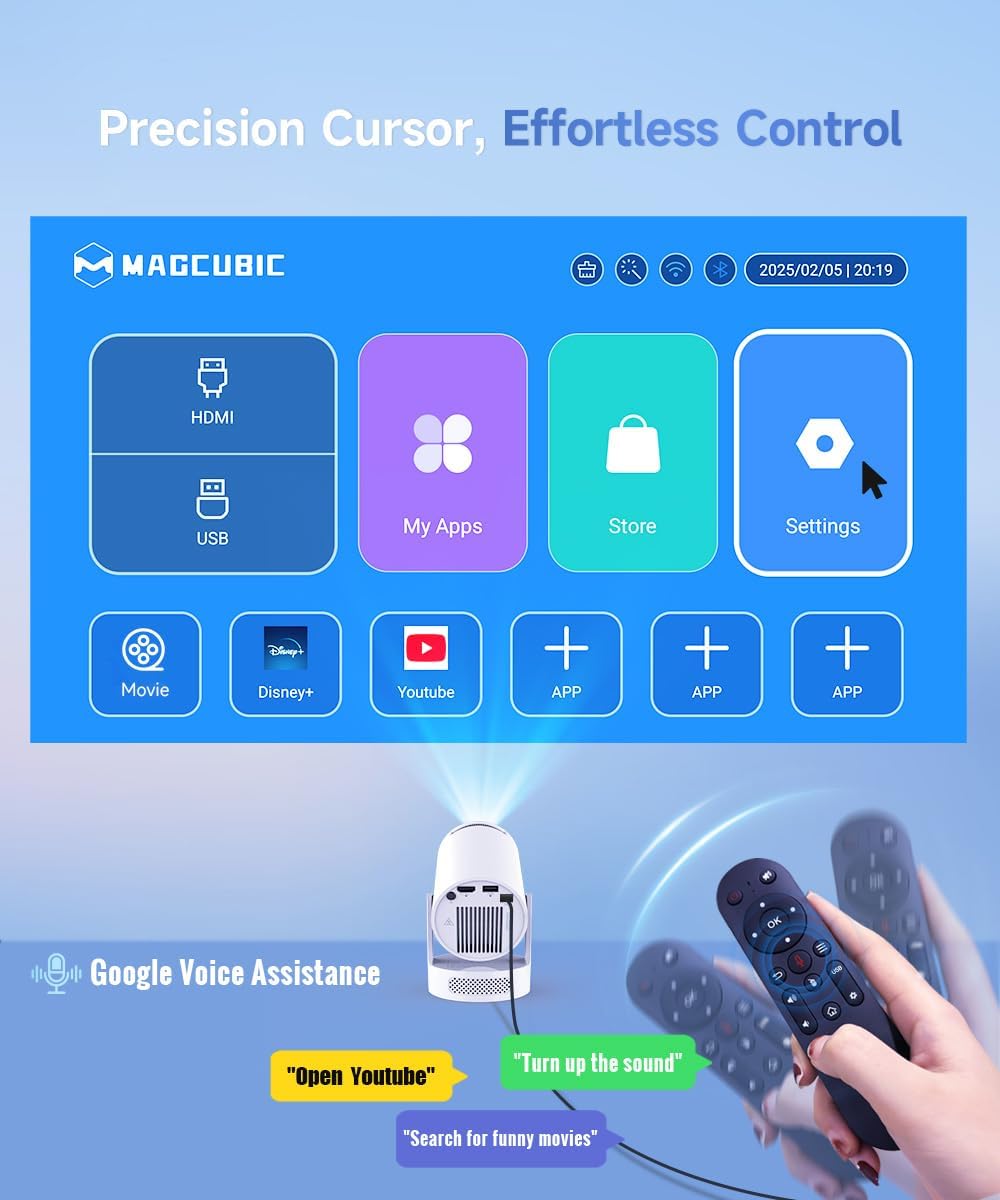
Image 5.2: Precision control with the Air Mouse remote and voice assistance.

Image 5.3: Instructions for using the Air Mouse remote control.
6. Bağlantı
6.1 Wireless Connectivity (WiFi6 & Bluetooth 5.4)
The projector supports both WiFi6 and Bluetooth 5.4 for high-speed and stable wireless connections.
- Wi-Fi6: İnternet erişimi ve yayın akışı için ev ağınıza bağlanın.
- Bluetooth 5.4: Pair with external Bluetooth speakers or headphones for enhanced audio, or connect other Bluetooth devices.

Image 6.1: Wireless casting and WiFi6 performance.

Image 6.2: Wireless casting and wired connection options.
6.2 Kablolu Bağlantı
The projector includes ports for wired connections to various devices.
- HDMI: Connect gaming consoles, laptops, TV sticks, or other HDMI-enabled devices.
- USB BAĞLANTI: Connect USB drives for media playback or other compatible USB accessories.

Image 6.3: Versatile compatibility and easy connection ports.
7. Görüntü Ayarlaması
Achieve a clear and perfectly aligned image using the following adjustment features:
- Manuel Odaklama: Görüntü netleşene kadar projektör merceğindeki odak halkasını ayarlayın.
- Otomatik Dikey Düzeltme: The projector automatically corrects vertical keystone distortion.
- Manual 4P Keystone: For more precise adjustments, manually correct the four corners of the image.
- Zoom (80-100%): Projektörü hareket ettirmeden görüntü boyutunu ayarlayın.

Image 7.1: Easy tuning and perfect alignment features.

Image 7.2: Simple manual focus for a clear view.
8. ses
The Magcubic HY300pro+ features an integrated 5W SoundBase speaker, providing clear and rich audio directly from the projector.

Image 8.1: Crisp, clear, powerful 5W speaker.

Image 8.2: Integrated 5W speaker for immersive sound.
For an enhanced audio experience, you can connect external Bluetooth speakers or a sound system via the Bluetooth 5.4 connection.
9. Bakım
Doğru bakım, projektörünüzün uzun ömürlü olmasını ve en iyi performansı göstermesini sağlar.
- Lensin Temizlenmesi: Optik lensler için özel olarak tasarlanmış, yumuşak ve tüy bırakmayan bir bez kullanın. Aşındırıcı temizleyiciler veya çözücüler kullanmayın.
- Dış Cephe Temizliği: Projektörün dış yüzeyini yumuşak, kuru bir bezle silin. İnatçı kirler için, biraz daha yumuşak bir bez kullanın.amp Önce bir bez, ardından kuru bir bez kullanılabilir.
- Havalandırma: Aşırı ısınmayı önlemek için projektörün havalandırma açıklıklarının açık ve engelsiz olduğundan emin olun.
- Depolamak: Uzun süre kullanılmayacaksa projektörü serin, kuru, doğrudan güneş ışığından ve aşırı sıcaklıklardan uzak bir yerde saklayın.
10. Sorun Giderme
Projeksiyon cihazınızla ilgili sorunlarla karşılaşırsanız, aşağıdaki yaygın sorunlar ve çözümlerine göz atın:
| Sorun | Olası Neden | Çözüm |
|---|---|---|
| Görüntü yok veya görüntü bulanık | Incorrect focus, wrong input source, projection distance too far/close. | Adjust manual focus. Verify input source. Adjust projection distance (1.6m for 80-inch screen). |
| Ses yok | Volume too low, external speaker not connected, audio output settings. | Increase volume. Check Bluetooth connection to external speakers. Verify audio output settings in Android. |
| Uzaktan kumanda çalışmıyor | Low battery, not paired, obstruction. | Replace batteries. Re-pair the remote control (see Section 5.2). Ensure no obstructions between remote and projector. |
| Wi-Fi bağlantı sorunları | Yanlış parola, kapsama alanı dışında, yönlendirici sorunları. | Wi-Fi şifresini doğrulayın. Projektörü yönlendiriciye daha yakın bir yere taşıyın. Yönlendiriciyi yeniden başlatın. |
| Projektör aşırı ısınıyor | Havalandırmanın engellenmesi, sıcak ortamda uzun süre kullanım. | Ensure ventilation ports are clear. Operate in a well-ventilated area. Allow projector to cool down. |
For optimal performance, ensure your projector's firmware is up to date. Check the settings menu for software updates.
11. Özellikler
| Özellik | Detay |
|---|---|
| Marka | Magcubic |
| Örnek | HY300Pro+ Android |
| Renk | Beyaz |
| Ürün Türü | Taşınabilir Projektör |
| Ekran Teknolojisi | LED-LCD |
| Yerel Çözünürlük | 1280 x 720 Piksel |
| Maksimum Ekran Çözünürlüğü | 3840 x 2160 Pixels (4K Support) |
| Parlaklık | 8000 Lümen |
| Kontrast Oranı | 8000:1 |
| Bağlantı Teknolojisi | Wi-Fi (WiFi6), Bluetooth (BT5.4), HDMI, USB |
| Özel Özellikler | Integrated Speaker, Lightweight, Portable, Built-in Wi-Fi, 180° Rotation |
| Entegre Hoparlör | 5W |
| Uyumlu Cihazlar | Smartphone, Game Console, Laptop/Tablet, TV Stick, USB Drive |
| Kurulum Türü | Tripod Mount, Tabletop, Ceiling Mount |
| Paket Boyutları | 24.4x18.2x13.2 cm |
| Ürün Ağırlığı | 400 gram |
12. Garanti ve Destek
Your Magcubic HY300pro+ Mini Projector comes with a manufacturer's warranty of 1 year.
Magcubic is committed to providing comprehensive customer support:
- 24/7 Professional Service: Günün her saati yardım mevcuttur.
- 30-Day Return or Exchange: Policy for product satisfaction.
- Ömür Boyu Teknik Destek: Ongoing support for the lifespan of your product.
For support inquiries, please refer to the contact information provided in your product packaging or visit the official Magcubic webalan.

Image 12.1: Magcubic Customer Service Commitment.


