1. Giriş
Thank you for choosing the GMKtec K10 Mini PC. This compact yet powerful workstation is designed for a wide range of applications, from office productivity and business tasks to multimedia consumption and light gaming. Featuring an Intel Core i9-13900HK processor, 32GB DDR5 RAM, and a 1TB SSD, the K10 delivers exceptional performance in a small form factor. This manual provides essential information for setting up, operating, maintaining, and troubleshooting your new Mini PC.
2. Paket İçeriği
Lütfen paketinizde tüm öğelerin mevcut olduğundan emin olun:
- GMKtec K10 Mini PC
- Güç Adaptörü
- HDMI Kablosu
- VESA Mount (with screws)
- Kullanım Kılavuzu (bu belge)
3. Ürün Bittiview
The GMKtec K10 Mini PC is engineered for high performance and versatility. Below are key features and components:

Figure 3.1: GMKtec K10 Mini PC - Front and Rear View. This image displays the compact design of the K10 Mini PC, highlighting its various connectivity options and dual Wi-Fi antennas.
3.1. İşlemci ve Grafikler

Figure 3.2: Intel Core i9-13900HK Processor Details. The K10 is powered by the Intel Core i9-13900HK, featuring 14 cores, 20 threads, 24MB Intel Smart Cache, and a turbo boost frequency of up to 5.4GHz, with a Thermal Design Power (TDP) ranging from 45-70W.

Figure 3.3: Intel Iris Xe Graphics 96EU. Enjoy dedicated graphics performance for efficient video editing, work, and gaming with the integrated Intel Iris Xe Graphics, featuring 96 Execution Units (EU) and a frequency of up to 1500MHz, supporting AV1 video decoding.
3.2. Bağlantı Noktaları ve Bağlantı

Figure 3.4: Rich Interface with 8 USB Ports. The K10 offers extensive connectivity, including multiple USB 3.2 and USB 2.0 ports, USB Type-C (DP/DATA), dual HDMI 2.0 (4K@60Hz), DisplayPort (DP), 2.5G RJ45 LAN, DC-IN, 3.5mm audio jack, COM port for industrial applications, and a Kensington Lock slot.
3.3. Expansion and Cooling

Figure 3.5: Expansion Slots. The K10 supports significant storage and memory expansion with M.2 2280 PCIe 4.0*3 slots (up to 12TB) and DDR5 SO-DIMM*2 slots (up to 96GB). The standard configuration includes 32GB DDR5 5600MHz SO-DIMM RAM and 1TB NVMe SSD.
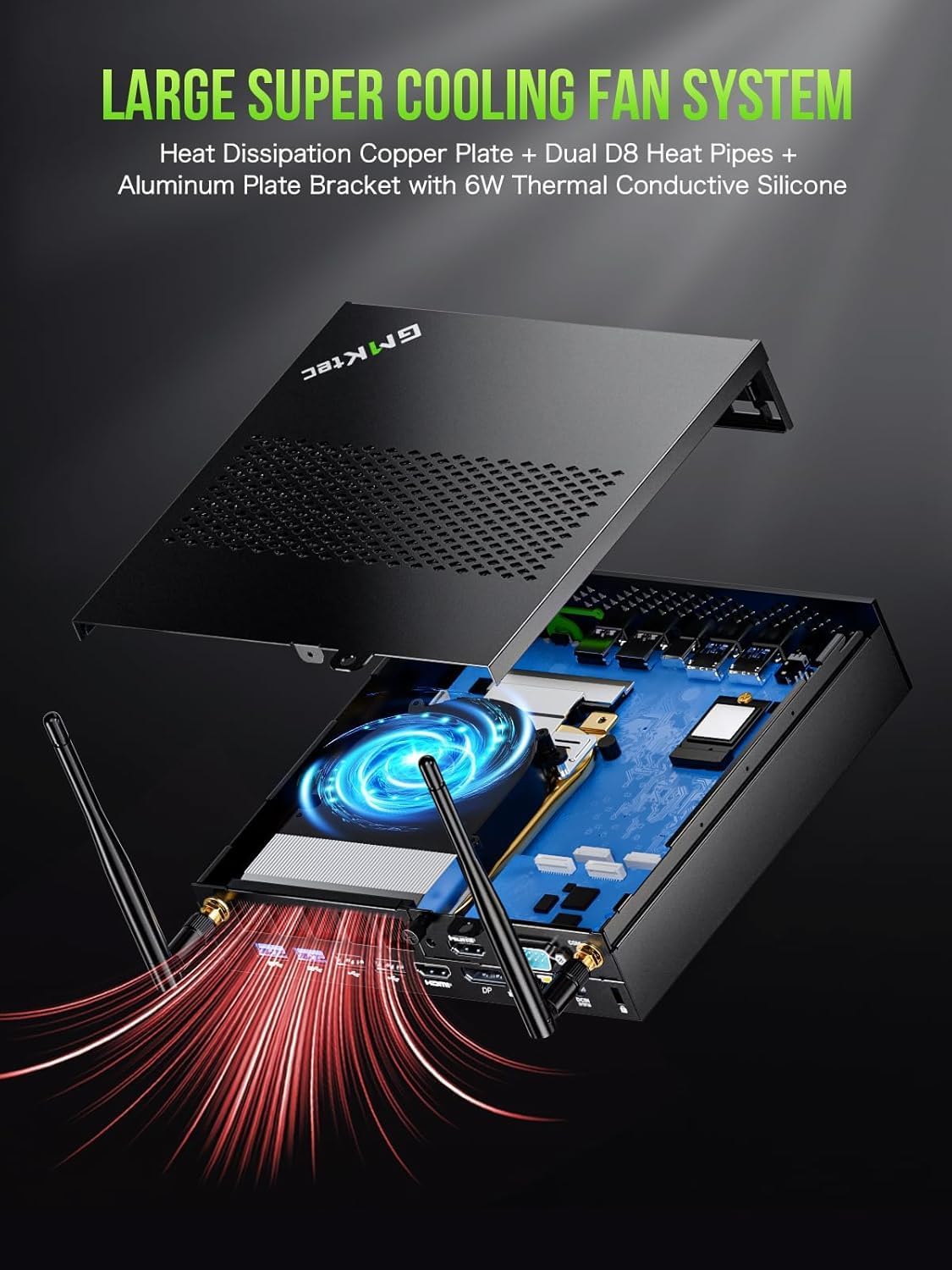
Figure 3.6: Large Super Cooling Fan System. The K10 features an advanced cooling system with a heat dissipation copper plate, dual D8 heat pipes, and an aluminum plate bracket with 6W thermal conductive silicone to ensure optimal performance and stability under load.
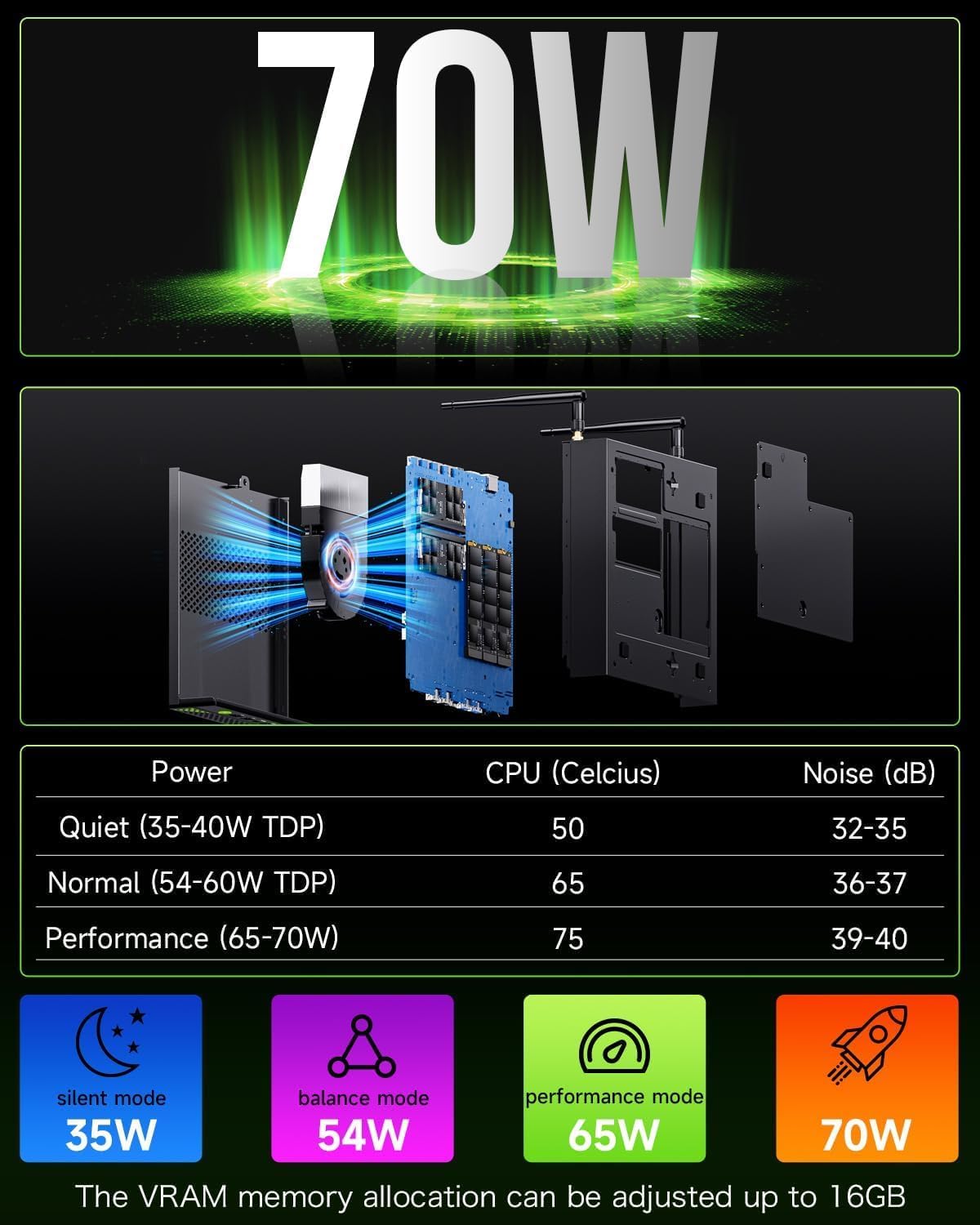
Figure 3.7: Power Consumption and Noise Levels. The K10 offers various power modes: Quiet (35-40W TDP, 50°C CPU, 32-35dB noise), Normal (54-60W TDP, 65°C CPU, 36-37dB noise), and Performance (65-70W TDP, 75°C CPU, 39-40dB noise). VRAM memory allocation can be adjusted up to 16GB.
3.4. Display Capabilities
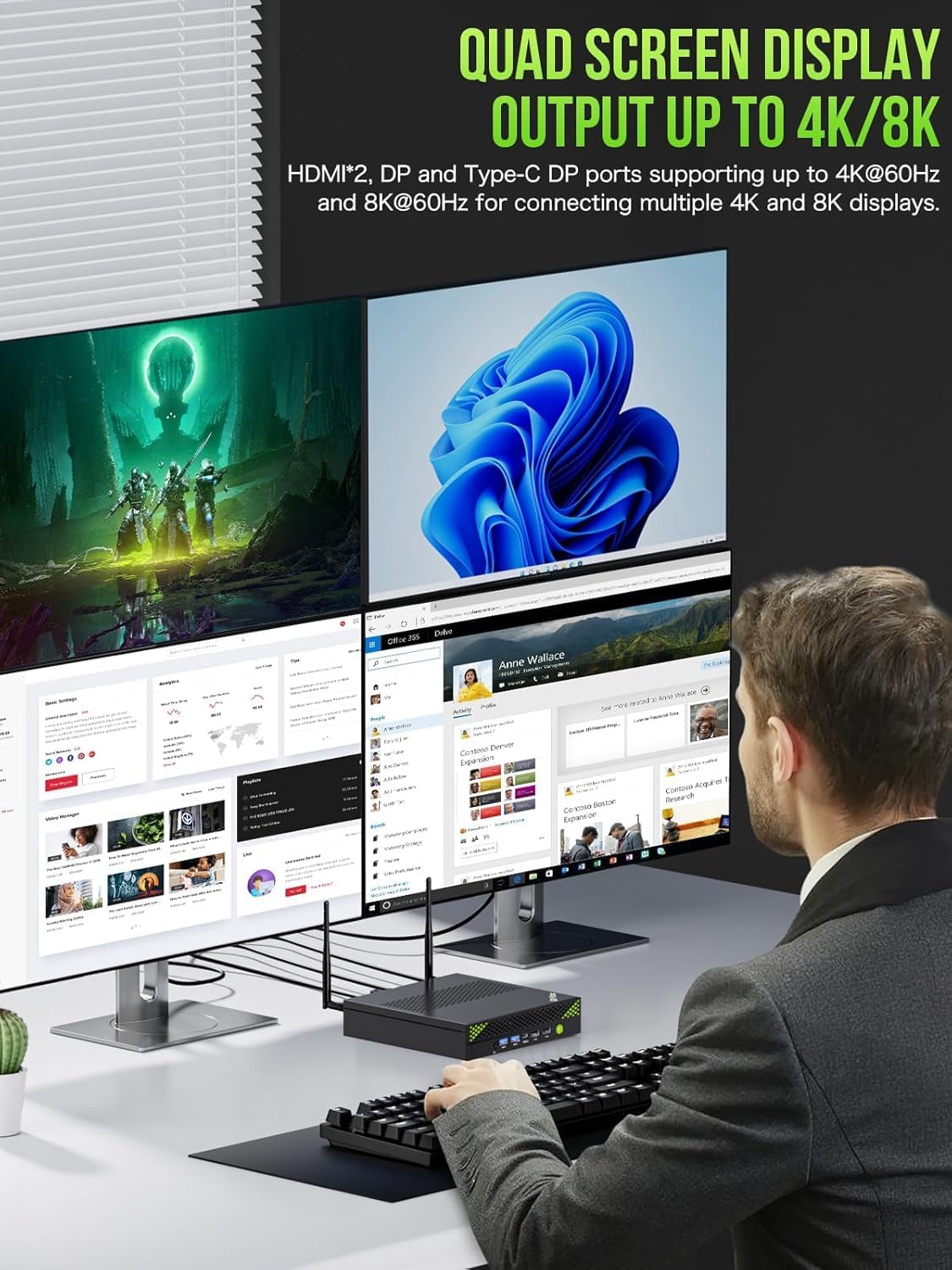
Figure 3.8: Quad Screen Display Output. The K10 supports quad-screen display output up to 4K/8K resolution. It features two HDMI 2.0 ports and one DisplayPort (DP) for connecting multiple 4K displays at 60Hz, and a Type-C DP port supporting up to 8K at 60Hz.
4. Kurulum Kılavuzu
Follow these steps to set up your GMKtec K10 Mini PC:
- Ekranı Bağla: Connect your monitor(s) to the Mini PC using the HDMI or DisplayPort cables. The K10 supports up to four displays simultaneously.
- Çevre Birimlerini Bağlayın: Plug in your USB keyboard and mouse into the available USB ports.
- Gücü bağlayın: Insert the power adapter cable into the DC-IN port on the Mini PC, then plug the power adapter into a wall outlet.
- Güç Açık: Press the power button located on the front of the Mini PC. The system will boot up automatically.
- İlk kurulum: Dil, bölge, ağ bağlantısı ve kullanıcı hesabı oluşturma dahil olmak üzere Windows 11 Pro'nun ilk kurulumunu tamamlamak için ekrandaki talimatları izleyin.
5. Kullanım Talimatları
5.1. Temel İşlem
- Güç Açma/Kapatma: Press the power button to turn on the PC. To shut down, click the Start button in Windows, then select Power > Shut down.
- Tekrar başlat: Bilgisayarı yeniden başlatmak için Windows'ta Başlat düğmesine tıklayın, ardından Güç > Yeniden Başlat'ı seçin.
- Uyku modu: To put the PC into sleep mode, click the Start button in Windows, then select Power > Sleep.
5.2. Ağ Bağlantısı
- Wifi: The K10 supports Wi-Fi 6 (802.11ax). To connect to a wireless network, click the Wi-Fi icon in the taskbar, select your desired network, enter the password, and click Connect.
- Ethernet: For a wired connection, connect an Ethernet cable from your router or modem to the 2.5G RJ45 LAN port on the Mini PC.
5.3. Çoklu Ekran Kurulumu
The GMKtec K10 supports connecting up to four displays simultaneously for enhanced productivity or immersive experiences. Use a combination of the HDMI, DisplayPort, and USB Type-C (DP Alt Mode) ports. After connecting the displays, right-click on the desktop, select 'Display settings', and configure your display layout (Extend, Duplicate, or Second screen only).
6. Bakım
Proper maintenance ensures the longevity and optimal performance of your Mini PC:
- Temizlik: Regularly clean the exterior of the Mini PC with a soft, dry cloth. Use compressed air to clear dust from the ventilation grilles to prevent overheating. Ensure the device is powered off and unplugged before cleaning.
- Havalandırma: Ensure the Mini PC is placed in a well-ventilated area, away from direct sunlight or heat sources. Do not block the air vents.
- Yazılım Güncellemeleri: Keep your Windows 11 Pro operating system and drivers updated to the latest versions. This improves security, stability, and performance.
- Veri Yedekleme: Veri kaybını önlemek için önemli verilerinizi düzenli olarak harici bir sürücüye veya bulut depolama alanına yedekleyin.
7. Sorun Giderme
If you encounter issues with your GMKtec K10 Mini PC, refer to the following common problems and solutions:
| Sorun | Olası Neden | Çözüm |
|---|---|---|
| Bilgisayar açılmıyor. | Güç kaynağı yok; güç adaptörü arızalı. | Ensure the power adapter is securely connected to the PC and the wall outlet. Try a different outlet. |
| Monitörde görüntü yok. | Incorrect display cable connection; monitor input not selected. | Check display cable connections. Ensure the monitor is set to the correct input source (HDMI/DP). Try a different display cable or port. |
| Yavaş performans. | Çok fazla uygulama çalışıyor; yetersiz boş depolama alanı; aşırı ısınma. | Close unnecessary applications. Free up disk space. Ensure proper ventilation and clean dust from vents. Check power mode settings. |
| Wi-Fi/Ethernet connectivity issues. | Driver issues; router problems; incorrect settings. | Restart the PC and router. Check network cable (for Ethernet). Update network drivers. Verify Wi-Fi password. |
| USB aygıtları tanınmıyor. | Faulty USB port; driver issues. | Try a different USB port. Update USB drivers in Device Manager. Restart the PC. |
8. Özellikler
Detailed technical specifications for the GMKtec K10 Mini PC:
| Özellik | Şartname |
|---|---|
| Marka | GMKtec |
| Model Numarası | K10 |
| Seri | GMKtec NUCBOX |
| İşletim Sistemi | Windows 11 Pro |
| İşlemci Markası | Akıllı |
| İşlemci Türü | Core i9-13900K (13900HK) |
| İşlemci Hızı | 5.4 GHz'e kadar |
| Çekirdek Sayısı | 14 |
| Önbellek Boyutu | 24 MB |
| Memory Storage Capacity (RAM) | 32 GB DDR5 |
| Desteklenen Maksimum Bellek | 64 GB |
| Sabit Sürücü Boyutu | 1 TB (SSD) |
| Sabit Disk Teknolojisi | SSD |
| Sabit Sürücü Arayüzü | PCIEx16 |
| Grafik Yonga Seti Markası | Akıllı |
| Grafik Kartı Açıklaması | Entegre |
| Grafik işlemcisi | Intel Iris Xe Grafikleri |
| Graphics Card RAM | 16 GB (VRAM allocation) |
| Grafik RAM Türü | DDR5 SDRAM |
| Maksimum Ekran Çözünürlüğü | 7680x4320 (8K) |
| İşlemci Soketi | FCBGA1744 |
| Bağlantı Türü | Bluetooth, Wi-Fi, Ethernet |
| Kablosuz Teknoloji Türü | 802.11ax (Wi-Fi 6), Bluetooth 5, 2.4 GHz/5 GHz Radio Frequency |
| Donanım Arayüzü | 802.11 ac/b/g/n, 3.5 mm Audio, Bluetooth 5, HDMI, Display Port, USB 3.2 Gen 2, USB Type C |
| HDMI Port Sayısı | 2 |
| USB 2.0 Port Sayısı | 4 |
| USB 3.0 Port Sayısı | 4 |
| Bağlayıcı Türü | Bluetooth, Ethernet, HDMI, USB, Wi-Fi |
| Cihaz Uyumluluğu | Keyboard, Printer, Monitor, Mouse, Television |
| Ürünün Belirli Kullanımları | Günlük Kullanım |
| Bilgisayar Türü | Mini Bilgisayar |
| Paket Boyutları | 22.5x22.4x9.9 cm; 2.23 kilogram |
| Üretici | GMKtec |
| Amazon.com.be'de İlk Satışa Sunulma Tarihi | 20 Ocak 2025 |
9. Garanti ve Destek
GMKtec is committed to providing excellent customer service and support for your K10 Mini PC.

Figure 9.1: Warranty & Support Information. This image outlines the available support channels for GMKtec products.
9.1. Garanti Bilgileri
The GMKtec K10 Mini PC comes with a 2 yıllık garanti. For specific details regarding warranty coverage and terms, please refer to the documentation included with your product or contact GMKtec customer support.
9.2. Müşteri Desteği
For any questions, technical assistance, or support inquiries, please use the following channels:
- Amazon Desteği: If purchased through Amazon, you can contact support by logging into your Amazon account, navigating to 'Your Orders', and selecting 'Ask Product Question' for the GMKtec K10.
- After-Sales Support (Email): For direct assistance, you can send an email to the GMKtec After-Sales Team at destek@gmktec.com. GMKtec offers 24/7 customer support.
- Ömür Boyu Teknik Destek: GMKtec provides lifetime technical support for its products.


