giriiş
Thank you for choosing the SOAR NBA Wireless Boombox Speaker. This manual provides essential information for the safe and effective use of your new speaker. Designed for the ultimate sports experience, this boombox delivers dynamic sound and features to amplify your game day celebrations. Please read this manual thoroughly before operating the device and retain it for future reference.

Resim: Ön view of the SOAR NBA Wireless Boombox Speaker, showcasing the Philadelphia 76ers logo and vibrant LED light show.

Image: A user enjoying the SOAR NBA Wireless Boombox Speaker outdoors on a basketball court.
Güvenlik Bilgileri
Güvenli çalışmayı sağlamak ve hasarı önlemek için lütfen aşağıdaki önlemlere uyun:
- Hoparlörü aşırı sıcaklıklara, doğrudan güneş ışığına veya yüksek neme maruz bırakmayın.
- Hoparlörü düşürmekten veya sert darbelere maruz bırakmaktan kaçının.
- Cihazı kendiniz sökmeyin, tamir etmeyin veya üzerinde değişiklik yapmayın. Tüm servis işlemlerini yetkili personele yaptırın.
- Hoparlörü sudan veya diğer sıvılardan uzak tutun.
- Yalnızca belirtilen şarj kablosunu ve güç adaptörünü kullanın.
- Hoparlörü yumuşak ve kuru bir bezle temizleyin. Aşındırıcı temizleyiciler kullanmayın.
Paket İçeriği
Paketin içinde tüm öğelerin mevcut olduğundan emin olun:
- SOAR NBA Wireless Boombox Speaker
- USB Şarj Kablosu
- Yardımcı Ses Kablosu
- Kullanıcı Kılavuzu
Ürün Bittiview
Familiarize yourself with the various parts and controls of your SOAR NBA Wireless Boombox Speaker.

Resim: Ön view of the speaker, highlighting the team logo and speaker grilles.

Resim: Ayrıntılı view of the control panel, including AUX, Micro SD, USB, DC IN ports, and control buttons.
Kontrol Paneli Özellikleri:
- Güç Düğmesi: Hoparlörü açar/kapatır.
- Mod Düğmesi: Switches between Bluetooth, FM Radio, AUX, USB, and TF Card modes.
- Oynat/Duraklat Düğmesi: Ses çalmayı kontrol eder.
- Önceki/Sesi Azaltma Düğmesi: Skips to the previous track or decreases volume.
- İleri/Sesi Açma Düğmesi: Skips to the next track or increases volume.
- AUX Girişi: Harici ses cihazlarını 3.5 mm kablo ile bağlamak için.
- Mikro SD Kart Yuvası: Mikro SD karttan ses dosyaları oynatmak için.
- USB Bağlantı Noktası: USB bellekten ses dosyaları oynatmak için.
- DC Giriş Bağlantı Noktası: Hoparlörü şarj etmek için.
- Mikrofon Girişi: Harici mikrofon bağlamak için.
Kurmak
1. Hoparlörü Şarj Etme
Before first use, fully charge the speaker. Connect the provided USB charging cable to the DC IN port on the speaker and the other end to a USB power adapter (not included) or a computer's USB port. The charging indicator light will illuminate during charging and turn off when fully charged. A full charge provides up to 8 hours of playback.
2. Açma/Kapama
Basılı tutun Güç Düğmesi for a few seconds to turn the speaker on or off. A voice prompt will indicate the power status.
3. Bluetooth Eşleştirme
Hoparlörünüzü Bluetooth özellikli bir cihaza bağlamak için:
- Turn on the speaker. It will automatically enter Bluetooth pairing mode, indicated by a voice prompt.
- Mobil cihazınızda (akıllı telefon, tablet vb.) Bluetooth'u etkinleştirin.
- Arama "SOAR Boombox" in the list of available Bluetooth devices.
- Select "SOAR Boombox" to connect. Once paired, a voice prompt will confirm the connection.
The speaker will automatically reconnect to the last paired device if it's within range and Bluetooth is enabled.

Image: Speaker connected via Bluetooth to a smartphone, ready for audio playback.
4. Yardımcı (AUX) Giriş
Connect non-Bluetooth devices using the provided 3.5mm auxiliary cable. Insert one end into the AUX input port on the speaker and the other end into the audio output jack of your device. The speaker will automatically switch to AUX mode, or you can manually select it using the Mod Düğmesi.
5. Mikrofon Girişi
For karaoke or announcements, connect a microphone (not included) to the microphone input jack on the speaker.
6. FM Radyonun Çalıştırılması
Dahili FM radyoyu kullanmak için:
- Basın Mod Düğmesi FM radyo moduna geçmek için.
- Basın Oynat/Duraklat Düğmesi Mevcut FM istasyonlarını otomatik olarak taramak ve kaydetmek.
- Kullanın Önceki/Ses Kısma Ve Sonraki/Sesi Aç Kaydedilen istasyonlar arasında gezinmek için düğmeler.
7. USB/TF Kart Oynatma
Insert a USB flash drive or a TF (Micro SD) card containing MP3 audio files into the respective port. The speaker will automatically detect the media and begin playback. Use the playback controls to manage your music.
8. Syncing Two Speakers (TWS Function)
For an enhanced stereo sound experience, you can pair two SOAR NBA Wireless Boombox Speakers together:
- Her iki hoparlörün de açık olduğundan ve herhangi bir Bluetooth cihazına bağlı olmadığından emin olun.
- Hoparlörlerden birinde (bu ana hoparlör olacaktır), iki kez basın. Mod Düğmesi or a dedicated TWS button (if available) to initiate TWS pairing. A voice prompt will indicate it's searching.
- The two speakers will automatically connect to each other. A voice prompt will confirm successful TWS pairing.
- Şimdi, 3. adımda açıklandığı gibi mobil cihazınızı Bluetooth aracılığıyla ana hoparlöre bağlayın. Ses, her iki hoparlörden de stereo olarak çalacaktır.

Image: Illustration of two speakers syncing together for stereo sound, with a smartphone connected to one.
Hoparlörü Çalıştırma
Oynatma Kontrolleri
- Oynat/Duraklat: Basın Oynat/Duraklat Düğmesi Sesi oynatmak veya duraklatmak için.
- Sonraki Parça: Kısa basın Sonraki/Sesi Artırma Düğmesi Bir sonraki parçaya geçmek için.
- Önceki parça: Kısa basın Önceki/Ses Kısma Düğmesi Önceki parçaya gitmek için.
Ses Ayarı
- Sesi arttır: Basılı tutun Sonraki/Sesi Artırma Düğmesi.
- Sesi Azalt: Basılı tutun Önceki/Ses Kısma Düğmesi.
LED Işık Gösterisi
The speaker features an integrated RGB LED light show that syncs with the music. This feature is automatically active when the speaker is on. There is no specific button to control the light show; it operates automatically.
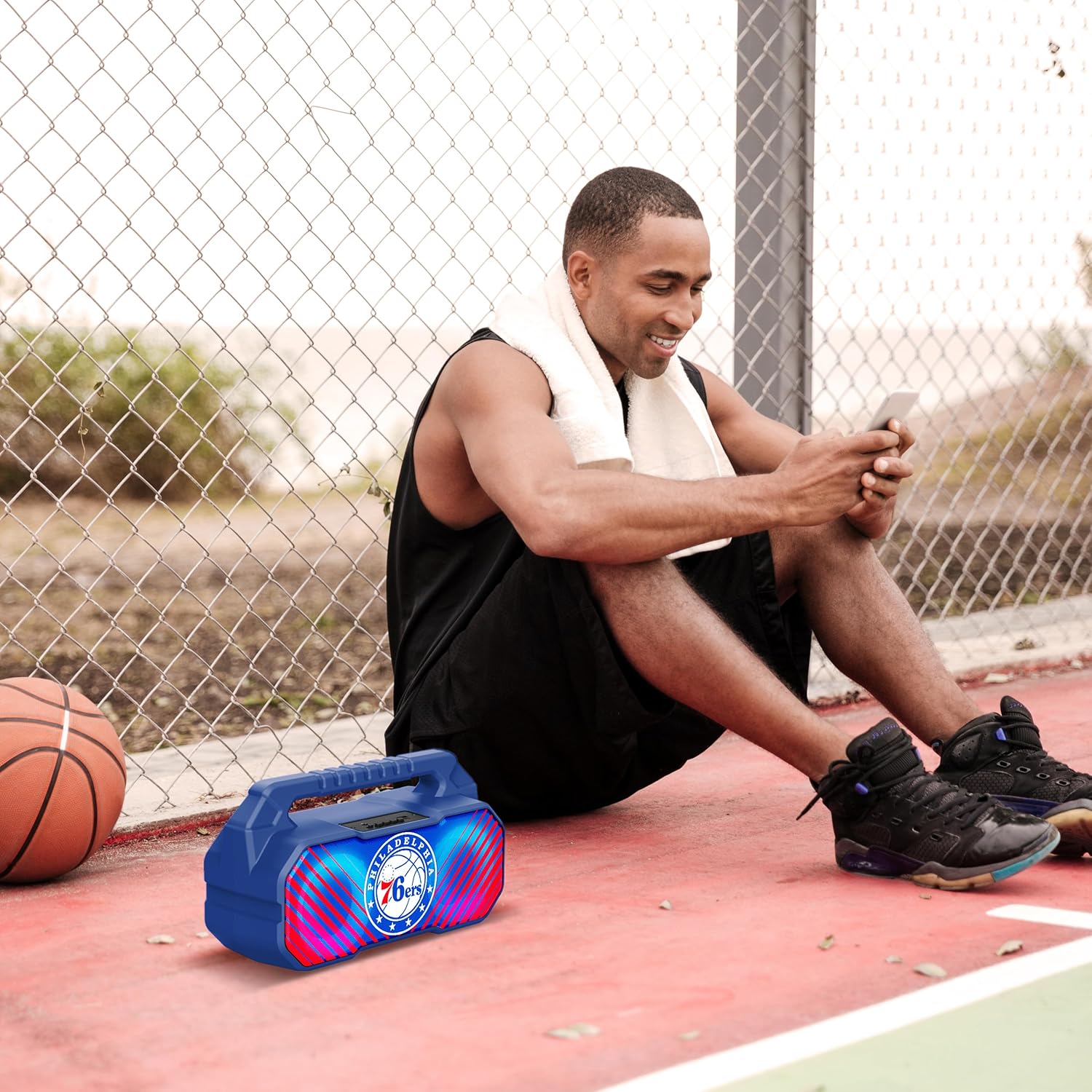
Image: The speaker's LED light show in action during a gathering, creating an ambient effect.
Bakım
Doğru bakım, hoparlörünüzün ömrünü uzatacaktır:
- Temizlik: Hoparlörü yumuşak, kuru ve tüy bırakmayan bir bezle silin. Sıvı temizleyiciler, aerosoller veya çözücüler kullanmayın.
- Depolamak: Uzun süre kullanılmayacaksa hoparlörü serin, kuru, doğrudan güneş ışığından ve aşırı sıcaklıklardan uzak bir yerde saklayın.
- Pil Bakım: To maintain battery health, charge the speaker at least once every three months if not used regularly.
Sorun giderme
Hoparlörünüzle ilgili sorunlarla karşılaşırsanız, aşağıdaki yaygın sorunlara ve çözümlere bakın:
| Sorun | Olası Neden | Çözüm |
|---|---|---|
| Hoparlör açılmıyor. | Pil zayıf veya bitmiş. | Hoparlörü tam olarak şarj edin. |
| Ses yok. | Volume is too low; incorrect mode selected; device not paired correctly. | Sesi artırın; doğru girişi seçmek için Mod düğmesine basın; Bluetooth cihazını yeniden eşleştirin. |
| Bluetooth bağlantısı kararsız. | Cihaz hoparlörden çok uzakta; parazit oluşuyor. | Move device closer to speaker (within 33 feet/10 meters); avoid obstacles. |
| FM radyo alımı zayıf. | Zayıf sinyal; çevresel parazit. | Relocate the speaker; re-scan for stations. |
| TWS eşleştirmesi başarısız. | Hoparlörler zaten başka bir cihaza bağlı; eşleştirme işlemi yanlış yapıldı. | Ensure both speakers are disconnected from other devices; follow TWS pairing steps precisely. |
Özellikler
Key technical specifications for the SOAR NBA Wireless Boombox Speaker:
| Özellik | Detay |
|---|---|
| Model Adı | Wireless BoomBox Speaker |
| Parça Numarası | NBA-BBX-PHI |
| Çıkış Gücü | 10 Watts (2 x 5-Watt speakers) |
| Bluetooth Sürümü | Bluetooth 5.0 |
| Pil Ömrü | 8 saate kadar |
| Boyutlar (U x G x Y) | 13.5 x 7.5 x 5.3 inç |
| Ağırlık | 1.11 Kilogram |
| Malzeme | Plastik |
| Dahil Bileşenler | Built-In Microphone (referring to microphone input capability) |
| UPC | 192129179047 |

Image: Dimensional drawing of the speaker, indicating its width and height.

Image: Internal component view, emphasizing the 10W speaker drivers and various features like Bluetooth 5.0, FM Radio, AUX input, and LED lights.
Garanti ve Destek
The SOAR NBA Wireless Boombox Speaker comes with a 1 Yıllık Sınırlı Garanti Satın alma tarihinden itibaren geçerlidir. Bu garanti, normal kullanım koşullarında malzeme ve işçilik kaynaklı üretim hatalarını kapsar.
The warranty does not cover damage caused by misuse, accident, unauthorized modification, or external causes such as drops or liquid exposure.
For warranty claims or technical support, please contact the manufacturer, Prime Brands Group Inc., or refer to the contact information provided on the product packaging or the official SOAR website. Please have your proof of purchase and product model number ready when contacting support.
Manufacturer: Prime Brands Group Inc.


