giriiş
Thank you for choosing the SOAR NBA Wireless Mouse and Mouse Pad. This product combines reliable wireless technology with ergonomic design and your favorite NBA team's spirit, providing a comfortable and efficient experience for work or leisure. This manual provides essential information for setting up, operating, maintaining, and troubleshooting your new device.

Image: The SOAR NBA Wireless Mouse and Mouse Pad featuring the Philadelphia 76ers logo and colors, shown together on a white background.
Paket İçeriği
Lütfen paketinizde tüm öğelerin mevcut olduğundan emin olun:
- 1 x SOAR Kablosuz Fare
- 1 x SOAR Bilek Destekli Fare Altlığı
- 1 x USB Wireless Receiver (stored inside the mouse battery compartment)
- Note: 1 AA battery required for the mouse (not included).

Image: The SOAR NBA Wireless Mouse and Mouse Pad displayed in its clear retail packaging, showing both components.
Kurmak
-
Pili Takın: Locate the battery compartment on the underside of the wireless mouse. Slide open the cover. Insert one AA battery (not included) ensuring correct polarity (+/-). Close the battery compartment cover.
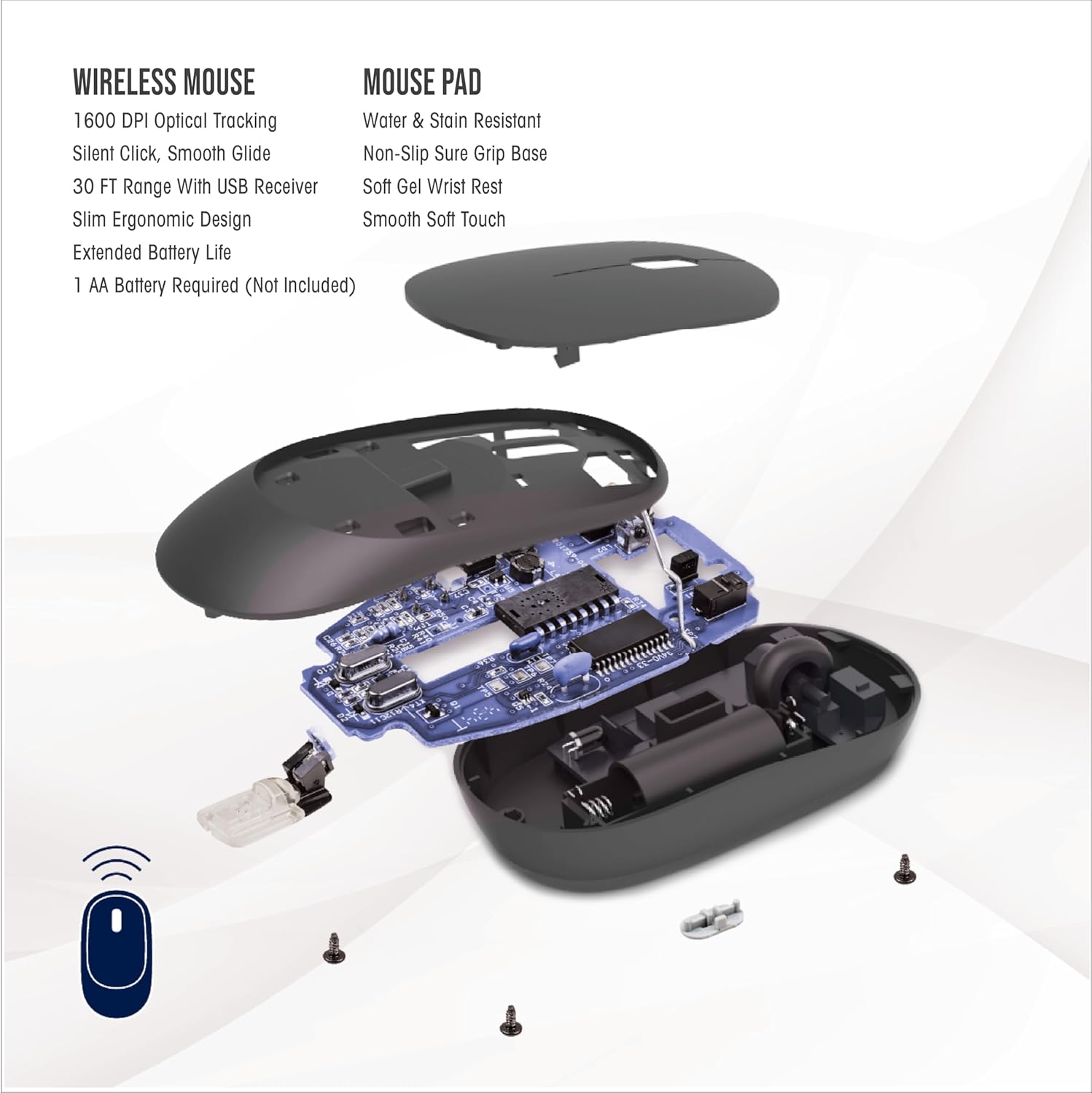
Image: An exploded diagram of the wireless mouse, illustrating the internal components, including the battery slot and the location of the USB receiver.
- USB Alıcısını Alın: The small USB wireless receiver is typically stored inside the mouse's battery compartment for safe keeping during transit. Gently remove it.
- Alıcıyı Bağlayın: Plug the USB wireless receiver into an available USB-A port on your computer (desktop, laptop, etc.). Your computer should automatically detect and install the necessary drivers. No special software installation is required.
-
Fare Altlığını Konumlandır: Place the mouse pad on a flat, stable surface. The anti-slip base will help keep it firmly in place during use. Position the wrist rest to comfortably support your wrist.

Image: A hand positioned on the wireless mouse, with the wrist comfortably supported by the mouse pad's gel wrist rest, illustrating optimal wrist alignment.
Kullanım Talimatları
Wireless Mouse Functionality:
- Temel Gezinme: The mouse features standard left-click and right-click buttons for primary and secondary functions.
- Kaydırma tekerleği: Use the scroll wheel for vertical scrolling through documents and web pages. Pressing down on the scroll wheel can activate an auto-scroll function in some applications.
- DPI Ayarı: The "DPI" button, located near the scroll wheel, allows you to cycle through three different sensitivity settings (low, medium, high). This adjusts the cursor speed to suit your preference and task.
- Sessiz Tıklama: The mouse is designed with silent click technology, reducing noise during use.
- Kablosuz Menzili: The mouse operates using advanced 2.4GHz technology, providing a stable and reliable connection within a 30-foot range from the USB receiver.
Mouse Pad Benefits:
- Ergonomik Destek: The soft gel wrist rest provides ergonomic support, helping to reduce wrist fatigue and discomfort during extended use.
- Kararlı Yüzey: The anti-slip base ensures the mouse pad remains securely in place on your desk, providing a consistent and smooth gliding surface for the mouse.

Image: A user's hands operating the wireless mouse and mouse pad alongside a laptop, demonstrating a typical desk setup.
Bakım
- Pil Değişimi: When the mouse performance degrades or stops responding, it is likely time to replace the AA battery. Follow the steps in the "Setup" section to open the battery compartment and insert a new AA battery.
- Fareyi Temizleme: Use a soft, dry cloth to wipe the exterior of the mouse. For stubborn dirt, a slightly damp Bez kullanılabilir, ancak cihazın içine nem girmemesine dikkat edin. Sert kimyasallardan veya aşındırıcı temizleyicilerden kaçının.
- Fare altlığını temizleme: The mouse pad is water and stain resistant. For minor spills, wipe immediately with a damp cloth. For general cleaning, a mild soap solution and a soft cloth can be used. Allow the mouse pad to air dry completely before reuse.
Sorun giderme
-
Fare Yanıt Vermiyor:
- AA pilin doğru takıldığından ve yeterli şarjı olduğundan emin olun. Gerekirse değiştirin.
- Verify the USB wireless receiver is securely plugged into a working USB port on your computer. Try a different USB port.
- Menzil sorunlarını veya paraziti ortadan kaldırmak için fareyi USB alıcısına daha yakın bir yere taşıyın.
- Bilgisayarınızı yeniden başlatın.
-
Aralıklı Bağlantı veya Gecikme:
- Ensure there are no large metallic objects or other wireless devices (like Wi-Fi routers, cordless phones) directly between the mouse and the receiver that could cause interference.
- The effective range is 30 feet; operating beyond this distance may cause connection issues.
-
Cursor Movement is Erratic or Too Slow/Fast:
- Press the "DPI" button on the mouse to cycle through the sensitivity settings.
- Farenin altındaki optik sensörün temiz ve tozdan arındırılmış olduğundan emin olun.
- Ensure the mouse pad surface is clean and free from obstructions.
-
USB Receiver Hard to Remove:
- Grip the receiver firmly and pull straight out. Avoid twisting or bending.
Özellikler
| Özellik | Detay |
|---|---|
| Model Adı | Kablosuz Mouse ve Mouse Pad |
| Parça Numarası | NBA-MMP-PHI |
| Marka | YÜKSELMEK |
| Renk | Team Color (Philadelphia 76ers) |
| Malzeme | Neoprene (Mouse Pad) |
| Bağlantı | 2.4 GHz Kablosuz (USB Alıcı) |
| kablosuz Menzil | 30 feet'e kadar |
| Fare Özellikleri | 1600 DPI Optical Tracking, Silent Click, Smooth Glide, Ergonomic Design |
| Mouse Pad Özellikleri | Water & Stain Resistant, Non-Slip Sure Grip Base, Soft Gel Wrist Rest, Smooth Soft Touch |
| Güç Kaynağı | 1 x AA Pil (dahil değildir) |
| Ürün Paket Boyutları | 11.69 x 8.98 x 3.5 inç |
| Paket Ağırlığı | 0.2 Kilogram |
| Üretici | Prime Brands Group Inc. |
| UPC | 192129180531 |
Garanti ve Destek
This SOAR product comes with a 1 Yıllık Sınırlı Garanti from the date of purchase. This warranty covers defects in materials and workmanship under normal use. It does not cover damage caused by accident, misuse, abuse, neglect, improper installation, or unauthorized repair.
For warranty claims or technical support, please contact the manufacturer, Prime Brands Group Inc., through their official support channels. Please retain your proof of purchase for warranty validation.


