1. Giriş
Welcome to the user manual for your new Google Pixel 9a smartphone. This guide provides essential information to help you set up, operate, maintain, and troubleshoot your device. The Pixel 9a combines advanced AI capabilities with a powerful camera and long-lasting battery, designed to enhance your daily mobile experience.

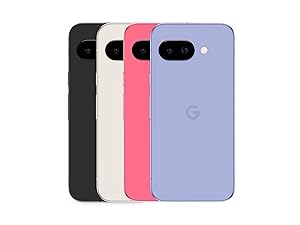
Figure 1: Google Pixel 9a in Obsidian
2. Kurulum Kılavuzu
2.1. Kutuda Neler Var?
- Google Pixel 9a Smartphone
- USB-C to USB-C Cable (1m, USB 2.0)
- SIM Aracı

Şekil 2: Kutu İçeriği
2.2. İlk Kurulum
- SIM Kartı Takın: Use the provided SIM tool to open the SIM tray. Insert your nano-SIM card.
- Güç Açık: Cihazın yan tarafındaki güç düğmesine Google logosu görünene kadar basılı tutun.
- Ekrandaki Komutları Takip Edin: The phone will guide you through connecting to Wi-Fi, signing in to your Google account, and transferring data from your old device.
- Bataryayı Şarj Edin: Connect the USB-C cable to the phone and a compatible power adapter (sold separately) to charge the device.
3. Cihazınızın Çalıştırılması
3.1. Kamera Özellikleri
The Pixel 9a camera is equipped with advanced AI features to capture stunning photos and videos.
Include Me (Inclúyeme)
This feature ensures no one is left out of group photos. Take one group photo, switch photographers, take another, and Pixel will magically merge both photos.

Macro Focus
Use Macro Focus to reveal vivid colors and surprising contrast in photos and videos of the smallest details, such as raindrops, flowers, or splashes.

Best Take (Mejor Versión)
Capture group photos where everyone looks their best. The phone can combine different facial expressions from a burst of photos to create the perfect group shot.

3.2. Gemini Yapay Zeka Asistanı
Gemini is your integrated AI assistant, simplifying multitasking and information retrieval across your Google applications.
Single Request, Multiple Apps
Ask Gemini to find information and perform actions for you across your Google apps, streamlining your workflow.

İkizler Canlı
Interact with Gemini through voice commands for quick assistance and information.

3.3. Pil Yönetimi
The Pixel 9a features an intelligent battery designed for extended use.
- The smart battery can last over 24 hours with typical usage.
- Etkinleştir Extreme Battery Saver to extend battery life up to 100 hours.

4. Bakım ve Onarım
Proper care ensures the longevity and optimal performance of your Pixel 9a.
- Temizlik: Ekranı ve gövdeyi temizlemek için yumuşak, tiftiksiz bir bez kullanın. Aşındırıcı malzemelerden veya sert kimyasallardan kaçının.
- Sıcaklık: Avoid exposing your device to extreme temperatures (hot or cold) as this can affect battery life and internal components.
- Su ve Toz Direnci: The Pixel 9a is rated IP68 for water and dust resistance, meaning it can withstand submersion in up to 1.5 meters of fresh water for up to 30 minutes. However, this is not permanent and resistance may decrease over time with normal wear. Avoid intentional submersion.
Şekil 3: Suya Dayanıklılık
- Geri Dönüştürülmüş Malzemeler: The Pixel 9a is manufactured with recycled materials, contributing to environmental sustainability.
5. Sorun Giderme
This section addresses common issues you might encounter with your Pixel 9a.
| Sorun | Olası Neden | Çözüm |
|---|---|---|
| Kısa Pil Ömrü | High screen brightness, excessive app usage, background processes. | Reduce screen brightness, close unused apps, activate Extreme Battery Saver, check battery usage in settings. |
| Setup Issues / Freezing | Software glitch, network connectivity problems during setup. | Restart the device. Ensure a stable Wi-Fi connection. If issues persist, perform a factory reset (data will be erased). |
| Parmak izi sensörü çalışmıyor. | Dirty sensor, screen protector interference, un-registered fingerprint. | Clean the sensor. Re-register your fingerprint. Ensure screen protector is compatible with in-display sensors. |
| Camera Quality Concerns | Dirty lens, poor lighting conditions, incorrect settings. | Clean the camera lens. Ensure adequate lighting. Adjust camera settings (e.g., HDR, night mode). |
6. Teknik Özellikler
Detailed specifications for the Google Pixel 9a.
| Özellik | Şartname |
|---|---|
| İşletim Sistemi | Android 15 |
| Boyutlar | 7.33x15.47x0.89 cm |
| Ağırlık | 186 gr |
| Ekran Boyutu | 6.3 inç |
| Çözünürlük | 2340x1080 |
| Veri deposu | 8 GB |
| Depolama Kapasitesi | 128 GB |
| CPU Modeli | Aslanağzı |
| Pil Güç Derecesi | 5100 mAh (Approximate) |
| Konuşma Zamanı | 30 Saat |
| Bağlantı | 5G |
| ses Bağlantısı | 3.5 mm |
| Model Numarası | GA05769-TR |
| İlk Mevcut Tarih | 14 Nisan 2025 |
For detailed product information and energy efficiency, refer to the EPREL database:

Şekil 4: AB Enerji Etiketi
7. Garanti ve Destek
Your Google Pixel 9a is manufactured by Google and comes with a standard warranty. For specific warranty terms and conditions, please refer to the documentation included with your device or visit the official Google support webalan.
- Üretici: Google
- Resmi Destek: For technical assistance, troubleshooting, and warranty claims, please visit the official Google Support page or contact Google customer service.
- Garanti Süresi: Information regarding the warranty duration is typically provided at the point of purchase or within the device's packaging.


