1. Giriş
This manual provides detailed instructions for the setup, operation, maintenance, and troubleshooting of your Transformers TF-Crystal 85 Keys Mechanical Keyboard. Please read this manual thoroughly before using the product to ensure proper functionality and longevity.
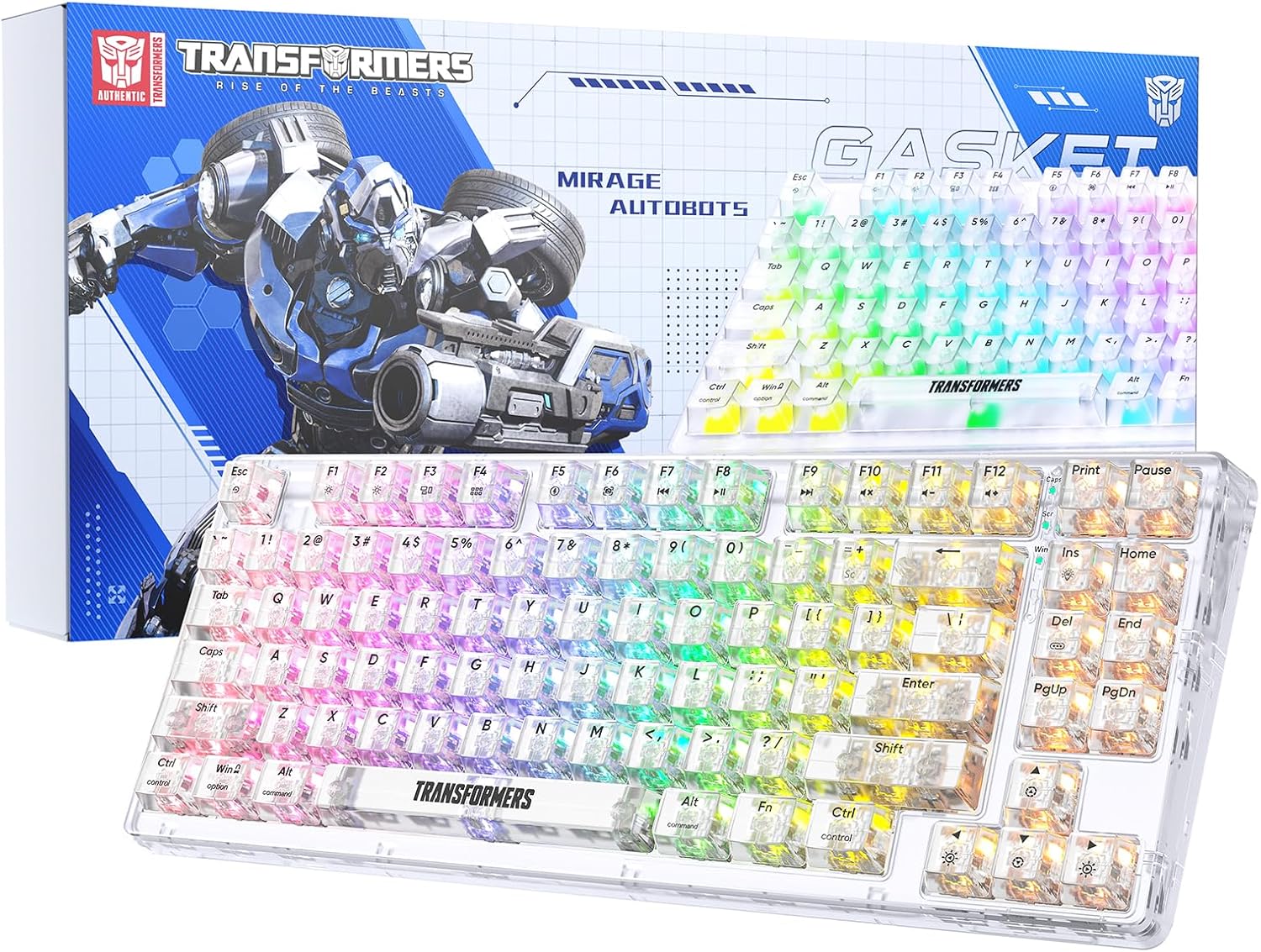
Image 1.1: Transformers TF-Crystal 85 Keys Mechanical Keyboard with its packaging, showcasing the transparent design and RGB lighting.
2. Ürün Bittiview
2.1 Temel Özellikler
- 85-Tuş Düzeni: Compact 75% design retaining essential functions, arrow, and navigation keys.
- Üç Modlu Bağlantı: Bluetooth 5.0, 2.4GHz kablosuz ve USB-C kablolu bağlantıları destekler.
- Değiştirilebilir Devre Kartı (Hot-Swappable PCB): Compatible with most 3-pin and 5-pin mechanical switches, allowing for easy customization and replacement.
- Linear Switches: Pre-lubricated switches with a 50 million keystroke lifespan for durability and smooth operation.
- Conta Yapısı: Incorporates high-quality gasket materials and a silicone pad to absorb vibrations and reduce typing noise.
- Özelleştirilebilir RGB Arka Aydınlatma: Features 20 built-in backlight modes, 16.8 million color options, and dynamic music rhythm effects.
- Programmable Driver: Enables macro customization, key function remapping, and advanced lighting control.
- Uzun Pil Ömrü: Equipped with a 4000mAh battery, providing up to 240 hours of continuous use in 2.4GHz mode without backlighting.
- Geniş Uyumluluk: Supports Mac, Windows, iOS, Android, PC, Laptop, Smartphone, Tablet, Switch, Xbox, and PlayStation.
- Şeffaf Tasarım: Features transparent keycaps and base for enhanced aesthetic appeal.
3. Kurulum
3.1 Klavyeyi Şarj Etme
Before initial use, fully charge the keyboard. Connect the provided USB-C cable to the keyboard's USB-C port and the other end to a powered USB port (e.g., computer, wall adapter). The charging indicator will show the charging status.
3.2 2.4GHz Kablosuz Modu ile Bağlantı Kurma
- Genellikle klavyenin bir bölmesinde saklanan 2.4 GHz USB alıcısını bulun.
- USB alıcısını bilgisayarınızdaki uygun bir USB bağlantı noktasına takın.
- Klavyedeki mod anahtarını şu konuma getirin: 2.4G konum.
- The keyboard will automatically connect to your device.
3.3 Bluetooth 5.0 Modu ile Bağlantı Kurma
- Klavyedeki mod anahtarını şu konuma getirin: BT konum.
- Basılı tutun Fn + 1 (veya Fn + 2, Fn + 3Gösterge ışığı hızlı bir şekilde yanıp sönene kadar (eşleştirme modunu gösterir) 3-5 saniye basılı tutun.
- Cihazınızda (bilgisayar, tablet, akıllı telefon) Bluetooth'u etkinleştirin ve yeni cihazları arayın.
- Select "TF-Crystal 85" from the list of available devices to pair.
- Once paired, the indicator light will stop flashing and remain solid. You can pair up to three Bluetooth devices using Fn + 1, Fn + 2, Ve Fn + 3.
3.4 Connecting via USB-C Wired Mode
- Verilen USB-C kablosunu klavyenin USB-C portuna bağlayın.
- USB-C kablosunun diğer ucunu bilgisayarınızdaki boş bir USB portuna takın.
- The keyboard will automatically switch to wired mode and function without battery power.

Image 3.1: Diagram illustrating the three connection modes: Bluetooth 5.0, 2.4GHz wireless, and USB-C wired, compatible with various devices.
4. Kullanım Talimatları
4.1 Modlar Arasında Geçiş
Use the physical switch located on the keyboard to select between BT (Bluetooth), 2.4G (2.4GHz wireless), and USB-C (wired) modes.
4.2 RGB Arka Aydınlatma Kontrolü
The keyboard features customizable RGB backlighting. Use the following key combinations to adjust:
- Fn + Girişler: Cycle through 20 different backlight effects.
- Fn + Del: Switch backlight colors within certain modes.
- Fn + ↑ / ↓: Arka ışık parlaklığını ayarlayın (5 seviye).
- Fn + ← / →: Adjust backlight effect speed (5 levels).
- Fn + Esc (hold for 3s): Reset backlight settings to default.

Image 4.1: Visual guide for controlling RGB backlight effects, brightness, and speed using Fn key combinations.
4.3 Programmable Driver Usage
The keyboard includes a programmable driver for advanced customization. This driver allows you to:
- Makro Düzenleme: Record and edit complex key sequences.
- Anahtarın Yeniden Tanımlanması: Customize the function of individual keys.
- RGB Effect Customization: Fine-tune lighting modes, colors, and speeds, including music rhythm lighting effects.
Refer to the software's dedicated user interface for detailed instructions on using these features.

Image 4.2: Screenshot of the programmable driver interface, showing options for macro editing, RGB effects, and key redefinition.
4.4 Çalışırken Değiştirilebilen Anahtarlar
The TF-Crystal 85 keyboard features a hot-swappable PCB, allowing you to change mechanical switches without soldering. This supports most 3-pin and 5-pin mechanical switches.
- Klavyeyi kapatın veya cihazınızdan ayırın.
- İstenilen tuş başlığını dikkatlice çıkarmak için verilen tuş başlığı çıkarıcısını kullanın.
- Use the provided switch puller to gently grip the switch from its top and bottom clips, then pull it straight up to remove it.
- Yeni anahtarın pinlerini PCB üzerindeki deliklerle hizalayın. Pinlerin düz olduğundan emin olun.
- Yeni düğmeyi yerine oturıncaya kadar hafifçe bastırın. Zorlamayın.
- Tuş başlığını değiştirin.

Image 4.3: Illustration of the hot-swappable feature, showing how to remove and insert 3-pin/5-pin switches and the linear switch specifications.
5. Bakım
5.1 Klavyeyi Temizleme
- Temizlemeden önce klavyeyi tüm güç kaynaklarından ayırın.
- Yumuşak, tiftiksiz bir bez kullanın ve hafifçe kurulayın.ampTuş takımlarını ve kasayı silmek için su veya hafif bir temizleme solüsyonu kullanın.
- Tuşlar arasındaki toz ve kalıntıları temizlemek için basınçlı hava veya küçük bir fırça kullanın.
- Klavyenin yüzeyine zarar verebilecek sert kimyasallar veya aşındırıcı malzemeler kullanmaktan kaçının.
5.2 Pil Bakımı
- Pilin sık sık tamamen boşaltılmasından kaçının.
- Uzun süre kullanılmayacaksa klavyeyi serin ve kuru bir yerde saklayın.
- If the keyboard will not be used for a long time, charge it to about 50% before storage.
6. Sorun Giderme
| Sorun | Olası Neden | Çözüm |
|---|---|---|
| Klavye kablosuz modunda yanıt vermiyor. | Low battery, incorrect mode selected, receiver not connected, Bluetooth not paired. | Charge the keyboard. Ensure the mode switch is set correctly (2.4G or BT). Re-insert the 2.4G receiver. Re-pair Bluetooth. |
| Anahtarlar kayıt olmuyor veya çift basılıyor. | Arızalı anahtar, tuş başlığının altında kalıntı, yazılım sorunu. | Clean under the keycap. Try hot-swapping the switch with a known working one. Restart your computer. |
| RGB backlight not working or incorrect. | Backlight turned off, incorrect settings, software conflict. | Parlaklığı ayarlamak için şunu kullanın: fn + ↑. Cycle modes with Fn + Girişler. Reset backlight with Fn + Esc (hold 3s). Check programmable driver settings. |
| Klavye şarj olmuyor. | Faulty USB-C cable, power source issue, keyboard port damage. | Try a different USB-C cable. Use a different USB port or power adapter. Ensure the cable is fully inserted. |
7. Özellikler
| Özellik | Detay |
|---|---|
| Model Numarası | TF-Crystal 85 |
| Tuş Düzeni | 85 Tuş ( %75 Kompakt) |
| Bağlantı | Bluetooth 5.0, 2.4 GHz Kablosuz, USB-C Kablolu |
| Anahtar Türü | Pre-lubricated Linear Mechanical Switches |
| Anahtar Ömrü | 50 Milyon Tuş Vuruşu |
| Sıcak-Swap | Evet (3 pinli/5 pinli uyumlu) |
| Arka ışık | RGB (20 mod, 16.8 milyon renk) |
| Pil Kapasitesi | 4000mAh |
| Battery Life (2.4G, no light) | 240 saate kadar |
| Battery Life (Backlit ON) | Yaklaşık 22 saat |
| Boyutlar (U x G x Y) | 34.7 cm x 14 cm x 4.5 cm |
| Uyumluluk | Mac, Windows, iOS, Android, PC, Laptop, Smartphone, Tablet, Switch, Xbox, PlayStation |

Image 7.1: Visual representation of the keyboard's battery life: 240 hours with backlight off, 22 hours with backlight on, powered by a 4000mAh battery.
8. Garanti ve Destek
Transformers is committed to providing exceptional customer service. If you encounter any problems with your TF-Crystal 85 Keys Mechanical Keyboard, our after-sales support team is available to assist you. This includes technical support, exchanges, or installation guidance.
Please contact our customer service for assistance. We guarantee a hassle-free service experience.


