giriiş
The Holosun IRIS-RD4 is a quad-function multi-laser device designed for versatile applications. It features a robust 7075 aluminum housing, offering a compact and lightweight design. This device integrates a powerful infrared (IR) illuminator, a high-lumen white light, a visible (VIS) laser pointer, and an infrared (IR) laser pointer.
Key features include independent fire buttons for ambidextrous activation of momentary or constant ON functions for both lasers and the white light. An updated, rear-facing power and mode selector switch enhances ergonomic control. The IRIS-RD4 also comes with a three-button remote activation switch, which includes a VIS override function.
Kutuda Neler Var?
Paketi açtığınızda tüm bileşenlerin mevcut olduğundan emin olun:
- IRIS-RD4 Laser Unit
- High/Low Intensity Selector Switch
- Remote Activation Switch (3-button)
- Kullanım Kılavuzu (bu belge)
Kurmak
Follow these steps to prepare your IRIS-RD4 device for use:
- Pil Montajı: The IRIS-RD4 operates on a CR123A or 18650 battery. Locate the battery compartment, typically secured with a screw-on cap. Insert the battery with the correct polarity as indicated inside the compartment. Securely close the cap.
- Montaj: Attach the IRIS-RD4 to your desired platform using the integrated mounting system. Ensure the device is securely fastened to prevent movement during operation.
- Remote Switch Connection: If using the remote activation switch, connect its cable to the designated port on the IRIS-RD4 unit. Secure the remote switch in an accessible location.
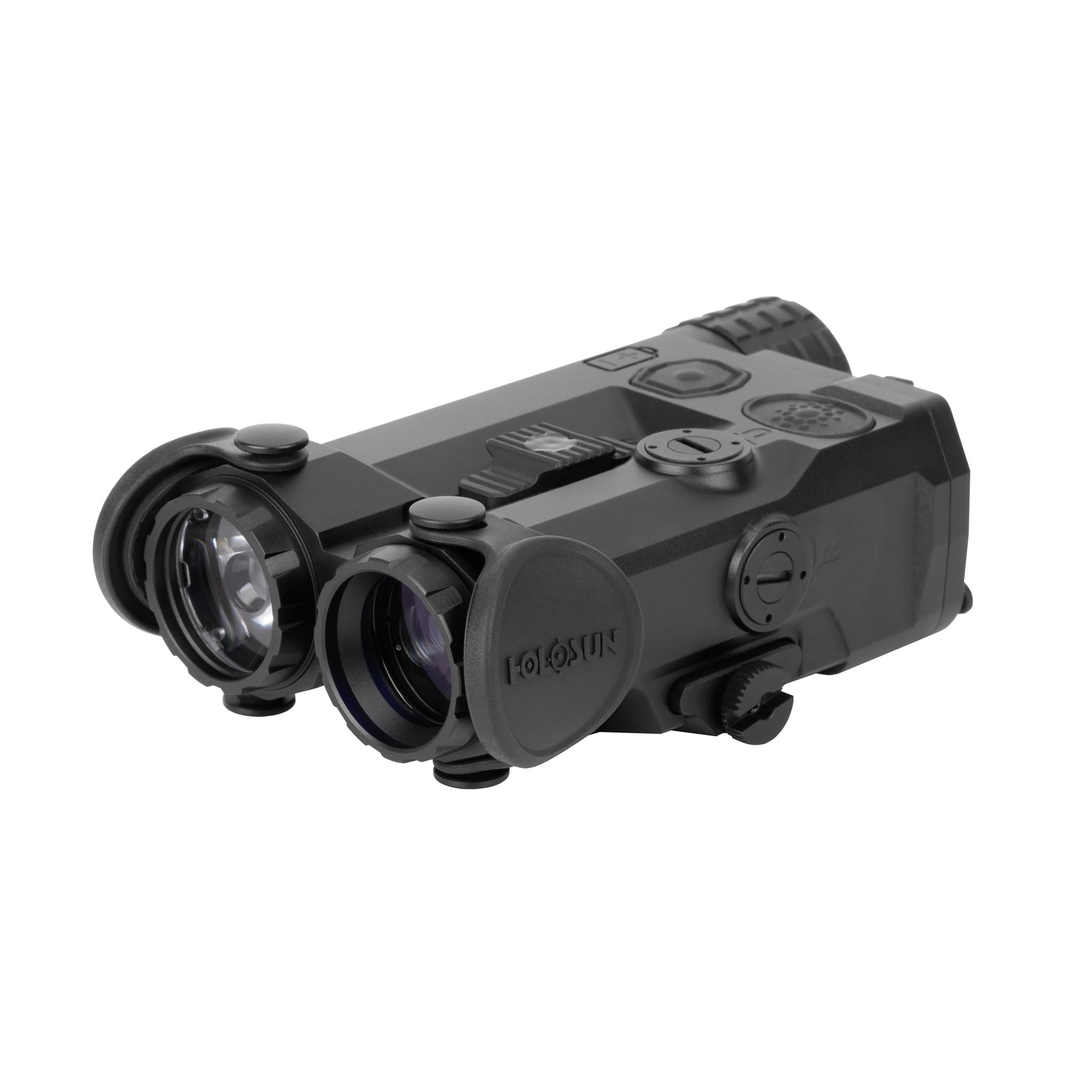
Image: The Holosun IRIS-RD4 multi-laser device, showcasing its compact design with the IR illuminator and white light apertures visible on the front, and control buttons on the top surface.
Kullanım Talimatları
The IRIS-RD4 offers multiple functions controlled by its integrated switches and remote activation switch.
- Power/Mode Selector Switch: Located at the rear of the unit, this switch controls the overall power and selects the operating mode (e.g., IR laser, VIS laser, IR illuminator, white light). Rotate or slide the switch to cycle through available modes.
- Independent Fire Buttons: The device features separate buttons for activating the laser functions and the white light. Press and hold for momentary activation, or press and release for constant ON, depending on the selected mode and configuration.
- IR Aydınlatıcı: The 60mW IR illuminator provides infrared light for use with night vision devices. It features quick adjustable focus to tailor the beam spread.
- Beyaz Işık: The 1,000 lumen / 25,000 candela white light provides powerful visible illumination.
- VIS Laser Pointer: The visible red laser pointer (5mW) is used for aiming and target designation.
- IR Laser Pointer: The infrared laser pointer (0.7mW VCSEL) is used for aiming with night vision devices.
- Remote Activation Switch: The included three-button remote switch allows for convenient activation of functions without breaking your grip. It also includes a VIS override function for quick access to the visible laser.
- High/Low Intensity Selector Switch: Adjust the output intensity of certain functions using this dedicated switch.
- Coaxial Laser Mechanism: This design ensures that the visible and infrared lasers are aligned for consistent aiming.
Refer to the markings on the device for specific button functions and switch positions.
Bakım
Proper maintenance ensures the longevity and reliable performance of your IRIS-RD4 device.
- Temizlik: Use a soft, clean cloth to wipe down the exterior of the device. For lenses, use a lens cleaning solution and a microfiber cloth to avoid scratches. Do not use abrasive cleaners or solvents.
- Pil Bakım: Remove the battery if the device will not be used for an extended period to prevent leakage. Store batteries in a cool, dry place.
- Depolamak: Store the device in a protective case or a dry environment away from extreme temperatures and direct sunlight.
- Denetleme: Periodically check all mounting screws and connections for tightness.
Sorun giderme
| Sorun | Olası Neden | Çözüm |
|---|---|---|
| Cihaz açılmıyor. | Pil bitmiş veya yanlış takılmış. | Check battery polarity. Replace with a fresh CR123A or 18650 battery. |
| Laser or light output is weak. | Low battery power. Dirty lens. | Replace battery. Clean the lens with a suitable lens cleaning kit. |
| Remote switch not functioning. | Gevşek bağlantı. Hasarlı kablo. | Ensure the remote switch cable is securely plugged into the device. Inspect the cable for damage. |
If issues persist, contact Holosun customer support for further assistance.
Özellikler
| Örnek | IRIS-RD4 |
| Konut Malzemesi | 7075 T6 Alüminyum |
| IR Illuminator Output | 60mW |
| IR Laser Output | 0.7mW VCSEL |
| Visible (Red) Laser Output | 5mW |
| Beyaz Işık Çıkışı | 1,000 Lumens / 25,000 Candela |
| Pil Türü | CR123A / 18650 |
| Ürün Ağırlığı | 8.5 Ons (yaklaşık 241 g) |
| Ürün Boyutları | 2.3"U x 1.4"G x 4.2"Y (yaklaşık 5.8 cm U x 3.6 cm G x 10.7 cm Y) |
| Renk | Red (referring to visible laser color) |
| UPC | 810047073888 |
Garanti ve Destek
Holosun products are typically covered by a limited warranty. For specific warranty terms and conditions, please refer to the warranty card included with your product or visit the official Holosun webSite. Satın alma belgenizi garanti talepleriniz için saklayın.
For technical support, service, or inquiries regarding your IRIS-RD4 device, please contact Holosun customer service through their official website veya ürün ambalajınızda yer alan iletişim bilgileri.


