giriiş
This manual provides essential information for the proper setup, operation, and maintenance of your My Arcade Sonic The Hedgehog Joystick Player. Please read this manual thoroughly before using the product to ensure a safe and enjoyable gaming experience.
Ürün Bittiview
The My Arcade Sonic The Hedgehog Joystick Player is a portable retro gaming console featuring classic SEGA titles. It offers an authentic arcade experience with a joystick and dedicated buttons.
Temel Özellikler:
- Officially licensed SEGA game console.
- High-resolution 3.5-inch full-color display.
- İçerir Kirpi Sonic Ve Sonic the Hedgehog 2.
- 3.5mm headphone jack for private audio.
- Ses kontrolüne sahip dahili hoparlör.
- Ayarlanabilir ekran parlaklığı.
- Powered by 4 AA batteries (not included) or USB-C cable (not included).
Bileşenler:
- Gaming Console Unit
- Joystick
- Action Buttons (A, B, C)
- Ana Sayfa Düğmesi
- Credit/Start Button
- Ses Kontrolü (+/-)
- Parlaklık Kontrolü
- 3.5 mm Kulaklık Girişi
- USB-C Power Input (5V IN)
- Battery Compartment (requires 4 AA batteries)

The My Arcade Sonic The Hedgehog Joystick Player, a portable retro gaming console.
Kurmak
Konsolun Çalıştırılması:
- Pil Montajı: Locate the battery compartment on the back of the console. Insert 4 AA batteries (not included), ensuring correct polarity.
- USB-C Power (Optional): Alternatively, connect a USB-C cable (not included) to the 5V IN port on the back of the console to power it.
İlk Kullanım:
- Peel off the protective screen sticker before use.
- Turn on the console using the power switch located on the back.

Arka view of the console, highlighting the battery compartment, USB-C port, and headphone jack.
Kullanım Talimatları
Game Selection and Start:
- Once powered on, use the joystick to navigate and select your desired game (Kirpi Sonic or Sonic the Hedgehog 2) from the main menu.
- Basın START/CREDIT button to add virtual coins and begin the game.
- To skip the Sonic demo mode, press the START/CREDIT düğme.
Kontroller:
- Oyun kolu: Controls character movement.
- Action Buttons (A, B, C): Perform in-game actions such as jumping or attacking.
- Ses Seviyesi Kontrolü (+/-): Adjust the sound level of the built-in speaker using the buttons on the back of the console.
- Ekran Parlaklığı: Adjust the screen brightness using the dedicated button on the back.
- Kulaklık girişi: For private listening, connect 3.5mm headphones to the headphone jack on the back.
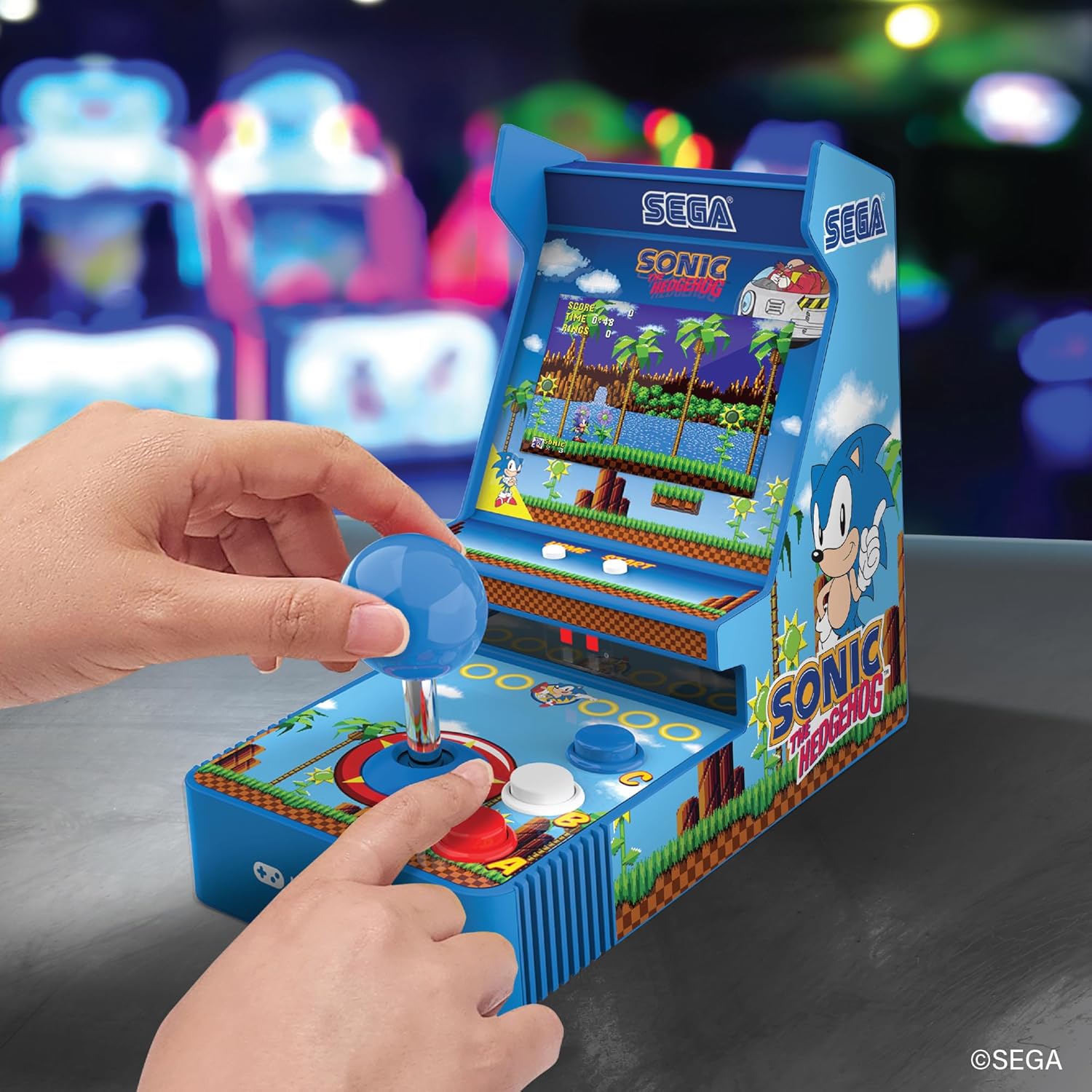
Ön view of the console, showing the joystick, action buttons, and screen during gameplay.
Official video demonstrating the My Arcade Sonic Arcade Game in action, showcasing gameplay and features.
Bakım
To ensure the longevity of your My Arcade Sonic The Hedgehog Joystick Player, follow these simple maintenance guidelines:
- Keep the console clean by wiping it with a soft, dry cloth. Avoid using abrasive cleaners or solvents.
- Konsolu serin, kuru bir yerde, doğrudan güneş ışığından ve aşırı sıcaklıklardan uzakta saklayın.
- If not in use for an extended period, remove the AA batteries to prevent leakage.
Sorun giderme
If you encounter any issues with your My Arcade Sonic The Hedgehog Joystick Player, refer to the following common solutions:
- Konsol açılmıyor: Ensure that fresh AA batteries are correctly installed or that the USB-C cable is securely connected to a power source.
- Game does not start from demo mode: Basın START/CREDIT button to exit demo mode and begin gameplay.
- Ses yok: Check the volume control buttons on the back of the console. If headphones are connected, ensure they are fully plugged in and functioning correctly.
- Ekran loş: Adjust the screen brightness using the dedicated button on the back of the console.
If problems persist, please contact My Arcade customer support for further assistance.
Özellikler
| Özellik | Detay |
|---|---|
| Ürün Boyutları | 4"U x 6.8"G x 7.6"Y |
| Denetleyici Türü | Joystick |
| Ürün Ağırlığı | 0.63 Kilogram (1.39 pound) |
| Ekran Boyutu | 3.5 inç |
| Güç Kaynağı | 4 AA batteries (not included) or USB Type C (not included) |
| Donanım Arayüzü | USB Tip C |
| Görüntü Türü | LCD |
| Malzeme | Plastik |
| Bellek Depolama Kapasitesi | 4 MB |
| Model Numarası | DGUNL-7157 |
| UPC | 845620071579 |
Güvenlik Bilgileri
- Küçük parçalar içerdiğinden 3 yaş altı çocuklar için uygun değildir.
- Kullanım sırasında küçük çocukları daima gözetim altında tutun.
- Do not expose the console to water or excessive moisture.
- Konsolu düşürmekten veya şiddetli darbelere maruz bırakmaktan kaçının.
- Use only recommended battery types and ensure correct installation.
Garanti ve Destek
For warranty information or technical support, please refer to the official My Arcade webSite üzerinden veya müşteri hizmetleri departmanıyla iletişime geçin. Satın alma belgenizi saklayın.


