1. Ürün Bittiview
The MOUNTUP Lockable RV TV Mount MU2101 is designed for secure and flexible TV mounting in recreational vehicles, campers, travel trailers, motorhomes, and trucks. It features a full-motion design allowing for tilt, swivel, and extension, along with a patented pull-cord locking mechanism to secure the TV during travel.

Figure 1: MOUNTUP Lockable RV TV Mount MU2101
2. Güvenlik Önlemleri
- Ensure the mounting surface in your vehicle is a wooden board at least 1/2 inch thick to provide adequate support.
- 33 lbs (15 kg) maksimum ağırlık kapasitesini aşmayın.
- Verify that your TV's VESA pattern is compatible with the mount (75x75mm to 200x200mm).
- Always engage the pull-cord locking mechanism before moving the vehicle to prevent TV movement.
- Perform a stability check after installation and periodically thereafter.
- Keep children and pets away from the TV and mount during installation and adjustment.

Figure 2: Wall thickness requirement for secure installation.
3. Paket İçeriği
Lütfen kurulum işlemine başlamadan önce tüm bileşenlerin eksiksiz olduğundan emin olun:
- Duvar Plakası Montajı
- TV Askı Kolları (4 Adet)
- Montaj Donanım Kiti (çeşitli vidalar, rondelalar, ara parçalar, dübeller)
- Kurulum Kılavuzu
4. Ürün Özellikleri
| Özellik | Şartname |
|---|---|
| TV Boyutu Uyumluluğu | 13 - 43 inç |
| Ağırlık Kapasitesi | Maksimum 33 lbs (15 kg) |
| VESA Uyumluluğu | 75x75mm, 100x100mm, 100x200mm, 200x100mm, 200x200mm |
| Eğim Açısı | +5° / -15° |
| Dönme Açısı | ±90° |
| Duvar uzantısı | 2.7 inç (geri çekilmiş) ila 14 inç (uzatılmış) |
| Kurulum Sonrası Tesviye | ±3° |
| Malzeme | Alaşımlı Çelik |

Figure 3: Visual representation of TV size, max load, and VESA compatibility.

Figure 4: Detailed VESA pattern compatibility chart.
5. Kurulum Kılavuzu
Follow these steps carefully for a secure installation. It is recommended to have a second person assist during certain steps.
5.1 Kurulum Öncesi Kontroller
- Confirm your TV's weight and VESA pattern are within the mount's specifications.
- Identify the exact mounting location on your RV wall. Ensure the wooden board is at least 1/2 inch thick.
- Gather necessary tools (e.g., drill, screwdriver, level, stud finder).
5.2 Step 1: Attach Brackets to TV
Carefully place your TV face down on a soft, clean surface. Attach the TV bracket arms to the back of your TV using the appropriate screws, washers, and spacers from the hardware kit. Ensure the brackets are centered and securely fastened.
5.3 Step 2: Mount Wall Plate
Position the wall plate on your desired mounting location. Mark the drill holes. Drill pilot holes into the wooden wall. Secure the wall plate to the wall using the provided lag screws. Ensure the wall plate is level before tightening all screws.
5.4 Step 3: Hang and Secure TV
With assistance, carefully lift the TV with the attached brackets and hook them onto the wall plate. Ensure the TV is properly seated. The mount features a patented dual latch design for secure attachment. Once the TV is hung, engage the pull-cord lock to secure it in place.

Figure 5: Close-up of the patented dual latch design, showing locked and unlocked positions.
5.5 Post-Installation Adjustment
After installation, you can make minor leveling adjustments of up to ±3° to ensure the TV is perfectly horizontal. This feature allows for fine-tuning even after the mount is secured to the wall.
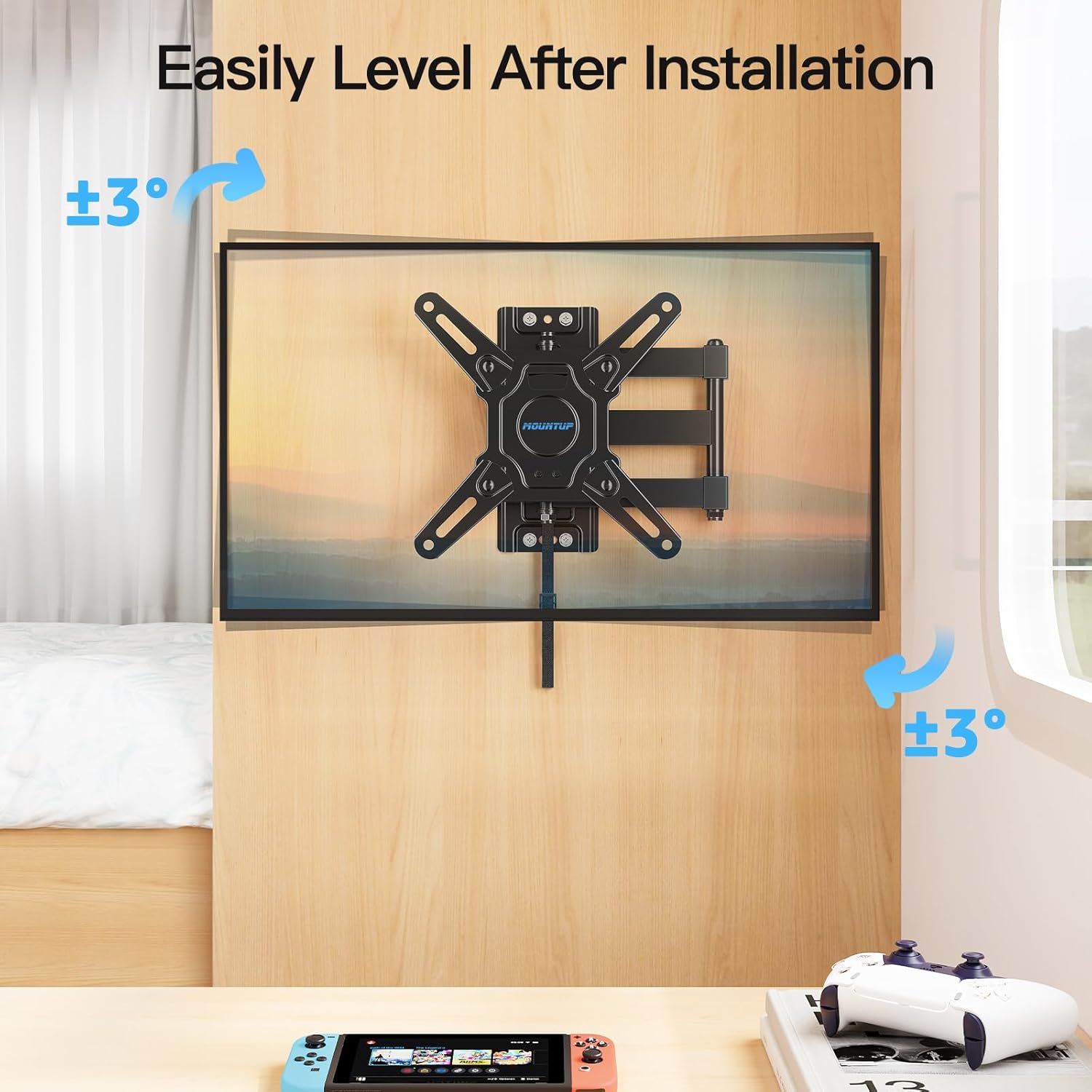
Figure 6: Adjusting the TV level after installation.
6. Kullanım Talimatları
The MOUNTUP RV TV Mount offers various adjustments for optimal viewing and secure travel.
6.1 Eğim Ayarı
The mount allows for a tilt range of +5° (upward) to -15° (downward). This helps reduce glare and provides a comfortable viewing angle from different positions within your RV.

Figure 7: Illustrates the tilt and extension capabilities of the mount.
6.2 Döner Mekanizmanın Ayarlanması
The mount can swivel up to ±90° (left or right), allowing you to position the TV for viewing from various angles in your living space.

Figure 8: Demonstrates the swivel range of the mount.
6.3 Uzatma ve Geri Çekme
The mount extends up to 14 inches from the wall and retracts back to a slim 2.7 inches, providing flexible positioning and space-saving when not in use.
6.4 Using the Lockable Design
The mount features a pull-cord locking mechanism to secure the TV in its retracted position during travel. To lock, push the TV fully back against the wall until it clicks into place. To unlock, simply pull the cord, and the spring lock will release, allowing you to extend the TV.
Video 1: Demonstration of the MOUNTUP Lockable RV TV Mount's features, including the locking mechanism, extension, swivel, and tilt.
7. Bakım
- Tüm vida ve cıvataların sıkılığını düzenli olarak kontrol edin. Gerekirse tekrar sıkın.
- Inspect the mount for any signs of wear or damage, especially after long periods of travel.
- Montaj parçasını yumuşak, kuru bir bezle temizleyin. Aşındırıcı temizleyicilerden veya çözücülerden kaçının.
8. Sorun Giderme
| Sorun | Olası Neden | Çözüm |
|---|---|---|
| Televizyon kurulumdan sonra düz durmuyor. | Minor misalignment during wall plate installation. | Use the post-installation leveling feature to adjust the TV up to ±3°. |
| Montaj aparatı dengesiz veya sallanıyor gibi görünüyor. | Screws are loose; TV weight exceeds capacity; improper wall material. | Ensure all screws are tightened. Verify TV weight and VESA compatibility. Confirm wall is a solid wooden board at least 1/2 inch thick. |
| Pull-cord lock is difficult to engage/disengage. | TV not fully retracted; mechanism obstruction. | Ensure the TV is pushed completely back against the wall. Check for any obstructions around the locking mechanism. |
9. Garanti ve Müşteri Desteği
MOUNTUP is committed to providing quality products and excellent customer service. If you have any questions regarding your MOUNTUP RV TV Mount MU2101, including pre-purchase inquiries or installation assistance, please contact the MOUNTUP professional support team. They are available to provide comprehensive and advanced technology solutions.
For support, please refer to the contact information provided with your product packaging or visit the official MOUNTUP webalan.


