1. Giriş ve Üzeriview
The MECHEER Plug-in Power Meter (Model WM07-DE) is a versatile device designed to help you monitor and understand the electricity consumption of your household appliances. By providing real-time data on various parameters, it enables you to identify energy-intensive devices and optimize your energy usage, ultimately leading to cost savings.
Key features include a 180° rotatable display for easy viewing, a large backlit LCD for clear readings, and multiple monitoring modes to track power, energy, voltage, current, and costs.

Figure 1: MECHEER Plug-in Power Meter. This image shows the compact design of the power meter, with its plug on one side and a clear digital display on the other, indicating a power reading of 35.6W.
2. Ürün Özellikleri
- Multiple Monitoring Parameters: This plug-in power meter features 6 modes to monitor power (W), energy (kWh), volts (V), current (A), and costs (€). Use the power meter to identify the largest electricity consumption and reduce energy costs.
- 180° Rotatable Display: The electricity meter's display can be rotated forwards, backwards, or horizontally to achieve any angle. Even if sockets are installed in very high/low positions or narrow corners, values can be easily read. This power meter socket adapts to various installation scenarios, saving you from neck strain or bending down to view Ekran.
- Büyük LCD Ekran: The energy consumption meter features a large LCD display with bright, white-backlit digits, ensuring clear readability from any angle and in low light. Compared to bulky energy monitors, our electrical socket is compact, practical, and space-saving.
- Kolay Kullanım: Two simple buttons make operation easy – no need to worry about complex instructions. The energy cost meter comes with an easy-to-understand instruction manual in German.
- Hafıza Fonksiyonu: The plug-in power meter automatically saves data in case of a sudden power failure or disconnection between the socket, power meter, and power supply. Upon restart, the last saved data is reloaded to prevent data loss.
- Data Deletion and Reset: Press the reset button to clear accumulated data (kWh, costs), while retaining the price setting. Use a stylus (not a needle) to press the RESET button and avoid damage.
- Aşırı Yük Uyarısı: The preset overload threshold is 3680 W. If the power exceeds this limit, "ENERGY OVERLOAD" flashes on the display. For safety reasons, immediately switch off the device. This power meter is an ideal choice to save energy, electricity, and money.
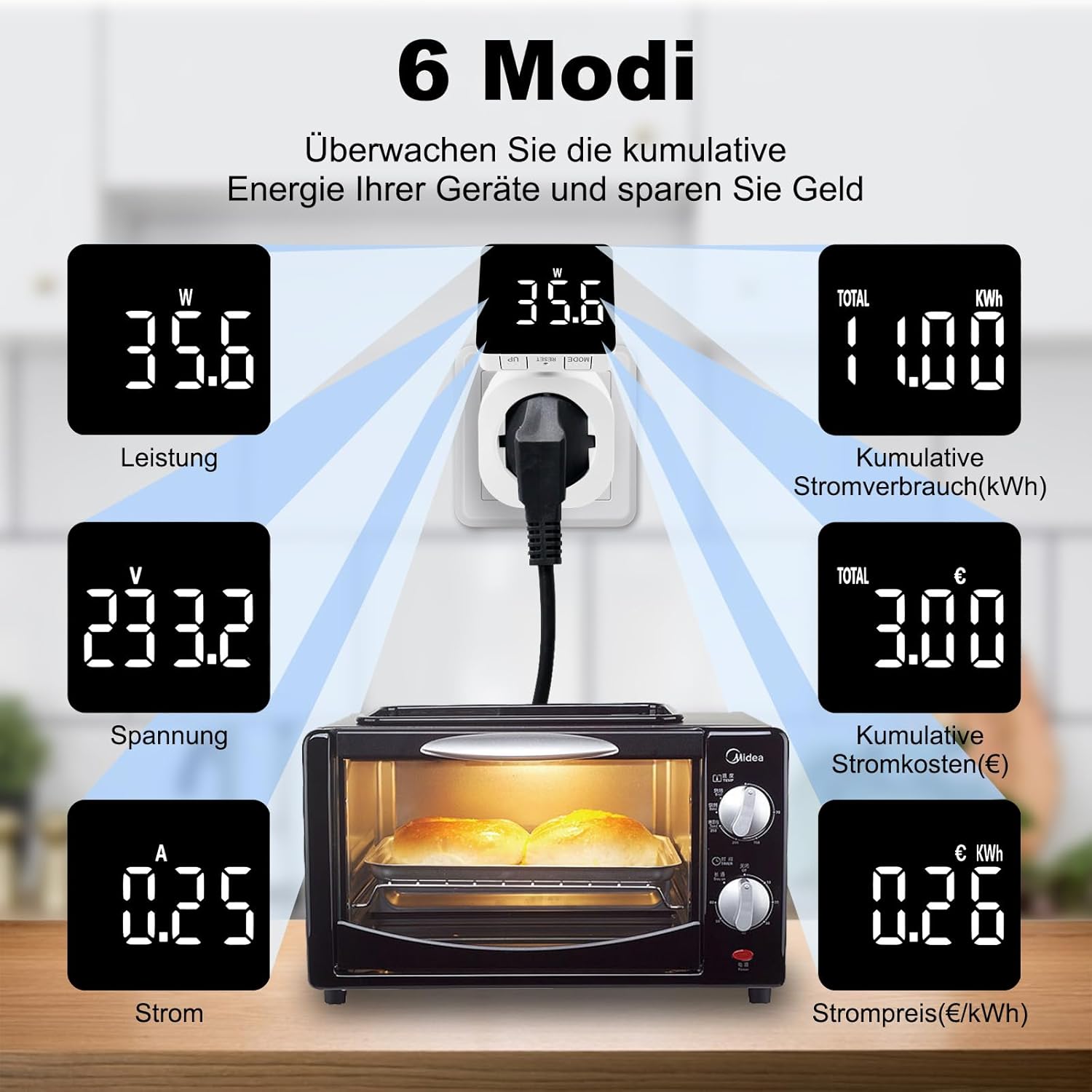
Figure 2: Six Monitoring Modes. This diagram illustrates the six different parameters the power meter can monitor: Power (W), Cumulative Power Consumption (kWh), Voltage (V), Cumulative Electricity Costs (€), Current (A), and Electricity Price (€/kWh). An example of the meter plugged into a wall socket with an appliance (oven) is shown.

Figure 3: Rotatable Display. This image demonstrates the flexibility of the display, showing it can rotate 180 degrees horizontally and 90 degrees forwards/backwards, allowing for optimal viewing angles in various socket orientations.

Figure 4: Clear Readability. This image contrasts a traditional, dim LCD display with the bright, white-backlit LCD of the MECHEER power meter, highlighting its superior readability in various lighting conditions.

Figure 5: Data Storage and Reset. This image illustrates the power meter's data storage capability, showing how it retains consumption data even when unplugged. It also points out the location of the recessed reset button, which requires a stylus to operate.

Figure 6: Overload Protection. This image displays the power meter's screen showing "ENERGY OVERLOAD" when the connected appliance exceeds the 3680W threshold, accompanied by a warning light icon.
3. Kurulum
Setting up your MECHEER Plug-in Power Meter is straightforward:
- Paketi aç: Carefully remove the power meter from its packaging.
- Eklenti: Insert the power meter into a standard electrical wall socket.
- Cihazı Bağlayın: Plug the appliance you wish to monitor into the socket on the front of the power meter.
- İlk Görüntü: The display will light up, showing the current power consumption (W) or the last recorded data if the memory function is active.
The device is designed for immediate use with minimal setup required.
4. Çalışma Modları
The power meter features two simple buttons: "MODE" and "RESET" (recessed). The "MODE" button allows you to cycle through the various monitoring displays:
- Güç (W): Displays the instantaneous power consumption of the connected device in Watts.
- Enerji (kWh): Shows the cumulative energy consumed in kilowatt-hours.
- Volt (V): Mevcut hacmi gösterirtagGüç kaynağının e'si.
- Akım (A): Displays the current drawn by the connected device in Amporada.
- Costs (€): Shows the cumulative cost of energy consumed based on the set unit price.
- Unit Price (€/kWh): Size izin verir view and set the cost per kilowatt-hour.
Setting the Unit Price
To set the unit price for cost calculation:
- Press the "MODE" button repeatedly until the display shows the "€/kWh" mode.
- While in this mode, use the "UP" button (often integrated with MODE or a separate button, refer to device markings) to adjust the unit price. The setting range is 00.00 €/kWh to 99.99 €/kWh.
- The device will automatically save the set price.
5. Veri Yönetimi
Hafıza Fonksiyonu
The power meter is equipped with a memory function that automatically saves accumulated data (kWh and costs) even if there is a sudden power failure or if the device is unplugged. When power is restored, the last saved data will be reloaded, preventing data loss and ensuring continuous monitoring.
Veri Sıfırlama
To clear the accumulated data (kWh and costs) while retaining the set unit price, locate the recessed "RESET" button on the device. Use a stylus or a non-sharp, pointed object (do not use a needle) to gently press this button. This will reset the cumulative readings to zero.
6. Safety Warnings and Tips
Aşırı Yük Uyarısı
The power meter has a preset overload threshold of 3680 B. If the power consumption of the connected device exceeds this limit, the display will flash "ENERGY OVERLOAD". For your safety and to prevent damage to the device or connected appliances, immediately switch off the overloaded device.
Genel İpuçları
- Avoid excessive rotation of the display to prevent cable breakage or internal damage.
- Data can only be read when the wattmeter is properly connected to a live electrical socket.
- The electrical socket records kWh data only when the device's operating power exceeds 0.3 W. Devices consuming less than 0.3W may not have their energy consumption accurately recorded.
7. Özellikler
| Parametre | Değer |
|---|---|
| Marka | MECHEER |
| Model Numarası | WM07-DE |
| Çalışma Hacmitage | 230V/50HZ |
| Power Display Range | 0 W - 3680 W |
| Çalışma Akımı | 16A |
| Total kWh Display Range | 0 kWh - 9999 kWh |
| Total Cost Display Range | 0.0€ - 9999€ |
| Birim Maliyet Ayar Aralığı | 00.00 €/kWh - 99.99 €/kWh |
| Güncel Doğruluk | ±%2 |
| Güç Doğruluğu | ±%2 |
| Renk | Beyaz |
| Stil | Döndürülebilir |
| Güç Kaynağı | Elektrik Kablolu |
| Ürün Boyutları (Y x G x D) | Yaklaşık 10.5 cm x 5.4 cm x 8 cm |
| Ürün Ağırlığı | 160 gr |

Figure 7: Product Specifications. This image provides a visual representation of the power meter's dimensions and lists its key technical specifications, including operating voltage, power range, and accuracy.
8. Sorun Giderme
- Ekran boş: Ensure the power meter is securely plugged into a live electrical socket. Data can only be read when the wattmeter is connected to a socket.
- Data not accumulating for low-power devices: The electrical socket records kWh data only when the device's operating power exceeds 0.3 W. For very low-power devices (e.g., standby mode), the consumption might not be registered.
- "ENERGY OVERLOAD" flashing: This indicates the connected appliance is drawing more than 3680 W. Immediately unplug the appliance and use it with a power source that can handle its load, or reduce its power consumption.
- Display rotation feels stiff or makes noise: Avoid excessive rotation of the display beyond its intended range (180° horizontal, 90° vertical) to prevent internal cable breakage.
- Reset button not working: Ensure you are using a stylus or a non-sharp, pointed object to press the recessed reset button. Do not use a needle or sharp object that could damage the internal mechanism.
9. Garanti ve Destek
For warranty information and customer support, please refer to the documentation provided with your purchase or contact MECHEER customer service through the retailer where you purchased the product. The energy cost meter is supplied with an easy-to-understand instruction manual in German, which may contain additional support details.
10. Kullanım Senaryoları
The MECHEER Plug-in Power Meter can be used to monitor a wide range of household appliances, helping you understand their energy consumption and make informed decisions about energy saving. ExampBunlar şunları içerir:
- Ovens and Toasters
- Çamaşır Makineleri
- Televisions and Entertainment Systems
- Coffee Grinders and Kitchen Appliances

Şekil 8: Uygulama Örneğiamples. This collage shows the power meter in use with various common household appliances, including an oven, washing machine, television, coffee grinder, and toaster, demonstrating its versatility in monitoring different types of energy consumption.


