1. Giriş
This manual provides detailed instructions for the installation, operation, and maintenance of your SINOTIMER DC/AC 24V Digital Programmable Timer Switch, Model 24VDC. This device is designed for precise, programmable control of electrical circuits, offering up to 28 ON/OFF events per day across a 7-day cycle. Please read this manual thoroughly before use to ensure proper function and safety.

Image 1.1: The SINOTIMER 7 Day Digital Programmable Timer Switch.
2. Güvenlik Bilgileri
- Elektrik Tehlikesi: Installation and wiring should only be performed by qualified personnel. Ensure power is disconnected before any installation or maintenance.
- Cilttage Uyumluluk: This device operates on DC/AC 24V. Connecting to an incorrect voltage supply may damage the unit and pose a safety risk.
- Yük Kapasitesi: Do not exceed the maximum load rating of 10A at 250VAC (2000 watts). For higher loads, use an external contactor or relay.
- Çevre: Install the timer in a dry, protected environment. While the unit has some dustproof features, direct exposure to water or extreme temperatures should be avoided.
- Pil: The internal battery is for memory backup only. Do not attempt to charge or replace it unless specified in the maintenance section.
3. Paket İçeriği
Paketin içinde tüm öğelerin mevcut olduğundan emin olun:
- 1x SINOTIMER Digital Programmable Timer Switch (Model: 24VDC)
- 1x Montaj Braketi
- 1x Toz Kapağı
- 1x CR2032 Battery (pre-installed or separate)
- 1x Disassembly Tool (small screwdriver)
- 2x Montaj Vidaları
- 5x Spade Connecting Wires
- 1x Kullanım Kılavuzu (bu belge)
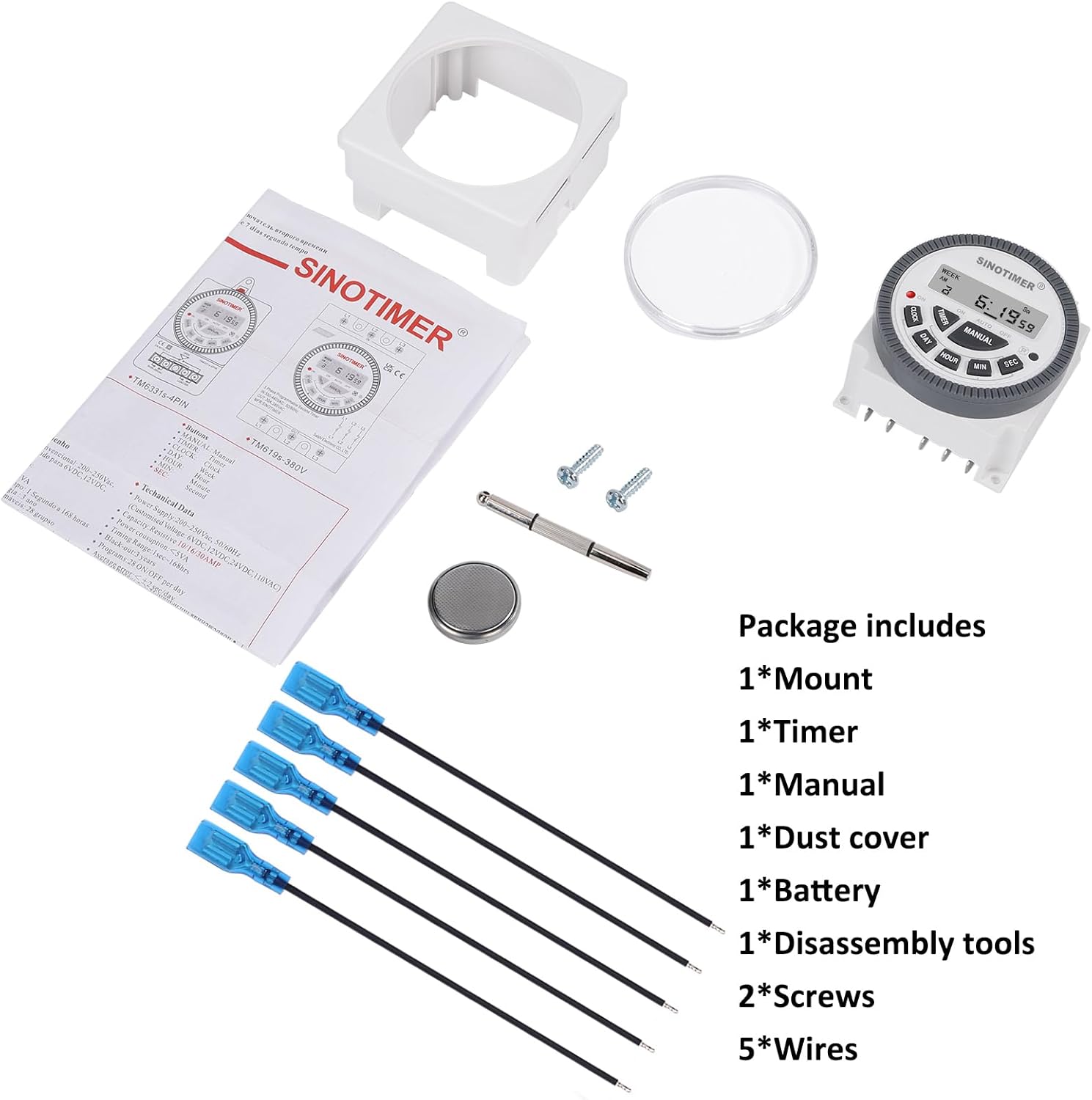
Image 3.1: Visual representation of the package contents, including the timer, mount, manual, dust cover, battery, disassembly tool, screws, and wires.
4. Ürün Bittiview & Özellikleri
The SINOTIMER DC/AC 24V Digital Programmable Timer Switch is a versatile device designed for automating various electrical applications. Its compact design and digital display ensure ease of use and integration into control panels.
Temel Özellikler:
- 7 Günlük Programlanabilirlik: Allows for up to 28 ON/OFF events per day, with flexible programming blocks for daily, weekly, or custom schedules.
- Dijital gösterge: Clear LCD for time, day, and program status.
- Internal Battery Backup: Retains program settings during power outagee.
- SPDT Output: Single Pole Double Throw relay output (1 Normally Open + 1 Normally Closed contact).
- Yüksek Yük Kapasitesi: Rated for up to 10A at 250VAC, 2000 watts.
- 12/24 Saat Formatı: Kullanıcı tarafından seçilebilen zaman görüntüleme biçimi.
- Toz Geçirmez Tasarım: Enhanced durability for various environments.

Resim 4.1: Üzeriview of the timer's key features, including its robust design and advanced functionality.
5. Özellikler
| Özellik | Şartname |
|---|---|
| Örnek | 24VDC (TM-619) |
| Giriş Voltage | Doğru Akım/AC 24V |
| Çıktı Türü | SPDT (1NO+1NC) |
| Maksimum Yük Akımı | 10A @ 250VAC, 2000W |
| Programlanabilir Olaylar | Up to 28 ON/OFF per day |
| Zaman Biçimi | 12-hour / 24-hour selectable |
| Pil Yedekleme | Internal CR2032 (for program memory) |
| Boyutlar (D x G x Y) | 1.77" x 2.83" x 2.83" (45 mm x 72 mm x 72 mm) |
| Ağırlık | 5.3 ons (yaklaşık 150g) |
| Malzeme | Metal, Plastik |

Image 5.1: Dimensional drawing and terminal layout of the timer switch.
6. Kurulum ve Kablolama
UYARI: Disconnect all power before installation to prevent electric shock or equipment damage.
6.1 Montaj
- Select a suitable location for mounting, ensuring it is protected from moisture and excessive heat.
- Attach the mounting bracket to a flat surface using the provided screws.
- Slide the timer switch into the mounting bracket until it clicks securely into place.
- Optionally, install the clear dust cover over the timer face for added protection.
6.2 Kablolama Talimatları
The timer switch features 5 spade connecting terminals. Refer to the wiring diagram below and the labels on the back of the unit for correct connections.
- Terminal 1 ve 2: Power Input (DC/AC 24V). Connect your 24V power supply here.
- Terminal 3: Common (COM) for the relay output.
- Terminal 4: Normally Open (NO) contact for the relay output. The circuit connected here will be ON when the timer is active.
- Terminal 5: Normally Closed (NC) contact for the relay output. The circuit connected here will be OFF when the timer is active.

Image 6.1: Simplified wiring diagram for the timer switch.

Resim 6.2: Örn.ample of spade connectors attached to the timer terminals.
7. Kullanım Talimatları
After successful installation and power connection, the timer display should illuminate. If not, ensure power is supplied correctly and the internal battery is properly seated.
7.1 Initial Setup (First Use)
- Reset: Press the 'R' (Reset) button with a pointed object (e.g., the provided disassembly tool) to clear all previous settings. The display will show '0:00'.
- Geçerli Saati Ayarlayın:
- Basın SAAT düğme.
- Basmak GÜN to select the current day of the week (Mo, Tu, We, Th, Fr, Sa, Su).
- Basmak SAAT Geçerli saati ayarlamak için
- Basmak DAKİKA Geçerli dakikayı ayarlamak için
- Basmak SEÇ to set the current second (optional, for precise synchronization).
- To switch between 12-hour (AM/PM) and 24-hour format, press SAAT Ve GÜN Aynı anda.
7.2 Programming ON/OFF Events
The timer supports up to 28 ON/OFF programs. Each program consists of an ON time and an OFF time.
- Basın ZAMANLAYICI button. The display will show '1 ON'. This is the first ON program.
- Basmak GÜN to select the day(s) for this program. You can choose a single day, weekdays, weekends, or various combinations. Keep pressing GÜN Seçenekler arasında geçiş yapmak için.
- Basmak SAAT İstenilen çalışma saatini ayarlamak için.
- Basmak DAKİKA İstenilen AÇIK kalma süresini ayarlamak için.
- Basmak ZAMANLAYICI again. The display will show '1 OFF'. This is the first OFF program.
- Bu program için istediğiniz KAPALI gün(ler), saat ve dakikayı ayarlamak için 2-4. adımları tekrarlayın.
- Basmaya devam et ZAMANLAYICI to cycle through '2 ON', '2 OFF', up to '28 ON', '28 OFF', setting each program as needed.
- İstediğiniz tüm programları ayarladıktan sonra, tuşuna basın. SAAT Geçerli zaman gösterimine geri dönmek için düğmeye tıklayın. Programlar kaydedildi.
7.3 Manuel Geçersiz Kılma
The KILAVUZ button allows you to override the programmed schedule temporarily or permanently.
- Basmak KILAVUZ Aşağıdaki modlar arasında geçiş yapmak için:
- AÇIK: Output is continuously ON, ignoring programs.
- OTOMATİK AÇIK: Output is currently ON, following programs.
- OTOMATİK KAPALI: Output is currently OFF, following programs.
- KAPALI: Output is continuously OFF, ignoring programs.
- Seçme OTOMATİK AÇIK or OTOMATİK KAPALI to resume programmed operation.
8. Bakım
8.1 Temizlik
Üniteyi yumuşak ve kuru bir bezle silin. Aşındırıcı temizleyiciler veya çözücüler kullanmayın.
8.2 Pil Değişimi
The internal CR2032 battery provides backup for program memory. If the display becomes dim or programs are lost during power outages, the battery may need replacement.
- UYARI: Disconnect main power to the timer before replacing the battery.
- Ünitenin arkasındaki pil bölmesini bulun.
- Bölme kapağını dikkatlice açın.
- Eski CR2032 pili çıkarın ve doğru kutupluluğa (+ taraf yukarı) dikkat ederek yeni bir pil takın.
- Pil bölmesinin kapağını kapatın.
- After replacement, perform an initial setup (Section 7.1) to reset and set the current time.

Image 8.1: Location of the replaceable CR2032 battery.
9. Sorun Giderme
| Sorun | Olası Neden | Çözüm |
|---|---|---|
| Ekran boş veya loş | No power supply; Incorrect wiring; Dead internal battery. | Check 24V power input (Terminals 1 & 2). Verify wiring. Replace CR2032 battery. |
| Programs are not running | Timer is in Manual ON/OFF mode; Incorrect program settings; Incorrect current time. | Basmak KILAVUZ until 'AUTO ON' or 'AUTO OFF' is displayed. Review program settings (Section 7.2). Set current time correctly (Section 7.1). |
| Output does not switch ON/OFF | Incorrect output wiring; Load exceeds capacity; Faulty relay. | Verify output wiring (Terminals 3, 4, 5) to your load. Ensure load does not exceed 10A/2000W. If issues persist, contact support. |
| Zaman hatalı | Internal clock drift; Battery low. | Reset and set time again. Consider replacing the internal battery if drift is significant. |
10. Garanti ve Destek
For warranty information and technical support, please refer to the documentation provided with your purchase or contact SINOTIMER customer service through the retailer where the product was purchased. Please have your product model (24VDC) and purchase date available when contacting support.
Çevrimiçi Kaynaklar: For additional information, FAQs, or to view other SINOTIMER products, visit the official SINOTIMER store or webalan.


