giriiş
This manual provides detailed instructions for the setup, operation, and maintenance of your Taiahiro Wireless Gaming Keyboard and Mouse Combo. This combo features a 98-key RGB backlit mechanical keyboard with blue switches and an ergonomic wireless gaming mouse, offering versatile connectivity options (USB-C, 2.4G, Bluetooth 5.0) for various devices.
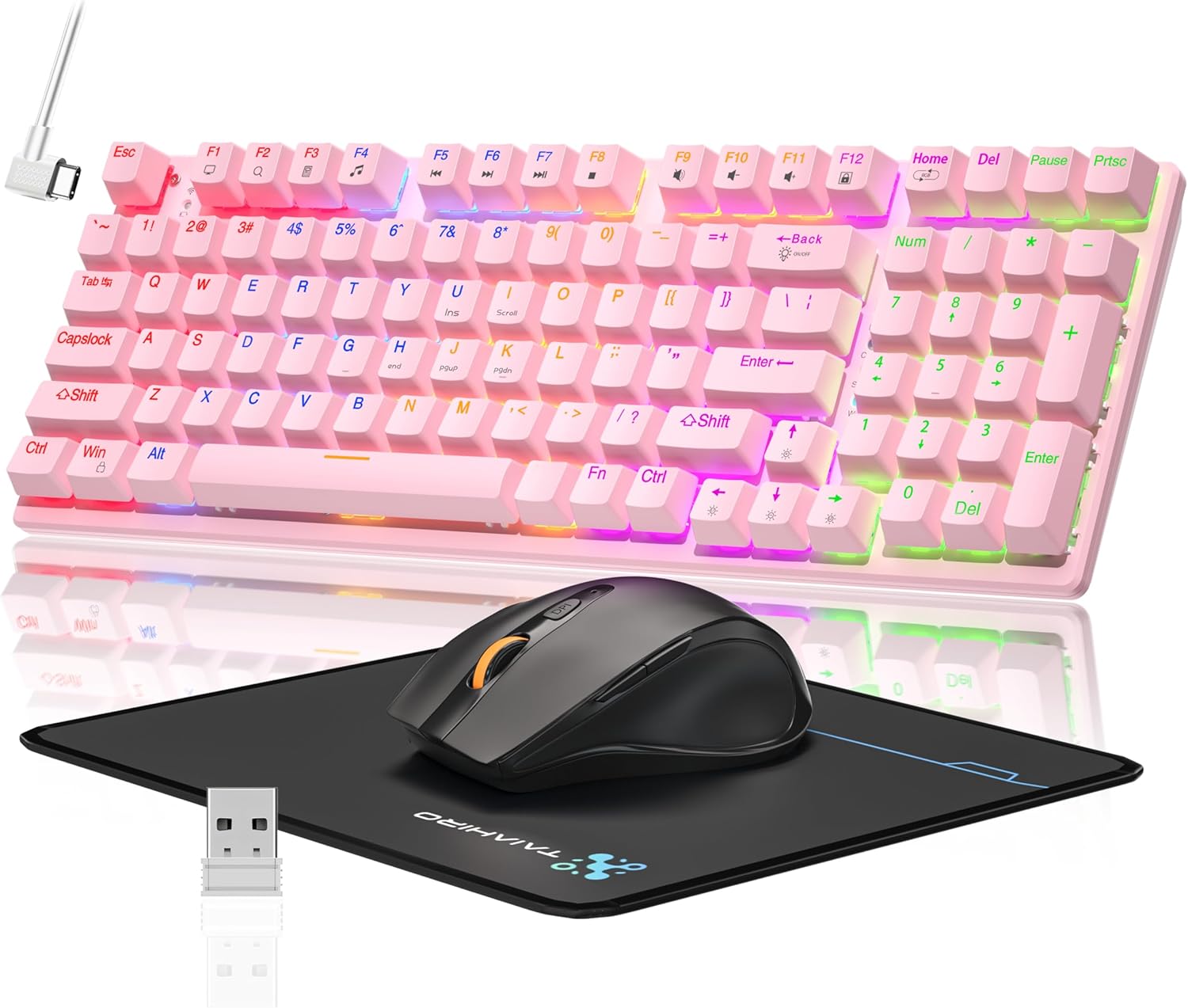
Image: The Taiahiro Wireless Gaming Keyboard and Mouse Combo, featuring a pink 98-key mechanical keyboard with RGB backlighting, a black ergonomic mouse, and a mouse pad. A USB receiver is also visible.
Paket İçeriği
- Kablosuz Mekanik Klavye
- Kablosuz Oyun Faresi
- USB-C Kablosu
- 2.4G USB Alıcı
- Fare Altlığı
- Kullanım Kılavuzu (bu belge)
Kurmak
Klavye Kurulumu
The keyboard supports three connectivity modes: USB-C wired, 2.4G wireless, and Bluetooth 5.0.
- USB-C Kablolu Bağlantı: Connect the provided USB-C cable from the keyboard to an available USB port on your computer. The keyboard will be recognized automatically.
- 2.4G Kablosuz Bağlantı:
- Locate the 2.4G USB receiver, typically stored in the mouse or keyboard compartment.
- 2.4G USB alıcısını bilgisayarınızdaki boş bir USB portuna takın.
- Ensure the keyboard's mode switch (usually on the back or side) is set to 2.4G mode.
- Klavyenin otomatik olarak bağlanması gerekiyor.
- Bluetooth 5.0 Bağlantısı:
- Klavyenin mod değiştirme düğmesinin Bluetooth moduna ayarlı olduğundan emin olun.
- Cihazınızda (PC, dizüstü bilgisayar, tablet, akıllı telefon) Bluetooth'u etkinleştirin ve yeni cihazları arayın.
- Select "Taiahiro Keyboard" (or similar name) from the list of available devices.
- Eşleştirmeyi tamamlamak için ekrandaki talimatları izleyin.

Image: A pink mechanical keyboard connected to various devices (monitor, laptop, tablet) illustrating its triple-mode connectivity via Bluetooth, 2.4GHz, and USB-C.
Fare Kurulumu
The mouse supports 2.4G wireless and Bluetooth connectivity.
- 2.4G Kablosuz Bağlantı:
- Insert 1 AA battery (not included) into the mouse.
- Plug the 2.4G USB receiver (shared with keyboard) into an available USB port on your computer.
- Ensure the mouse's power switch is turned ON.
- Fare otomatik olarak bağlanmalıdır.
- Bluetooth Bağlantısı:
- Insert 1 AA battery (not included) into the mouse.
- Ensure the mouse's power switch is turned ON and set to Bluetooth mode.
- Cihazınızda Bluetooth'u etkinleştirin ve yeni cihazları arayın.
- Select "Taiahiro Mouse" (or similar name) from the list of available devices.
- Eşleştirmeyi tamamlamak için ekrandaki talimatları izleyin.

Image: A wireless gaming mouse highlighting its 4 adjustable DPI levels and showing the battery compartment with a tiny USB receiver and space for a 1AA battery.
Kullanım Talimatları
Klavye İşlevleri
- RGB Arka Aydınlatma: The keyboard features 8 different RGB lighting modes.
- Basmak Fn + Ana Sayfa Aydınlatma modları arasında geçiş yapmak için.
- Basmak Fn + ↑/↓ to adjust brightness (5 levels).
- Basmak Fn + ←/→ to adjust breathing speed (5 levels).
- Multimedya Tuşları: Kullanın Fn key in combination with F-keys for multimedia controls (e.g., Fn+F1 for media player, Fn+F2 for volume down, etc.). Refer to the keycap legends for specific functions.
- Ayarlanabilir ayak: Klavyenin alt tarafında, ergonomik konfor için yazma açısını değiştirmeye olanak tanıyan ayarlanabilir ayaklar bulunmaktadır.
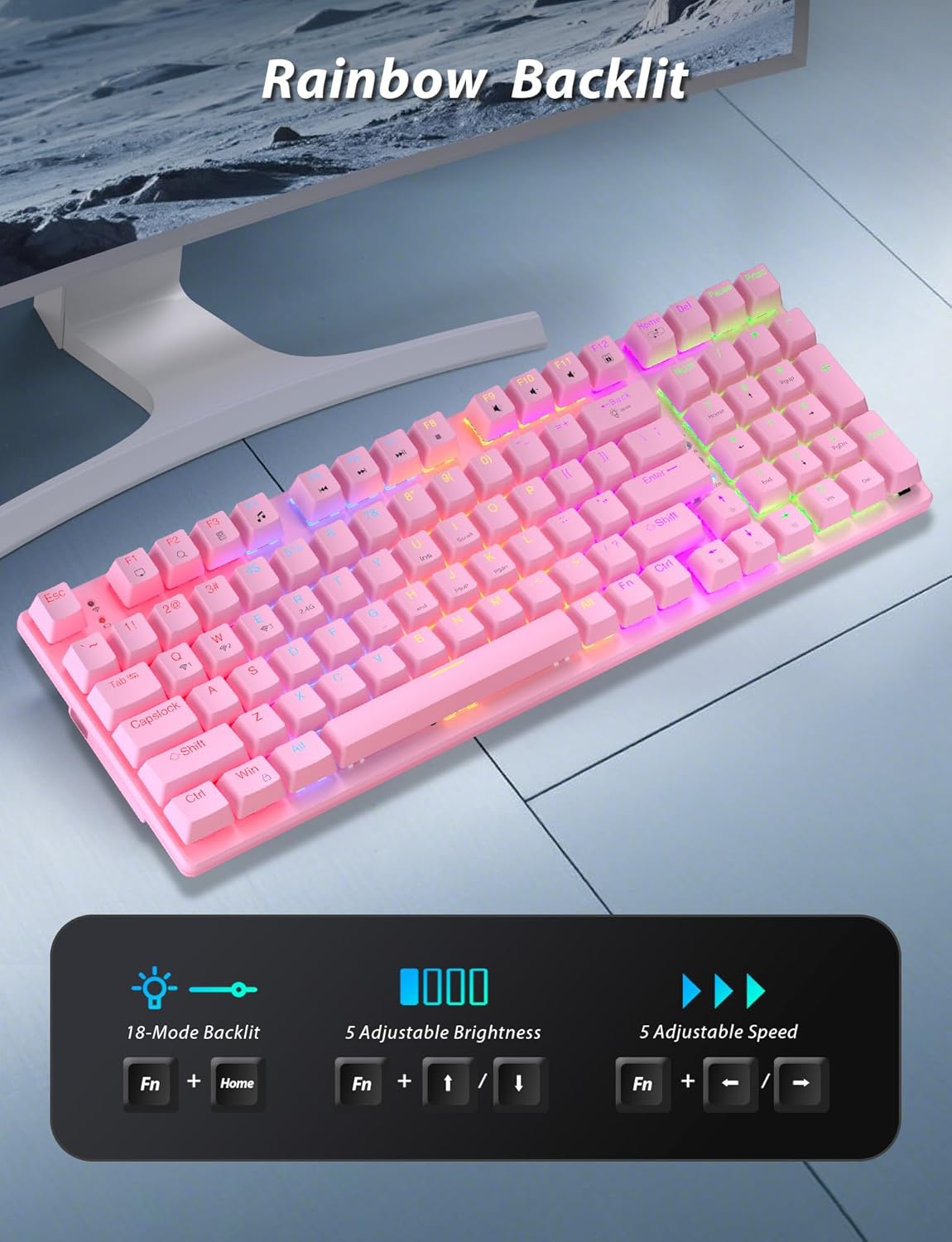
Image: A pink mechanical keyboard displaying its rainbow backlit keys, with an overlay showing the key combinations (Fn + Home, Fn + ↑/↓, Fn + ←/→) for controlling 8 modes, 5 adjustable brightness levels, and 5 adjustable speeds.

Resim: Yakın çekim view of the side of the pink mechanical keyboard, showing its ergonomic sloped design and the adjustable feet extended for comfortable typing. The accompanying mouse is also shown on a mousepad.
Fare İşlevleri
- DPI Ayarı: The mouse features 4 adjustable DPI levels (800/1600/2400/3200). Press the DPI button (usually located behind the scroll wheel) to cycle through the sensitivity settings.
- Ergonomik Tasarım: The contoured shape of the mouse is designed to fit comfortably in your hand, reducing fatigue during extended use.
- Anti-skid Scroll Wheel: Provides precise scrolling control.

Image: A wireless gaming mouse with a prominent scroll wheel and DPI button, illustrating its 4 adjustable DPI levels (800/1600/2400/3200), ergonomic shape, and forward/back buttons.
Bakım
- Temizlik: Klavyenin ve farenin yüzeylerini temizlemek için yumuşak, kuru bir bez kullanın. Daha derinlemesine temizlik için, biraz daha kuru bir bez kullanabilirsiniz.amp İç bileşenlere sıvı girmemesini sağlamak için bez kullanılabilir. Sert kimyasallardan veya aşındırıcı malzemelerden kaçının.
- Pil Değişimi: For the mouse, replace the AA battery when performance degrades. For the keyboard, recharge via the USB-C cable when the battery indicator shows low power.
- Depolamak: Uzun süre kullanılmayacaksa, komboyu serin, kuru ve doğrudan güneş ışığından ve aşırı sıcaklıklardan uzak bir yerde saklayın.
Sorun giderme
| Sorun | Çözüm |
|---|---|
| Keyboard/Mouse not connecting via 2.4G. |
|
| Klavye/fare Bluetooth üzerinden bağlanmıyor. |
|
| RGB backlighting not working or dim. |
|
| Fare imleci dengesiz veya tepkisiz. |
|
Özellikler
| Özellik | Detay |
|---|---|
| Model Numarası | BK6301 |
| Klavye Türü | 98-Key Mechanical Keyboard |
| Anahtar Türü | Mavi Anahtarlar |
| Klavye Bağlantısı | USB-C (Wired), 2.4G Wireless, Bluetooth 5.0 |
| Fare Bağlantısı | 2.4G Kablosuz, Bluetooth |
| Fare DPI Düzeyleri | 800/1600/2400/3200 |
| Arka aydınlatma | RGB (8 Modes, 5 Brightness, 5 Speed) |
| Uyumlu Cihazlar | PC, Laptop, Smartphone, Tablet (Windows, macOS, Android) |
| Klavye Tuş Ömrü | 50 Milyon Tıklama |
| Klavye Boyutları | Approx. 14.96 x 5.51 x 3.15 inches (from Package Dimensions) |
| Ürün Ağırlığı | 2.72 pounds (combo weight) |
| Fare pili | 1 x AA pil (dahil değildir) |
| Klavye Pili | 1 adet C tipi pil (dahil) Note: This seems unusual for a keyboard, usually Li-ion. Based on input "1 C batteries required. (included)". Will state as per input. |

Resim: Yakın çekim view of the mechanical blue switches on the keyboard, showing the keycap removed and the switch mechanism, along with specifications like 50,000,000 keystrokes life, key force, and stroke travel.
Garanti ve Destek
Taiahiro products are designed for reliability and performance. For warranty information or technical support, please refer to the contact details provided on the product packaging or visit the official Taiahiro webalan. Garanti talepleri için satın alma makbuzunuzu saklayın.
For further assistance, you may contact Taiahiro customer service through their official channels. Please provide your product model number (BK6301) and a detailed description of the issue when seeking support.


