giriiş
Thank you for choosing the Aiwa FP-30-2G Flip Phone. This manual provides essential information for setting up, operating, and maintaining your device. The FP-30-2G is a reliable 2G mobile phone designed for essential communication, featuring dual SIM support, Bluetooth 3.0, dual displays, an FM radio, and a dedicated SOS button for emergencies.
Please read this manual carefully before using your phone to ensure proper operation and to maximize its lifespan.
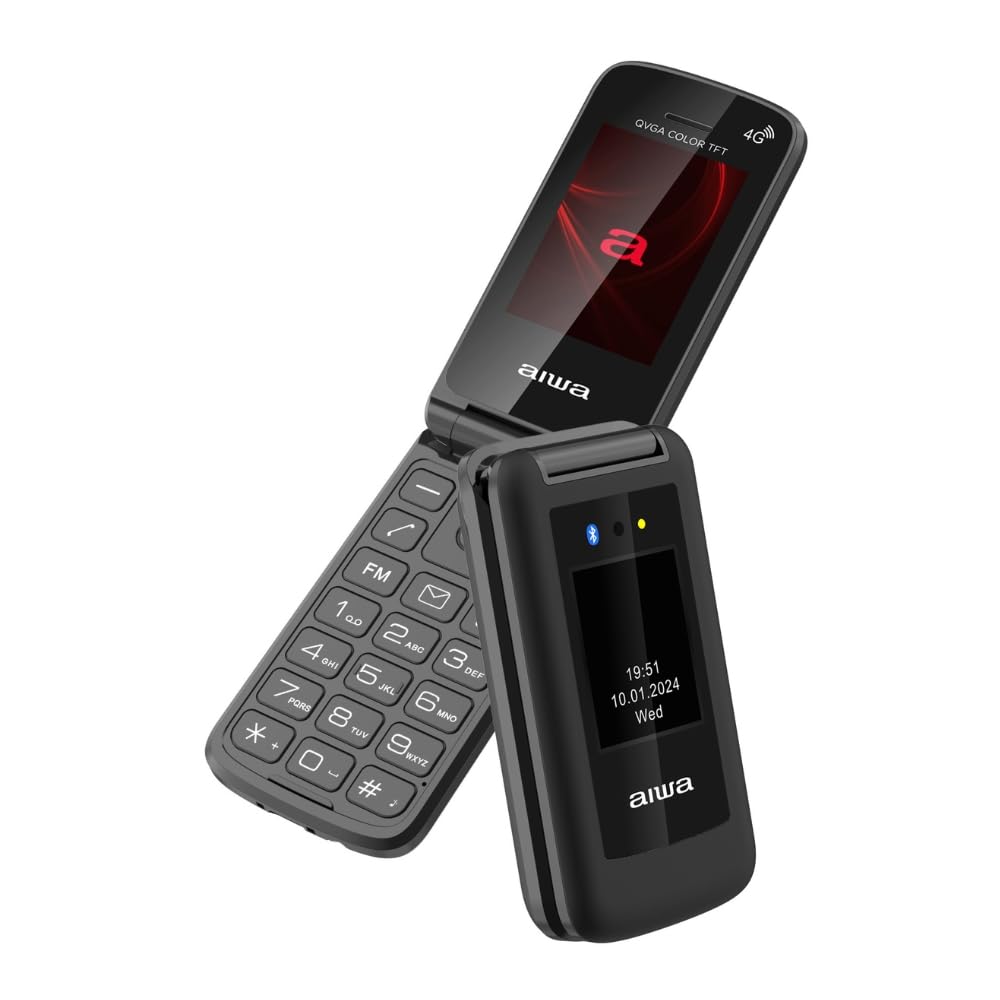
Image: Aiwa FP-30-2G Flip Phone in open position, displaying the main screen and keypad.
1. Kurulum
1.1 Paket İçeriği
Kutunun içinde tüm öğelerin mevcut olduğundan emin olun:
- Aiwa FP-30-2G Flip Phone
- Battery (BL-5C 1000mAh)
- AC Şarj Cihazı
- USB-C Kablosu
- Kullanım Kılavuzu (bu belge)
1.2 Pil ve SIM Kart Takılması
- Arka Kapağı Çıkarın: Telefonun arka kapağını, üzerindeki çentik yardımıyla nazikçe açın.
- SIM kart(lar)ı takın: The phone supports Dual SIM. Locate the SIM card slots. Insert your 2G compatible SIM card(s) into the designated slots with the gold contacts facing down and the cut corner aligned as shown in the diagram (refer to phone's internal markings).
- MicroSD Kart Takın (İsteğe bağlı): If you wish to expand storage (up to 32GB), insert a MicroSD card into the T-Flash card slot.
- Pili takın: Place the BL-5C battery into the battery compartment, ensuring the contacts align with the phone's terminals.
- Arka Kapağı Değiştirin: Arka kapağı dikkatlice hizalayın ve yerine oturana kadar bastırın.
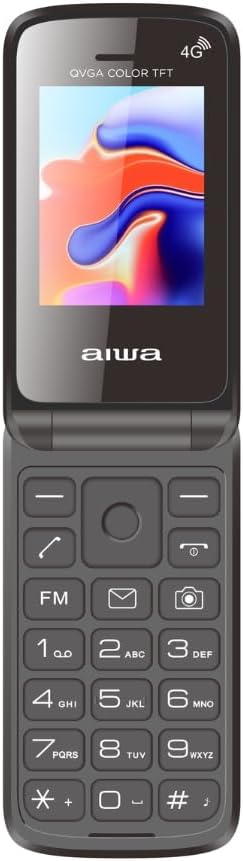
Image: Aiwa FP-30-2G Flip Phone in closed position, front view.
1.3 Pilin Şarj Edilmesi
Before first use, fully charge the phone's battery. Use only the provided charger and USB-C cable.
- Connect the USB-C cable to the charging port on the phone.
- Connect the other end of the USB-C cable to the AC charger.
- AC şarj cihazını elektrik prizine takın.
- Telefonunuzdaki şarj göstergesi şarj durumunu gösterecektir. Tamamen şarj olduğunda şarj aletini çıkarın.
Not: The phone has a standby time of up to 180 hours and talk time of up to 4 hours on a full charge.
1.4 Açma/Kapatma
- Açmak İçin: Ekran ışığı yanana kadar Güç/Çağrı Sonlandırma düğmesini (genellikle kırmızı) basılı tutun.
- Kapatmak İçin: Press and hold the Power/End Call button until the power-off options appear, then select "Power Off" or simply hold until the phone shuts down.
2. Kullanım Talimatları
2.1 Temel Çağrı Fonksiyonları
- Arama yapmak: Tuş takımını kullanarak telefon numarasını girin ve Arama düğmesine (genellikle yeşil) basın.
- Bir Aramayı Cevaplama: When the phone rings, press the Call button.
- Aramayı Bitirme: Güç/Çağrı Sonlandırma düğmesine basın.
- Sesi Ayarlama: Use the side volume keys during a call.
2.2 SMS Mesajları Gönderme
- Go to the "Messages" menu.
- "Mesaj Yaz" veya "Yeni SMS" seçeneklerinden birini seçin.
- Alıcının numarasını girin veya kişilerden seçin.
- Alfasayısal tuş takımını kullanarak mesajınızı yazın.
- "Gönder"e basın.
2.3 Çift Ekran
The FP-30-2G features two displays:
- Ana Ekran: 2.4-inch (240 x 320 QVGA) screen visible when the phone is open. This is your primary interface.
- Harici Ekran: 1.77-inch (128 x 160) screen visible when the phone is closed. This display shows essential information like time, date, battery status, and incoming call notifications without needing to open the phone.
2.4 SOS Acil Durum Düğmesi
The dedicated SOS button provides a quick way to contact pre-set emergency numbers.
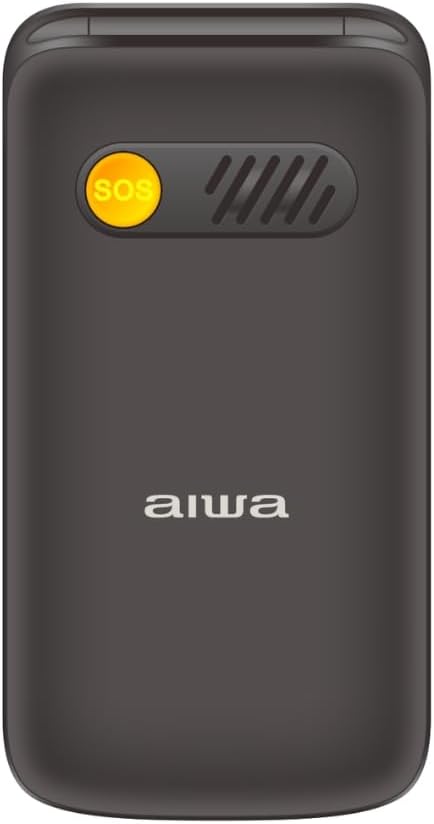
Resim: Arka view of the Aiwa FP-30-2G Flip Phone, highlighting the yellow SOS button and speaker grille.
- Setting Up SOS Numbers: Navigate to the "SOS Settings" in the phone's menu. Add up to 5 emergency contact numbers.
- SOS Düğmesini Kullanma: In an emergency, press and hold the SOS button on the back of the phone for a few seconds. The phone will automatically call the pre-set emergency numbers in sequence until one answers. It will also send an emergency SMS message to these contacts.
2.5 FM Radyo
The phone includes an offline FM radio. To use it:
- Ana menüden "FM Radyo" uygulamasına erişin.
- You may need to connect wired headphones (not included) to act as an antenna for optimal reception.
- İstasyonları taramak veya manuel olarak ayarlamak için navigasyon tuşlarını kullanın.
2.6Bluetooth 3.0
Connect your phone to Bluetooth headsets or other compatible devices.
- "Ayarlar" > "Bluetooth" bölümüne gidin.
- Bluetooth'u "Açın".
- Seçme "Arama "Cihazlar" veya "Yeni cihaz eşleştir".
- Select your desired device from the list and follow the on-screen prompts to pair.
2.7 Camera and Flashlight
- Kamera: The phone features a 0.3 MP rear camera with flash. Access it from the main menu to take basic photos or QVGA videos.
- El feneri: A built-in LED flashlight is available. It can usually be activated quickly by pressing and holding a specific key (refer to your phone's quick access keys, often the '0' or a dedicated side button) or through the utilities menu.
3. Bakım
3.1 Cihazın Temizlenmesi
- Use a soft, dry, lint-free cloth to clean the phone's exterior and screen.
- Do not use liquid cleaners, aerosols, or harsh chemicals, as these can damage the phone.
- Şarj portunun toz ve kirden uzak tutulmasına özen gösterin.
3.2 Pil Bakımı
- Pili aşırı sıcaklıklara (sıcak veya soğuk) maruz bırakmaktan kaçının.
- Pili delmeyin, sökmeyin veya üzerinde değişiklik yapmayın.
- Telefon uzun süre kullanılmayacaksa, saklamadan önce pilini yaklaşık %50'ye kadar şarj edin.
- Replace the battery if you notice a significant decrease in performance or swelling.
3.3 Genel Bakım
- Protect the phone from drops and impacts.
- Keep the phone dry. Moisture can damage internal components.
- Do not attempt to repair the phone yourself. Refer to qualified service personnel.
4. Sorun Giderme
If you encounter issues with your Aiwa FP-30-2G, try the following solutions before seeking professional assistance.
| Sorun | Olası Çözüm |
|---|---|
| Telefon açılmıyor |
|
| Ağ sinyali yok |
|
| Pil şarj olmuyor |
|
| SOS düğmesi çalışmıyor. |
|
| Cannot hear FM radio |
|
5. Özellikler
Detailed technical specifications for the Aiwa FP-30-2G:
| Özellik | Detay |
|---|---|
| Model Numarası | FP-30-2G |
| Ağ Bantları | GSM 850/900/1800/1900Mhz (2G) |
| Bluetooth | 3.0 + EDR |
| Ana Ekran | 2.4 inches, 240 x 320 QVGA, TN Type |
| Harici Ekran | 1.77 inches, 128 x 160, TN Type |
| Kamera | Flaşlı 0.3 MP |
| Dahili Bellek | 32MB + 32MB |
| Genişletilebilir Bellek | T-Flash Card Slot, up to 32GB |
| SIM Kart Desteği | Çift SIM |
| Pil | BL-5C, 1000mAh (Removable) |
| Bekleme Süresi | 180 Saate Kadar |
| Konuşma Zamanı | 4 Saate Kadar |
| Şarj cihazı | 5V, 500mA with USB-C cable |
| Boyutlar (Kapalı) | 103x53.5x21.05 mm |
| Ağırlık (pil dahil) | 106 gr |
| İşletim Sistemi | Symbian 9.1 (as per specifications, though this is unusual for a modern feature phone) |
| Ses Oynatıcısı | AMR, MID, MP3, WAV |
| Video Oynatıcısı | 3GP, MP4, AVI |
| Diğer Özellikler | FM Radio, Torchlight, Vibration System, QVGA Video Recorder, Sound Recorder, SMS, Phonebook (500 contacts), Calendar, Calculator, Alarm, Speed Dial (M1/M2/M3), Photo Contacts |

Resim: Yan view of the Aiwa FP-30-2G Flip Phone, showing its compact profile.
6. Garanti ve Destek
Your Aiwa FP-30-2G Flip Phone comes with a standard manufacturer's warranty. Please refer to the warranty card included in your package for specific terms and conditions, including the warranty period and coverage details.
For technical support, service, or warranty claims, please contact Aiwa customer service through their official website or the contact information provided in your warranty documentation. Do not attempt to open or repair the device yourself, as this may void your warranty.
Garanti kapsamında satın alma belgenizi satın alma belgeniz olarak saklayın.


