1. Giriş
This manual provides essential instructions for the proper setup, operation, and maintenance of your OnePlus Nord N30 5G smartphone. Please read this guide thoroughly before using your device to ensure optimal performance and longevity.
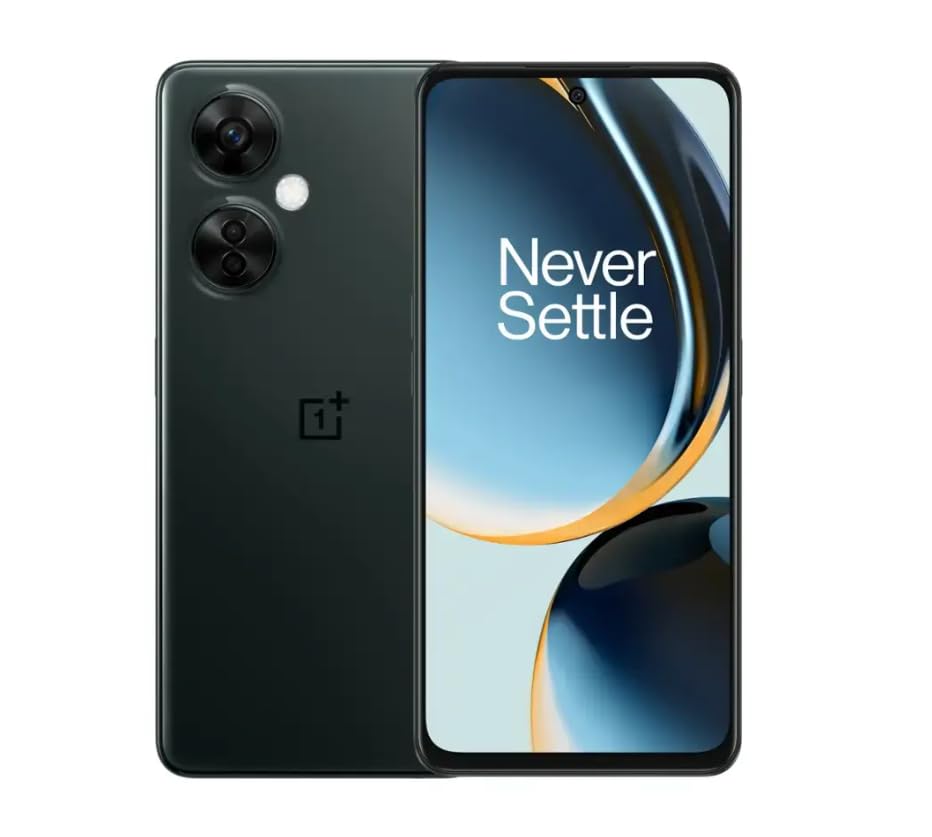
Image 1.1: OnePlus Nord N30 5G smartphone. This image displays the overall design of the device, highlighting its screen and camera module.
2. Kutuda Neler Var?
Paketin içinde tüm öğelerin mevcut olduğundan emin olun:
- OnePlus Nord N30 5G Akıllı Telefon
- Güç Adaptörü
- USB kablosu
Not: Aksesuarlar bölgeye göre değişiklik gösterebilir.
3. Kurulum
3.1. SIM Kartın Takılması
- Cihazın yan tarafında bulunan SIM kart tepsisini bulun.
- Insert the SIM ejector tool (not included, use a paperclip if necessary) into the small hole next to the tray to open it.
- Place your Nano-SIM card(s) into the tray with the gold contacts facing down. The device supports a single SIM card and a microSDXC card for expandable storage.
- Tepsiyi, telefonun gövdesiyle aynı hizaya gelene kadar dikkatlice yuvasına geri itin.
3.2. İlk Şarj ve Güç Açma
İlk kullanımdan önce cihazınızın tam şarj edilmesi önerilir.
- Connect the USB cable to the power adapter and then to the phone's USB-C port.
- Plug the power adapter into a wall outlet. The device supports 50W SUPERVOOC fast charging.
- Once sufficiently charged, press and hold the Power button (located on the side) until the OnePlus logo appears.
3.3. Cihazın İlk Yapılandırması
İlk kurulumu tamamlamak için ekrandaki yönergeleri izleyin:
- Tercih ettiğiniz dili seçin.
- Bir Wi-Fi ağına bağlanın.
- Review ve şartlar ve koşulları kabul edin.
- Google hesabınızla giriş yapın veya yeni bir hesap oluşturun.
- Set up security features such as fingerprint unlock or face unlock.
4. Kullanım Talimatları
4.1. Görüntüleme ve Gezinme
The OnePlus Nord N30 5G features a 6.72-inch LCD display with a 120Hz refresh rate for smooth visuals. Navigate the OxygenOS interface using gestures or traditional navigation buttons.
- Yukarı kaydırın: Uygulama çekmecesine erişin.
- Aşagı kaydır: Access notifications and quick settings.
- Musluk: Eşyaları seç.
- Tutam: Yakınlaştır veya uzaklaştır.
4.2. Kamera Kullanımı
The device is equipped with a triple rear camera system and a front camera.
- Ana Kamera: 108 MP, f/1.7 (wide) for high-resolution photos.
- Makro Kamera: Yakın çekimler için 2 MP, f/2.4.
- Derinlik Kamerası: 2 MP, f/2.4 for portrait mode effects.
- Ön Kamera: 16 MP, f/2.4 for selfies and video calls.
Open the Camera app and select your desired mode (Photo, Video, Portrait, Macro, etc.) from the interface. Tap the shutter button to capture images or start/stop video recording.
4.3. Depolama Yönetimi
The phone comes with 128GB of internal storage. You can expand this up to 1TB using a microSDXC card inserted into the SIM tray.
- To check storage usage: Go to Ayarlar > Depolamak.
- Hareket etmek files to microSD: Use the File Yönetici uygulaması.
4.4. Bağlantı
The device supports 5G cellular technology, Wi-Fi, and Bluetooth 5.1.
- 5G: Ensure your SIM card and plan support 5G for faster mobile data speeds.
- Wifi: Kablosuz ağlara bağlanın Ayarlar > Wifi.
- Bluetooth: Pair with wireless headphones or other devices via Ayarlar > Bluetooth.
4.5. Güvenlik Özellikleri
Secure your device using the side-mounted fingerprint sensor or face unlock.
- To set up fingerprint unlock: Go to Ayarlar > Güvenlik ve gizlilik > Parmak izi kilidi.
- To set up face unlock: Go to Ayarlar > Güvenlik ve gizlilik > Yüz tanıma kilidi.
4.6. ses
The device features dual stereo speakers for enhanced audio experience. It also includes a 3.5 mm audio jack for wired headphones.
5. Bakım
5.1. Pil Bakımı
5000 mAh pil, uzun süreli kullanım sağlar. Pil ömrünü uzatmak için:
- Aşırı sıcaklıklardan kaçının.
- Use the provided 50W SUPERVOOC charger for optimal charging speed and battery health.
- Pilin sık sık tamamen bitmesini önleyin.
5.2. Yazılım Güncellemeleri
Keep your OxygenOS (based on Android 13) updated to ensure optimal performance, security, and access to new features.
- To check for updates: Go to Ayarlar > Cihaz hakkında > OxygenOS sürümü.
5.3. Cihazın Temizlenmesi
Telefonunuzun ekranını ve gövdesini temizlemek için yumuşak, tiftiksiz bir bez kullanın. Sert kimyasallar veya aşındırıcı malzemeler kullanmaktan kaçının.
6. Sorun Giderme
Bu bölümde karşılaşabileceğiniz yaygın sorunlar ele alınmaktadır.
6.1. Cihaz Açılmıyor
- Pilin şarjlı olduğundan emin olun. Cihazı en az 15 dakika şarj cihazına takın.
- Yeniden başlatmayı zorlamak için Güç düğmesini 10-15 saniye basılı tutun.
6.2. Ağ Bağlantı Sorunları
- SIM kartın doğru takılı olup olmadığını kontrol edin.
- Verify that mobile data is enabled in Ayarlar > Mobil ağ.
- Cihazı yeniden başlatın.
- Contact your carrier (T-Mobile) to confirm service availability in your area.
6.3. Uygulamaların Çökmesi veya Donması
- Uygulamayı kapatıp yeniden açın.
- Uygulamanın önbelleğini temizleyin: Ayarlar > Uygulamalar > [Uygulama Adı] > Depolama kullanımı > Önbelleği temizle.
- Ensure the app and OxygenOS are updated to the latest versions.
6.4. Pilin Hızlı Bitmesi
- Ekran parlaklığını azaltın.
- İhtiyaç duyulmadığında Bluetooth, GPS veya Wi-Fi gibi kullanılmayan özellikleri devre dışı bırakın.
- Pil kullanımını kontrol edin Ayarlar > Pil güç tüketen uygulamaları belirlemek için.
- Ensure background app refresh is limited for non-essential apps.
7. Özellikler
| Model Adı | OnePlus Nord N30 5G |
| İşletim Sistemi | OxygenOS (based on Android 13) |
| İşlemci | Qualcomm Snapdragon 695 Sekiz Çekirdekli |
| Veri deposu | 8 GB |
| Dahili Depolama | 128GB (Expandable up to 1TB via microSDXC) |
| Görüntülemek | 6.72 inches LCD, 2400 x 1080 resolution, 120Hz Refresh Rate |
| Arka Kamera | 108 MP (geniş), 2 MP (makro), 2 MP (derinlik) |
| Ön Kamera | 16 MP |
| Pil Kapasitesi | 5000 mAh |
| Şarj etme | 50W SUPERVOOC Hızlı Şarj (tam şarj için yaklaşık 47 dakika) |
| Bağlantı | 5G, Wi-Fi, Bluetooth 5.1, USB-C |
| Ses Jakı | 3.5 mm |
| Boyutlar | 6 x 4 x 4 inç |
| Ağırlık | 10.8 ons |
| Özel Özellikler | Dual SIM, Side-mounted Fingerprint Sensor, Face Unlock, Dual Stereo Speakers |
8. Renewed Product Information
This OnePlus Nord N30 5G is an Amazon Renewed product. Renewed products are pre-owned and professionally inspected, tested, and cleaned to work like new. They come with generic or original accessories and packaging.
8.1. Amazon Yenilenmiş Ürünler Şartları
Amazon Renewed products are categorized based on their cosmetic condition and battery life. All renewed products are fully functional and have a battery life greater than 80% of a new equivalent.

Image 8.1: Amazon Renewed conditions overview. This image illustrates the criteria for Excellent, Good, and Acceptable cosmetic conditions for renewed products.

Resim 8.2: Görsel örnekamples of renewed product cosmetic conditions. This image provides visual examples of what 'Excellent', 'Good', and 'Acceptable' cosmetic conditions might look like on a phone's back.

Image 8.3: Customer feedback on Amazon Renewed. This image presents testimonials from customers regarding their positive experiences with Amazon Renewed products.
9. Garanti ve Destek
9.1. Garanti Bilgileri
As an Amazon Renewed product, this device is backed by the Amazon Renewed Guarantee. Please refer to the Amazon Renewed program terms and conditions for specific warranty details and coverage. This typically includes a limited warranty for a specified period from the date of purchase, covering defects in materials and workmanship.
9.2. Müşteri Desteği
For technical assistance, troubleshooting, or warranty claims, please contact Amazon Customer Service or refer to the official OnePlus support webEk kaynaklar ve SSS için site.
- Amazon Müşteri Hizmetleri: Ziyaret etmek amazon.com/iletişim-bize
- OnePlus Support: Visit the official OnePlus support webBölgeniz için site.


