giriiş
Satın aldığınız için teşekkür ederizasing the ZEBRONICS Sound Feast 800 Portable Bluetooth Speaker. This manual provides essential information for the safe and efficient operation of your device. Please read it thoroughly before use and retain it for future reference.
Önemli Güvenlik Talimatları
- Hoparlörü aşırı sıcaklıklara, doğrudan güneş ışığına veya yüksek neme maruz bırakmayın.
- Hoparlörü düşürmekten veya sert darbelere maruz bırakmaktan kaçının.
- Keep the speaker away from water and other liquids. While it is splash-proof, it is not fully waterproof and should not be submerged.
- Hoparlörü kendiniz sökmeye, tamir etmeye veya değiştirmeye çalışmayın. Tüm servis işlemlerini yetkili personele yaptırın.
- Yalnızca kutu içeriğinde bulunan şarj kablosunu veya onaylı bir eşdeğerini kullanın.
- Hoparlörü çalıştırırken uygun havalandırmayı sağlayın.
- Hoparlörü yumuşak ve kuru bir bezle temizleyin. Aşındırıcı temizleyiciler veya çözücüler kullanmayın.
- Çocukların erişemeyeceği yerde saklayınız.
Paket İçeriği
Lütfen aşağıdaki öğelerin kutucuğunu işaretleyin:
- ZEBRONICS Sound Feast 800 Speaker - 1 unit
- Wireless Microphone - 1 unit
- Charging Cable (Type-C) - 1 unit
- AUX Cable - 1 unit
- QR Code Guide - 1 unit

Image: The ZEBRONICS Sound Feast 800 speaker in black with a purple-lit grille, accompanied by its wireless microphone.
Ürün Bittiview
Temel Özellikler
- Dinamik Güç: 55 Watts output for robust sound.
- Powerful Driver: Equipped with a 16.51 cm (6.5 inch) driver for enhanced audio.
- Çoklu Bağlantı: Supports Bluetooth v5.3, USB, mSD, AUX, and FM radio.
- Uzatılmış Çalma Süresi: Up to 6 hours of playback on a single charge (at 50% volume with LED off).
- RGB LED Işıklar: Multiple light modes to enhance ambiance.
- TWS İşlevi: Connect two Sound Feast 800 speakers for a stereo experience.
- Karaoke Hazır: Includes a 6.3mm mic input and a wireless microphone.
- Convenient Mobile Holder: Integrated holder for smartphones.
- Sıçrama Geçirmez Tasarım: Offers protection against splashes.
Kontroller ve Bağlantı Noktaları
Familiarize yourself with the control panel and connectivity ports for optimal use.

Resim: Ayrıntılı view of the speaker's control buttons (Power, Mode, Play/Pause, Volume/Track, RGB light control, Bass) and connectivity ports (6.3mm Mic In, USB, mSD, AUX In, Type-C Charging).
- Güç Düğmesi: Açmak/kapatmak için basılı tutun.
- Mod Düğmesi (M): Short press to switch between Bluetooth, USB, mSD, AUX, and FM modes.
- Oynat/Duraklat Düğmesi: Sesi oynatmak veya duraklatmak için kısa basın.
- Sesi Kısma / Önceki Parça: Önceki parçaya geçmek için kısa basın, sesi kısmak için uzun basın.
- Sesi Artırma / Sonraki Parça: Sonraki parçaya geçmek için kısa basın, sesi artırmak için uzun basın.
- RGB Işık Kontrolü: Button to cycle through different RGB light modes.
- Bas Düğmesi: Activates or deactivates bass boost.
- TWS Düğmesi: Gerçek Kablosuz Stereo eşleştirmesini başlatır.
- 6.3 mm Mikrofon Girişi: Kablolu mikrofon bağlamak için.
- USB Bağlantı Noktası: USB bellekten oynatma için.
- mSD Card Slot: For mSD card playback.
- AUX Girişi: For connecting external audio devices via AUX cable.
- C Tipi Şarj Bağlantı Noktası: Hoparlörü şarj etmek için.
Kurulum Kılavuzu
İlk Şarj
- Before first use, fully charge the speaker. Connect the provided Type-C charging cable to the speaker's charging port and the other end to a USB power adapter (not included).
- The charging indicator will illuminate during charging and turn off once fully charged. A full charge takes approximately 4 hours.
Açma/Kapatma
- Açmak için, düğmesine basın ve basılı tutun. Güç düğmesi until the speaker activates.
- Kapatmak için tuşunu basılı tutun. Güç düğmesi Hoparlör kapanana kadar tekrar tekrar.
Kullanım Talimatları
Bluetooth Modu
- Turn on the speaker. It will automatically enter Bluetooth mode, indicated by a prompt sound.
- Enable Bluetooth on your mobile device and search for "ZEB-SOUND FEAST 800" in the list of available devices.
- Eşleştirmek istediğiniz hoparlörü seçin. Eşleştirme tamamlandığında bir onay sesi duyacaksınız.
- Artık cihazınızdaki sesleri hoparlörünüz aracılığıyla oynatabilirsiniz.
USB / mSD Card Mode
- Insert a USB drive or mSD card (with audio files) hoparlör üzerindeki ilgili porta.
- The speaker will automatically detect the storage device and begin playback. If not, press the Mod düğmesi (M) to switch to USB or mSD mode.
- Kullanın Önceki/Sonraki Parça buttons to navigate songs and Oynat/Duraklat Oynatma kontrolü için.
AUX Modu
- Connect one end of the provided AUX cable to the speaker's AUX input and the other end to the audio output of your external device (e.g., smartphone, MP3 player).
- Basın Mod düğmesi (M) AUX moduna geçmek için.
- Bağlı cihazınızdan oynatmayı ve ses seviyesini kontrol edin.
FM Radyo Modu
- Basın Mod düğmesi (M) FM radyo moduna geçmek için.
- Uzun basın Oynat/Duraklat düğmesi to automatically scan and save available FM channels.
- Kullanın Önceki/Sonraki Parça buttons to switch between saved channels.
Gerçek Kablosuz Stereo (TWS) İşlevi
The TWS function allows you to connect two ZEB-SOUND FEAST 800 speakers wirelessly for a stereo sound experience.
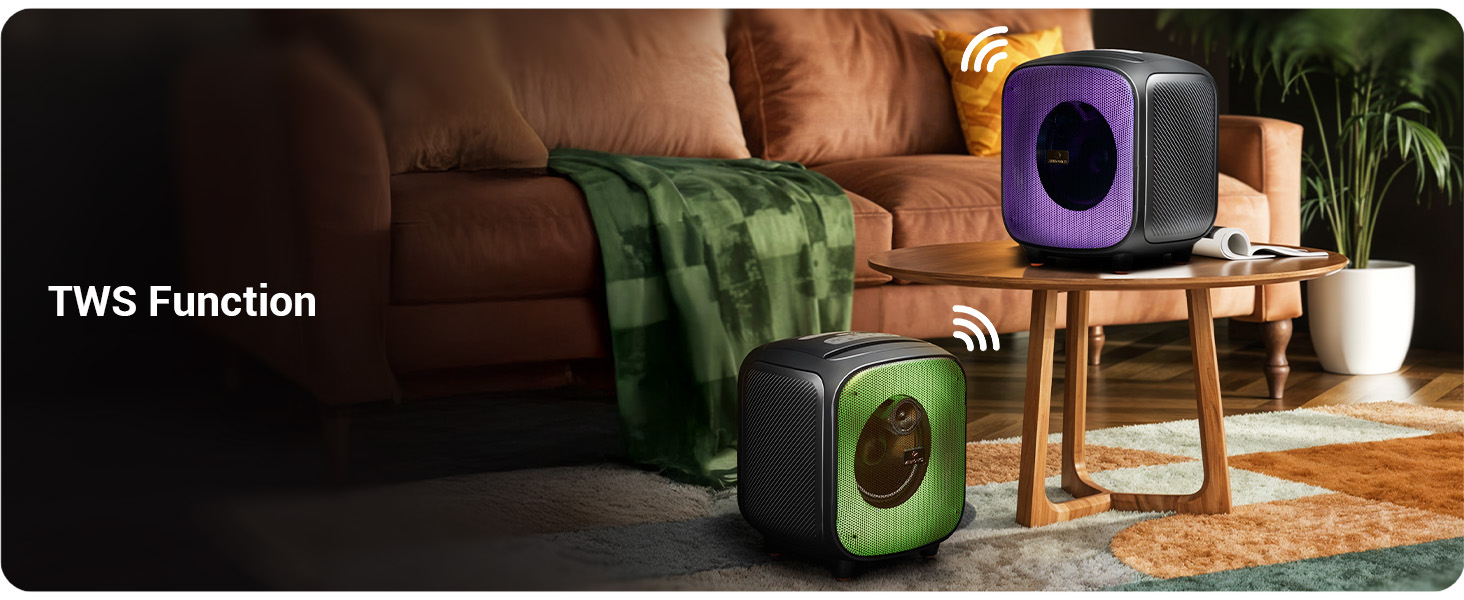
Image: Two Sound Feast 800 speakers positioned in a living room, illustrating the TWS connection.
- Ensure both ZEB-SOUND FEAST 800 speakers are powered on and in Bluetooth mode, but not connected to any device.
- Hoparlörlerden birinde (bu ana hoparlör olacaktır), kısa bir süre basılı tutun. TWS düğmesi. It will search for the secondary speaker.
- Once connected, you will hear a confirmation sound. The primary speaker's Bluetooth indicator will flash, and the secondary speaker's indicator will be solid.
- Now, connect your mobile device to the primary speaker via Bluetooth as described in the Bluetooth Mode section.
- Audio will play in stereo through both speakers.
Karaoke İşlevi

Image: A woman holding the wireless microphone, demonstrating the karaoke function.
- Ensure the speaker is powered on and playing music (e.g., via Bluetooth, USB, or AUX).
- Turn on the provided wireless microphone. It will automatically connect to the speaker.
- Alternatively, connect a wired microphone to the 6.3mm Mic Input port.
- Adjust the microphone volume and echo effect (if available on the mic) for your desired karaoke experience.
RGB LED Işıklar
The speaker features dynamic RGB LED lights with various modes.
- Kısa basın RGB Light Control button to cycle through different light modes.
- Press and hold the button to turn the RGB lights off or on.
Bakım
- Temizlik: Hoparlörün dış yüzeyini temizlemek için yumuşak, kuru ve tiftiksiz bir bez kullanın. Sıvı temizleyiciler, aerosoller veya çözücüler kullanmayın.
- Depolamak: Uzun süre kullanılmayacaksa hoparlörü serin, kuru, doğrudan güneş ışığından ve aşırı sıcaklıklardan uzak bir yerde saklayın.
- Pil Bakım: Pil ömrünü uzatmak için hoparlörü sık sık tamamen boşaltmaktan kaçının. Pil sağlığını korumak için, kullanılmadığı zamanlarda bile hoparlörü düzenli olarak şarj edin.
- Suya Maruz Kalma: While splash-proof, avoid direct exposure to heavy rain or submersion in water. Ensure all ports are dry before charging.
Sorun giderme
| Sorun | Olası Neden | Çözüm |
|---|---|---|
| Hoparlör açılmıyor. | Pil zayıf. | Hoparlörü, kutu içeriğinde bulunan Type-C kablosuyla tamamen şarj edin. |
| Ses yok. | Ses seviyesi çok düşük; yanlış mod; cihaz bağlı değil. | Increase speaker and source device volume. Ensure correct input mode (BT, AUX, USB, mSD). Re-pair Bluetooth device. |
| Bluetooth eşleştirme başarısız. | Hoparlör eşleştirme modunda değil; cihaz çok uzakta; parazit. | Ensure speaker is in Bluetooth mode and discoverable. Move device closer to speaker. Turn off other Bluetooth devices. |
| Mikrofon çalışmıyor. | Microphone off; battery low (wireless mic); incorrect connection. | Ensure wireless mic is powered on and charged. For wired mic, ensure it's fully inserted into the 6.3mm port. |
| TWS bağlantısı başarısız oldu. | Speakers already paired to a device; speakers too far apart. | Ensure both speakers are disconnected from other devices. Place speakers within close proximity (e.g., 5 meters). |
| Speaker turns off frequently. | Low battery; overheating; unstable power supply. | Charge the speaker. Ensure adequate ventilation. If problem persists, contact customer support. |
Özellikler

Image: Diagram showing the dimensions of the ZEBRONICS Sound Feast 800 speaker: 25.5cm Depth, 26.4cm Width, 30.2cm Height.
| Özellik | Detay |
|---|---|
| Model Adı | ZEB-SES ŞÖLENİ 800 |
| Hoparlör Tipi | Taşınabilir Hoparlör |
| Çıkış Gücü | 55 Watt |
| Sürücü Boyutu | 16.51 cm (6.5 inç) |
| Bağlantı | Bluetooth v5.3, USB, mSD, AUX, FM Radio |
| Kablosuz İletişim Teknolojisi | Bluetooth |
| Güç Kaynağı | Pil ile çalışır |
| Pilin Ortalama Ömrü | Up to 6 Hours (at 50% volume, LED off) |
| Şarj Süresi | Yaklaşık 4 Saat |
| Kontrol Yöntemi | Basmalı Düğme |
| Sinyal-Gürültü Oranı | 65 dB |
| Frekans Tepkisi | 60 Hz |
| Ürün Boyutları (D x G x Y) | 25.5 x 26.4 x 30.2 Santimetre |
| Ürün Ağırlığı | 3.65 kilo |
| Renk | Siyah |
| Özel Özellikler | Wireless MIC, Karaoke Function, RGB LED Lights, TWS Function, Mobile Holder, Splash-proof |
Garanti ve Destek
The ZEBRONICS Sound Feast 800 comes with a Sınırlı Garanti. For detailed warranty terms and conditions, please refer to the QR Code Guide included in your package or visit the official ZEBRONICS webalan.
For technical support, service, or any queries regarding your product, please contact ZEBRONICS customer service. Contact information can typically be found on the official ZEBRONICS websitede veya ürün ambalajında yer almamaktadır.
Manufacturer: Zebronics India Private Limited, No.13/7, Smith Road, Royapettah, Chennai - 600 002.


