1. Giriş
The OFITE Model 900 Viscometer is a highly precise instrument designed for measuring the viscosity of fluid samples. It utilizes a Couette coaxial cylinder system with a transducer to accurately measure the induced rotation of the bob immersed in the fluid. This viscometer offers exceptional control and data acquisition capabilities, making it suitable for research applications. It can be seamlessly integrated with a computer via a serial (RS-232) port and operated using OFITE's proprietary Windows-based ORCADA software, providing a fully automated and user-friendly experience. The compact and portable design, coupled with its robust construction, ensures reliable performance in various environments. Whether you need to analyze viscosity for quality control, product development, or scientific research, the OFITE Model 900 Viscometer delivers accurate and consistent results.
2. Kurulum
Follow these steps to set up your OFITE Model 900 Viscometer for operation.
2.1 Paketin Açılması ve Muayene
Carefully unpack all components from the carrying case. Verify that all included components are present and undamaged. The standard package includes the Viscometer Unit, Carrying Case, Power Cables, and Calibration Accessories.

Şekil 1: The OFITE Model 900 Viscometer unit and its accessories, including power cables and a sample container, are securely stored within a protective foam-lined carrying case, ready for transport or setup.
2.2 Bileşen Montajı
- Place the viscometer unit on a stable, level surface.
- Connect the power cable to the viscometer and a suitable power outlet.
- If using computer control, connect the serial (RS-232) cable from the viscometer to your computer.
- Ensure the bob and rotor cup are clean and properly seated. Refer to the images below for correct placement of the bob and cup assembly.

Şekil 2: Yakın çekim bir taraf view of the OFITE Model 900 Viscometer, highlighting the lower section where the rotor cup and bob are positioned. This view shows the connection points and the general structure of the measurement area.
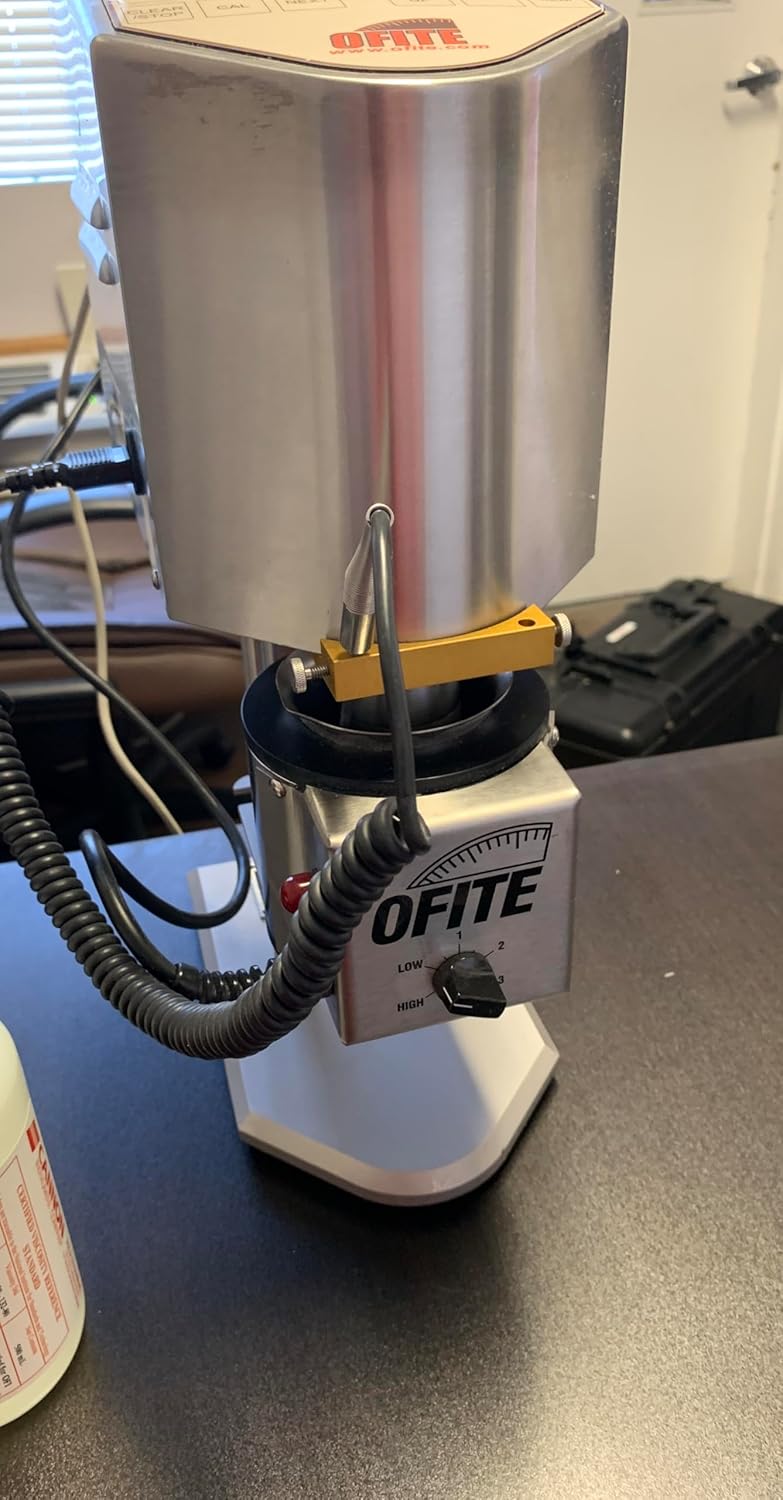
Şekil 3: This image provides an alternative side perspective of the OFITE Model 900 Viscometer, emphasizing the precise alignment of the bob within the rotor cup. A control knob labeled 'LOW' and 'HIGH' is visible, likely for speed or torque adjustment.
3. Kullanım Talimatları
This section details the steps for performing viscosity measurements using the Model 900 Viscometer.
3.1 Açma ve İlk Kontroller
- Ensure the viscometer is properly connected to power.
- Cihazın arkasında veya yanında bulunan ana güç şalterini açın.
- The display on the front panel should illuminate.
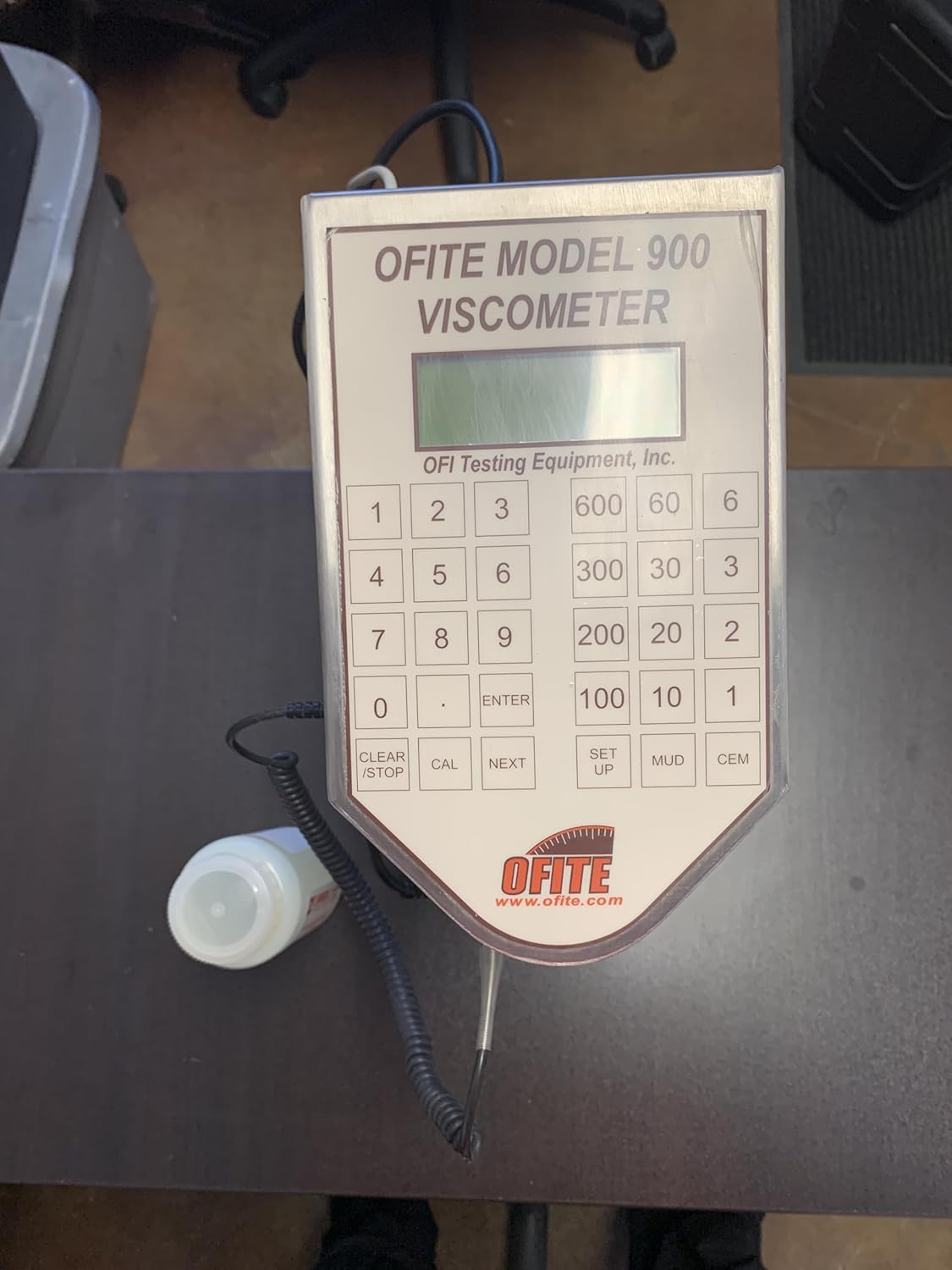
Şekil 4: The front control panel of the OFITE Model 900 Viscometer, featuring a digital display at the top and a numerical keypad below it. Various function buttons like 'CAL', 'NEXT', 'SET UP', 'MUD', and 'CEM' are also visible, indicating control and calibration options.
3.2 Sample Preparation and Loading
- Prepare your fluid sample according to your testing protocol.
- S'yi dikkatlice dökünample into the rotor cup, ensuring the bob is fully immersed and the fluid level is appropriate for measurement. Avoid air bubbles.
3.3 Ölçüm İşlemi Gerçekleştirme
- Using the control panel or the ORCADA software, select the desired test parameters (e.g., shear rate, temperature).
- Initiate the measurement cycle. The viscometer will begin rotating the rotor cup, and the transducer will measure the induced angle of rotation of the bob.
- Monitor the display for real-time readings or observe the data acquisition through the ORCADA software.
- Once the measurement is complete, record the data.
3.4 Data Acquisition and Analysis (with ORCADA Software)
For automated control and comprehensive data analysis, connect the viscometer to a computer running OFITE's ORCADA software. The software allows for:
- Real-time data plotting.
- Customizable test profiles.
- Veri depolama ve dışa aktarma.
- Advanced rheological calculations.
4. Bakım
Proper maintenance ensures the longevity and accuracy of your Model 900 Viscometer.
4.1 Temizlik
- After each use, thoroughly clean the rotor cup and bob with an appropriate solvent for the tested fluid.
- Wipe down the exterior of the viscometer with a soft, damp Bez. Cilaya zarar verebilecek aşındırıcı temizleyiciler veya çözücüler kullanmaktan kaçının.
- Ensure no fluid enters the internal components of the viscometer.
4.2 Kalibrasyon
Regular calibration is crucial for maintaining measurement accuracy. Use the provided calibration accessories and follow the calibration procedure outlined in the ORCADA software or a separate calibration guide (if provided by OFITE). It is recommended to calibrate the instrument at regular intervals or if you suspect measurement inaccuracies.
4.3 Depolama
When not in use, store the viscometer in its carrying case in a clean, dry environment, away from extreme temperatures and direct sunlight.
5. Sorun Giderme
This section provides solutions to common issues you might encounter with the Model 900 Viscometer.
| Sorun | Olası Neden | Çözüm |
|---|---|---|
| Viscometer does not power on | No power supply; faulty power cable; unit switch off | Check power cable connection; ensure power outlet is functional; turn on main power switch. |
| Yanlış okumalar | Improper calibration; dirty bob/cup; incorrect sample preparation; damaged bob/cup | Perform calibration; clean bob and cup thoroughly; ensure proper sample loading; inspect bob/cup for damage and replace if necessary. |
| Software (ORCADA) not connecting | RS-232 cable disconnected; incorrect COM port selected; software driver issue | Verify RS-232 cable connection; check COM port settings in ORCADA; reinstall software drivers if needed. |
| Motor dönmüyor | Obstruction in rotor cup; motor fault | Check for and remove any obstructions; if problem persists, contact OFITE support. |
6. Özellikler
Key technical specifications for the OFITE Model 900 Viscometer:
- Modeli: Model 900
- Tip: Couette Coaxial Cylinder Rotational Viscometer
- Ölçüm Prensibi: Transducer measures induced angle of rotation of bob
- Bağlantı: Serial (RS-232) port for computer integration
- Yazılım Uyumluluğu: OFITE's Windows-based ORCADA software
- Dahil Bileşenler: Viscometer Unit, Carrying Case, Power Cables, Calibration Accessories
- Yapı: Sağlam ve dayanıklı tasarım
- Üretici: Ofite
- İlk Mevcut: 9 Aralık 2024
7. Garanti ve Destek
For information regarding product warranty, technical support, or service, please refer to the documentation provided with your purchase or visit the official OFITE website. Contacting OFITE directly will ensure you receive accurate and timely assistance for your Model 900 Viscometer.


