1. Giriş
This manual provides detailed instructions for the installation, operation, and maintenance of your Xigmatek Aqua V AIR Arctic Mid-Tower PC Case. Please read this manual thoroughly before beginning any installation to ensure proper setup and safe operation. Retain this manual for future reference.
2. Güvenlik Bilgileri
Kurulum ve çalıştırma sırasında aşağıdaki güvenlik önlemlerine uyun:
- Herhangi bir bileşeni takmadan veya çıkarmadan önce daima güç kaynağını duvar prizinden çıkarın.
- Hassas bileşenlerin elektrostatik deşarj (ESD) hasarından korunması için antistatik bileklik takın.
- Handle components carefully. Avoid touching pins or circuit boards directly.
- Aşırı ısınmayı önlemek için bilgisayar kasasının etrafında yeterli havalandırma olduğundan emin olun.
- Küçük parçaları ve aletleri çocuklardan uzak tutun.
- Do not attempt to modify the case or its components, as this may void your warranty and pose safety risks.
3. Paket İçeriği
Paketin içinde tüm öğelerin mevcut olduğundan emin olun:
- Xigmatek Aqua V AIR Arctic Mid-Tower PC Case
- Accessory kit (screws, standoffs, cable ties)
- Kullanım Kılavuzu (bu belge)
If any items are missing or damaged, contact your retailer or Xigmatek support.
4. Ürün Bittiview
The Xigmatek Aqua V AIR Arctic is a mid-tower PC case designed for high-performance gaming configurations. It features tempered glass panels for component visibility and optimized airflow with pre-installed ARGB fans.

Şekil 4.1: Ön-sol view of the Xigmatek Aqua V AIR Arctic PC case, showcasing the tempered glass front and side panels, and the pre-installed ARGB fans.

Şekil 4.2: Arka view of the PC case, showing the I/O shield cutout, expansion slots, and rear fan mount.
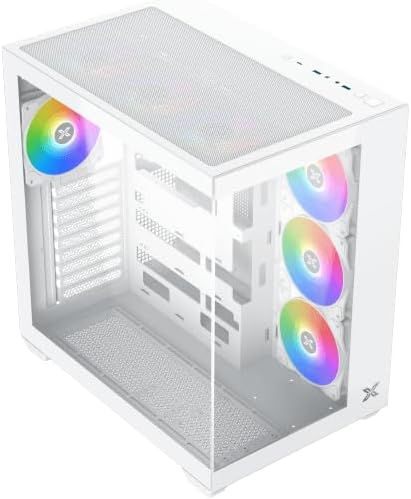
Şekil 4.3: Yukarıdan aşağıya açılı view, highlighting the top mesh panel for additional cooling and the internal layout.
5. Kurulum ve Kurulum
Follow these steps to install your PC components into the Xigmatek Aqua V AIR Arctic case.
5.1. Davayı Hazırlama
- Kılıfı düz ve sağlam bir yüzeye yerleştirin.
- Remove the tempered glass side panel by unscrewing the thumb screws at the rear and carefully sliding it off. Place it on a soft, non-abrasive surface to prevent scratches.
- Remove the opposite steel side panel by unscrewing the thumb screws and sliding it off.
5.2. Anakart Kurulumu
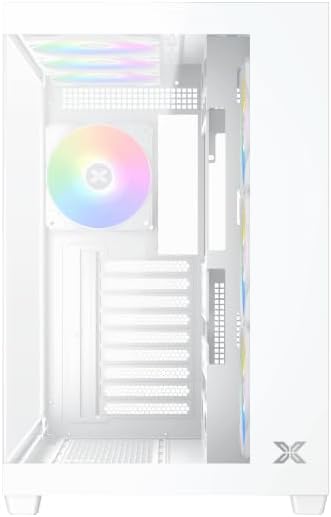
Şekil 5.1: İç mekan view of the case, illustrating the motherboard mounting area and cable routing cutouts.
- Giriş/çıkış koruma kalkanını kasanın arka tarafındaki oyuğa takın.
- Align your motherboard with the pre-installed standoffs. Ensure the standoffs match your motherboard's form factor (ATX, Micro ATX).
- Secure the motherboard using the provided screws from the accessory kit. Do not overtighten.
5.3. Güç Kaynağı Ünitesi (PSU) Kurulumu
- Locate the PSU mounting bracket at the bottom rear of the case.
- Güç kaynağınızı kasanın arka tarafındaki belirlenmiş bölmeye yerleştirin.
- Güç kaynağınızla birlikte verilen vidaları kullanarak PSU'yu kasaya sabitleyin.
5.4. Depolama Sürücüsü Kurulumu
The case supports multiple storage drives:
- 2.5" SSD'ler: Mount directly to the SSD trays located behind the motherboard tray. Secure with screws.
- 3.5" HDD'ler: Install into the drive cage located beneath the PSU shroud. Slide the drive into the tray and secure with screws.
5.5. Grafik Kartı (GPU) ve Genişletme Kartı Kurulumu
- Kasanın arka tarafındaki gerekli genişletme yuvası kapaklarını çıkarın.
- Ekran kartınızı veya diğer genişletme kartlarınızı anakart üzerindeki uygun PCIe yuvalarına takın.
- Secure the cards with the provided screws.
5.6. Kablo Yönetimi
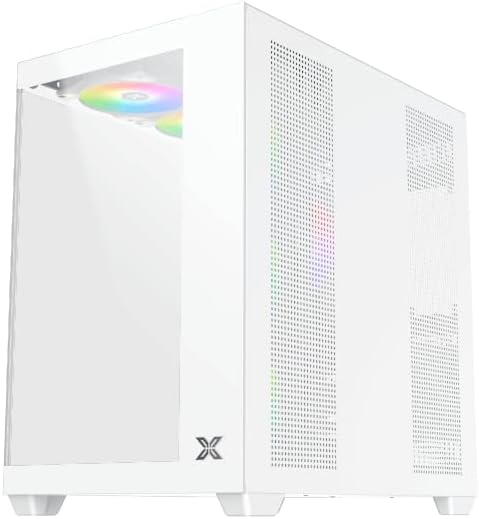
Şekil 5.2: View behind the motherboard tray, illustrating the ample space and tie-down points for effective cable management.
Anakart tepsisinin arkasındaki kablo yönlendirme oyuklarını ve sabitleme noktalarını kullanarak kabloları düzenleyin. Bu, hava akışını iyileştirir ve estetiği artırır.
- PSU'dan anakarta, GPU'ya ve depolama sürücülerine gerekli tüm güç kablolarını bağlayın.
- Connect front panel cables (USB, audio, power/reset switches, LED indicators) to the corresponding headers on your motherboard. Refer to your motherboard manual for specific header locations.
- Connect the ARGB fan cables to the integrated fan controller or directly to your motherboard's ARGB headers if available.
5.7. Fan ve Radyatör Desteği
The Xigmatek Aqua V AIR Arctic comes with 7 pre-installed 120mm ARGB fans. Additional cooling options are available:
- Ön: Supports up to 3 x 120mm or 2 x 140mm fans / 240mm, 280mm, 360mm radiators.
- Tepe: Supports up to 3 x 120mm or 2 x 140mm fans / 240mm, 280mm, 360mm radiators.
- Arka: 1 adet 120 mm fanı destekler.
- Alt: Supports up to 3 x 120mm fans.
Ensure proper fan orientation for optimal airflow (intake at front/bottom, exhaust at rear/top).
6. Çalıştırma
Once all components are installed and cables are connected, replace the side panels. Connect your monitor, keyboard, mouse, and power cable. Press the power button on the front panel to start your system.
The pre-installed ARGB fans can be controlled via the integrated controller (if present) or through compatible motherboard software, allowing customization of lighting effects and fan speeds.
7. Bakım
Düzenli bakım, PC bileşenlerinizin optimum performans ve uzun ömürlü olmasını sağlamaya yardımcı olur.
- Toz Temizleme: Periodically clean dust filters (top, front, bottom) to maintain good airflow. Use compressed air to remove dust from inside the case and components.
- Dış Temizlik: Dış yüzeyleri yumuşak, damp Bez. Aşındırıcı temizleyicilerden veya çözücülerden kaçının.
- Kablo Yönetimi Kontrolü: Kabloların fanları veya hava akışını engellemediğinden emin olmak için ara sıra kablo yönlendirmesini kontrol edin.
8. Sorun Giderme
Sorunlarla karşılaşırsanız aşağıdaki genel sorun giderme adımlarına bakın:
- Sistem açılmıyor:
- Güç kaynağının açık olduğundan ve duvar prizine doğru şekilde bağlı olduğundan emin olun.
- Verify all power cables (24-pin ATX, 8-pin CPU, PCIe, SATA) are securely connected.
- Ön paneldeki güç anahtarının anakarta olan bağlantılarını kontrol edin.
- Görüntü çıkışı yok:
- Ensure the monitor cable is connected to the graphics card (not the motherboard I/O if using a dedicated GPU).
- Ekran kartını ve RAM modüllerini yeniden yerleştirin.
- Fanlar dönmüyor veya ARGB çalışmıyor:
- Anakart veya fan kontrolcüsüne giden fan güç bağlantılarını kontrol edin.
- Verify ARGB connections to the controller or motherboard headers.
- Ensure any fan control software or BIOS settings are correctly configured.
For more complex issues, consult your component manuals or contact Xigmatek technical support.
9. Özellikler
| Özellik | Detay |
|---|---|
| Model Adı | Aqua V AIR Arctic |
| Model Numarası | EN45837 |
| Dava Türü | Orta Kule |
| Anakart Uyumluluğu | ATX, Mikro ATX |
| Malzeme | Steel Alloy, Tempered Glass |
| Renk | Beyaz |
| Önceden yüklenmiş Fanlar | 7 x 120mm ARGB Fanı |
| Maksimum GPU Uzunluğu | 410 mm |
| USB Bağlantı Noktaları | 3 |
| Ağırlık | 8.8 Kilogram |
10. Garanti ve Destek
Xigmatek products are manufactured to high quality standards. For warranty information, please refer to the warranty card included with your product or visit the official Xigmatek website. For technical support or inquiries, please contact Xigmatek customer service through their official channels.
Resmi Webalan: www.xigmatek.com


