1. Giriş
Thank you for choosing the EPOMAKER TH99 Tri-Mode Wireless Mechanical Keyboard. This manual provides detailed instructions on how to set up, operate, and maintain your new keyboard. The TH99 is designed for versatility and performance, featuring tri-mode connectivity, a gasket-mounted structure, hot-swappable switches, and dynamic RGB backlighting.

Figure 1: EPOMAKER TH99 Tri-Mode Wireless Mechanical Keyboard (Blue&White)
2. Paket İçeriği
Lütfen paketinizde tüm öğelerin mevcut olduğundan emin olun:
- EPOMAKER TH99 Mekanik Klavye
- Detachable USB-C Keyboard Cable
- Switch & Keycap Puller Tool
- Multilingual User Manual (this document)
- Ek Anahtarlar (2 adet)
3. Temel Özellikler
- Üç Modlu Bağlantı: Seamlessly switch between wired USB-C, 2.4GHz wireless, and Bluetooth 5.0 connections for maximum flexibility across various devices.
- Conta Montajlı Yapı: Experience a soft, flexible, and acoustically pleasing typing feel with the advanced gasket mount design, complemented by 5 layers of sound-dampısıtma malzemeleri.
- Sıcak Değiştirilebilir Anahtarlar: Customize your typing experience without soldering. The PCB supports 3/5-pin mechanical switches, allowing for easy switch replacement. The keyboard comes pre-installed with EPOMAKER Creamy Jade switches.
- Dinamik RGB Arka Aydınlatma: Personalize your setup with 102 south-facing per-key RGB LEDs, offering a wide range of lighting effects and colors.
- PBT Tuş Takımları: Durable, grease-resistant PBT keycaps with Cherry profile ensure longevity and a comfortable typing experience.
- 1800 Compact Layout: A space-saving 96% layout that retains a full Numpad and dedicated function keys for enhanced productivity.
- Uzun Ömürlü Pil: Equipped with an 8000mAh battery, providing extended usage in wireless modes.
- Low Latency Performance: Enjoy responsive input with 2-5ms latency in wired and 2.4G modes, ideal for gaming and fast-paced tasks.
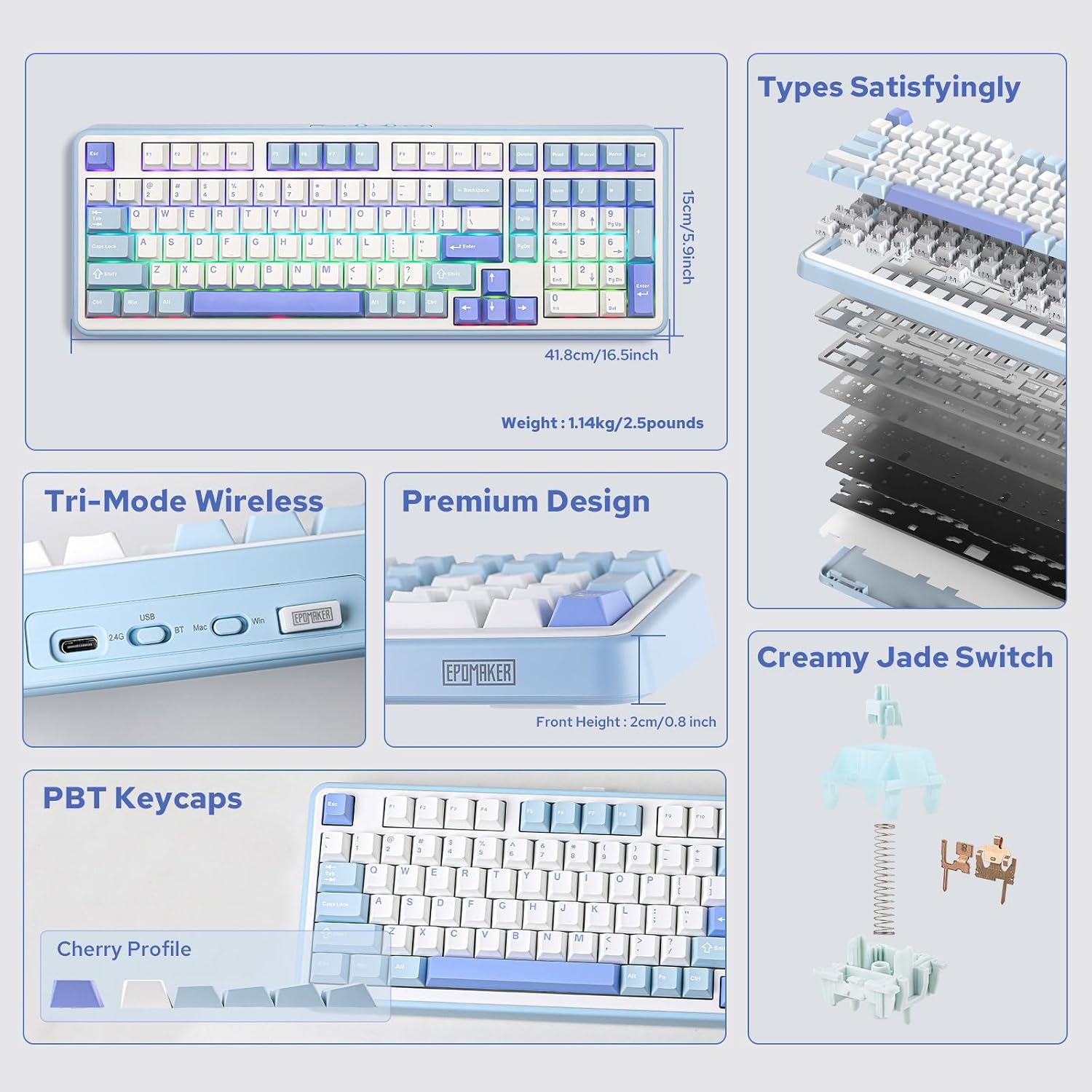
Şekil 2: Üzeriview of EPOMAKER TH99 features and internal structure.
4. Kurulum
4.1. Klavyenizi Bağlama
The EPOMAKER TH99 offers three connection methods:
- Kablolu Mod (USB-C):
- Verilen USB-C kablosunu klavyenin USB-C portuna bağlayın.
- Kablonun diğer ucunu bilgisayarınızdaki boş bir USB portuna takın.
- Klavyenin arkasındaki mod değiştirme düğmesinin 'USB' konumunda olduğundan emin olun.
- Klavyeniz sisteminiz tarafından otomatik olarak tanınacaktır.
- 2.4GHz Kablosuz Modu:
- Locate the 2.4GHz USB dongle (usually stored in a slot on the keyboard).
- Dongle'ı bilgisayarınızdaki kullanılabilir bir USB bağlantı noktasına takın.
- Set the mode switch on the back of the keyboard to '2.4G'.
- Klavyenin otomatik olarak bağlanması gerekir. Bağlanmazsa, tuşuna basın. Fn + R eşleştirmeyi başlatmak için.
- Bluetooth Modu:
- Set the mode switch on the back of the keyboard to 'BT'.
- Cihazınızda (PC, Mac, tablet, akıllı telefon) Bluetooth'u etkinleştirin ve yeni cihazları arayın.
- Basılı tutun Fn + Q, Fn + W, veya Fn + E for 3-5 seconds to enter pairing mode for one of the three Bluetooth channels. The corresponding key (Q, W, or E) will flash rapidly.
- Select 'EPOMAKER TH99' from the list of available Bluetooth devices on your host device.
- Once paired, the key will stop flashing and remain steadily lit.
- Eşleştirilmiş Bluetooth cihazları arasında geçiş yapmak için tuşuna basabilirsiniz. Fn + Q/W/E.

Figure 3: Tri-mode connectivity options for the TH99 keyboard.
4.2. İşletim Sistemi Uyumluluğu
The TH99 keyboard is compatible with both Windows and Mac operating systems.
- Use the 'Win/Mac' toggle switch on the back of the keyboard to select the appropriate operating system mode.
- In Mac mode, the 'Alt' key functions as 'Option' and the 'Win' key functions as 'Command'.

Figure 4: Multi-system compatibility of the TH99 keyboard.
5. Operasyon
5.1. RGB Arka Aydınlatma Kontrolü
The TH99 keyboard features extensive RGB backlighting customization:
- Aydınlatma Efektini Değiştir: Basmak Fn + Girişler to cycle through various pre-programmed RGB lighting effects.
- Toggle Backlight On/Off: Basmak Fn + Geri tuşu to turn the backlighting on or off.
- Parlaklığı Ayarla: Basmak fn + ↑ (Yukarı ok) parlaklığı artırmak için ve fn + ↓ (Aşağı ok tuşu) parlaklığı azaltır.
- Hızı Ayarla: Basmak fn + ← (left arrow) to slow down the effect speed, and + → (right arrow) to speed up the effect.
- Change Color (for static effects): Basmak Fn + Del to cycle through different static colors.

Figure 5: RGB and single color backlight controls.
Video 1: EPOMAKER TH99 RGB Effect Show.
5.2. Fonksiyon Tuşu Kombinasyonları
The TH99 keyboard utilizes the Fn key for various secondary functions:
- Fn + F1-F12: Access multimedia controls and system functions (e.g., volume, play/pause, brightness). Refer to the keycap legends for specific functions.
- Fn + R: Initiate 2.4G pairing.
- Fn + Q/W/E: Switch between Bluetooth channels 1, 2, and 3, respectively. Hold for 3-5 seconds to enter pairing mode.
- Fn + Win: Lock/Unlock the Windows key.
- Fn + Alt: Switch between Mac and Windows layout (also controlled by the physical switch on the back).
5.3. Özelleştirme Yazılımı
For advanced customization, including key remapping, macro settings, and detailed backlight configuration, please download the official EPOMAKER software from the manufacturer's website. The software allows for a personalized user experience beyond the onboard controls.
6. Bakım
6.1. Klavyeyi Temizleme
Klavyenizin görünümünü ve işlevselliğini korumak için:
- Temizlemeden önce klavyeyi cihazınızdan ayırın.
- Yumuşak, tiftiksiz bir bez kullanın ve hafifçe kurulayın.ampTuş kapaklarını ve kasayı silmek için su veya hafif bir temizleme solüsyonu kullanın.
- Daha derinlemesine temizlik için, verilen tuş başlığı çıkarıcısını kullanarak tuş başlıklarını çıkarın ve altlarını basınçlı hava veya küçük bir fırça ile temizleyin.
- Sert kimyasallar veya aşındırıcı malzemeler kullanmaktan kaçının.
6.2. Replacing Keycaps and Switches
The TH99 features hot-swappable switches, allowing for easy replacement:
- Use the provided keycap puller to gently remove the desired keycap by hooking it onto the keycap and pulling upwards.
- Once the keycap is removed, use the switch puller to grasp the switch firmly from the top and bottom clips, then pull upwards to remove it.
- To install a new switch, align its pins with the holes on the PCB. Ensure the pins are straight to avoid bending. Gently push the switch down until it clicks into place.
- Place the keycap back onto the new switch, ensuring it is securely seated.

Figure 6: Hot-swappable PCB and tools for switch replacement.
Video 2: Creamy Jade Switch VS Sea Salt Silent Switch sound test.
Video 3: EPOMAKER TH99 Typing with Creamy Jade Switch.
6.3. Pil Bakımı
To maximize battery life and ensure safe operation:
- Charge the keyboard using the provided USB-C cable connected to a standard USB power source (e.g., computer USB port, wall adapter).
- Klavyeyi aşırı sıcaklıklara maruz bırakmaktan kaçının.
- If storing the keyboard for an extended period, charge it to approximately 50% and store in a cool, dry place.
7. Sorun Giderme
- Klavye yanıt vermiyor:
- Klavyenin şarjlı olduğundan emin olun.
- Check the connection mode switch (USB, 2.4G, BT) is correctly set.
- For wireless modes, ensure the dongle is properly inserted or Bluetooth is paired.
- Kablosuz sorunlarını elemek için USB-C kablosuyla bağlanmayı deneyin.
- RGB arka aydınlatma çalışmıyor:
- Arka ışığın kapalı olmadığından emin olun (Fn + Geri tuşu).
- Check brightness levels (Fn + ↑/↓).
- If using customization software, ensure no conflicting settings are applied.
- Anahtarlar kayıt olmuyor veya çift yazılıyor:
- This could indicate a faulty switch. Use the provided tools to replace the affected switch.
- Tuş başlıklarının doğru şekilde yerleştirildiğinden emin olun.
- Bağlantı sorunları (2.4G/Bluetooth):
- Klavyenin alıcı/cihazın menzilinde olduğundan emin olun.
- Diğer kablosuz cihazların neden olduğu parazitlerden kaçının.
- Klavyeyi cihazınızla yeniden eşleştirin.
8. Özellikler
| Özellik | Detay |
|---|---|
| Ürün Boyutları | 16.46"U x 5.91"G x 1.65"Y |
| Ürün Ağırlığı | 2.51 pound |
| Bağlantı Teknolojisi | 2.4 GHz Kablosuz, Bluetooth 5.0, USB-C Kablolu |
| Klavye Açıklaması | Mekanik |
| Özel Özellikler | Backlit, Creamy Sound, Hot-Swappable, Programmable Keys, Three Modes of Connectivity |
| Klavye Arka Aydınlatma | RGB |
| Pil Kapasitesi | 8000mAh |
| Uyumlu Cihazlar | Oyun Konsolu, Dizüstü Bilgisayar, PC, Akıllı Telefon, Tablet |
| Tuş Malzemesi | PBT |
| Anahtar Türü | Creamy Jade (Linear, Pre-lubed) |
9. Garanti ve Destek
EPOMAKER products come with a standard manufacturer's warranty. For detailed warranty information, technical support, or to download the latest customization software and firmware updates, please visit the official EPOMAKER website veya doğrudan müşteri hizmetleriyle iletişime geçin. Garanti talepleri için satın alma kanıtı olarak satın alma makbuzunuzu saklayın.


