1. Ürün Bittiview
The YeeSite 800W Wireless Remote Control Snow Machine is designed to create realistic artificial snow effects for various indoor and outdoor events. This compact and portable unit requires no preheating, making it convenient for quick setup and operation. It features both wireless and wired control options for flexible use.
Temel özellikler şunlardır:
- Kablosuz kontrol: Operates up to 50 ft (15m) wirelessly, with a wired backup option (5.1ft signal line).
- High Snow Output: Generates 2400 cubic feet of snow per minute, with horizontal spray up to 13 ft (4m) and vertical coverage of 30-40 ft (9-12m).
- Ön Isıtma Yok: Ready for use immediately after filling with snow fluid and plugging in.
- Taşınabilir Tasarım: Lightweight (6.56 lbs) and compact, with a 500ml built-in tank.
- Dayanıklı Yapı: Built with a rugged metal casing for long-lasting use.
- Güvenlik Özellikleri: Includes an auto shut-off function when fluid is low.
Note: The 800W power motor produces a noise level of 70-80dB in quiet environments. Please consider this for your application.
2. Paket İçeriği
Paketin içinde tüm öğelerin mevcut olduğundan emin olun:
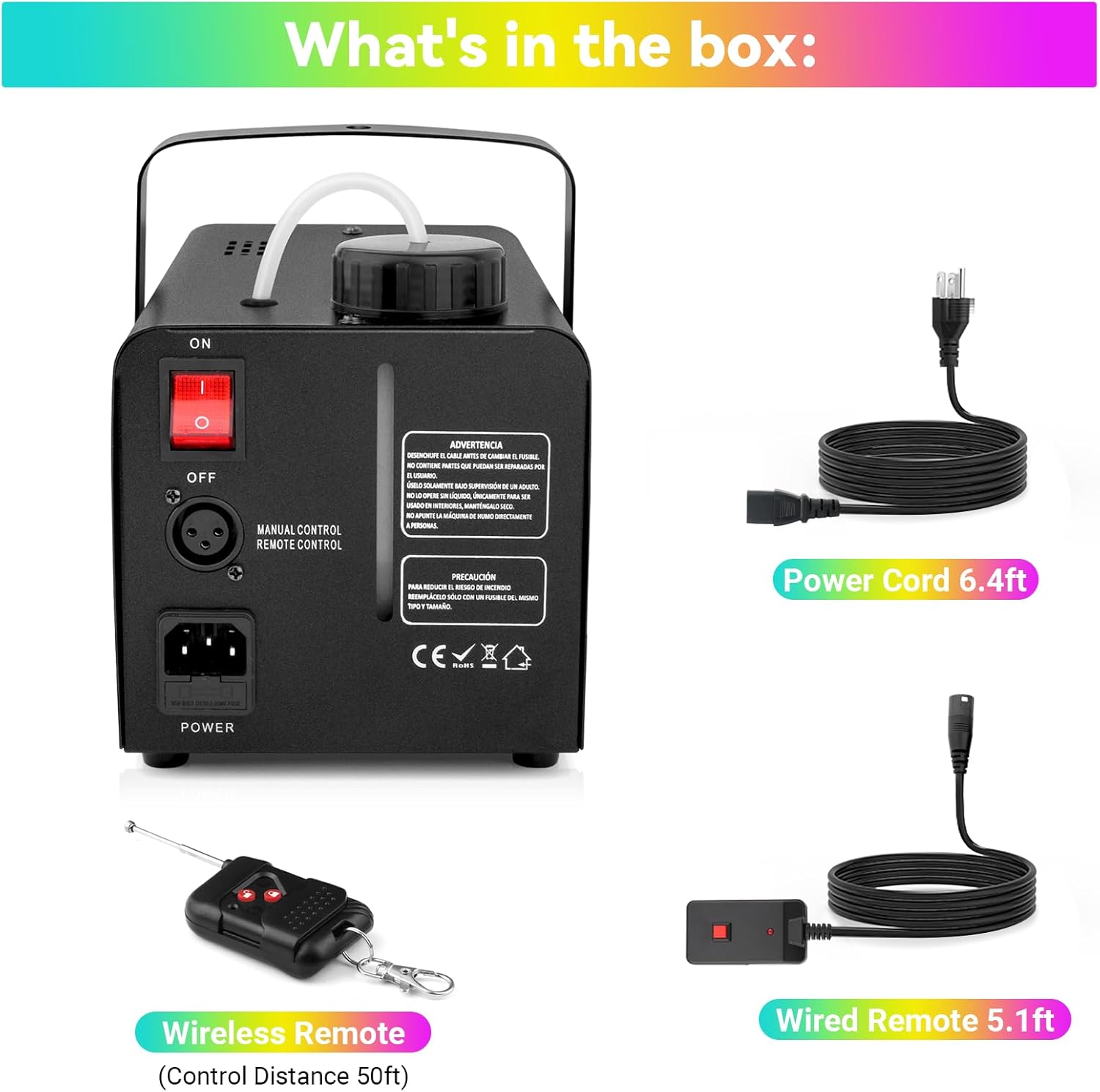
- YeeSite 800W Snow Machine (Model YS-075-SM)
- Wireless Remote Control (Control Distance 50ft)
- Wired Remote (5.1ft signal line)
- Güç Kablosu (6.4ft)
- Kullanıcı Kılavuzu
3. Kurulum Talimatları
Follow these steps to set up your YeeSite Snow Machine:
- Makineyi Konumlandırın: Place the snow machine on a stable, level surface in the desired location. Ensure adequate space for snow dispersal and ventilation.
- Add Snow Fluid: Unscrew the cap of the built-in 500ml tank and carefully pour compatible snow machine fluid into the tank. Do not overfill. If continuous operation is desired, the inlet pipe can be inserted directly into a larger capacity snowmaking liquid container.
- Gücü bağlayın: Plug the power cord into the machine's power socket and then into a standard AC 110V outlet (for USA models).
- Kontrol Ünitesini Bağlayın: Connect either the wired remote control or the wireless receiver (for wireless remote operation) to the designated controller socket on the machine.
- Güç Açık: Flip the main ON/OFF switch to the "ON" position. The machine does not require preheating.

Önemli: Ensure the snow fluid is compatible with snow machines. Snow maker liquid is not included with the product.
4. Kullanım Talimatları
Once set up, operate your snow machine as follows:
- Activate Snow Output: Use the wired remote or the wireless remote control to start and stop the snow dispensing. Press the button on the remote to begin the snow effect.
- Adjust Snow Intensity: The machine produces a continuous flow of snow. For varying effects, you may need to adjust the duration of activation via the remote.
- Snow Evaporation: The artificial snow evaporates mess-free within approximately 10 minutes and is skin-safe.
Güvenlik Notu: Always ensure the machine is placed in a secure location where it will not be easily knocked over. Avoid direct contact with the nozzle during operation.
5. Bakım
Proper maintenance ensures the longevity and optimal performance of your snow machine:
- Fluid Level Monitoring: The machine features an auto shut-off function when the fluid is low. Always monitor the fluid level and refill as needed to prevent the machine from running dry, which can cause damage.
- Temizlik: After each use, it is recommended to run the machine with a small amount of distilled water to flush out any remaining snow fluid from the pump and nozzle, preventing clogs.
- Depolamak: Store the machine in a cool, dry place when not in use. Ensure the tank is empty and clean before storage.
6. Sorun Giderme
If you encounter any issues with your YeeSite Snow Machine, please consider the following:
- No Snow Output:
- Güç kablosunun güvenli bir şekilde takılı olup olmadığını kontrol edin.
- AÇMA/KAPAMA düğmesinin "AÇIK" konumunda olduğundan emin olun.
- Verify that there is sufficient snow fluid in the tank. The machine will auto shut-off if fluid is low.
- Confirm the remote control is functioning and properly connected (wired) or paired (wireless).
- Weak Snow Output:
- Check the snow fluid level; low fluid can reduce output.
- Ensure the nozzle is not obstructed.
- Alışılmadık Gürültü:
- A humming sound (70-80dB) is normal during operation.
- If the noise is excessive or unusual, ensure the machine is on a stable surface and not vibrating against other objects.
For any problems such as damage, poor contact, or if the machine is not working properly, please contact YeeSite customer support for assistance.
7. Özellikler
| Özellik | Şartname |
|---|---|
| Model Numarası | YS-075-SM |
| Güç | 800W |
| Cilttage | AC 110V (USA) |
| Tank Kapasitesi | 500ml (0.13 gal) |
| Kar Çıkışı | 2400 cubic feet/minute |
| Yatay Püskürtme Mesafesi | 13 ft'ye (4 m) kadar |
| Dikey Kapsama | 30-40 ft (9-12m) |
| Kablosuz Uzaktan Menzil | 50 ft'ye (15 m) kadar |
| Kablolu Uzaktan Kumanda Kablo Uzunluğu | 5.1 fit |
| Güç Kablosu Uzunluğu | 6.4 fit |
| Ürün Ağırlığı | 6.56 lbs (3 kg) |
| Paket Boyutları | 12.13 x 8.03 x 7.72 inç |

8. Garanti ve Destek
YeeSite is committed to providing quality products and customer satisfaction. If you encounter any problems with your snow machine, such as damage, poor contact, or if it is not working properly, please contact YeeSite customer support.
For further assistance, please refer to the contact information provided in your product packaging or visit the official YeeSite store on Amazon: YeeSite Amazon Store.


