1. Giriş
The Alxum HDMI DisplayPort USB 3.0 KVM Switch allows you to control two computers using a single set of peripherals (keyboard, mouse, monitors). This device supports dual monitor output for each computer, enabling seamless switching between systems for enhanced productivity in various environments.
2. Paket İçeriği
- 1 x USB HDMI DP KVM Switch
- 2 x USB A to B cables
- 1 x Masaüstü Kontrol Cihazı
- 1 x DC 5V Güç Adaptörü
- 1 x Kullanım Kılavuzu
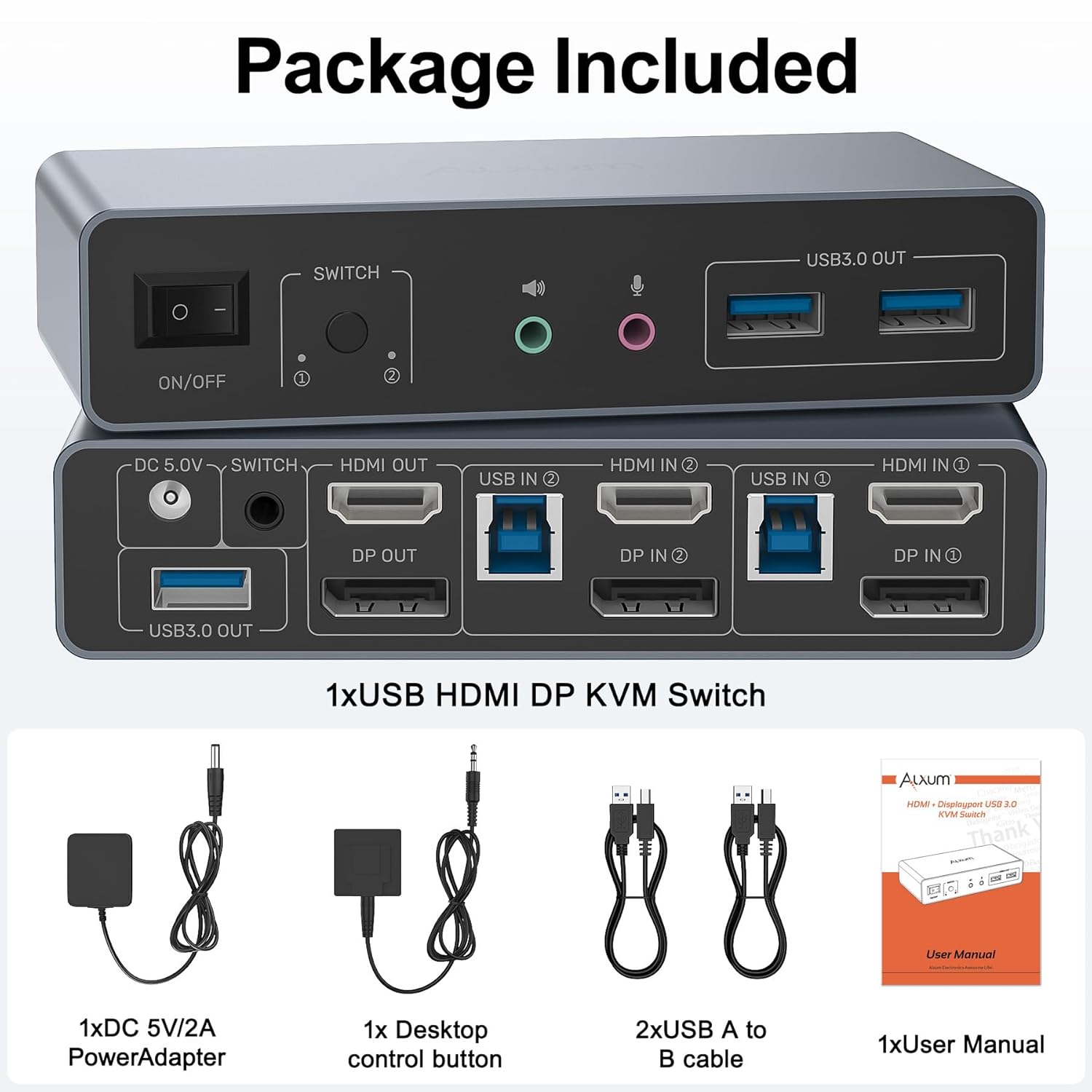
Şekil 1: Paket İçeriği
3. Ürün Bittiview
3.1 Ön Panel
- Açma / kapama düğmesi: Power control for the KVM switch.
- Anahtar Düğmesi: PC1 ve PC2 arasında manuel olarak geçiş yapın.
- Ses Çıkışı (Hat Çıkışı): Kulaklıkları veya hoparlörleri bağlayın.
- Microphone Input (Mic In): Bir mikrofon bağlayın.
- USB 3.0 Çıkış Bağlantı Noktaları (x3): Connect USB peripherals like keyboard, mouse, USB drives, or printers.
3.2 Arka Panel
- DC 5V: Güç girişi bağlantı noktası.
- HDMI ÇIKIŞI: Connect to Monitor 1.
- DP ÇIKIŞI: Connect to Monitor 2.
- USB IN (PC1/PC2): Connect to the USB 3.0 port on your computer.
- HDMI IN (PC1/PC2): Connect to the HDMI output of your computer.
- DP IN (PC1/PC2): Connect to the DisplayPort output of your computer.
- Desktop Controller Port: Connect the included desktop controller for remote switching.

Şekil 2: Bağlantı Şeması
4. Kurulum Talimatları
- Bilgisayarları Bağlayın:
For each computer (PC1 and PC2), connect one HDMI cable from the computer's HDMI output to the KVM switch's HDMI IN port, and one DisplayPort cable from the computer's DisplayPort output to the KVM switch's DP IN port. Additionally, connect a USB A to B cable from each computer's USB 3.0 port to the KVM switch's USB IN port. - Monitörleri Bağlayın:
Connect your primary monitor to the KVM switch's HDMI OUT port. Connect your secondary monitor to the KVM switch's DP OUT port. Ensure you use 4K-compatible HDMI and DisplayPort cables for optimal results. - Çevre Birimlerini Bağlayın:
Connect your keyboard, mouse, USB drives, printer, or other USB 3.0 devices to the USB 3.0 OUT ports on the front panel of the KVM switch. - Ses Cihazlarını Bağlayın:
If desired, connect your headphones/speakers to the Audio Output (Line Out) and your microphone to the Microphone Input (Mic In) on the front panel. - Connect Desktop Controller:
Plug the desktop controller into the dedicated port on the rear panel for convenient remote switching. - Güç Açık:
Connect the DC 5V Power Adapter to the KVM switch's DC 5V port and plug it into a power outlet. Turn on the KVM switch using the ON/OFF switch.
Önemli Notlar:
- To use dual-screen mode, both of your computers must be desktop PCs. This USB 3.0 KVM Switch is NOT recommended for use with laptops in dual-screen mode.
- All interfaces must be properly connected for the KVM switch to control two monitors with two computers.
- Always ensure the included DC 5V power adapter is connected when using the KVM switch, especially when connecting high-power equipment.
- For protection during transportation, the product is covered with a clear protective film. You can remove the clear protective film before use.
Video 1: Alxum USB 3.0 HDMI KVM Switch 2 Monitors to 2 Computers - This video demonstrates the connection process and functionality of the KVM switch, showing how to connect two computers to two monitors and share USB peripherals.
5. Kullanım Talimatları
5.1 Switching Between Computers
You can instantly switch between the two connected computers using one of the following methods:
- Cihaz Düğmeleri: Press the 'Switch' button on the front panel of the KVM switch.
- Masaüstü Denetleyici: Press the button on the included wired desktop controller.

Figure 3: Multiple Switching Methods
5.2 Görüntü Modları
The KVM switch supports both Extend Mode and Mirror Mode for your dual monitor setup. To switch between these modes, you must set both computers to the desired mode simultaneously by operating on the monitor settings of each computer.
- Uzatma Modu: Each monitor displays different content, extending your desktop across two screens.
- Ayna Modu: Both monitors display the same content, duplicating your desktop.

Figure 4: Extend Mode and Mirror Mode
6. Sorun Giderme
- No Display/Inconsistent Signal: Ensure all HDMI and DisplayPort cables are securely connected and are 4K-compatible. Verify that the DC 5V power adapter is connected and providing power. Check your computer's display settings to ensure the correct output mode (Extend/Mirror) is selected for both monitors.
- USB Peripherals Not Responding: Confirm that the USB A to B cables are correctly connected from both computers to the KVM switch. Try connecting the USB device to a different USB 3.0 OUT port on the KVM switch. Ensure the KVM switch is powered.
- Geçiş Sorunları: If the device button or desktop controller is not switching, ensure the desktop controller is properly plugged in. Try restarting the KVM switch by cycling its power.
- Dizüstü Bilgisayar Uyumluluğu: This KVM switch is primarily designed for desktop PCs for dual-screen output. Connecting a laptop for dual monitor output is not recommended and may result in unstable performance.
- Optimal 4K Resolution: For 4K@60Hz resolution, use high-quality, 4K-compatible HDMI and DisplayPort cables.
7. Özellikler
| Özellik | Şartname |
|---|---|
| Model Numarası | SJW-DKM202B |
| Video Girişleri | 2x HDMI, 2x DisplayPort |
| Video Çıkışları | 1x HDMI, 1x DisplayPort |
| USB Girişleri | 2x USB 3.0 (Type-B) |
| USB Çıkışları | 3x USB 3.0 (Type-A) |
| Max Çözünürlük | 4K@60Hz (backward compatible with 4K@30Hz, 1080p) |
| USB Veri Aktarım Hızı | 5 Gbps'ye kadar |
| Ses Bağlantı Noktaları | 1x Line Out, 1x Mic In |
| Anahtarlama Yöntemleri | Device Button, Desktop Controller |
| Güç Kaynağı | DC 5V Power Adapter (Included) |
| Malzeme | Alüminyum |
| Ürün Boyutları | 13x6.25x2.96 cm |
| Ürün Ağırlığı | 490 gr |
8. Garanti ve Destek
Alxum is committed to providing high-quality products and excellent customer service. If you have any questions before purchase or during use, please contact us. We offer 24-hour customer-friendly support service to assist you with any inquiries or issues.
Please refer to the product packaging or the official Alxum webBelirli garanti ayrıntıları ve şartları için siteyi ziyaret edin.


