1. Giriş
The SIGMA ROX 4.0 White is a versatile GPS bicycle computer designed to enhance your cycling experience with a wide range of functions. It provides essential ride data, navigation capabilities, and connectivity options for a comprehensive overview of your performance and route. This manual will guide you through the initial setup, operation, and maintenance of your device.
2. Paket İçeriği
Upon unboxing your SIGMA ROX 4.0 White, please verify that all the following components are included:
- SIGMA ROX 4.0 White GPS Bicycle Computer
- GPS Bağlantısı
- USB-C Kablosu
- Montaj Malzemesi
- Hızlı Başlangıç Kılavuzu

Image: SIGMA ROX 4.0 White device, GPS mount, and USB-C charging cable.
3. Kurulum
3.1 Cihazın Montajı
The SIGMA ROX 4.0 comes with a GPS mount for secure attachment to your bicycle handlebar or stem.
- Position the GPS mount on your handlebar or stem in a location that provides clear visibility and easy access.
- Use the provided mounting material (e.g., zip ties or rubber bands) to firmly secure the mount.
- ROX 4.0'ı montaj aparatı ile hizalayın ve yerine güvenli bir şekilde oturana kadar saat yönünde çevirin.

Image: The SIGMA ROX 4.0 device securely attached to a bicycle handlebar using the provided mount.
3.2 İlk Güç Açma ve Şarj Etme
Before first use, ensure your ROX 4.0 is fully charged. Connect the device to a USB power source using the supplied USB-C cable. The battery indicator on the display will show charging progress.
To power on, press and hold the main button until the SIGMA logo appears.
3.3 Pairing with SIGMA RIDE App
For full functionality, including navigation and detailed data analysis, pair your ROX 4.0 with the SIGMA RIDE app on your smartphone.
- SIGMA RIDE uygulamasını akıllı telefonunuzun uygulama mağazasından indirin.
- Enable Bluetooth on your smartphone and open the SIGMA RIDE app.
- Follow the in-app instructions to search for and connect to your ROX 4.0.
- The app allows you to configure display settings, manage routes, and view detaylı sürüş istatistikleri.

Image: A smartphone showing the SIGMA RIDE app interface, connected to the ROX 4.0 device, demonstrating data synchronization and map features.
3.4 Sensor Pairing (ANT+ and BLE)
The ROX 4.0 supports ANT+ and Bluetooth Low Energy (BLE) for connecting external sensors such as speed, cadence, and heart rate monitors.
- Ensure your external sensors are active and within range of the ROX 4.0.
- Navigate to the sensor pairing menu on your ROX 4.0 (refer to the Quick Start Guide for specific button presses).
- Eşleştirmek istediğiniz sensör tipini seçin. Cihaz, mevcut sensörleri tarayacaktır.
- Once detected, select your sensor from the list to complete the pairing process.

Image: A diagram illustrating the connectivity options of the SIGMA ROX 4.0, including Bluetooth and ANT+ for pairing with speed, cadence, and heart rate sensors, as well as smartphone connectivity via the SIGMA RIDE app.
4. Cihazı Çalıştırma
4.1 Ekran Üstüview
The ROX 4.0 features a large 2.4" FSTN display that shows up to 30 different functions. The display layout can be customized via the SIGMA RIDE app.

Resim: Yakın çekim view of the SIGMA ROX 4.0 display, showing current time, speed, distance, temperature, and battery level, along with navigation cues.
Commonly displayed data includes:
- Mevcut Hız (KMH)
- Mesafe (KM)
- Yükseklik Profile
- Günün Saati
- Pil Durumu
- Navigation Cues
4.2 Navigation (Search & Go and My Tracks)
The ROX 4.0 offers two primary navigation methods:
- Arama ve Git: Use the SIGMA RIDE app to enter an address or tap a point on the map. The app will generate a route, and the ROX 4.0 will provide turn-by-turn directions.
- My Tracks: Upload pre-planned routes (e.g., GPX files) to the SIGMA RIDE app. These tracks can then be synced to your ROX 4.0 for guided navigation.

Image: A visual representation of the navigation capabilities, showing the "Search & Go" function on a smartphone map and "My Tracks" with a list of saved routes, both syncing with the ROX 4.0 device for on-bike navigation.
4.3 Elektrikli Bisiklet Bağlantısı
If you have a compatible E-bike system, the ROX 4.0 can connect to it to display specific E-bike data.
- Mevcut Aralık
- E-bike Battery Status
- Yardım Seviyesi
Refer to your E-bike's manual for compatibility and pairing instructions.
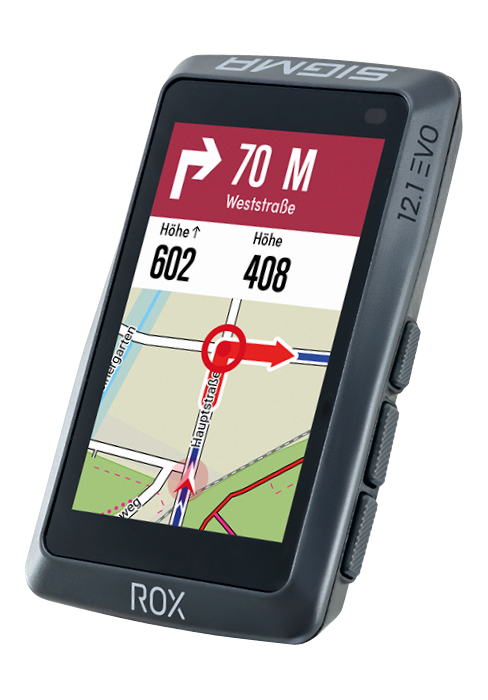
Image: The SIGMA ROX 4.0 display showing E-bike specific data, including battery charge level and estimated remaining range.
4.4 Data Recording and Sport Profiles
The ROX 4.0 automatically records your ride data. It can store up to 100 hours of ride time. You can set up individually adjustable sport profiles via the SIGMA RIDE app to tailor the displayed data fields to different cycling activities (e.g., road cycling, mountain biking).

Image: The SIGMA ROX 4.0 device displaying altitude data, with a cyclist riding through a forest in the background, emphasizing its barometric altimeter function.
5. Bakım
5.1 Şarj Etme
To charge the internal Lithium-Ion battery, connect the supplied USB-C cable to the charging port on the device and to a standard USB power adapter or computer USB port. A full charge provides up to 25 hours of battery life.
5.2 Temizlik
Cihazı yumuşak bir bezle temizleyin.amp Bez kullanın. Aşındırıcı temizleyiciler veya çözücüler kullanmayın, çünkü bunlar ekranı veya cihazı hasar verebilir.asing. Ensure the USB-C port cover is securely closed before cleaning or exposing to water.
5.3 Suya Dayanıklılık
The SIGMA ROX 4.0 is rated IPX7 waterproof, meaning it can withstand immersion in water up to 1 meter for 30 minutes. This makes it suitable for use in rainy conditions, but it is not designed for underwater activities.
6. Sorun Giderme
| Sorun | Olası Neden | Çözüm |
|---|---|---|
| Cihaz açılmıyor. | Pil zayıf. | Cihazı USB-C kablosunu kullanarak şarj edin. |
| GPS sinyali yok. | Engellenmiş view gökyüzünün; iç mekanda. | Açık bir dış mekan alanına geçin ve net bir görüş açısına sahip olun view Gökyüzünün. Sinyal alımı için birkaç dakika bekleyin. |
| Cannot pair with SIGMA RIDE app. | Bluetooth off; app not running; device not in pairing mode. | Ensure Bluetooth is enabled on your phone. Restart the app and the ROX 4.0. Put the ROX 4.0 into pairing mode. |
| Sensörler bağlanmıyor. | Sensor battery low; sensor out of range; incorrect sensor type selected. | Check sensor batteries. Bring sensors closer to the device. Ensure correct sensor type is selected in the ROX 4.0 settings. |
7. Özellikler
| Özellik | Detay |
|---|---|
| Model Numarası | 01061 |
| Boyutlar (U x G x Y) | 7.36x4.49x1.84 cm |
| Ağırlık | 51 Gram |
| Görüntü Türü | FTN |
| Ekran Boyutu | 2.4 inç |
| Pil Türü | 1 Lityum-İyon (dahil) |
| Pil Ömrü | 25 saate kadar |
| Suya Dayanıklılık Derecesi | IPX7 |
| Bağlantı | ANT+, Bluetooth Low Energy (BLE) |
| Veri Depolama | Up to 100 hours of ride time |
| Küresel Konumlama Sistemi | Yes (GPS, GLONASS) |
| Altimetre | Barometrik |
8. Garanti ve Destek
For information regarding warranty terms and conditions, please refer to the documentation included with your product or visit the official SIGMA webalan.
Teknik destek, sık sorulan sorular ve ek kaynaklar için lütfen şu adresi ziyaret edin: SIGMA Brand Store on Amazon or the official SIGMA support portal.


