1. Giriş
This manual provides detailed instructions for the safe and proper installation, operation, and maintenance of your MOUNTUP MU0057-L Full Motion TV Wall Mount. Please read all instructions carefully before installation to ensure correct setup and to prevent damage or injury. Keep this manual for future reference.
The MOUNTUP MU0057-L is designed to securely mount most 42-75 inch flat or curved screen televisions weighing up to 99 lbs (45 kg). It features a 30-inch extension arm, +/-90° swivel, +5°/-10° tilt, and +/-3° leveling for optimal viewesneklik.
2. Güvenlik Bilgileri
WARNING: Failure to read and follow these instructions may result in serious personal injury, property damage, or voiding of warranty.
- Ağırlık Kapasitesi: Do not exceed the maximum weight capacity of 99 lbs (45 kg). This mount is intended for use only with the maximum weights indicated. Use with products heavier than the maximum weights indicated may result in instability causing possible injury.
- Televizyon Boyutu: Bu montaj aparatı 42 ila 75 inç arasındaki televizyonlarla uyumludur.
- VESA Uyumluluğu: Ensure your TV's VESA pattern (mounting hole spacing) is within the range of 150x100mm to 600x400mm.
- Duvar Tipi: This mount is designed for installation on solid concrete/brick walls or single wood studs. Tek başına alçıpan üzerine monte etmeyin.
- Profesyonel Kurulum: If you have any doubts about your ability to safely install this mount, consult a qualified professional.
- Bileşen Kontrolü: Before installation, verify that all components are present and undamaged. Do not use damaged or defective parts.
- Aletler: Kurulum için uygun araçları kullanın.
3. Paket İçeriği
Please check the package to ensure all parts are included and undamaged. If any parts are missing or damaged, contact MOUNTUP customer service.
- Duvar Plakası Montajı
- TV Konsolları (2)
- Montaj Donanım Kiti (çeşitli vidalar, rondelalar, ara parçalar, dübeller)
- Su Terazisi
- Sondaj Şablonu
- Kullanım Kılavuzu
4. Özellikler
| Şartname | Değer |
|---|---|
| Örnek | MU0057-L |
| TV Boyutu Uyumluluğu | 42 - 75 inç |
| Ağırlık Kapasitesi | 99 lbs'ye (45 kg) kadar |
| VESA Uyumluluğu | 150x100mm ila 600x400mm |
| Duvar uzantısı | 3 inç (geri çekilmiş) ila 30 inç (uzatılmış) |
| Dönme Aralığı | +/-90° |
| Eğim Aralığı | +5° / -10° |
| Seviye Ayarlaması | +/-3° |
| Malzeme | Metal |
| Renk | Siyah |
| Ürün Ağırlığı | 13.77 pound |
Not: The TV plate is offset approximately 8.5 inches (215mm) from the wall plate center. Consider this when positioning your TV on the wall.

Image: TV Plate Offset Diagram
5. Kurulum Talimatları
5.1 Kurulum Öncesi Kontroller
- Televizyon uyumluluğunu doğrulayın: Check your TV's size, weight, and VESA mounting pattern. The VESA pattern refers to the four mounting holes on the back of your TV.
- Duvar Tipini Tanımlayın: Determine if your wall is solid concrete/brick or a single wood stud.
- Check TV Ports: Ensure the mount will not block any necessary ports on your TV.

Image: Available VESA Patterns and TV Mounting Holes

Image: Diverse Wall Compatibility

Image: Ensure Mount Won't Block Ports
5.2 Adım Adım Kurulum
The installation process involves three main steps:
- Mount Brackets to TV: Attach the TV brackets to the back of your television using the appropriate screws, washers, and spacers from the hardware kit. Ensure they are securely fastened.
- Duvar Plakasını Takın: Using the provided drilling template and bubble level, mark and drill pilot holes in your wall. Secure the wall plate assembly to the wall with the appropriate anchors and lag bolts.
- Hang TV onto Wall Plate: Carefully lift your TV with the attached brackets and hook them onto the wall plate. Secure the TV to the wall plate using the safety screws or locking mechanisms.


Image: Easy & Quick 3-Step Installation Overview
6. Çalıştırma ve Ayarlamalar
6.1 Uzatma ve Geri Çekme
The mount allows your TV to extend up to 30 inches from the wall and retract to approximately 3 inches, providing flexibility for various viewing positions and saving space when not in use.
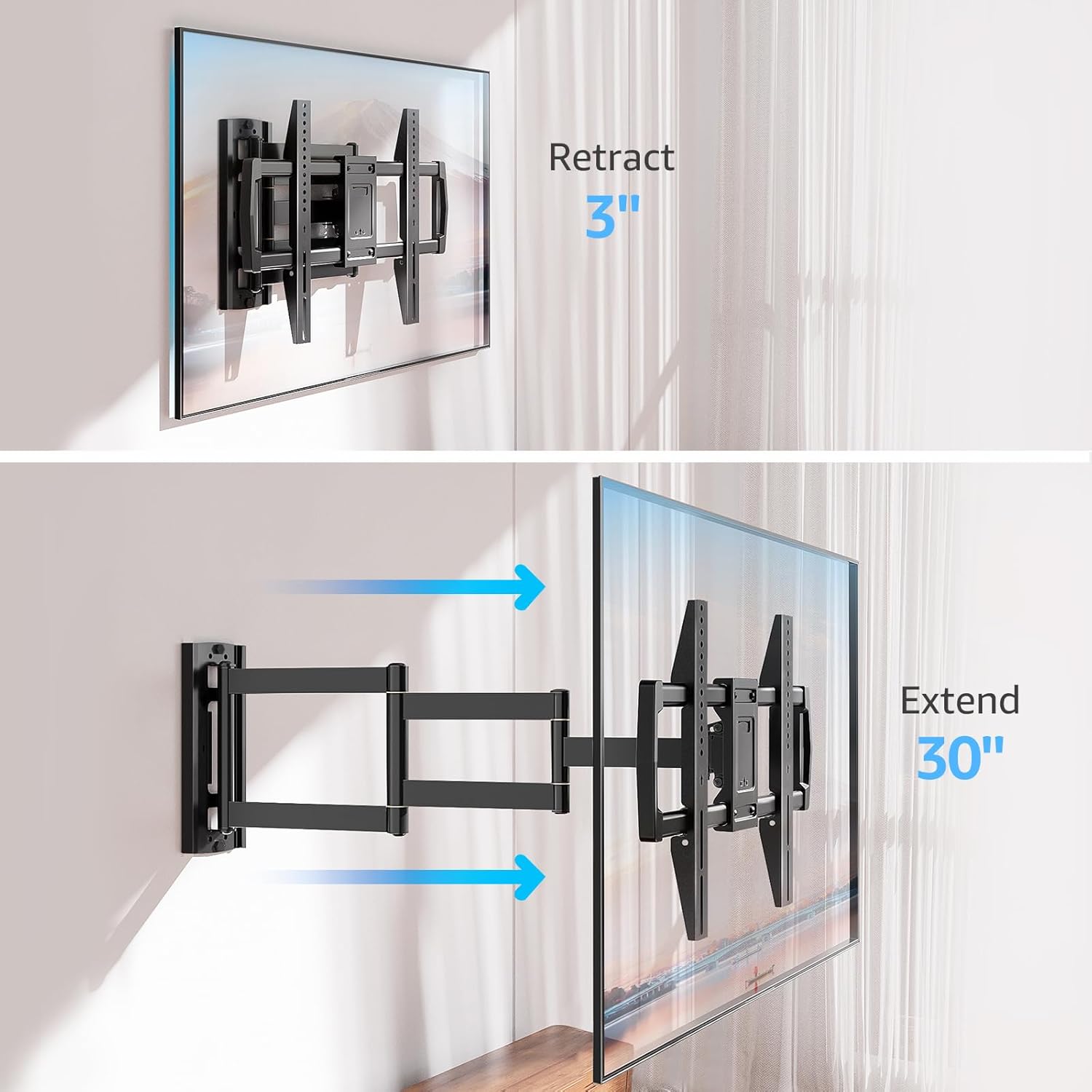
Image: Mount Extension and Retraction
6.2 Döner Ayar
The articulating arm allows for a smooth +/-90° swivel, enabling you to adjust the TV's angle to suit different viewing areas within a room, including corner mounting scenarios.
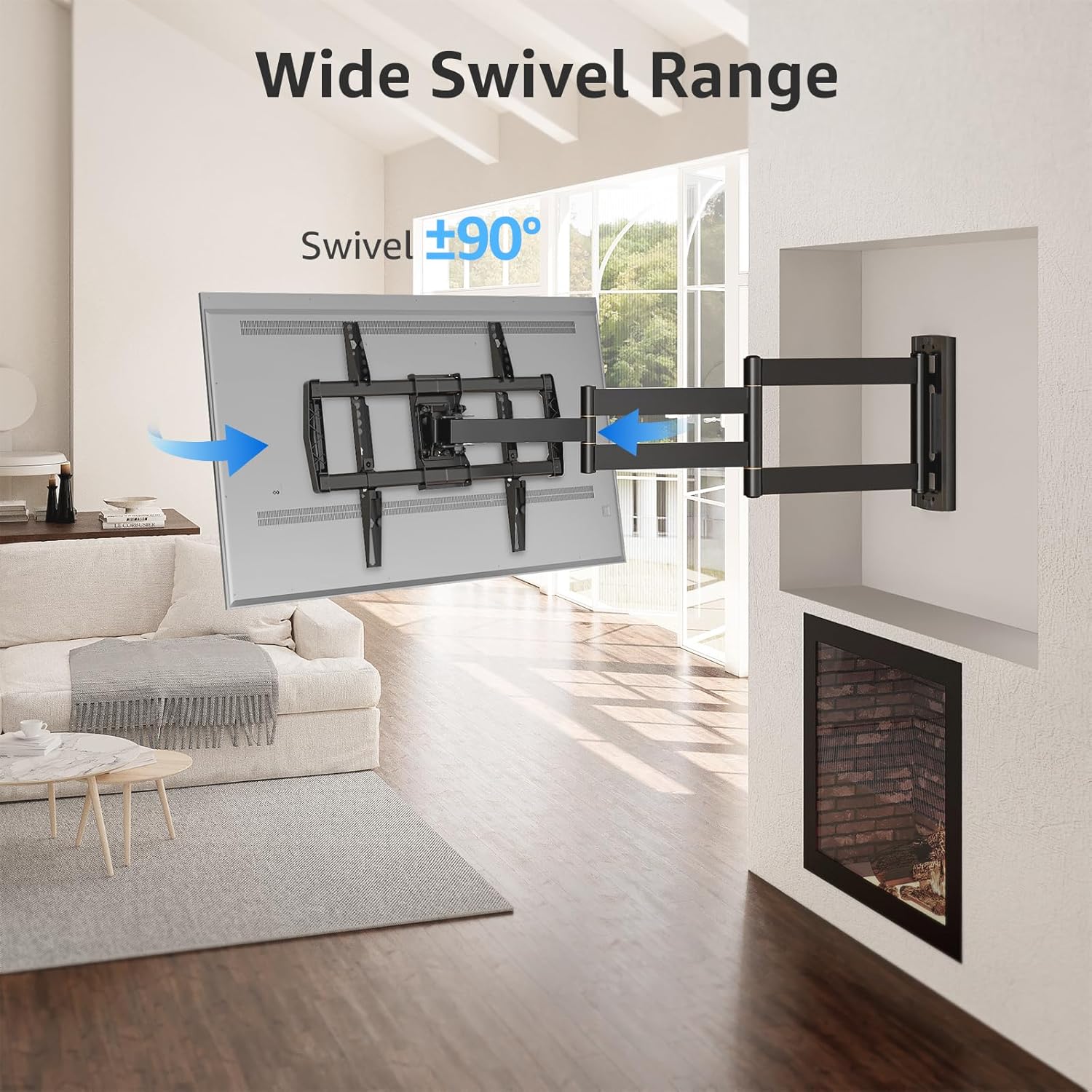
Image: Wide Swivel Range for Corner Mounting
6.3 Eğim Ayarı
Adjust the TV's vertical angle with a +5°/-10° tilt range. This feature helps reduce glare from lights or windows and provides a comfortable viewaçı.
6.4 Leveling Adjustment
After installation, you can make minor horizontal adjustments of +/-3° to ensure the TV is perfectly level.

Image: Level and Tilt Adjustments
7. Bakım
Düzenli bakım, TV duvar askılığınızın uzun ömürlü ve güvenli çalışmasını sağlar.
- Temizlik: Montaj yüzeyini yumuşak, kuru bir bezle silin. Yüzeye zarar verebilecek aşındırıcı temizleyicilerden veya çözücülerden kaçının.
- Bağlantı Elemanı Kontrolü: Tüm vidaların ve cıvataların sıkı ve sağlam kaldığından emin olmak için periyodik olarak kontrol edin. Gerekirse yeniden sıkın.
- Hareket Kontrolü: Test the mount's full range of motion (extension, retraction, swivel, tilt) occasionally to ensure smooth operation.
8. Sorun Giderme
Kurulum sırasında veya sonrasında sorunlarla karşılaşırsanız, aşağıdaki yaygın sorunlar ve çözümlere bakın:
- Televizyon düz durmuyor: Use the +/-3° post-installation leveling feature to adjust the TV's horizontal position.
- Montaj gevşek gibi görünüyor: Re-check all wall and TV fasteners to ensure they are securely tightened. Do not overtighten.
- Difficulty moving the arm: The mount's joints may be stiff initially. Apply gentle force. If persistent, ensure no cables are snagged.
- TV not fitting VESA pattern: Double-check your TV's VESA pattern against the mount's specifications (150x100mm to 600x400mm). If incompatible, the mount cannot be used.
9. Garanti ve Destek
MOUNTUP is dedicated to providing quality products and customer satisfaction. While specific warranty details are not provided in this document, MOUNTUP offers comprehensive support.
If you have any questions, require assistance with installation, or need to report a missing/damaged part, please contact MOUNTUP customer service. Experts are available 7 days a week to provide support and advanced technology solutions.
For more information or to contact support, please visit the official MOUNTUP store or webalan.


