1. Giriş
This manual provides comprehensive instructions for the assembly, operation, and maintenance of your FLEXISPOT 42 inch Desk Converter. This height-adjustable riser is designed to transform your traditional desk into an active sit-stand workstation, promoting varied postures for enhanced comfort and productivity.
The unique U-shaped design expands the keyboard workspace, accommodating dual monitors and a laptop, along with a wide keyboard tray.

Image 1.1: FLEXISPOT 42 inch Desk Converter in a typical office setup.
2. Güvenlik Bilgileri
- Always ensure the desk riser is placed on a stable, flat surface.
- Maksimum taşıma kapasitesini aşmayın: 33 lbs (15 kg) for the desktop Ve 6.6 lbs (3 kg) for the keyboard tray. Exceeding these limits can compromise stability and lead to damage or injury.
- Yükseklik ayarı sırasında sıkışmayı önlemek için ellerinizi ve parmaklarınızı hareketli parçalardan uzak tutun.
- Distribute weight evenly across the desktop to maintain balance.
- Kullanmadan önce tüm vidaların ve bağlantı elemanlarının iyice sıkıldığından emin olun ve periyodik olarak gevşeklik olup olmadığını kontrol edin.
3. Paket İçeriği
Montajdan önce tüm bileşenlerin mevcut ve hasarsız olduğundan emin olun. Herhangi bir parça eksik veya hasarlıysa, lütfen müşteri hizmetleriyle iletişime geçin.
- Ana Masa Dönüştürücü Ünitesi
- Klavye Tepsisi
- Assembly Hardware (screws, brackets)
- Kullanım Kılavuzu (bu belge)
4. Kurulum ve Montaj
The FLEXISPOT Desk Converter is designed for quick assembly. Only the keyboard tray requires attachment.
Gerekli Araçlar:
- Tornavida (dahil değildir)
Montaj Adımları:
- Carefully remove all components from the packaging. Place the main desk converter unit on a stable, flat surface.
- Identify the keyboard tray and its corresponding mounting brackets.
- Align the keyboard tray brackets with the pre-drilled holes on the underside of the main desktop unit.
- Secure the brackets to the desktop using the provided screws. Ensure they are tightened firmly but do not overtighten.
- Attach the keyboard tray to the brackets using the remaining screws. Verify that the keyboard tray is level and stable.

Image 4.1: Illustration of keyboard tray attachment.
5. Kullanım Talimatları
The desk converter features a gas-spring lifting mechanism for smooth and effortless height adjustment.
Yüksekliği Ayarlama:
- Clear any obstructions from around the desk converter.
- Locate the adjustment lever, typically on the side of the desktop.
- To raise the desk, gently squeeze the lever and lift the desktop to your desired height. The gas spring will assist the movement.
- To lower the desk, gently squeeze the lever and apply downward pressure to the desktop. Guide it smoothly to your preferred sitting height.
- Release the lever to lock the desk converter in position.

Image 5.1: Height adjustment range from 4.7 inches to 19.6 inches.
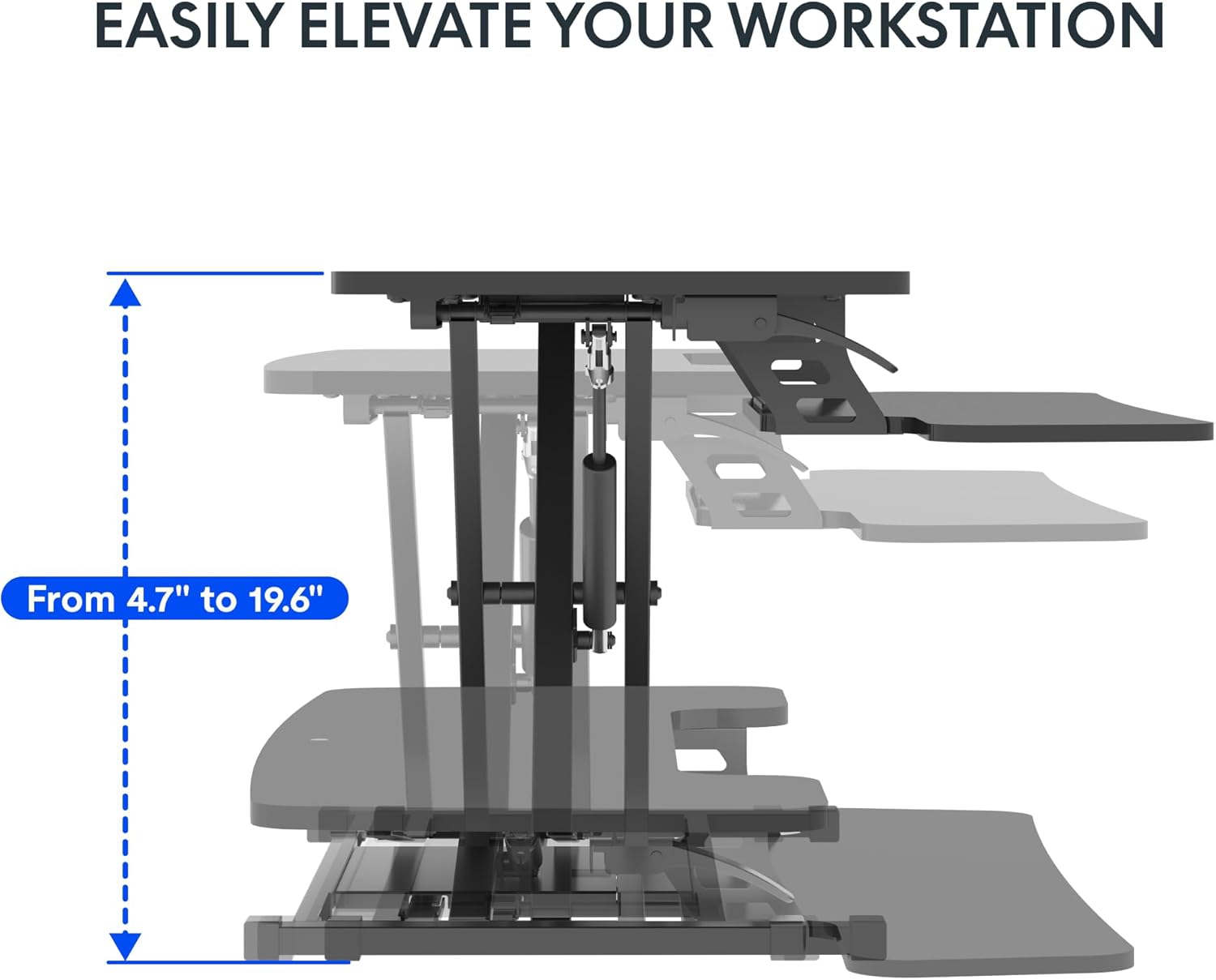
Image 5.2: Spacious two-tier design for monitors and keyboard.
6. Bakım
Regular maintenance ensures the longevity and optimal performance of your desk converter.
- Temizlik: Yüzeyleri yumuşak bir bezle silin.amp Kumaşı aşındırmayın. Cilaya zarar verebilecek aşındırıcı temizleyicilerden veya sert kimyasallardan kaçının.
- Bağlantı Elemanı Kontrolleri: Periodically inspect all screws and bolts, especially those securing the keyboard tray and the main frame. Tighten any loose fasteners to maintain stability.
- Mekanizma Kontrolü: Ensure the lifting mechanism operates smoothly. If you notice any stiffness or unusual noises, contact support. Do not attempt to lubricate or disassemble the gas spring mechanism yourself.
7. Sorun Giderme
If you encounter issues with your desk converter, refer to the following common problems and solutions:
- Desk Converter is Unstable or Wobbles:
- Ensure the desk converter is placed on a completely flat and stable surface.
- Verify that all assembly screws, particularly those for the keyboard tray and the base, are securely tightened.
- Check that the weight on the desktop and keyboard tray does not exceed the specified capacity (33 lbs desktop, 6.6 lbs keyboard tray) and is evenly distributed.
- A slight wobble may be noticeable at maximum height; this is normal for some adjustable risers.
- Yüksekliği ayarlamakta zorluk:
- Ensure the adjustment lever is fully engaged when attempting to raise or lower the desk.
- Check for any obstructions preventing the mechanism from moving freely.
- Verify that the weight on the desktop is within the specified limits. Excessive weight can make adjustment difficult.
- Keyboard Tray Screws Do Not Fit or Come Loose:
- Ensure you are using the correct screws for the keyboard tray attachment. Refer to the assembly instructions.
- If screws consistently come loose, consider using slightly larger or coarser threaded screws of appropriate length, or apply a thread-locking compound (e.g., Loctite) if suitable for the material.
- Desktop Appears Slanted:
- Check the underlying desk surface for levelness.
- Inspect the desk converter's frame for any visible damage or bending. If damage is present, discontinue use and contact support.
8. Özellikler
Detailed product specifications for the FLEXISPOT 42 inch Desk Converter.

Resim 8.1: Ürün boyutları ve yük taşıma kapasiteleri.
| Özellik | Detay |
|---|---|
| Marka | ESNEKLİK |
| Model Numarası | XLCB |
| Model Adı | MT137 |
| Ürün Boyutları (D x G x Y) | 24.9"D x 42"G x 19.6"Y |
| Masaüstü Boyutları | 41.7" x 16.3" |
| Klavye Tepsisi Boyutları | 34.6" x 12.2" |
| Taban Boyutları | 27.4" x 15.5" |
| Yükseklik Ayar Aralığı | 4.7" - 19.6" |
| Masaüstü Ağırlık Kapasitesi | 33 lbs (15 kg) |
| Klavye Tepsisi Ağırlık Kapasitesi | 6.6 lbs (3 kg) |
| Ürün Ağırlığı | 27.2 lbs (12.3 kg) |
| Renk | Klasik Siyah |
| Üst Malzeme Türü | Odun |
| Taban Malzemesi | Metal |
| Kaldırma Mekanizması | Manual (Gas Spring) |
| Gerekli Montaj | Evet |
| Meclis İçin Önerilen Kişiler | 1 |
9. Garanti ve Destek
The FLEXISPOT 42 inch Desk Converter comes with a Sınırlı Garanti. For specific details regarding warranty coverage, duration, and terms, please refer to the warranty card included with your product or visit the official FLEXISPOT webalan.
For technical assistance, troubleshooting not covered in this manual, or to inquire about replacement parts, please contact FLEXISPOT customer support directly. You can often find support contact information on the manufacturer's websiteniz veya satın alma platformunuz aracılığıyla.
Visit the official FLEXISPOT Store for more information: FLEXISPOT Mağazası Amazon'da


