1. Önemli Güvenlik Talimatları
Please read all instructions carefully before using the FLEXISPOT XL5 Power Lift Recliner Chair. Retain this manual for future reference.
- Ensure all components are securely assembled before connecting to power.
- Çocukları ve evcil hayvanları sandalyenin hareketli parçalarından uzak tutun.
- Do not allow children to operate the chair without adult supervision.
- Çalışma sırasında ellerinizi veya ayaklarınızı kaldırma mekanizmasının yakınına koymaktan kaçının.
- Do not expose the chair to excessive moisture or liquids.
- Temizlik veya bakım yapmadan önce sandalyenin fişini prizden çekin.
- Güç kablosu hasarlıysa tehlikeleri önlemek için üretici veya yetkili servis tarafından değiştirilmelidir.
- Do not sit on the footrest when it is extended.
- Bu sandalye yalnızca iç mekan kullanımı için tasarlanmıştır.
2. Paket İçeriği
The FLEXISPOT XL5 recliner is shipped in one box. Carefully unpack all components and verify against the list below. If any parts are missing or damaged, contact customer support immediately.
- Recliner Base
- arkalık
- Side Wings (2)
- Güç Adaptörü
- Remote Control (2) - one for lift/recline, one for massage/heat
- Kullanıcı Kılavuzu

Image: The FLEXISPOT XL5 recliner shown next to a shipping box, illustrating the 'All in One Box' delivery.
3. Montaj Talimatları
Assembly of the FLEXISPOT XL5 recliner is designed to be straightforward. Please follow these steps:
- Bileşenleri Paketinden Çıkarın: Carefully remove all parts from the shipping box. Place the recliner base on a flat, stable surface.
- Sırtlığı Takın: Slide the backrest onto the metal posts on the recliner base until it clicks securely into place. Ensure both sides are fully engaged.
- Connect Side Wings: Attach the side wings to the designated slots on the backrest.
- Gücü bağlayın: Locate the power cable from the chair and connect it to the power adapter. Plug the power adapter into a standard electrical outlet.
- Allow for Rebound: After assembly, allow the cushions approximately 48 hours to fully rebound to their intended plushness.
4. Kullanım Talimatları
The FLEXISPOT XL5 features dual OKIN motors for independent control of the backrest and footrest, along with massage and heating functions.
4.1 Lift and Recline Functions
Use the dedicated lift and recline remote control to adjust the chair's position.

Image: Diagram illustrating the buttons on the lift and recline remote control and their corresponding chair movements.
- Recline Backrest: Press the 'Recline the Backrest' button (down arrow for backrest) to lean the backrest backward.
- Raise Backrest: Press the 'Raise the Backrest' button (up arrow for backrest) to bring the backrest upright.
- Ayak Dayama Yerini Yükseltin: Press the 'Raise the Footrest' button (up arrow for footrest) to elevate the footrest.
- Lower Footrest & Lift to Standing: Press the 'Lower the Footrest, then Lift to Standing Position' button (down arrow for footrest) to retract the footrest and then gently lift the chair to assist in standing.
- Lay Flat Position: The dual motors allow for a nearly 180° lay-flat recline by independently adjusting the backrest and footrest to your desired comfort.

Image: The recliner demonstrating its lay-flat capability and the lift-assist function for easy standing.
4.2 Massage and Heating Functions
Utilize the separate massage and heat remote control to activate these features.
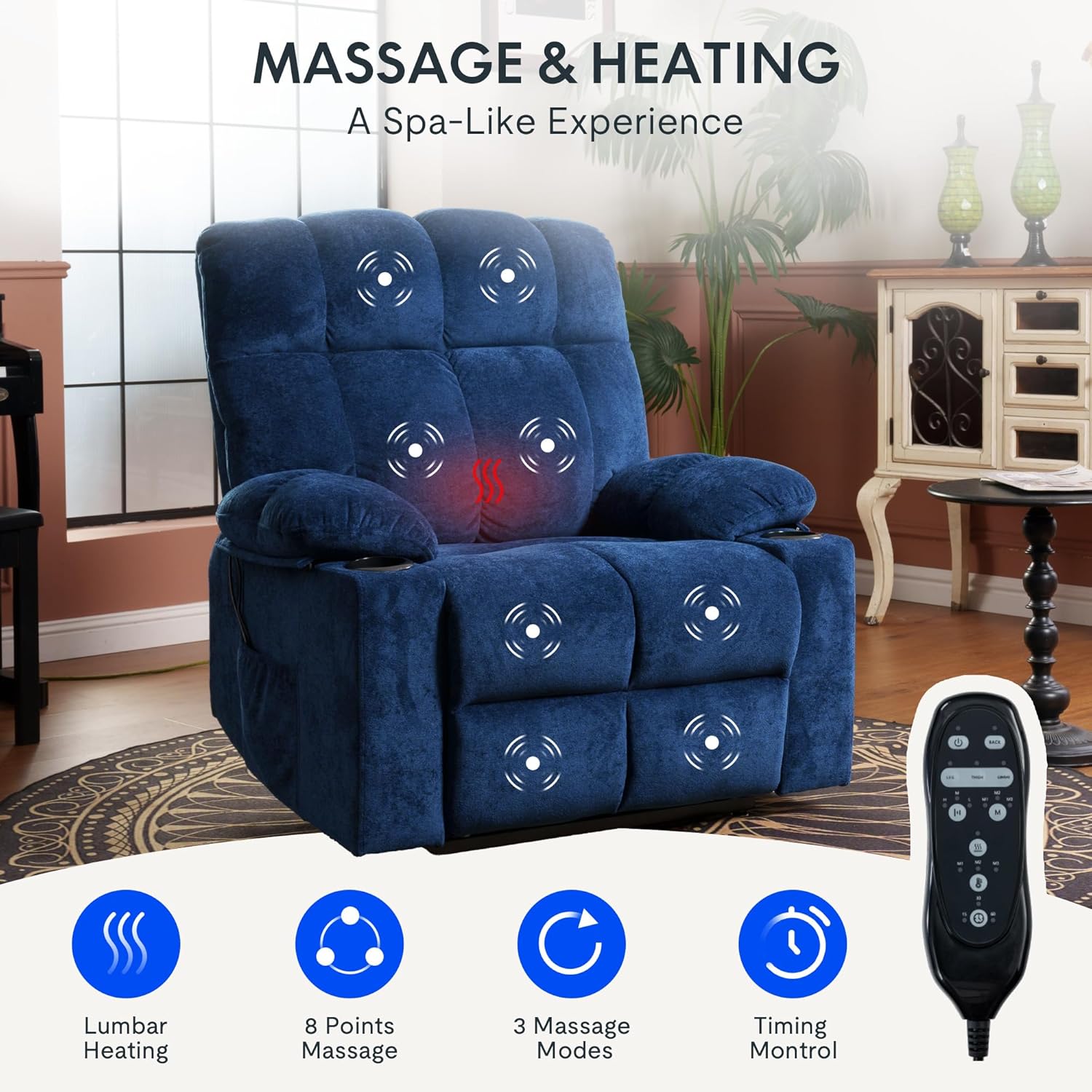
Image: The recliner highlighting the lumbar heating area and the 8 massage points across the back, seat, and leg rest.
- Masaj Noktaları: The chair features 8 vibrating massage points located in the back, lumbar, seat, and leg areas.
- Masaj Modları: Select from 3 adjustable massage modes to suit your preference.
- Bel Isıtma: Activate the lumbar heating function for soothing warmth.
- Intensity and Timer: Adjust massage intensity and set a timer for your massage sessions using the remote.
4.3 USB Charging Ports and Storage
The recliner is equipped with convenient features for your comfort.

Resim: Ayrıntılı view of the built-in cup holders, side storage pockets, and the USB charging port located on the lift/recline remote.
- USB Şarj Noktası: A USB port is integrated into the lift/recline remote control, allowing you to charge your electronic devices while relaxing.
- Bardak Tutucular: Two built-in cup holders are provided for beverages.
- Yan Cepler: Dual side pockets offer convenient storage for remotes, magazines, or other small items.
5. Bakım ve Onarım
Doğru bakım, uzanma koltuğunuzun ömrünü ve görünümünü uzatacaktır.
- Kumaş Temizliği: For general cleaning, use a soft cloth and a mild, non-abrasive fabric cleaner. Test on an inconspicuous area first.
- Dökülmeler: Dökülen sıvıyı hemen temiz ve kuru bir bezle silin. Ovmayın.
- Vakumlama: Regularly vacuum the fabric to remove dust and debris.
- Hareketli parçalar: Periodically check all bolts and connections to ensure they are tight. Do not lubricate moving parts unless specifically instructed by the manufacturer.
- Güç Kablosu: Güç kablosunu hasar açısından kontrol edin. Hasarlıysa, kullanmayı bırakın ve müşteri desteğiyle iletişime geçin.
6. Sorun Giderme Kılavuzu
If you encounter issues with your recliner, refer to the following common problems and solutions.
| Sorun | Olası Neden | Çözüm |
|---|---|---|
| Sandalye çalışmıyor (elektrik yok). | Güç kablosu takılı değil, priz çalışmıyor, güç adaptörü arızalı. | Ensure power cord is securely plugged into the chair and a working wall outlet. Test the outlet with another device. Check for damage to the power adapter. |
| Motor alışılmadık bir ses çıkarıyor. | Loose connection, obstruction in mechanism. | Check for any obstructions under the chair. Ensure all connections are secure. If noise persists, contact customer support. |
| Masaj/Isıtma çalışmıyor. | Massage/heat remote not connected, power issue. | Ensure the massage/heat remote is properly connected to the chair's power system. Verify the main power supply to the chair. |
| Chair does not lift or recline smoothly | Obstruction, weight exceeding capacity, motor issue. | Check for obstructions. Ensure user weight does not exceed 350 lbs. If issues persist, contact customer support. |
If the problem persists after attempting these solutions, please contact FLEXISPOT customer support.
7. Ürün Özellikleri
Detailed specifications for the FLEXISPOT XL5 Dual OKIN Motor Power Lift Recliner Chair.
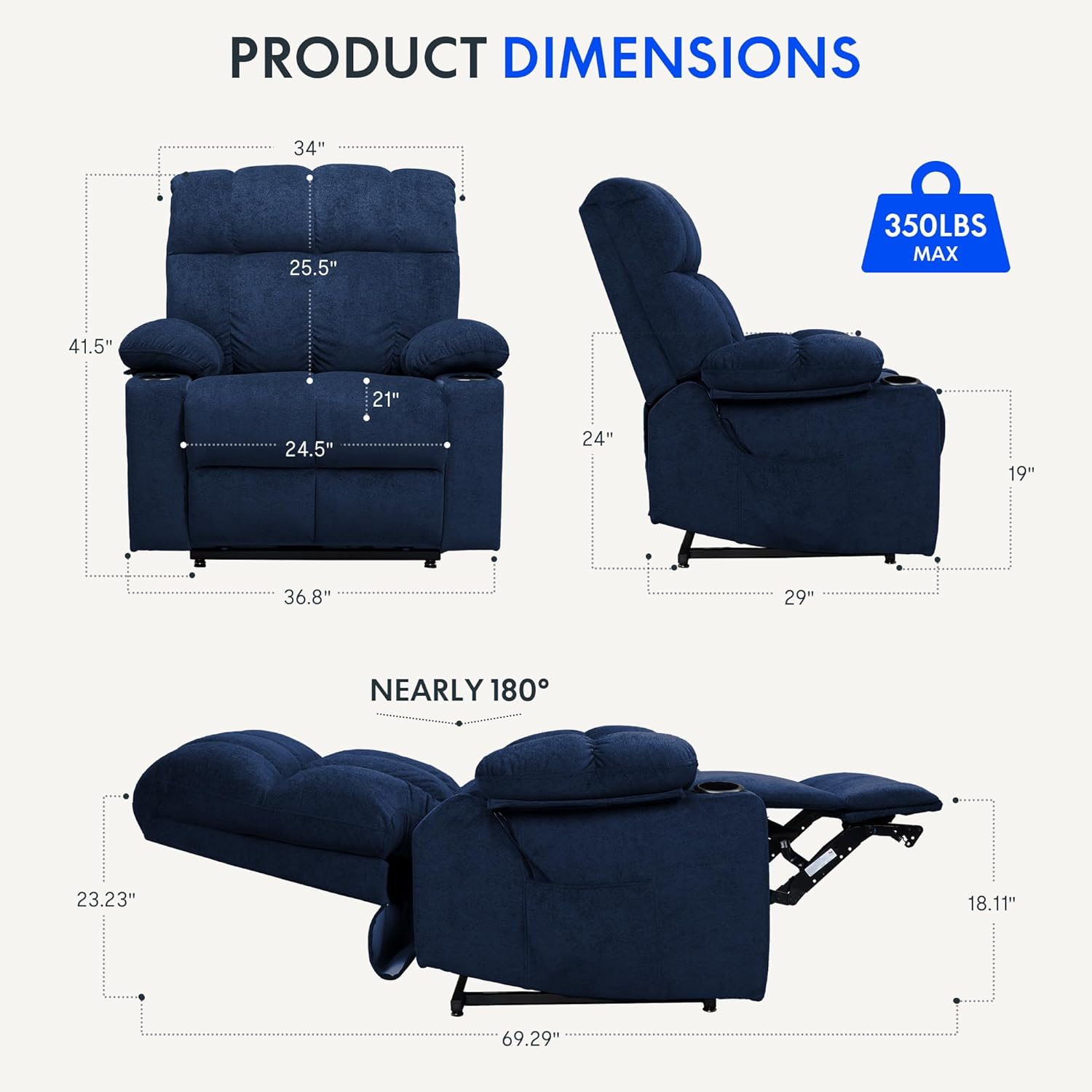
Image: Technical drawing displaying the width, depth, height, seat depth, and seat width of the recliner.
- Marka: ESNEKLİK
- Modeli: XL5
- Renk: Mavi
- Malzeme: Tekstil
- Ürün Ölçüleri: 29"D x 36.8"G x 41.5"Y
- Koltuk Derinliği: 21 inç
- Özellik: Dual OKIN Motor, Lay Flat, Massage, Heat, USB Ports, Cup Holders
- Ağırlık Kapasitesi: Up to 350 lbs (as indicated in product images)
- Güç: Electric (Power Adapter included)
8. Garanti ve Müşteri Desteği
FLEXISPOT is committed to providing quality products and excellent customer service.
- Garanti: For detailed warranty information regarding your FLEXISPOT XL5 recliner, please refer to the warranty card included with your purchase or contact FLEXISPOT customer support directly.
- Müşteri Desteği: If you have any questions, require assistance with assembly, operation, or troubleshooting, FLEXISPOT's customer service team is available to provide prompt support.
İletişim Bilgileri: Please visit the official FLEXISPOT website or refer to your purchase documentation for the most current customer support contact details.


