1. Giriş
This user manual provides detailed instructions for the safe and effective operation of the AMPBANK M256 Thermal Camera. Please read this manual thoroughly before using the device to ensure proper functionality and to prevent damage.
2. Güvenlik Bilgileri
Always adhere to the following safety guidelines to ensure safe operation and to prevent damage to the device or injury to yourself:
- Kamerayı aşırı sıcaklıklara, uzun süre doğrudan güneş ışığına veya yüksek neme maruz bırakmayın.
- Cihazı düşürmekten veya güçlü darbelere maruz bırakmaktan kaçının.
- Kamerayı sökmeye veya üzerinde değişiklik yapmaya çalışmayın. Bu, garantiyi geçersiz kılacak ve hasara neden olabilir.
- Keep the lens clean using only a soft, lint-free cloth. Avoid abrasive materials or harsh chemicals.
- Ensure proper ventilation when operating the device, especially if connected to a smartphone for extended periods.
3. Ürün Bittiview
3.1. Kutuda Neler Var?

Image: The package contents include the M256 Thermal Imaging Camera, a Quick User Guide, a Cleaning Cloth, a Multifunctional Adapter Cable, a Carrying Bag, and the Packing Box.
Paketi açtığınızda tüm bileşenlerin mevcut olduğundan emin olun:
- AMPBANK M256 Termal Görüntüleme Kamerası
- Multifunctional Adapter Cable
- Hızlı Kullanıcı Kılavuzu
- Temizlik Bezi
- Taşıma Çantası
3.2. Temel Özellikler
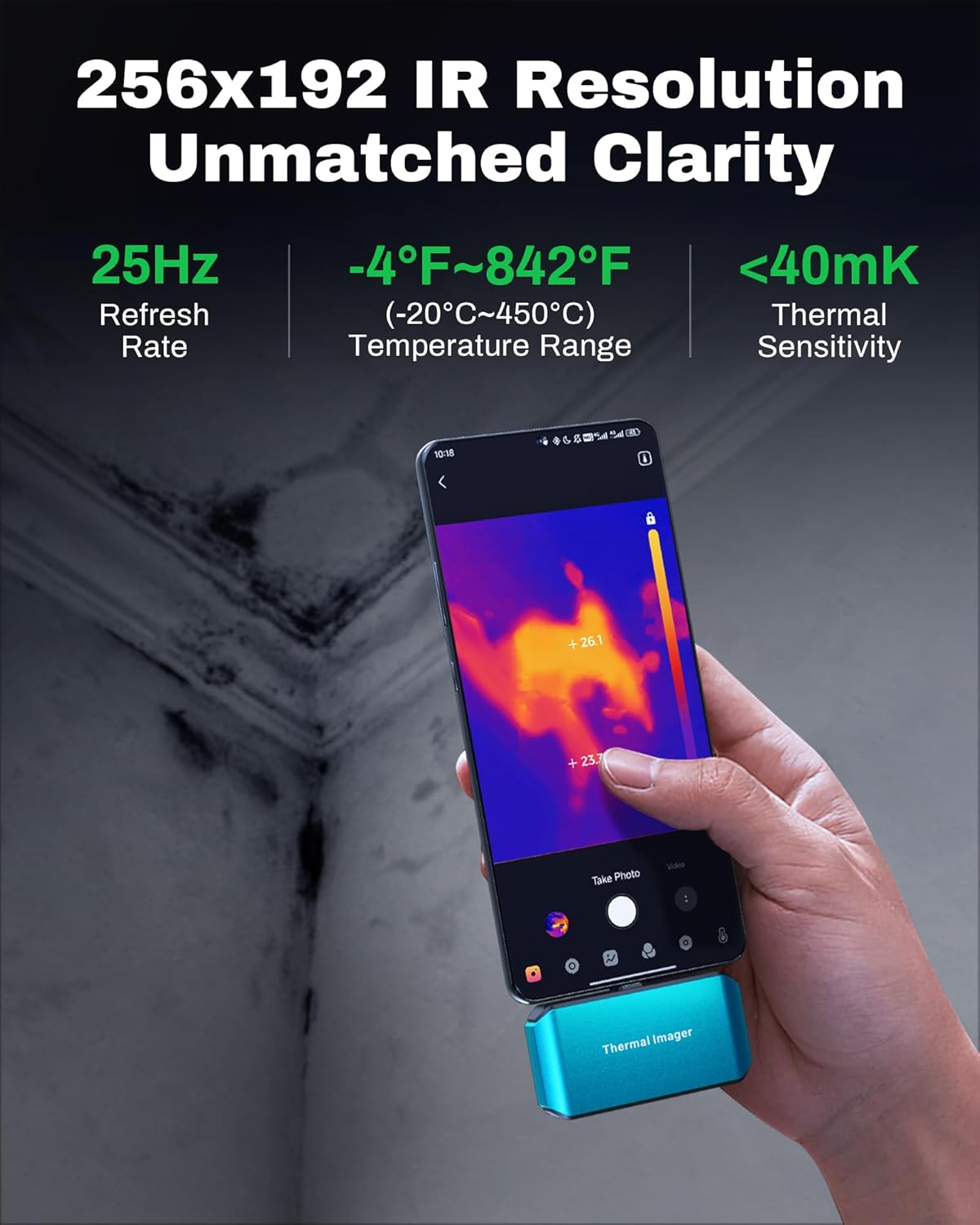
Image: The M256 camera connected to a smartphone, displaying a thermal image. Key specifications like 256x192 IR resolution, 25Hz refresh rate, -4°F~842°F temperature range, and less than 40mK thermal sensitivity are highlighted.
The AMPBANK M256 Thermal Camera offers advanced thermal imaging capabilities:
- Yüksek Çözünürlük: 256x192 infrared resolution for clear and detailed thermal images.
- Geniş Sıcaklık Aralığı: Measures temperatures from -4°F to 842°F (-20°C to 450°C).
- Hızlı Yenileme Hızı: 25Hz refresh rate for smooth thermal video and real-time temperature monitoring.
- Yüksek Doğruluk: Temperature accuracy of ±3.6°F (±2°C) or ±2%.
- Düşük Güç Tüketimi: Operates with just 0.35W, allowing for extended use with smartphone batteries.
- Kompakt ve Taşınabilir: Weighs approximately 30g (0.07lb), making it easy to carry and use on the go.
3.3. Fiziksel Açıklama

Resim: Yakın çekim view of the M256 thermal camera, showcasing its compact blue design, central thermal lens, and integrated USB-C connector at the top.
The M256 camera features a durable, compact design with a USB-C connector for direct attachment to compatible Android smartphones and tablets. Its lightweight construction ensures portability and ease of use in various inspection scenarios.
4. Kurulum
4.1. Kamerayı Bağlama

Image: The M256 thermal camera shown connected directly to a smartphone and also to a tablet and laptop using the included extension cable, demonstrating its versatile connectivity with Android devices and PCs.
The M256 Thermal Camera is designed for plug-and-play operation with Android devices and PCs.
- Akıllı Telefonlar/Tabletler İçin: Directly plug the USB-C connector of the M256 camera into your Android smartphone or tablet's USB-C port. If the port is obstructed or for more flexible positioning, use the provided multifunctional adapter cable.
- Bilgisayar için: Connect the camera to your PC using the multifunctional adapter cable.
4.2. App Installation (ThermCam App)
To utilize the full functionality of the M256 camera, you need to install the dedicated 'ThermCam' application on your Android device.
- İndirmek: Arama 'ThermCam' on the Google Play Store.
- Düzenlemek: Uygulamayı yüklemek için ekrandaki talimatları izleyin.
- İzinler: Grant necessary permissions when prompted by the app for proper operation (e.g., camera, storage).
5. Kullanım Talimatları
5.1. Temel İşlem
Once the camera is connected and the ThermCam app is installed and launched, the app will automatically detect the camera and display the thermal image feed.
- Canlı View: The main screen of the app will show the real-time thermal image.
- Güç: The camera draws power directly from the connected device, so no separate power source is needed.
5.2. Görüntü ve Video Yakalama

Image: Screenshots of the ThermCam app interface, illustrating the dedicated buttons for initiating video recording to capture dynamic infrared insights and photo capturing for snapping clear thermal images.
The ThermCam app allows you to capture both still thermal images and thermal videos.
- Photo Capturing: Tap the camera icon on the app interface to take a still thermal image.
- Video Kaydı: Tap the video camera icon to start recording thermal video. Tap again to stop.
- All captured media will be saved to your device's gallery or a designated folder within the app.
5.3. Temperature Measurement and Analysis

Image: A smartphone connected to the M256 camera, showing a thermal image of industrial equipment with temperature readings and a 'Smart Alerts' notification, indicating the camera's ability to accurately spot anomalies.
The ThermCam app provides various tools for temperature analysis:
- Nokta Sıcaklığı: Tap on any point in the thermal image to display its temperature.
- Alan Ölçümü: Define an area to measure average, maximum, and minimum temperatures within that region.
- Akıllı Uyarılar: Set temperature thresholds to receive alerts when temperatures exceed or fall below specified limits.
5.4. Gelişmiş Uygulama Özellikleri

Image: A collage of smartphone screens displaying the ThermCam app, highlighting its diverse functionalities such as 3D analysis, various viewing modes, and calibration options, demonstrating how to get more from the app.
The ThermCam app includes advanced features for comprehensive analysis and reporting:
- 3D Analysis: Visualize thermal data in a 3D representation for deeper insights.
- Renk Paletleri: Choose from multiple color palettes to optimize thermal image visualization based on your application (e.g., Iron, Rainbow, Grayscale).
- Resim içinde resim modu: Overlay a visible light image with the thermal image for better context.
- Professional Reports: Generate detailed reports with captured images, data, and customizable information for sharing.
5.5. PC Software (TCView 2.0)

Image: A laptop displaying the TCView 2.0 software, showing thermal images and analysis tools, with the M256 camera connected via its cable. This illustrates the advanced features available with the PC software.
For more advanced image editing, real-time temperature tracking, and professional analysis, download the TCView 2.0 software from the official AMPBANKA website. This software provides a robust platform for in-depth thermal data processing.
5.6. Tipik Uygulamalar

Image: Four distinct panels showing the M256 thermal camera being used for various applications: HVAC maintenance on a rooftop unit, electrical inspection of a circuit board, water leak inspection on a wall, and automotive inspection under a car hood, demonstrating its versatility.
The AMPBANK M256 Thermal Camera is suitable for a wide range of applications, including but not limited to:
- HVAC system inspection and maintenance
- Electrical system troubleshooting and inspection
- Water leak detection in residential and commercial buildings
- Automotive diagnostics and inspection
- Building insulation and energy efficiency audits
6. Bakım
Proper maintenance ensures the longevity and optimal performance of your M256 Thermal Camera.
- Lensin Temizlenmesi: Use the provided cleaning cloth or a soft, lint-free cloth to gently wipe the thermal lens. Do not use harsh chemicals or abrasive materials, as they can damage the lens coating.
- Vücudun Temizlenmesi: Kamera gövdesini yumuşak bir bezle silin.amp Bez kullanın. USB-C bağlantı noktasına nem girmesini önleyin.
- Depolamak: When not in use, store the camera in its carrying bag in a cool, dry place, away from direct sunlight and extreme temperatures.
7. Sorun Giderme
If you encounter issues with your M256 Thermal Camera, refer to the following common problems and solutions:
| Sorun | Olası Neden | Çözüm |
|---|---|---|
| Camera not detected by phone/app. | Loose connection, app permissions, incompatible device. | Ensure the camera is securely plugged in. Check app permissions in your phone settings. Verify your smartphone/tablet is compatible with USB-C OTG functionality. Try restarting the app or phone. |
| Termal görüntü bulanık veya net değil. | Dirty lens, out of focus (if applicable), environmental factors. | Clean the thermal lens with the provided cloth. Ensure the target is within the camera's optimal measurement distance. Avoid extreme temperature gradients or reflective surfaces that can distort readings. |
| Uygulama çöküyor veya donuyor. | Software glitch, insufficient device resources. | Close and restart the ThermCam app. Ensure your device has sufficient free RAM. Check for app updates on Google Play. |
| Yanlış sıcaklık okumaları. | Incorrect emissivity setting, environmental interference. | Adjust the emissivity setting in the app to match the material being measured. Ensure there are no strong heat sources or reflections interfering with the measurement. |
If the problem persists after trying these solutions, please contact AMPBANK customer support.
8. Özellikler
| Özellik | Şartname |
|---|---|
| Kızılötesi Çözünürlük | 256x192 piksel |
| Sıcaklık Aralığı | -4°F ila 842°F (-20°C ila 450°C) |
| Sıcaklık Doğruluğu | ±3.6°F (±2°C) or ±2% |
| Yenileme Hızı | 25Hz |
| Termal Duyarlılık (NETD) | <40mK |
| Güç Tüketimi | 0.35W |
| Arayüz | USB-C |
| İşletim Sistemi Uyumluluğu | Android Smartphones/Tablets, PC |
| Boyutlar | Yaklaşık 4.33 x 3.54 x 1.97 inç (Paket) |
| Ağırlık | Yaklaşık 30 g (0.07 lb) |
9. Garanti ve Destek
AMPBANK provides a standard warranty for the M256 Thermal Camera against defects in materials and workmanship under normal use. For specific warranty terms and conditions, please refer to the warranty card included with your product or visit the official AMPBANKA webalan.
Teknik destek, sorun giderme yardımı veya hizmet talepleri için lütfen iletişime geçin. AMPBANK customer support through the contact information provided on the official AMPBANKA websitenizde veya ürün dokümanlarınızda.