giriiş
This manual provides detailed instructions for the installation, operation, and maintenance of your AIDA Single Pole Motion Sensor Light Switch. This device is designed to enhance convenience and energy efficiency by automatically controlling lighting based on occupancy. Please read this manual thoroughly before installation and use to ensure proper function and safety.

Image: The AIDA Single Pole Motion Sensor Light Switch shown alongside its product packaging, highlighting its design and key features.
Önemli Güvenlik Bilgileri
WARNING: RISK OF ELECTRIC SHOCK. Improper installation can be dangerous or illegal. Always consult a qualified electrician if you are unsure about any part of the installation process.
- Gücü kapatın: Şalteri takmadan veya bakımını yapmadan önce daima devre kesiciden veya sigorta kutusundan elektriği kesin.
- Nötr Tel Gerekli: This device requires a neutral wire for proper operation. If your electrical box does not have a neutral wire, this switch is not compatible.
- Single Pole Only: This switch is designed for single-pole control only and is not suitable for 3-way or multiple-way circuits.
- UL/CUL Certified: The switch is UL and CUL listed, ensuring compliance with safety standards.
- Çalışma Hacmitage: Ensure your electrical system operates at 120 Volts (AC).
Paket İçeriği
Kuruluma başlamadan önce tüm bileşenlerin mevcut olduğundan emin olun:
- AIDA Single Pole Occupancy Motion Sensor Light Switch
- Vidasız Duvar Plakası
- Wire Nuts (Terminal caps)
- Montaj Vidaları
- Kullanım Kılavuzu (bu belge)
Ürün Özellikleri
| Özellik | Detay |
|---|---|
| Giriş Derecelendirmesi | 120/277V~50/60Hz |
| Applicable Load Types | 200W LED/CFL, 500W MLV, 500W INC/HAL, 5A Ballast (120V), 1/6HP Fan (4.4A 120V) |
| Anahtar Türü | Tek kutuplu |
| Tel Ölçer | #14 - #12 AWG |
| Kablolama Türü | Terminal kapağı |
| Çalışma Sıcaklığı | 32°F ila 104°F (0°C ila 40°C) |
| Ürün Boyutu | 4.17"x1.73"x1.77" (106x44x45mm) |
| Malzeme | Copper, Brass (Contact Material) |
| Kontrol Yöntemi | Sensor, Touch |

Image: A visual representation of the product dimensions and a detailed table of specifications for the AIDA motion sensor switch.

Image: A chart illustrating the universal compatibility of the AIDA motion sensor switch with various load types including LED/CFL, MLV, INV/HAL, Ballast, and Fan.
Kurulum ve Yükleme
Başlamadan Önce:
- Gücü kapatın: Sigorta panelinizi bulun ve üzerinde çalışacağınız anahtar kutusunun gücünü kapatın. Bir ses anahtarı kullanarak gücün kapalı olduğunu doğrulayın.tage test cihazı.
- Kabloları Tanımlayın: Carefully remove the existing wall plate and switch. Identify the following wires:
- Line Wire (Black): Devre kesiciden gelen gücü taşır.
- Load Wire (Black): Aydınlatma armatürüne güç sağlar.
- Nötr Kablo (Beyaz): Required for this switch.
- Topraklama Kablosu (Yeşil veya Çıplak Bakır): For safety.
- Confirm Neutral Wire: This switch requires a neutral wire. If you do not have a neutral wire (typically white) in your electrical box, this switch is not compatible.
Kablolama talimatları:
Follow the wiring diagram carefully. Use the provided wire nuts to secure connections.
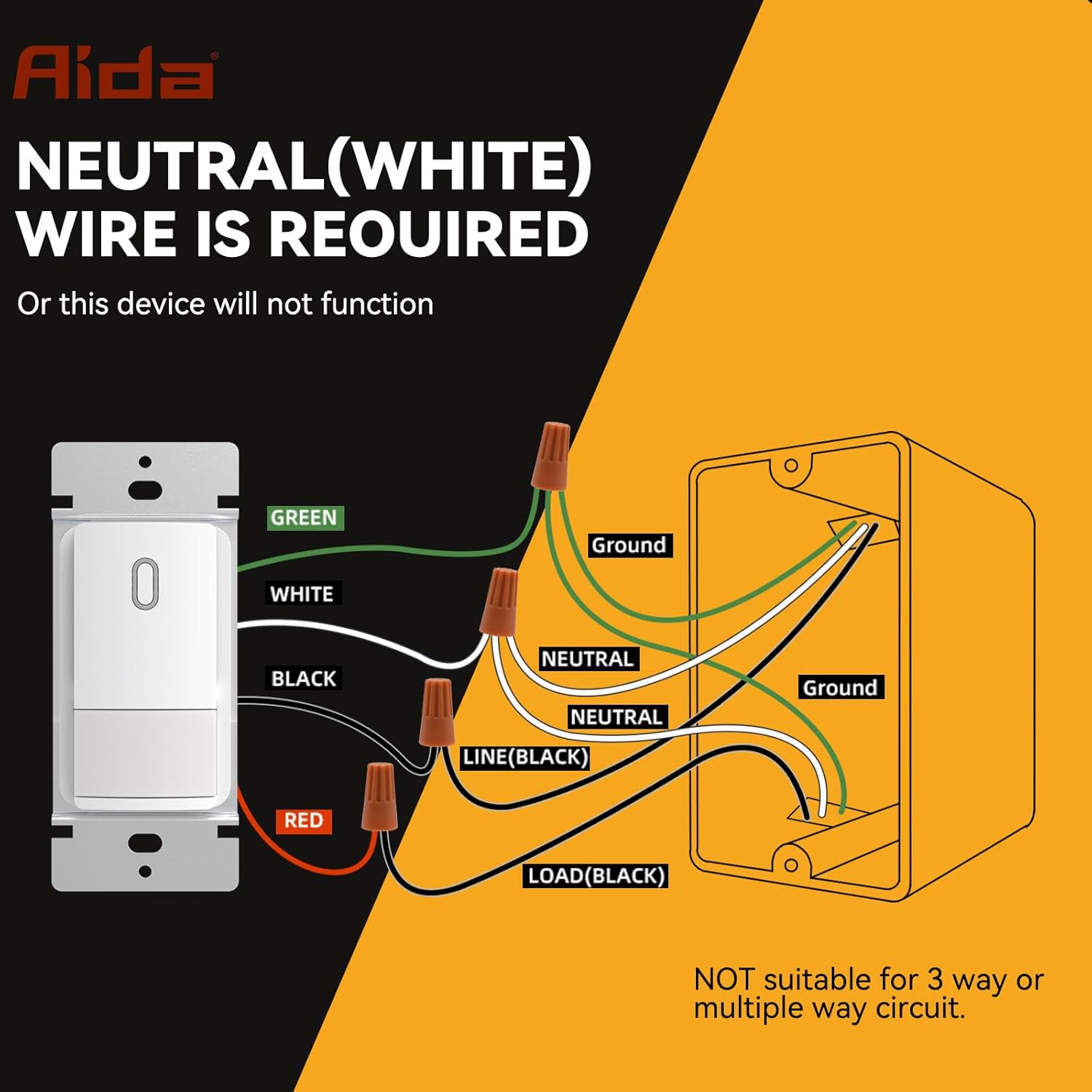
Image: A detailed wiring diagram showing connections for the AIDA motion sensor light switch, including Line, Load, Neutral, and Ground wires. It explicitly states that a neutral wire is required and the switch is not suitable for 3-way or multiple-way circuits.
- Bağlan YEŞİL wire from the switch to your house's ZEMİN tel.
- Bağlan BEYAZ wire from the switch to your house's DOĞAL tel.
- Bağlan SİYAH wire from the switch to your house's ASTAR (sıcak) tel.
- Bağlan KIRMIZI wire from the switch to your house's YÜK wire (to the light fixture).
Important: Ensure all connections are secure and insulated with wire nuts. This switch is for single-pole applications only. Do not use in 3-way or multi-way circuits.
Anahtarın Montajı:
- Carefully fold the wires and push the switch into the electrical box.
- Verilen vidaları kullanarak şalteri elektrik kutusuna sabitleyin.
- Attach the screwless wall plate.
- Sigortadan elektriği geri verin.

Image: A diagram showing the precise dimensions of the AIDA motion sensor light switch, its mounting bracket, and the screwless wall plate for easy installation.
Operating Instructions and Customization
The AIDA motion sensor switch offers various modes and adjustable settings to suit your needs.
Operasyon modları:
- Occupancy Mode (Auto-On/Auto-Off): Lights automatically turn ON when motion is detected and OFF after a set delay when no motion is detected. Ideal for high-traffic areas like bathrooms, laundry rooms, and kitchens.
- Vacancy Mode (Manual-On/Auto-Off): Lights must be manually turned ON, but will automatically turn OFF after a set delay when no motion is detected. Suitable for bedrooms or TV rooms where you prefer manual control for turning on lights.
Ayarlanabilir Ayarlar:
The switch features internal dip switches for customizing settings. Carefully remove the faceplate to access these controls.

Resim: Yakın çekim view of the AIDA motion sensor switch's internal settings, showing dip switches for Adjustable Light Level (Timeout), PIR Sensitivity, and Ambient Light Sensor Mode.
- Adjustable Light Level (Timeout): This setting determines how long the light stays on after the last detected motion. Options typically include 30 seconds, 1 minute, 5 minutes, 15 minutes, or 30 minutes. Refer to the switch's internal labels for specific settings.
- PIR Hassasiyeti: Adjusts the sensitivity of the Passive Infrared (PIR) sensor to detect motion. Settings range from Low (L) to High (H). A higher sensitivity detects smaller movements or movements at a greater distance.
- Ambient Light Sensor Mode: Controls how the switch reacts to ambient light.
- Düşük/Yüksek: The switch will only turn on lights if the ambient light level is below a certain threshold (e.g., only turn on at night).
- Kapalı: The ambient light sensor is disabled, and the switch will turn on lights regardless of ambient light.
- Gelenek: Allows for more specific ambient light level adjustments.
Note: After adjusting any internal settings, reattach the faceplate securely.

Resim: Ayrıntılı view of the AIDA motion sensor switch with its cover removed, showing the dip switches for adjusting timeout, PIR sensitivity, and ambient light sensor mode.
Bakım
The AIDA Motion Sensor Light Switch is designed for long-lasting, maintenance-free operation. To ensure optimal performance:
- Temizlik: Periodically wipe the switch and wall plate with a soft, damp Bez. Aşındırıcı temizleyiciler veya çözücüler kullanmayın, çünkü bunlar yüzeye veya iç bileşenlere zarar verebilir.
- Engelleme: Ensure the sensor lens is not obstructed by furniture, decorations, or other objects, as this can impair motion detection.
- Kullanıcı Tarafından Bakımı Yapılabilecek Parça Yok: There are no user-serviceable parts inside the switch. Do not attempt to open or repair the unit beyond adjusting the dip switches.
Sorun giderme
| Sorun | Olası Neden | Çözüm |
|---|---|---|
| Light does not turn ON with motion. |
|
|
| Light stays ON constantly. |
|
|
| Light turns OFF too quickly or too slowly. |
|
|
| Switch makes a clicking noise. |
|
|
Garanti ve Müşteri Desteği
AIDA products are manufactured to high-quality standards and are backed by a limited warranty. For specific warranty details, please refer to the warranty card included with your purchase or visit the official AIDA webalan.
If you encounter any issues or have questions regarding your AIDA Single Pole Motion Sensor Light Switch, please contact our customer support team:
- Webalan: Visit the AIDA Store on Amazon (Genel ürün bilgileri için)
- E-posta: Ürün ambalajına veya resmi bilgilere bakın webiletişim için e-posta adresi.
- Telefon: Ürün ambalajına veya resmi bilgilere bakın webİletişim için telefon numarasına ulaşabilirsiniz.
Please have your model number (B0DM4SGNBQ) and purchase date ready when contacting support.


