giriiş
This manual provides instructions for the assembly, operation, and maintenance of your FLEXISPOT MT137 32-inch Height Adjustable Standing Desk Converter. This product is designed to transform your existing desk into an ergonomic sit-to-stand workstation, promoting a healthier work routine.
Güvenlik Bilgileri
- Montaj talimatlarını daima dikkatlice takip edin.
- Do not exceed the weight limit of 33 lbs (15 kg) on the upper desktop.
- Do not exceed the weight limit of 6.6 lbs (3 kg) on the keyboard tray.
- Ensure the desk converter is placed on a stable, flat surface.
- Keep hands and fingers clear of moving parts during height adjustment.
Paket İçeriği
- Pre-assembled Desk Converter Unit
- Klavye Tepsisi
- Mounting Screws for Keyboard Tray
- Kullanım Kılavuzu (bu belge)
Kurulum ve Montaj
- Paketin açılması: Tüm bileşenleri dikkatlice ambalajından çıkarın.
- Keyboard Tray Attachment: Position the keyboard tray beneath the main desktop. Align the pre-drilled holes on the keyboard tray with the mounting points on the converter's frame. Secure the keyboard tray using the provided screws.
- Atama: Place the assembled desk converter on a stable, flat desk surface.

The desk converter is largely pre-assembled, requiring only the attachment of the keyboard tray for immediate use.
Kullanım Talimatları
- Yüksekliği Ayarlama: To adjust the height, locate the adjustment lever on the side of the upper desktop.
- Raising the Desk: Squeeze the lever and gently lift the desktop to your desired standing height. Release the lever to lock it in place. The gas spring mechanism assists in smooth elevation.
- Lowering the Desk: Squeeze the lever and apply gentle downward pressure to lower the desktop to your desired sitting height. Release the lever to lock it in place.
- Ağırlık Kapasitesi: The upper desktop supports up to 33 pounds (15 kg). The keyboard tray supports up to 6.6 pounds (3 kg). Do not exceed these limits.


Özellikler
- Ergonomik Tasarım: Seamlessly transition between sitting and standing positions to promote a healthy work posture. The streamlined edges are designed to reduce wrist discomfort.
- Spacious Two-Tier Workstation: The upper desktop provides ample space for monitors or laptops, while the lower keyboard tray accommodates your keyboard and mouse. A U-shaped cutout on the upper deck allows for laptop placement directly on the tray, optimizing space.
- Sturdy X-Frame Construction: Built with a robust X-frame, ensuring stability and smooth, effortless height adjustments.
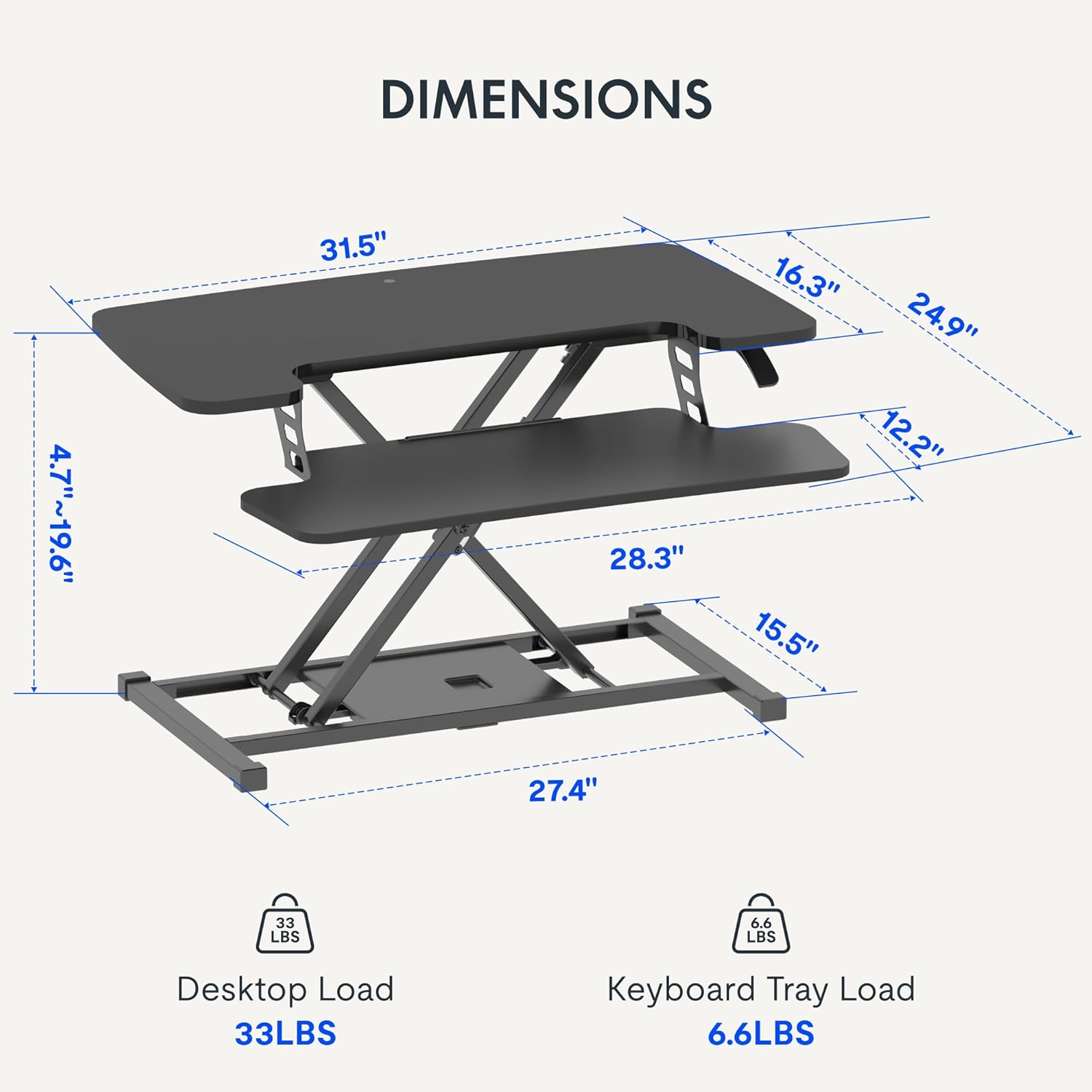
- Versatile Height Range: Offers a height adjustment range from 4.7 inches (12 cm) to 19.6 inches (50 cm), accommodating various user heights and work preferences.


Bakım
- Temizlik: Yüzeyleri yumuşak bir bezle silin.amp bez. Aşındırıcı temizleyicilerden kaçının.
- Denetleme: Tüm vidaların ve bağlantıların sağlam olduğundan emin olmak için periyodik olarak kontrol edin.
Sorun giderme
- Yüksekliği ayarlamakta zorluk: Ensure no objects are obstructing the lifting mechanism. Verify that the weight on the desk does not exceed the specified limits.
- Sallanma: Confirm the desk converter is placed on a flat, stable surface. Check all assembly screws for tightness.
Özellikler
| Marka | ESNEKLİK |
| Model Adı | MT137 |
| Ürün Boyutları | 24"D x 32"G x 19.7"Y (61 cm D x 81 cm G x 50 cm Y) |
| Renk | Siyah |
| Taban Malzemesi | Metal |
| Üst Malzeme Türü | Odun |
| Ürün Ağırlığı | 24 Pound (10.9 kg) |
| Maximum Upper Desktop Load | 33 Pound (15 kg) |
| Maximum Keyboard Tray Load | 6.6 Pound (3 kg) |
| Yükseklik Ayar Aralığı | 4.7 inç (12 cm) ila 19.6 inç (50 cm) |
| Montaj Gerekli | Evet (Minimum) |
| Montaj İçin Önerilen Aletler | Tornavida |
| UPC | 810072862501 |
Garanti ve Destek
Garanti Türü: This product comes with a Full Warranty.
For further assistance, warranty claims, or technical support, please contact FLEXISPOT customer service. Refer to the official FLEXISPOT webGüncel iletişim bilgileri için siteyi ziyaret edin.


