1. Giriş
This manual provides detailed instructions for the installation, operation, and maintenance of your SODOLA 5 Port 10G Easy Web Managed Switch. This device is designed to provide high-speed 10 Gigabit Ethernet connectivity with comprehensive management features for demanding network environments.
The switch features 5x10G RJ45 ports, compliant with IEEE 802.3, IEEE 802.3u, IEEE 802.3ab, IEEE 802.3bz, and IEEE 802.3ae standards. Its adaptive RJ45 ports support 100M/1G/2.5G/5G/10G speeds for versatile device integration.

Figure 1: SODOLA 5 Port 10G Easy Web Managed Switch (SL510S-5T)
2. Paket İçeriği
Paketinizin aşağıdaki öğeleri içerdiğini doğrulayın:
- Kullanıcı Kılavuzu
- 1x SODOLA 5 Port 10G Managed Ethernet Switch
- 1x Güç Kablosu
- 4x Footrests
- 1x Ürün Kılavuzu
- 1x Certificate of Inspection

Figure 2: Included components: User Manual, 5 Port 10G Managed Ethernet Switch, Power Adapter, Footrests, Product Manual, and Certificate of Inspection.
3. Fiziksel Açıklama
The SODOLA 5 Port 10G Easy Web Managed Switch features a durable metal casing and is equipped with essential indicators and ports for network operation.
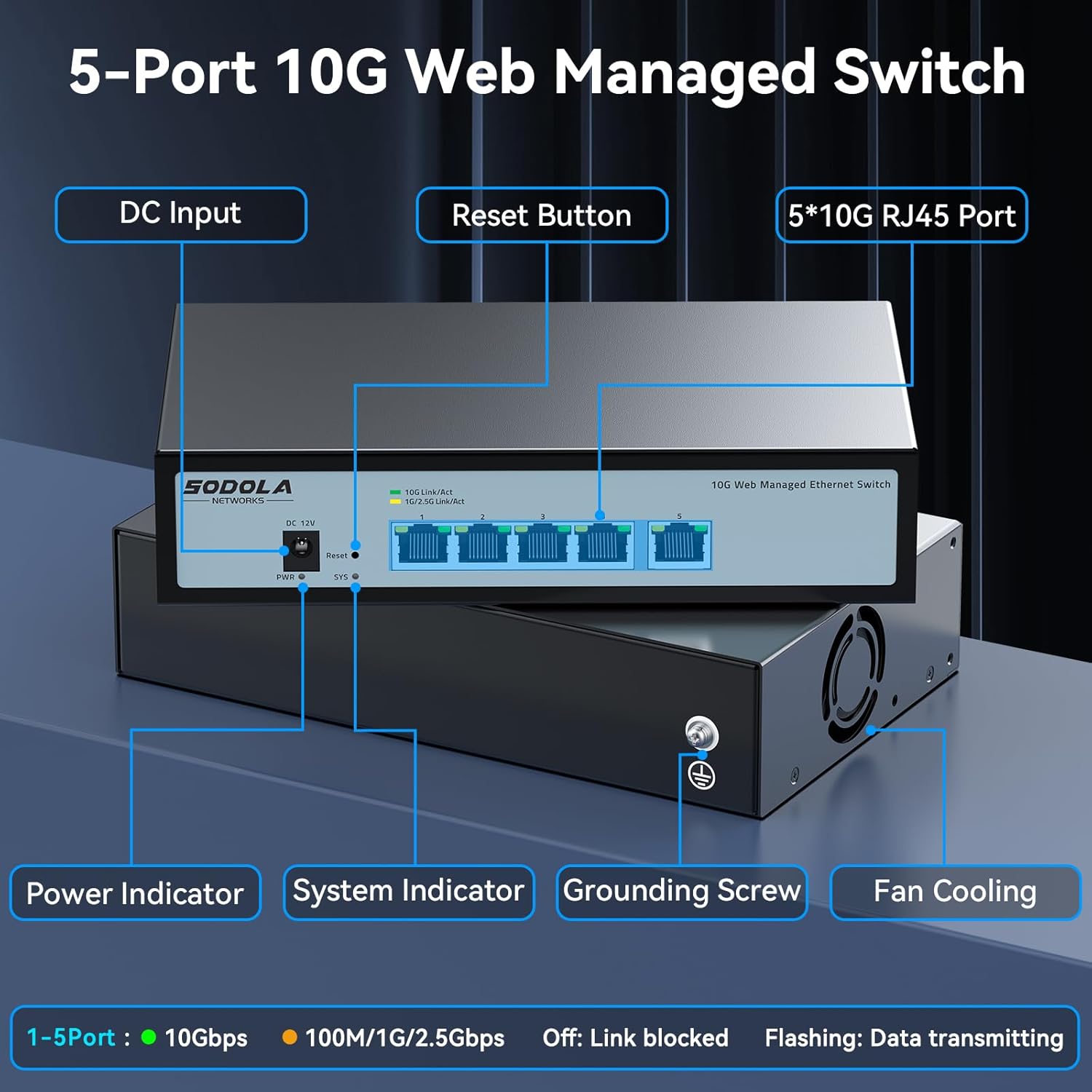
Figure 3: Front panel features include DC Input, Reset Button, 5x10G RJ45 Ports, Power Indicator, and System Indicator. The rear panel includes a Grounding Screw and Fan Cooling.
LED Göstergeleri:
- Güç Göstergesi (PWR): Güç durumunu gösterir.
- System Indicator (SYS): Sistem çalışma durumunu gösterir.
- Link/Act (1-5 Ports):
- Green: 10Gbps link speed.
- Yellow: 100M/1G/2.5Gbps link speed.
- Off: Link blocked.
- Flashing: Data transmitting.
4. Kurulum
4.1 Fiziksel Kurulum
The switch supports both desktop placement and wall mounting. Choose a location that allows for proper ventilation and easy access to ports.

Figure 4: The switch can be placed on a desktop or mounted on a wall for flexible installation.
4.2 Cihazları Bağlama
Connect your network devices (e.g., computers, NAS, routers, access points) to the RJ45 ports on the switch using appropriate Ethernet cables. The ports are adaptive and will automatically negotiate the speed (100M/1G/2.5G/5G/10G).
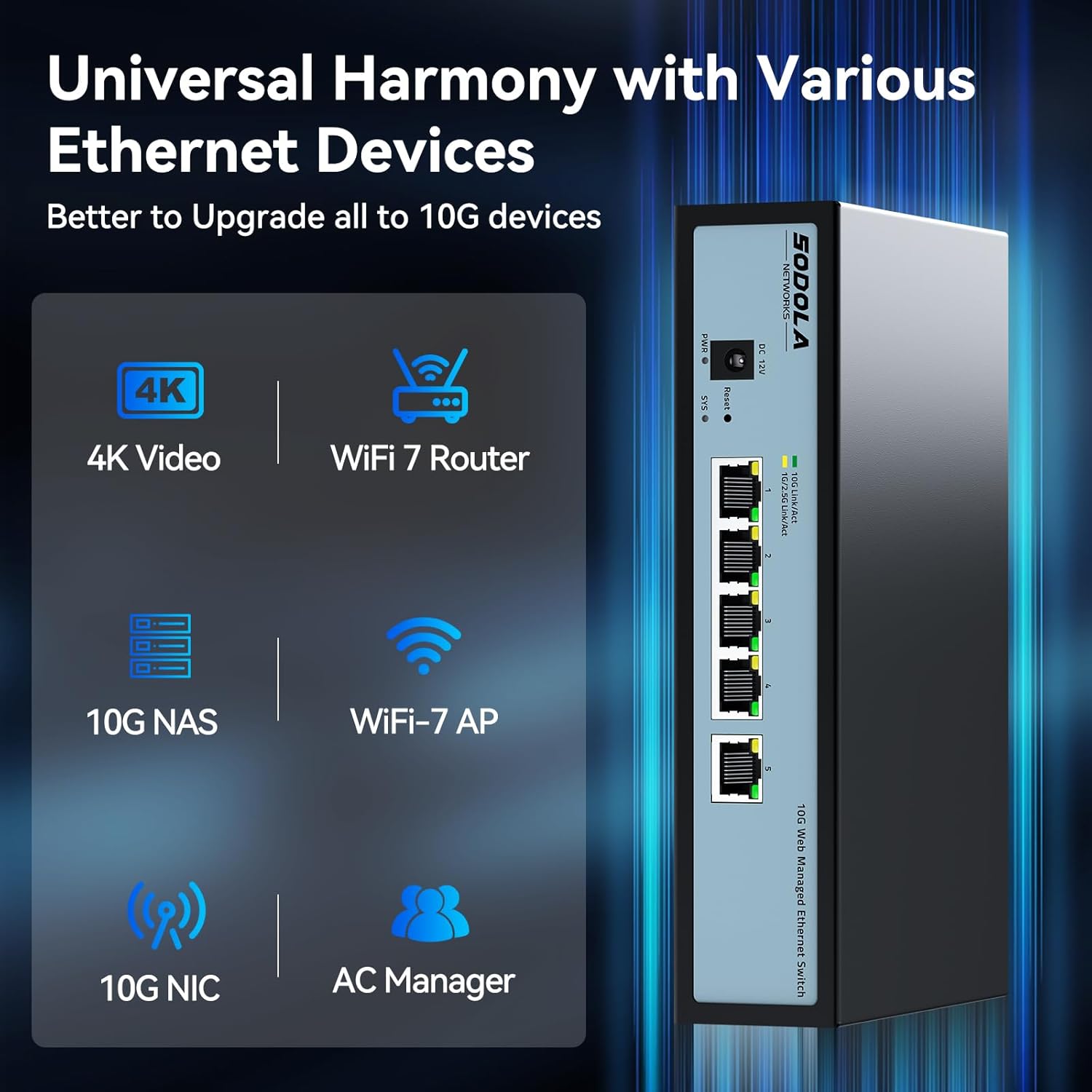
Şekil 5: Ör.ample of connecting devices like 4K Video devices, WiFi 7 Routers, 10G NAS, WiFi-7 APs, 10G NICs, and AC Managers to the switch.
4.3 Başlangıç Web Yönetim Erişimi
Erişim için web yönetim arayüzü:
- Ensure your PC's IP address is in the same subnet as the switch's default IP (e.g., 192.168.2.x).
- Bir tane aç web Tarayıcıyı açın ve varsayılan IP adresine gidin: 192.168.2.1.
- The default User Name is yönetici. There is no default password; leave it blank.
- Click "Login" to access the dashboard.
Not: Please set an IP address via IPv4 first before logging in to this switch.

Figure 6: Steps for Easy Web Managed Method, including adjusting network settings and logging in to 192.168.2.1 with username 'admin' and no password.
Video 1: This video demonstrates the web management interface login process and basic configuration steps for a similar managed switch. It shows how to access the dashboard using the default credentials and navigate through the settings.
5. Anahtarın Çalıştırılması
5.1 Bağlantı Noktası Yapılandırması
The switch ports support auto-negotiation for speed and duplex settings. It is generally recommended to leave ports in auto-negotiation mode for optimal compatibility.
For specific scenarios, such as connecting to 2.5G or 1G SFP+ devices, you may need to manually set the port speed within the web interface. Navigate to the "Switching" section, then "Port Link Config" to adjust settings for individual ports. Select the desired port, choose the appropriate speed (e.g., 2.5G Full, 1G Full), and click "Apply".

Figure 7: Steps to manually switch SFP port speeds (10G/2.5G or 10G/1000M) by logging into the UI and changing parameters.
5.2 Managed Features
The SODOLA switch offers a range of managed features accessible through its web arayüz:
- VLAN Yönetimi: Create and manage Virtual Local Area Networks to segment network traffic.
- Link Aggregation (LACP): Bant genişliğini ve yedekliliği artırmak için birden fazla fiziksel bağlantıyı tek bir mantıksal bağlantıda birleştirin.
- Hizmet Kalitesi (QoS): Kritik uygulamaların yeterli bant genişliğine sahip olmasını sağlamak için ağ trafiğini önceliklendirin.
- IGMP Gözetleme: Optimize multicast traffic delivery to relevant devices.
- DHCP Gözetleme: Enhance network security by filtering untrusted DHCP messages.
- SNMP: Ağ aygıtlarını izleyin ve ağ performansını yönetin.
- Spanning Tree Protocol (RSTP): Ağ döngülerini önleyin ve ağ istikrarını sağlayın.
- Bağlantı Noktası Yansıtma: Bir porttan diğerine paketlerin bir kopyasını göndererek ağ trafiğini izleyin.
- Fırtına Kontrolü: Prevent network disruptions caused by excessive broadcast, multicast, or unknown unicast traffic.
- MAC Adresi Filtreleme: Control network access based on MAC addresses.

Şekil 8: Üzeriview of managed features including VLAN, Link Aggregation, SNMP, DHCP, Port Mirroring, Loopback, ERPS, Multicast, and QoS.
5.3 Yapılandırmayı Kaydetme
After making any changes to the switch configuration, it is crucial to save them to ensure they persist after a reboot. Navigate to the "Maintenance" section, then "Save Configuration". Check the box and click "Apply" to save your settings.

Şekil 9: web interface showing the "Save Config" option under Maintenance, emphasizing the need to save changes after adjusting parameters.
6. Bakım
6.1 Soğutma Sistemi
The switch is equipped with an internal cooling fan to manage heat dissipation, especially during high-power operation. Ensure adequate airflow around the device. If fan noise is a concern, the fan can be removed by opening the casing, though this may affect thermal performance.
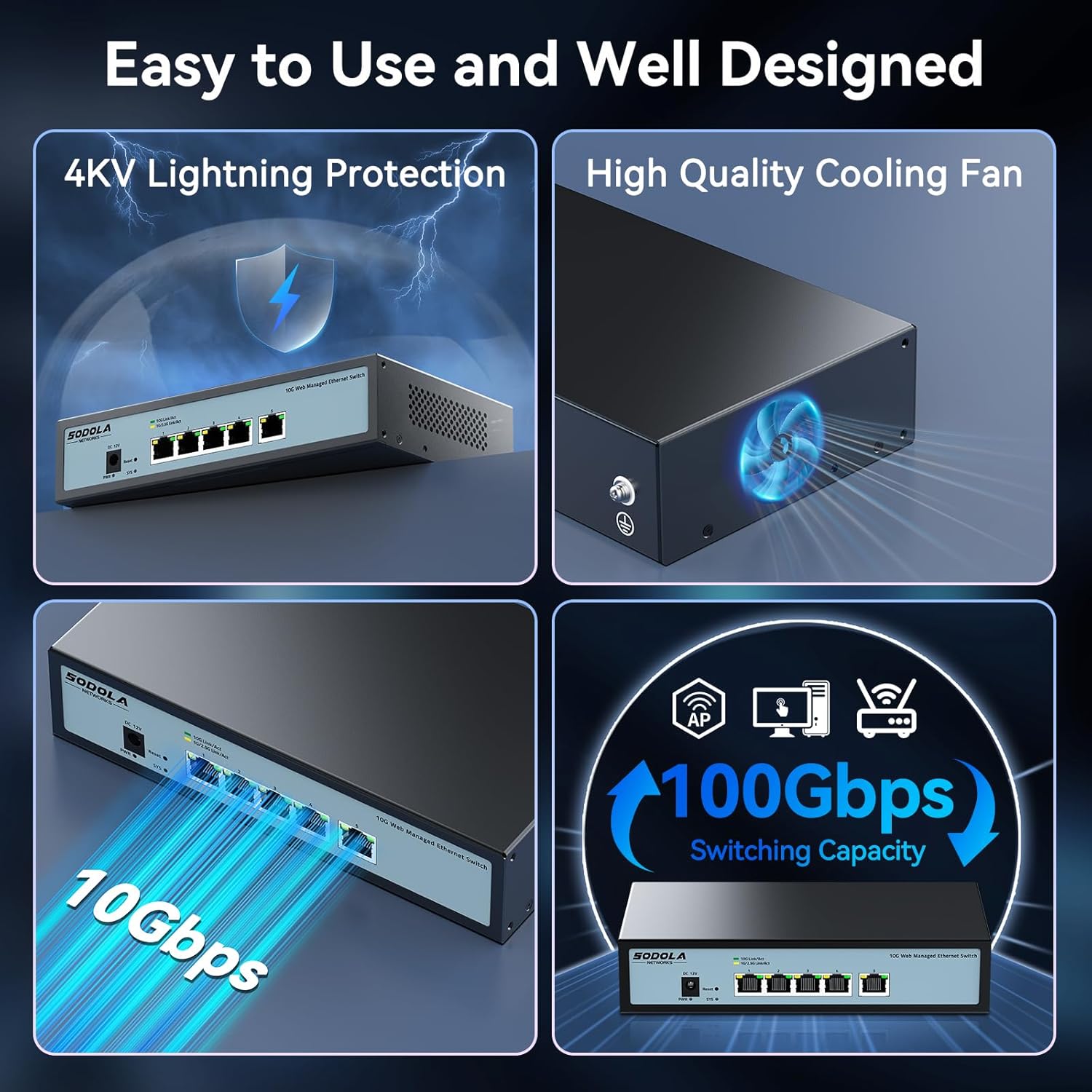
Figure 10: The switch features a high-quality cooling fan for efficient heat dissipation and 4KV lightning protection.
6.2 Sıfırlama Seçenekleri
The web management interface provides options to reset the device:
- Cihazı Yeniden Başlatma: Restarts the switch.
- Fabrika Varsayılanı: Resets all configuration settings to their original factory defaults.
- Şifre Sıfırlama: Resets the management password.
These options are typically found under the "Maintenance" section of the web arayüz.
7. Sorun Giderme
- Bağlantı yok:
- Check if the Ethernet cables are securely connected to both the switch and the connected device.
- Verify the LED indicators for the port. If off, the link is blocked or inactive.
- Bağlı cihazın açık olduğundan ve düzgün çalıştığından emin olun.
- If manually configured, ensure the port speed setting matches the connected device's capability. Forcing speed on RJ45 ports is not recommended and can cause issues.
- Erişilemiyor Web Arayüz:
- Confirm your computer's IP address is in the same subnet as the switch (default: 192.168.2.x).
- Verify the switch's IP address has not been changed from the default 192.168.2.1.
- Try clearing your browser's cache.
- Reboot the switch and try again.
- Yavaş Ağ Hızı:
- Ensure all connected devices and cables support 10G speeds for optimal performance.
- Check the Link/Act LED indicators to confirm the negotiated speed (Green for 10Gbps).
- Verify that auto-negotiation is enabled on ports unless a specific manual speed setting is required for SFP+ connections.
- Fan Gürültüsü:
- The internal fan operates to dissipate heat. If noise is excessive, ensure the switch is in a well-ventilated area.
- The fan can be removed by opening the casing, but this is not recommended as it may lead to overheating and reduced device lifespan.
8. Özellikler
| Marka | Sodola |
| Model Numarası | 5x10G RJ45(Managed) |
| Port Sayısı | 5 |
| Arayüz Türü | RJ45 |
| Veri Aktarım Hızı | Saniyede 10 Gigabit |
| Kasa Malzemesi | Metal |
| Renk | Siyah |
| Ürün Ağırlığı | 2.03 pound |
| Paket Boyutları | 11.97 x 7.68 x 2.44 inç |
| Uyumlu Cihazlar | Desktop, Laptop, Router |
| Üretici | Shenzhen hongyavision Technology Co.,Ltd. |
| İlk Mevcut Tarih | 1 Aralık 2024 |
9. Garanti ve Destek
SODOLA offers a one-year free replacement for any non-human-induced quality issues from the date of purchase. Additionally, lifetime technical support is provided to ensure a positive user experience.
For technical assistance or warranty claims, please contact Sodola Networks customer service through the official channels.


