giriiş
Thank you for choosing the TECKNET Wireless Doorbell TK-WD004. This manual provides detailed instructions for the installation, operation, and maintenance of your new doorbell system. Please read this manual thoroughly before use to ensure proper functionality and safety.
The TECKNET Wireless Doorbell offers a reliable and convenient solution for your home or office. Key features include a long wireless range of up to 400 meters, IP65 waterproof rating for outdoor use, 60 selectable melodies, 5 adjustable volume levels, and RGB indicators for visual alerts.
Paket İçeriği
Lütfen paketi aşağıdaki öğeler açısından kontrol edin:
- 1 x Kablosuz Kapı Zili Vericisi (Basmalı Düğme)
- 1 x Wireless Doorbell Receiver (Chime Unit)
- 1 adet CR2032 Lityum Pil (vericiye önceden takılı)
- Mounting Hardware (screws, anchors, double-sided adhesive tape)
- Kullanıcı Kılavuzu

Image: The package contents, showing the doorbell transmitter, receiver, and installation accessories.
Ürün Bittiview
The TECKNET Wireless Doorbell system consists of two main components: the transmitter (push button) and the receiver (chime unit).
Transmitter (Push Button)
- Butona basınız: Kapı zilinin sesini etkinleştirir.
- LED Göstergesi: Düğmeye basıldığında yanar.
- Pil Bölmesi: CR2032 pilini barındırır.
- Su geçirmez Casing: IP65 rated for outdoor durability.
Receiver (Chime Unit)
- Konuşmacı: Emits the selected melody.
- Ses Düğmesi: Adjusts the chime volume (5 levels, 0-120 dB).
- Melody Selection Button: 60 farklı melodi arasından geçiş yapar.
- Mod Düğmesi: Selects between LED flash, chime, or both.
- RGB Indicator: Provides visual alerts with customizable lighting modes.
- Güç Fişi: Plugs directly into a standard electrical outlet.

Resim: Ayrıntılı view of the doorbell receiver and transmitter, highlighting the RGB indicator, melody selection buttons, volume control, and the push button.
Kurulum ve Yükleme
The TECKNET Wireless Doorbell is designed for easy installation. Follow these steps to set up your doorbell system.
Adım 1: Alıcıyı Takın
- Plug the receiver into a standard electrical outlet in your desired location. Ensure the outlet is easily accessible and within the wireless range of the transmitter.
- Alıcı pil gerektirmez.
Step 2: Install the Transmitter (Push Button)
Verici, yapışkan bant veya vidalar kullanılarak monte edilebilir.
Seçenek A: Yapıştırıcı ile Montaj
- Clean the mounting surface thoroughly to ensure it is dry and free of dust or grease.
- Peel off one side of the double-sided adhesive tape and apply it firmly to the back of the transmitter.
- Peel off the other side of the tape and press the transmitter firmly onto the desired location (e.g., door frame or wall). Hold for at least 30 seconds.
Seçenek B: Vidalı Montaj
- Vericiyi açınasing harfini dikkatlice okuyun.
- Mark the positions for the screw holes on your desired mounting surface.
- Gerekirse pilot delikler açın ve duvar dübellerini yerleştirin.
- Secure the transmitter base to the wall using the provided screws.
- Reattach the transmitter casing.

Resim: Zil vericisinin yapışkan bant veya vidalar kullanılarak takılmasına ilişkin görsel kılavuz.
Note: The transmitter comes with a pre-installed CR2032 lithium battery, offering a lifespan of up to 3 years.
Kullanım Talimatları
1. Değişen Melodiler
- Press the "Melody Selection" button on the receiver to cycle through the 60 available melodies.
- Once you hear your desired melody, stop pressing the button. The receiver will automatically save your selection.

Image: The doorbell receiver displaying musical notes, illustrating the selection of 60 different melodies.
2. Sesi Ayarlama
- Press the "Volume" button on the receiver to adjust the sound level.
- There are 5 adjustable volume levels, ranging from 0 dB (mute) to 120 dB.
- The mute mode (0 dB) is useful for quiet environments or when visual alerts are preferred.
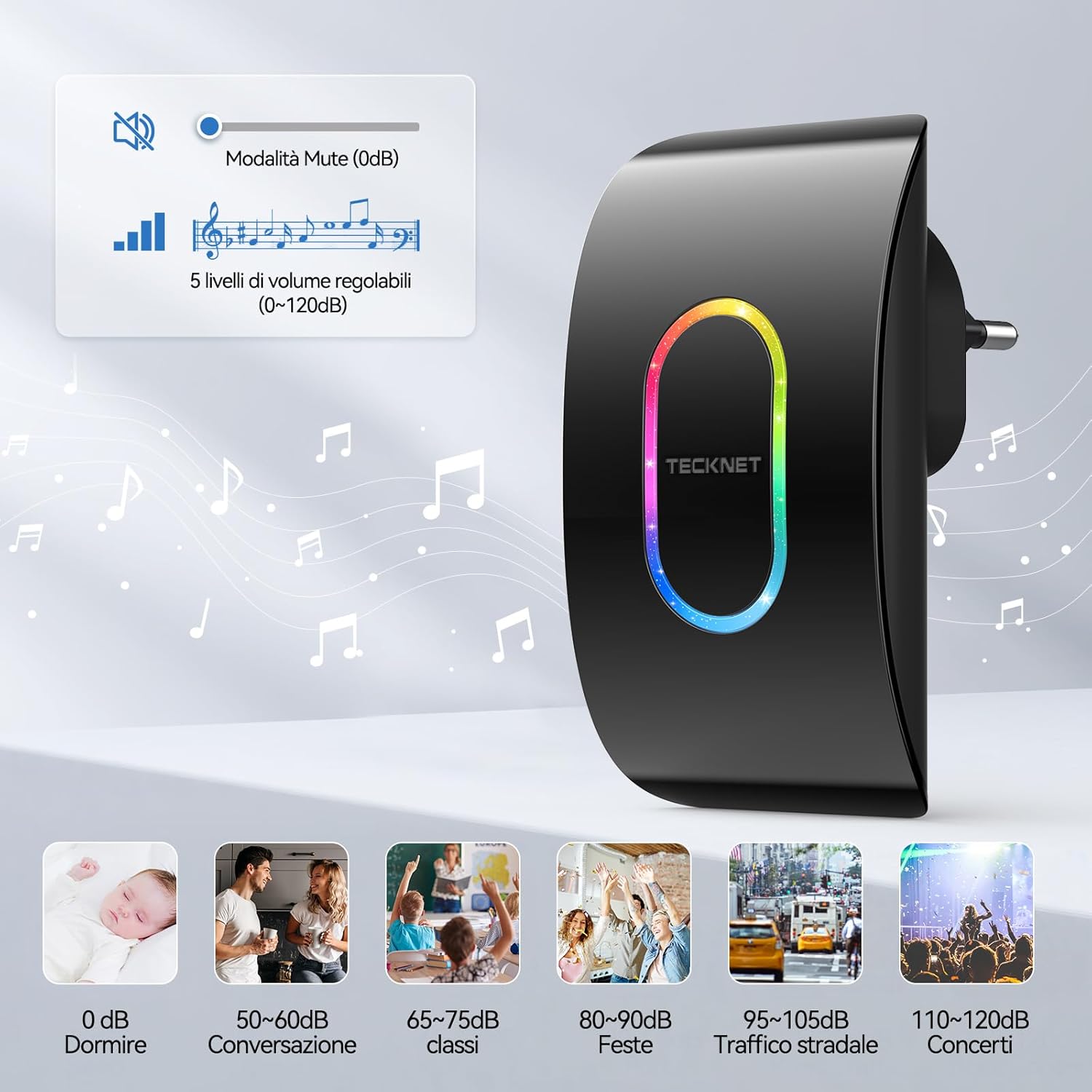
Image: A visual representation of the 5 volume levels, from silent (0 dB) to loud (120 dB), with corresponding typical sound environments.

Image: The doorbell receiver in silent mode, ideal for environments like a baby's room.
3. Selecting Lighting Modes (RGB Indicators)
- Press the "Mode" button on the receiver to switch between different notification modes.
- Available modes typically include:
- LED and Chime: Both sound and visual alert.
- Only LED: Visual alert only (silent mode).
- Only Chime: Sound alert only (no LED flash).
- The RGB indicator also offers various flash patterns such as "Ghost Flash", "Marching Flash", and "Breathing Flash" for visual distinction.

Image: Illustration of the three distinct RGB flash modes: Ghost Flash, Marching Flash, and Breathing Flash, providing visual cues for doorbell activation.

Image: The doorbell receiver's side view with labeled buttons for mode, melody, and volume, alongside visual examples of the three working modes: LED and chime, LED only, and chime only.
4. Hafıza İşlevi
The doorbell receiver features a memory function that retains your last selected melody and volume level even after a power outage or if unplugged.

Image: A graphic illustrating the doorbell's memory function, which saves your preferred melody and volume settings.
Bakım
Pil Değişimi (Verici)
The transmitter uses a CR2032 lithium battery with an estimated lifespan of up to 3 years. When the transmitter's LED indicator no longer lights up or the range decreases significantly, it's time to replace the battery.
- Vericiyi dikkatlice açın.asing.
- Eski CR2032 pili çıkarın.
- Yeni bir CR2032 pili pozitif (+) tarafı yukarı bakacak şekilde takın.
- c'yi kapatasing güvenli bir şekilde.
Temizlik
Wipe the doorbell units with a soft, dry cloth. Do not use abrasive cleaners or solvents, as these may damage the surface or internal components.
Hava Direnci
The transmitter is IP65 rated, meaning it is protected against dust ingress and low-pressure water jets from any direction. It is designed to withstand various weather conditions, including temperatures from -20°C (-4°F) to 60°C (140°F).

Image: The doorbell transmitter demonstrating its IP65 waterproof and dustproof capabilities, along with its operational temperature range.
Sorun giderme
| Sorun | Olası Neden | Çözüm |
|---|---|---|
| Kapı zili çalmıyor. |
|
|
| Kısa kablosuz menzili. |
|
|
| Chime sounds intermittently. |
|
|
Özellikler
| Özellik | Detay |
|---|---|
| Model Numarası | TK-WD004 |
| kablosuz Menzil | 400 metreye (1300 feet) kadar |
| Melodiler | 60 seçilebilir zil sesi |
| Ses Seviyeleri | 5 ayarlanabilir seviye (0 dB ila 120 dB) |
| Su Geçirmezlik Derecesi (Verici) | IP65 |
| Çalışma Sıcaklığı | -20°C ila 60°C (-4°F ila 140°F) |
| Verici Pil | 1 adet CR2032 Lityum Pil (dahil) |
| Alıcı Gücü | AC powered (plugs into outlet) |
| Ürün Boyutları | Receiver: 8.7 x 7.5 x 11.2 cm; Transmitter: 5.8 x 4.1 x 7.5 cm (approximate, based on image) |
| Ağırlık | 160 gram (toplam paket ağırlığı) |

Image: Visual representation of the dimensions for both the receiver and the transmitter units.
Garanti ve Destek
TECKNET provides a 36-month support period for this product. If you encounter any issues during the use of the product, please contact the professional TECKNET customer service team for assistance.
For further support or warranty claims, please refer to the contact information provided on the TECKNET official website veya satın alma belgeleriniz.


