1. Giriş
This user manual provides comprehensive instructions for the setup, operation, maintenance, and troubleshooting of your Thomson 27-inch QHD Gaming Monitor (Model: M27QG5Y14). This monitor is designed to deliver a superior visual experience with its QHD resolution, 180Hz refresh rate, and IPS panel technology, making it ideal for gaming and multimedia applications.

Resim 1.1: Ön view of the Thomson 27-inch QHD Gaming Monitor, showcasing its sleek design and display area.
2. Güvenlik Bilgileri
Monitörü kullanmadan önce lütfen tüm güvenlik talimatlarını dikkatlice okuyun. Bu kılavuzu ileride başvurmak üzere saklayın.
- Güç Kaynağı: Yalnızca monitörle birlikte verilen güç adaptörünü kullanın. Elektrik prizinin doğru şekilde topraklanmış olduğundan emin olun.
- Havalandırma: Havalandırma açıklıklarını kapatmayın. Aşırı ısınmayı önlemek için monitörün etrafında yeterli hava akışı sağlayacak boşluk bırakın.
- Sıvı ve Nem: Monitörü sudan, yağmurdan veya aşırı nemden uzak tutun. Sıvı dolu nesneleri monitörün üzerine koymayın.
- Temizlik: Disconnect the power cable before cleaning. Use a soft, dry cloth. Do not use liquid cleaners or aerosol cleaners.
- Atama: Monitörü sabit, düz bir yüzeye yerleştirin. Doğrudan güneş ışığına veya ısı kaynaklarının yakınına koymaktan kaçının.
- İşleme: Monitörü dikkatli kullanın. Düşürmekten veya şiddetli darbelere maruz bırakmaktan kaçının.
- Servis: Monitörün bakımını kendiniz yapmaya çalışmayın. Tüm bakım işlemlerini yetkili servis personeline yaptırın.
3. Paket İçeriği
Paketin içindeki tüm ürünlerin eksiksiz olduğundan emin olun. Herhangi bir ürün eksik veya hasarlıysa, satıcınızla iletişime geçin.
- Thomson 27-inch QHD Gaming Monitor
- Monitör Standı (Taban ve Boyun)
- Güç Adaptörü ve Güç Kablosu
- HDMI Kablosu
- DisplayPort (DP) Cable (may vary by region)
- USB-B - USB-A Kablosu (USB hub işlevi için)
- Kullanım Kılavuzu (bu belge)
- Stand montajı için vidalar
4. Kurulum
4.1. Monitör Standının Montajı
- Monitörü ambalajından dikkatlice çıkarın ve çizilmeleri önlemek için yumuşak ve temiz bir yüzeye yüzü aşağı bakacak şekilde yerleştirin.
- Verilen vidaları kullanarak stand boynunu monitör paneline takın.
- Attach the stand base to the stand neck and secure it with the designated screw.
- Once assembled, carefully lift the monitor and place it on a stable desk or table.

Image 4.1: Monitor dimensions and stand assembly overview. The monitor measures approximately 61 cm wide, 54 cm high (with stand), and 24 cm deep (with stand).
4.2. Monitörün Bağlanması
Connect the necessary cables to the monitor's input ports. Refer to the image below for port locations.
- Güç Bağlantısı: Connect the power adapter to the "DC IN" port on the monitor, then plug the power cable into a power outlet.
- Video Girişi:
- Connect an HDMI cable from your computer's graphics card to an "HDMI 2.1" port on the monitor.
- Alternatively, connect a DisplayPort (DP) cable from your computer's graphics card to a "DP 1.2" port on the monitor.
- USB Hub'ı: To enable the monitor's USB 3.0 ports, connect a USB-B cable from the "USB 3.0 B" port on the monitor to a USB-A port on your computer.
- Ses Çıkışı: Connect headphones or external speakers to the "Earphone Plug" (3.5mm audio jack) for audio output.

Image 4.2: Rear panel of the monitor displaying the various input and output ports for connectivity.
4.3. Ergonomik Ayarlamalar
Monitör standı, monitörünüzü en iyi şekilde kullanmanız için çeşitli ayarlamalara olanak tanır. viewkonfor:
- Tilt: Adjust the screen's vertical angle (up or down).
- Döner: Ekranı yatay olarak döndürün (sola veya sağa).
- Pivot: Dikey mod için ekranı 90 derece döndürün. viewIng.
- Yükseklik Ayarı: Monitörü tercih ettiğiniz göz seviyesine yükseltin veya alçaltın.
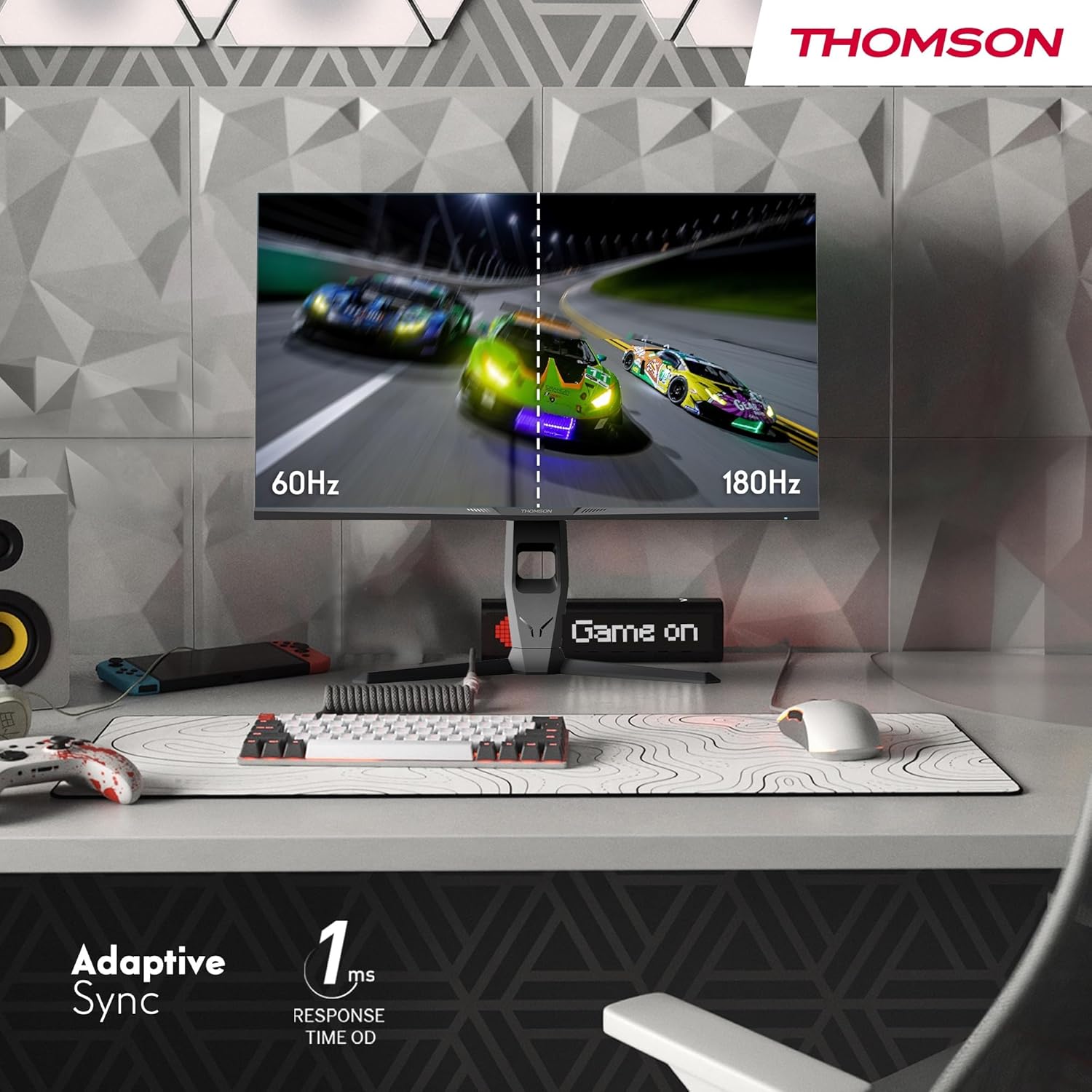
Image 4.3: Demonstrations of the monitor's ergonomic capabilities, including tilt, swivel, and pivot for optimal viewaçıları.
4.4. VESA Montajı
The monitor is compatible with VESA 100x100mm mounting standards. To mount the monitor on a wall or an alternative stand, remove the original stand and attach the VESA-compatible mount (sold separately) using appropriate screws.
5. Kullanım Talimatları
5.1. Güç Açma/Kapatma
Monitörü açmak veya kapatmak için genellikle monitörün arkasında veya altında bulunan güç düğmesine basın. Monitör açık olduğunda güç gösterge ışığı yanacaktır.
5.2. Ekran Üstü Görüntüleme (OSD) Menüsü
OSD menüsü, çeşitli monitör ayarlarını yapmanıza olanak tanır. Menüde gezinmek için joystick'i veya monitör üzerindeki düğmeleri (konumları değişebilir) kullanın.
- Resim Ayarları: Parlaklığı, kontrastı, keskinliği, renk sıcaklığını ve gama değerini ayarlayın.
- Renk ayarları: Fine-tune RGB levels, saturation, and hue.
- Giriş Seçimi: HDMI ve DisplayPort girişleri arasında manuel geçiş yapın.
- Ses: Adjust volume for built-in speakers or headphone output.
- OSD Ayarları: OSD dilini, şeffaflığını ve zaman aşımını değiştirin.
- Oyun Ayarları: Access features like Adaptive Sync, response time (OD), and crosshair overlays.
5.3. Oyun Özellikleri
- 180Hz Yenileme Hızı: Provides smoother motion and reduced input lag, especially beneficial for fast-paced games. Ensure your graphics card and cable support this refresh rate.
- 1ms Response Time (OD): Minimizes motion blur and ghosting for clear, crisp images during rapid movements.
- Uyarlanabilir Senkronizasyon: Synchronizes the monitor's refresh rate with your graphics card's frame rate, eliminating screen tearing and stuttering. Enable this feature in the OSD menu and your graphics card control panel.

Image 5.1: Visual comparison illustrating the difference between 60Hz and 180Hz refresh rates, highlighting the smoother motion provided by the higher refresh rate, alongside the Adaptive Sync feature.
5.4. Göz Bakımı Özellikleri
- Titreşim Önleyici Teknoloji: Reduces screen flickering, which can cause eye strain during prolonged use.
- Düşük Mavi Işık Modu: Filters out harmful blue light emissions to protect your eyes and reduce fatigue. This mode can be activated through the OSD menu.
- Yansıma Önleyici Ekran: The matte screen surface minimizes reflections from ambient light, providing clear visuals without distraction.

Image 5.2: Depiction of the monitor's eye comfort features, including an anti-glare screen and technologies like Anti-Flicker and Low Blue Light for reduced eye strain.
5.5. RGB Ambient Lighting
The monitor features integrated RGB ambient lighting on the rear. This lighting can be customized via the OSD menu to enhance your gaming environment or match your setup's aesthetics.
6. Bakım
6.1. Monitörün Temizlenmesi
- Ekran: Ekranı yumuşak, tiftiksiz bir bezle nazikçe silin. İnatçı lekeler için hafifçe silin.ampen the cloth with water or a specialized screen cleaner (ensure it's safe for LCD/IPS panels) and wipe gently. Never spray liquid directly onto the screen.
- Casing: Monitörü silmek için yumuşak, kuru bir bez kullanın.asing. Aşındırıcı temizleyiciler veya çözücüler kullanmaktan kaçının.
- Temizliğe başlamadan önce mutlaka güç kablosunu çıkarın.
6.2. Depolama
Monitörü uzun süre saklayacaksanız, tüm kabloları çıkarın, orijinal ambalajına (mümkünse) koyun ve doğrudan güneş ışığından ve aşırı sıcaklıklardan uzakta, serin ve kuru bir yerde saklayın.
7. Sorun Giderme
Bu bölümde karşılaşabileceğiniz yaygın sorunlar ele alınmaktadır. Sorun devam ederse, müşteri desteğiyle iletişime geçin.
| Sorun | Olası Neden | Çözüm |
|---|---|---|
| Güç yok | Güç kablosu bağlı değil; Elektrik prizi arızalı; Monitör kapalı. | Ensure power cable is securely connected. Test the power outlet. Press the monitor's power button. |
| Sinyal yok / Boş ekran | Video cable not connected; Incorrect input selected; Computer not outputting signal. | Check HDMI/DP cable connections. Select the correct input source via OSD. Ensure computer is on and outputting video. |
| Distorted image / Flickering | Incorrect resolution/refresh rate; Faulty cable; Graphics driver issue. | Set display resolution to 2560x1440 and refresh rate to 180Hz. Try a different video cable. Update graphics drivers. |
| Hoparlörlerden/kulaklıklardan ses gelmiyor. | Ses seviyesi çok düşük; Ses kablosu bağlı değil; Bilgisayarda yanlış ses çıkışı seçilmiş. | Increase monitor volume via OSD. Ensure headphones/speakers are connected. Select monitor as audio output device in PC settings. |
8. Özellikler
Detailed technical specifications for the Thomson M27QG5Y14 monitor.
| Özellik | Şartname |
|---|---|
| Marka | Thomson |
| Örnek | M27QG5Y14 |
| Ekran Boyutu | 27 inç |
| Panel Tipi | IPS |
| Çözünürlük | 2560x1440 (Çözünürlük Yüksek) |
| Yenileme Hızı | 180 Hz |
| Tepki Süresi | 1 Millisecond (OD) / 5 Milliseconds (GtG) |
| Parlaklık | 350 Nit |
| Kontrast Oranı | 1200:1 |
| ViewAçı | 178 Derece (Yatay/Dikey) |
| Renk Gamı | %120 sRGB |
| HDR Desteği | HDR10 (10-bit) |
| Uyarlanabilir Senkronizasyon | Evet |
| Bağlantı | 2x HDMI 2.1, 1x DisplayPort 1.2, 1x USB 3.0 Type-B (upstream), 3x USB 3.0 Type-A (downstream), 1x Earphone Plug (3.5mm) |
| Dahili Hoparlörler | Evet (2x2W) |
| VESA Montaj Uyumluluğu | 100x100mm |
| Ürün Boyutları (standlı) | 61 x 54 x 24 cm (G x Y x D) |
| Ağırlık (stand ile) | 7.3 kilo |
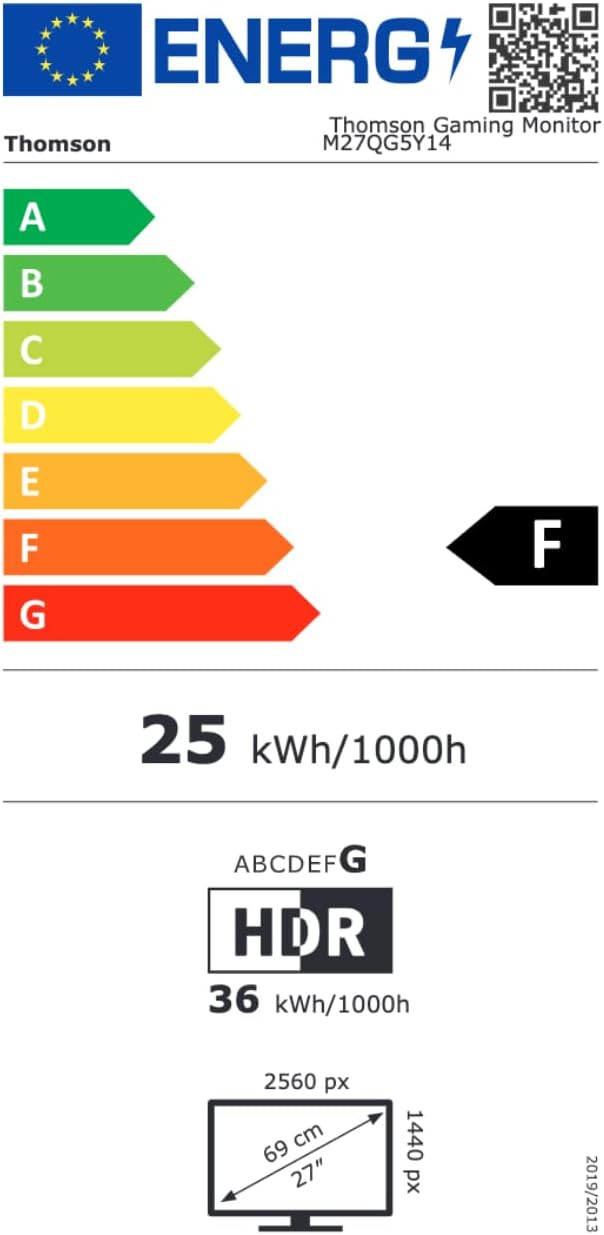
Image 8.1: EU Energy Label for the Thomson M27QG5Y14 monitor. For more details, visit the EPREL veritabanı.
9. Garanti ve Destek
Thomson products are designed for reliability and performance. This monitor typically comes with a 3 yıllık garanti Satın alma tarihinden itibaren üretim hatalarını da kapsayan garanti kapsamındadır. Lütfen garanti talepleriniz için satın alma belgenizi saklayın.
For technical assistance, troubleshooting beyond this manual, or warranty inquiries, please contact Thomson customer support or your local retailer. Refer to the official Thomson website or your product packaging for specific contact details.
You can also visit the official Thomson store on Amazon for more information: Thomson Store.


