1. Giriş
This manual provides essential information for the operation and maintenance of your HOTWAV R8 Rugged Tablet. The HOTWAV R8 is designed for durability and performance, featuring a 10.1-inch HD+ display, Android 14 operating system, 12GB RAM, 128GB internal storage (expandable up to 1TB), a 10800mAh battery, and IP68/IP69K ratings for water and dust resistance. It is equipped with a Unisoc T606 Octa-Core processor, 4G Dual SIM support, 5G WiFi, Face ID, and OTG functionality.
Cihazın düzgün çalışması ve uzun ömürlü olması için lütfen kullanmadan önce bu kılavuzu dikkatlice okuyun.

Resim 1.1: Ön ve arka view of the HOTWAV R8 Rugged Tablet, showcasinSağlam tasarımı ve ekranıyla dikkat çekiyor.
2. Paket İçeriği
Paketin içinde tüm öğelerin mevcut olduğundan emin olun:
- 1x HOTWAV R8 Rugged Tablet
- 1x User Manual/Warranty Card
- 1x Şarj Cihazı
- 1x USB Type-C Kablosu
- 1x OTG Cable
- 1x Explosion-proof Film (Screen Protector)

Image 2.1: All items included in the HOTWAV R8 Tablet package, laid out on a wooden surface.
3. İlk Kurulum
3.1. Tableti Şarj Etme
Before first use, fully charge the tablet using the provided charger and USB Type-C cable. Connect the USB cable to the tablet's charging port and the charger to a power outlet. The charging indicator will show the charging status.
3.2. SIM Kart ve MicroSD Kart Takma
The HOTWAV R8 supports Dual SIM cards and a MicroSD card for expanded storage (up to 1TB). Locate the SIM card tray on the side of the tablet. Use the provided SIM ejector tool (if applicable, otherwise carefully open the tray) to open the tray. Insert your SIM cards and MicroSD card into the designated slots, ensuring correct orientation. Close the tray securely.

Image 3.1: Illustration of inserting SIM cards and a MicroSD card into the tablet's tray.
3.3. Açma/Kapama
- Açmak İçin: Press and hold the Power button until the HOTWAV logo appears.
- Kapatmak İçin: Güç tuşuna basılı tutun, ardından ekrandaki seçeneklerden "Kapat" seçeneğini seçin.
- Yeniden başlatmak: Güç tuşuna basılı tutun, ardından seçeneklerden "Yeniden Başlat"ı seçin.
4. Kullanım Talimatları
4.1. Görüntüleme ve Gezinme
The tablet features a 10.1-inch HD+ display with 800 x 1200 pixels resolution. Navigate the Android 14 interface using touch gestures: tap, swipe, pinch-to-zoom. The display supports glove mode for operation in various conditions.

Image 4.1: The HOTWAV R8 tablet displaying the Android 14 operating system interface.
4.2. Performans ve Depolama
Powered by a Unisoc T606 Octa-Core processor and 12GB RAM (4GB physical + 8GB virtual), the tablet handles multitasking efficiently. It comes with 128GB of internal storage, expandable up to 1TB via a MicroSD card.

Image 4.2: Diagram illustrating the Unisoc T606 Octa-Core processor, 12GB RAM, and 128GB ROM (expandable to 1TB).
4.3. Kamera Fonksiyonları
The tablet is equipped with a 13MP rear camera and a 5MP front camera. Open the Camera application to capture photos and videos. Various modes and settings are available within the app.

Image 4.3: Visual representation of the 13MP rear camera and 5MP front camera on the HOTWAV R8 tablet.
4.4. Bağlantı
- 4G Çift SIM: Supports 4G LTE connectivity for mobile data and calls. Note: Not compatible with AT&T.
- 5G Wi-Fi: Connect to wireless networks using 2.4GHz and 5GHz Wi-Fi bands.
- Bluetooth 5.1: Pair with Bluetooth accessories such as headphones and speakers.
- KÜRESEL KONUMLAMA SİSTEMİ: Integrated Beidou, Galileo, Glonass, and GPS for accurate navigation.

Image 4.4: The HOTWAV R8 tablet displaying a GPS map, highlighting its navigation capabilities.
4.5. Battery and OTG Functionality
The 10800mAh battery provides extended usage time. The tablet also supports OTG (On-The-Go) reverse charging, allowing it to act as a power bank to charge other devices using the provided OTG cable.

Image 4.5: Diagram illustrating the large 10800mAh battery capacity of the HOTWAV R8 tablet.

Image 4.6: The HOTWAV R8 tablet demonstrating its OTG reverse charging capability, charging a smartphone.
5. Bakım ve Dayanıklılık
The HOTWAV R8 is built to withstand challenging environments, featuring IP68/IP69K water and dust resistance and MIL-STD-810H compliance for drop protection.
- Suya Dayanıklılık: The tablet can be submerged in up to 2 meters of water for at least 30 minutes. Ensure all ports are securely sealed before exposure to water.
- Toz Direnci: Cihaz toz girişine karşı korumalıdır.
- Düşme Koruması: 1.2 metreye kadar yükseklikten düşmeye dayanıklı olarak tasarlanmıştır.
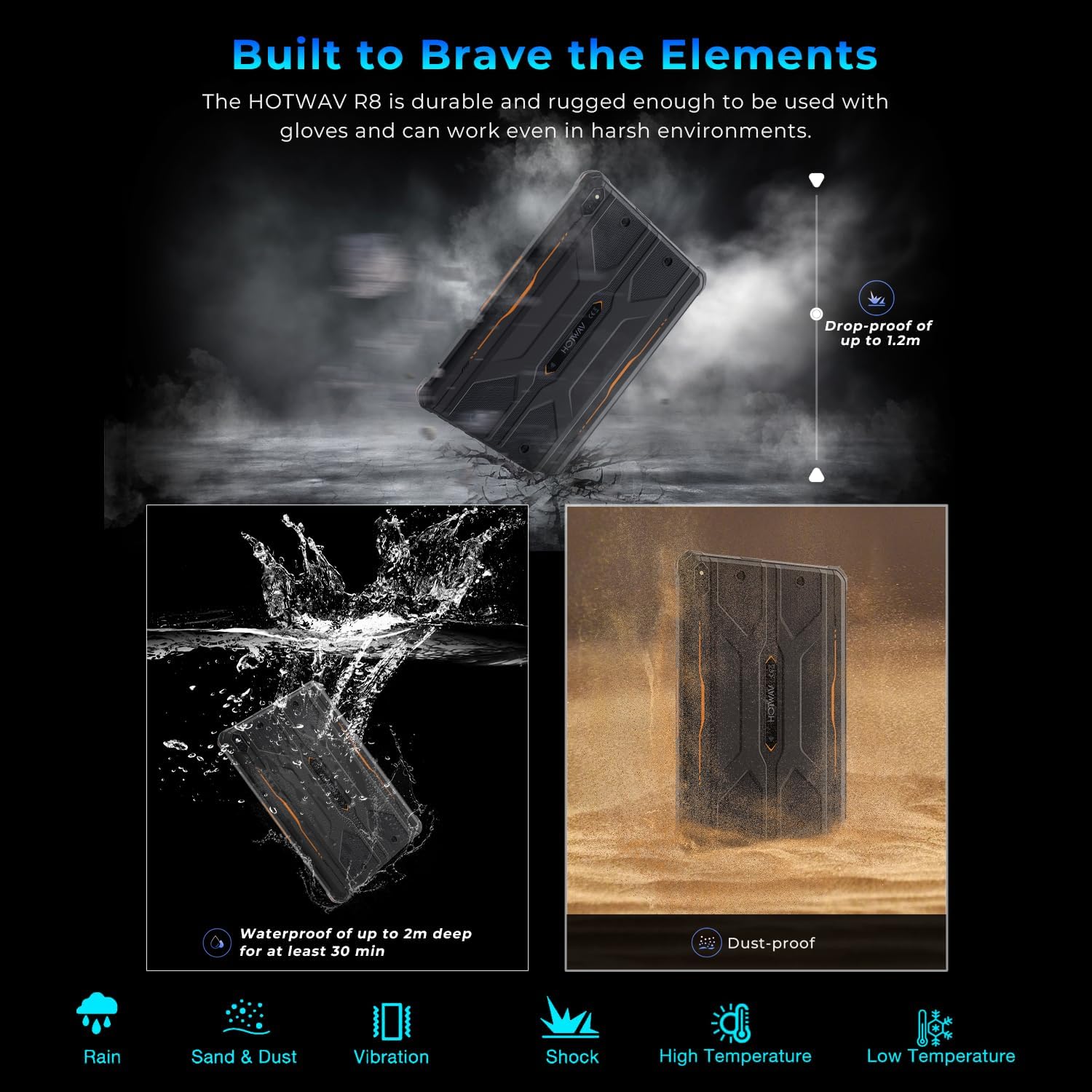
Image 5.1: Visual representation of the HOTWAV R8 tablet's resistance to drops, water immersion, and dust.
5.1. Temizlik
Yumuşak bir d kullanınamp cloth to clean the tablet's surface. Avoid harsh chemicals or abrasive materials that could damage the device or its protective coatings.
5.2. Depolama
Store the tablet in a cool, dry place away from direct sunlight and extreme temperatures when not in use for extended periods.
6. Sorun Giderme
6.1. Cihaz Açılmıyor
- Pilinin dolu olduğundan emin olun. Tableti en az 30 dakika şarj cihazına bağlayın.
- Zorunlu yeniden başlatma işlemi için Güç düğmesini 10-15 saniye basılı tutun.
6.2. Zayıf Ağ Bağlantısı
- SIM kartların doğru takılıp etkinleştirildiğini kontrol edin.
- Verify Wi-Fi connection settings and router functionality.
- Restart the tablet and try connecting again.
6.3. Dokunmatik Ekran Tepki Vermiyor
- Tableti yeniden başlatın.
- Ekranın temiz olduğundan ve toz veya aşırı nemden arındırılmış olduğundan emin olun.
6.4. Pilin Hızlı Bitmesi
- Ekran parlaklığını azaltın.
- Arka planda çalışan kullanılmayan uygulamaları kapatın.
- Kullanmadığınız zaman Wi-Fi, Bluetooth veya GPS'i devre dışı bırakın.
7. Özellikler
| Özellik | Detay |
|---|---|
| Model Adı | R8 |
| İşletim Sistemi | Android 14 |
| Ekran Boyutu | 10.1 inç |
| Ekran Çözünürlüğü | 800 x 1200 piksel |
| İşlemci | Unisoc T606 Sekiz Çekirdekli |
| Veri deposu | 12GB (4GB fiziksel + 8GB sanal) |
| Dahili Depolama | 128 GB |
| Genişletilebilir Depolama | MicroSD kart ile 1 TB'a kadar |
| Arka Kamera | 13 MP |
| Ön Kamera | 5 MP |
| Pil Kapasitesi | 10800mAh |
| Kablosuz Tip | 802.11ax (5G WiFi), Bluetooth 5.1 |
| Hücresel Bağlantı | 4G Dual SIM (Note: Not compatible with AT&T) |
| Navigasyon | Beidou, Galileo, Glonass, GPS |
| Dayanıklılık Derecelendirmeleri | IP68, IP69K, MIL-STD-810H |
| Ürün Ağırlığı | 2.72 pound (yaklaşık 1.23 kg) |
| Ürün Boyutları | 9.9 x 6.6 x 0.6 inç (yaklaşık 25.1 x 16.8 x 1.5 cm) |
8. Garanti ve Destek
The HOTWAV R8 Rugged Tablet typically comes with a manufacturer's warranty. Please refer to the included Warranty Card in your package for specific terms and conditions. For technical support or warranty claims, please contact HOTWAV customer service.
- Müşteri Hizmetleri: Refer to the contact information provided on the Warranty Card or the official HOTWAV webalan.
- Koruma Planları: Ek koruma planları ayrıca satın alınabilir.
- İade: Standard return policies apply. Please check with your retailer for details.

Image 8.1: HOTWAV customer support shield logo, indicating 24-hour customer service, 30-day return policy, and 2-year warranty.


