giriiş
This manual provides detailed instructions for the setup, operation, and maintenance of your ATTACK SHARK L80 Wireless Gaming Headset. Please read this manual thoroughly before using the product to ensure proper function and longevity.
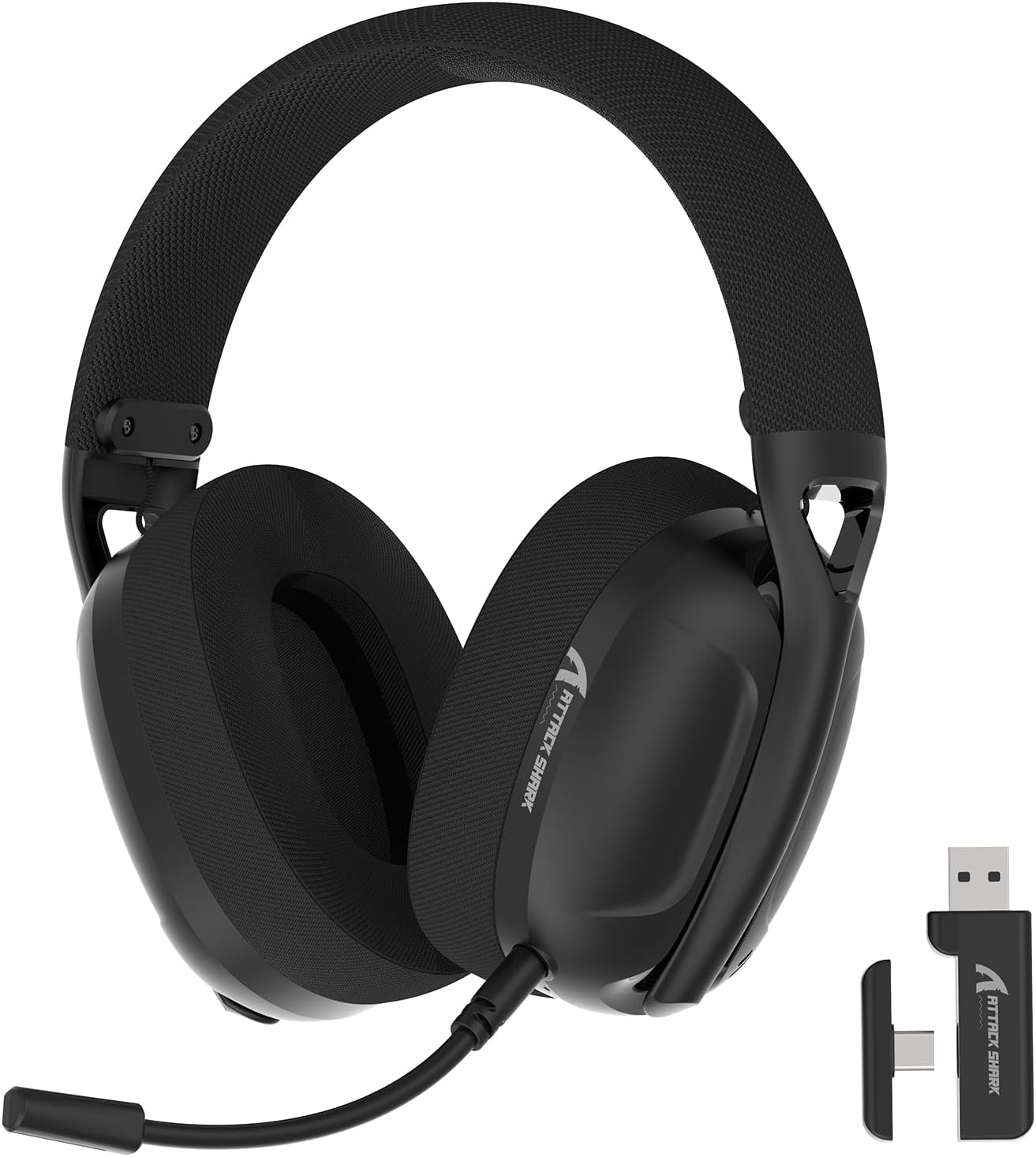
Image: The ATTACK SHARK L80 Wireless Gaming Headset, featuring over-ear cups, a flexible microphone, and a USB dongle.
Paket İçeriği
Ürün paketinizde tüm öğelerin mevcut olduğunu doğrulayın:
- ATTACK SHARK L80 Wireless Gaming Headset
- Çıkarılabilir Çok Yönlü Mikrofon
- 2.4GHz USB Wireless Dongle (USB-A)
- USB-C - USB-A Şarj Kablosu
- 3.5 mm Ses Kablosu
- Kullanım Kılavuzu (bu belge)

Image: All components included in the ATTACK SHARK L80 headset package: headset, detachable microphone, 2.4GHz USB dongle, USB-C charging cable, and 3.5mm audio cable.
Ürün Bittiview
Headset Controls and Ports
Familiarize yourself with the headset's controls and connection points:

Image: Close-up of the ATTACK SHARK L80 headset's left earcup, showing the power button, mode switch button, volume up/previous track button, volume down/next track button, and microphone mute button.
- Güç Düğmesi: Press and hold for 3 seconds to power ON/OFF. Short press to answer/end calls or play/pause media.
- Mod Değiştirme Düğmesi: Short press 3 times in succession to switch between Bluetooth and 2.4G wireless modes.
- Volume Up / Previous Song: Short press for Volume+, Long press for Previous Song.
- Volume Down / Next Song: Short press for Volume-, Long press for Next Song.
- Mikrofon Sessiz Düğmesi: Short press to toggle microphone ON/OFF.
- Mikrofon Bağlantı Noktası: Çıkarılabilir mikrofonu bağlamak için.
- 3.5 mm Ses Jakı: Kablolu bağlantı için.
- USB-C Şarj Portu: Kulaklığı şarj etmek için.
- Gösterge Işığı: Bağlantı durumunu ve pil seviyesini gösterir.
Çıkarılabilir Mikrofon
The L80 headset features a detachable, omni-directional microphone with noise reduction capabilities. It can be adjusted 360 degrees for optimal positioning.

Image: The ATTACK SHARK L80 headset with its detachable, 360-degree adjustable, noise-cancelling microphone attached.
Kurmak
The ATTACK SHARK L80 headset offers three connection modes: 2.4GHz wireless, Bluetooth 5.2, and 3.5mm wired. Choose the appropriate method for your device.
1. 2.4GHz Wireless Connection (for PC, PS5, PS4, Nintendo Switch Docked)
- Insert the 2.4GHz USB wireless dongle into an available USB port on your PC, PS5, PS4, or Nintendo Switch dock.
- Power on the L80 headset by pressing and holding the Power Button for 3 seconds.
- The headset will automatically attempt to connect to the dongle. The indicator light will show a stable color once connected.
- On your device, ensure the audio output is set to "ATTACK SHARK L80" or similar.

Image: Diagram illustrating 2.4GHz USB dongle connection to a PS4 and a USB-C dongle connection to a portable device, alongside Bluetooth connectivity for phones.
2. Bluetooth 5.2 Connection (for Phones, Tablets, Laptops)
- Power on the L80 headset by pressing and holding the Power Button for 3 seconds.
- If not already in Bluetooth mode, short press the Mode Switch Button three times in quick succession to enter Bluetooth pairing mode. The indicator light will flash, indicating it is discoverable.
- On your device (phone, tablet, laptop), go to Bluetooth settings and search for available devices.
- Select "ATTACK SHARK L80" from the list to pair. The indicator light will become stable once connected.
3. 3.5mm Wired Connection (for various devices)
- Connect one end of the 3.5mm audio cable to the 3.5mm audio jack on the L80 headset.
- 3.5 mm ses kablosunun diğer ucunu cihazınızın ses çıkış portuna bağlayın.
- The headset will function in wired mode. Note that volume control via the headset buttons may not be available in wired mode, depending on the connected device.

Image: The ATTACK SHARK L80 headset displayed among various compatible platforms including PlayStation consoles, Nintendo Switch, Xbox, PC, tablets, and smartphones.
Kullanım Talimatları
Güç Açık/Kapalı
- Güç Açık: Press and hold the Power Button for approximately 3 seconds until the indicator light illuminates.
- Kapat: Press and hold the Power Button for approximately 3 seconds until the indicator light turns off.
Ses Kontrolü
- Sesi arttır: Sesi Açma tuşuna kısa basın.
- Sesi Azalt: Sesi Azaltma düğmesine kısa basın.
Medya Oynatma Kontrolü
- Oynat/Duraklat: Güç Düğmesine kısa basın.
- Önceki Şarkı: Sesi Açma tuşuna uzun basın.
- Sonraki Şarkı: Sesi Azaltma düğmesine uzun basın.
Yönetim Çağrı
- Çağrıyı Cevapla/Sonlandır: Güç Düğmesine kısa basın.
Mikrofon Kullanımı
- Çıkarılabilir mikrofonu kulaklığın üzerindeki belirlenmiş bağlantı noktasına takın.
- Adjust the microphone's position for optimal voice pickup.
- Mikrofonun Sesini Kapatın/Sesini Açın: Short press the Microphone Mute Button.
Mod Değiştirme
- To switch between 2.4GHz wireless mode and Bluetooth mode, short press the Mode Switch Button three times in quick succession.
Kulaklığı Şarj Etme
The headset provides up to 50 hours of playtime at 50% volume and takes approximately 3 hours for a full charge.
- Şarj kablosunun USB-C ucunu kulaklığın USB-C bağlantı noktasına takın.
- Connect the USB-A end of the charging cable to a USB power source (e.g., computer USB port, wall adapter).
- The indicator light will show charging status. A red light alert indicates battery level below 10%.

Image: Visual representation of the ATTACK SHARK L80 headset's battery features, including 45-50 hours gaming time, red light alert for low battery, 3 hours charging time, and electricity saving standby.
Bakım
- Temizlik: Kulaklığı temizlemek için yumuşak, kuru bir bez kullanın. Sert kimyasallar veya aşındırıcı malzemeler kullanmayın.
- Depolamak: Kulaklığınızı serin, kuru ve doğrudan güneş ışığından ve aşırı sıcaklıklardan uzak bir yerde saklayın.
- Pil Bakım: Pil ömrünü uzatmak için kulaklığı sık sık tamamen boşaltmaktan kaçının. Uzun süre kullanmasanız bile düzenli olarak şarj edin.
- Kablo yönetimi: Kabloların hasar görmesini önlemek için keskin kıvrımlardan veya bükülmelerden kaçının.

Image: Close-up of the headset's ultra-soft mesh earmuffs, highlighting their breathable and comfortable design for extended wear.
Sorun giderme
| Sorun | Olası Neden | Çözüm |
|---|---|---|
| Kulaklıktan ses gelmiyor. | Headset not powered on, not connected, or volume too low. |
|
| Mikrofon çalışmıyor. | Microphone muted, not properly attached, or incorrect input device selected. |
|
| 2.4GHz kablosuz bağlantı üzerinden bağlantı kurulamıyor. | Dongle not inserted, headset not in 2.4GHz mode, or interference. |
|
| Bluetooth üzerinden bağlantı kurulamıyor. | Headset not in pairing mode, Bluetooth off on device, or previously paired device interfering. |
|
| Kulaklık şarj olmuyor. | Charging cable faulty, power source issue, or charging port obstruction. |
|
Özellikler
| Özellik | Detay |
|---|---|
| Model Adı | L80 headset |
| Bağlantı Teknolojisi | 2.4Ghz Wireless, Bluetooth 5.2, 3.5mm Wired |
| Ses Sürücüsü Boyutu | 40 mm |
| Frekans Aralığı | 20 Hz - 20,000 Hz |
| Empedans | 30 Ohm |
| Gürültü Kontrolü | Ses Yalıtımı |
| Mikrofon | Detachable, Omni-directional, Noise-reduction |
| Pil Ömrü | 50 saate kadar (% 50 ses seviyesinde) |
| Şarj Süresi | Yaklaşık 3 saat |
| Ağırlık | 12 ons (yaklaşık 340 gram) |
| Malzeme | Plastik |
| Uyumlu Cihazlar | PC, PS5, PS4, Nintendo Switch, Laptops, Tablets, Phones |

Resim: Kesit view of the ATTACK SHARK L80 headset's earcup, highlighting the powerful 40mm audio drivers responsible for high-fidelity sound.
Garanti ve Destek
Garanti bilgileri ve teknik destek için lütfen resmi ATTACK SHARK web sitesine başvurun. webSite üzerinden satın alabilir veya müşteri hizmetleriyle iletişime geçebilirsiniz. Garanti talepleriniz için satın alma belgenizi saklayın.
Üretici: SALDIRI KÖPEKBALIĞI
Temas etmek: Lütfen ziyaret edin ATTACK SHARK Mağazası Amazon'da for further assistance or to find contact information.


