1. Giriş
The BOYA BY-V10 is a compact and lightweight wireless lavalier microphone system designed for use with USB-C compatible devices, including Android smartphones, iPhone 15/16, iPads, and laptops. It offers high-quality audio recording with features like one-click noise cancellation and stable wireless transmission, making it suitable for various content creation scenarios.

Image: The BOYA BY-V10 USB-C Wireless Lavalier Microphone system, showing the transmitter and receiver.
Video: Bir fazlaview of the BOYA BY-V10 Wireless Microphone, highlighting its ease of use for recording.
2. Kutuda Neler Var?
Paketinizde tüm bileşenlerin mevcut olduğunu doğrulayın:
- 1 x Verici (TX)
- 1 x Receiver (RXU) with USB-C connector
- 1 x USB-A - USB-C Şarj Kablosu
- 1 x Köpük Ön Cam
- 1 x Taşıma Çantası
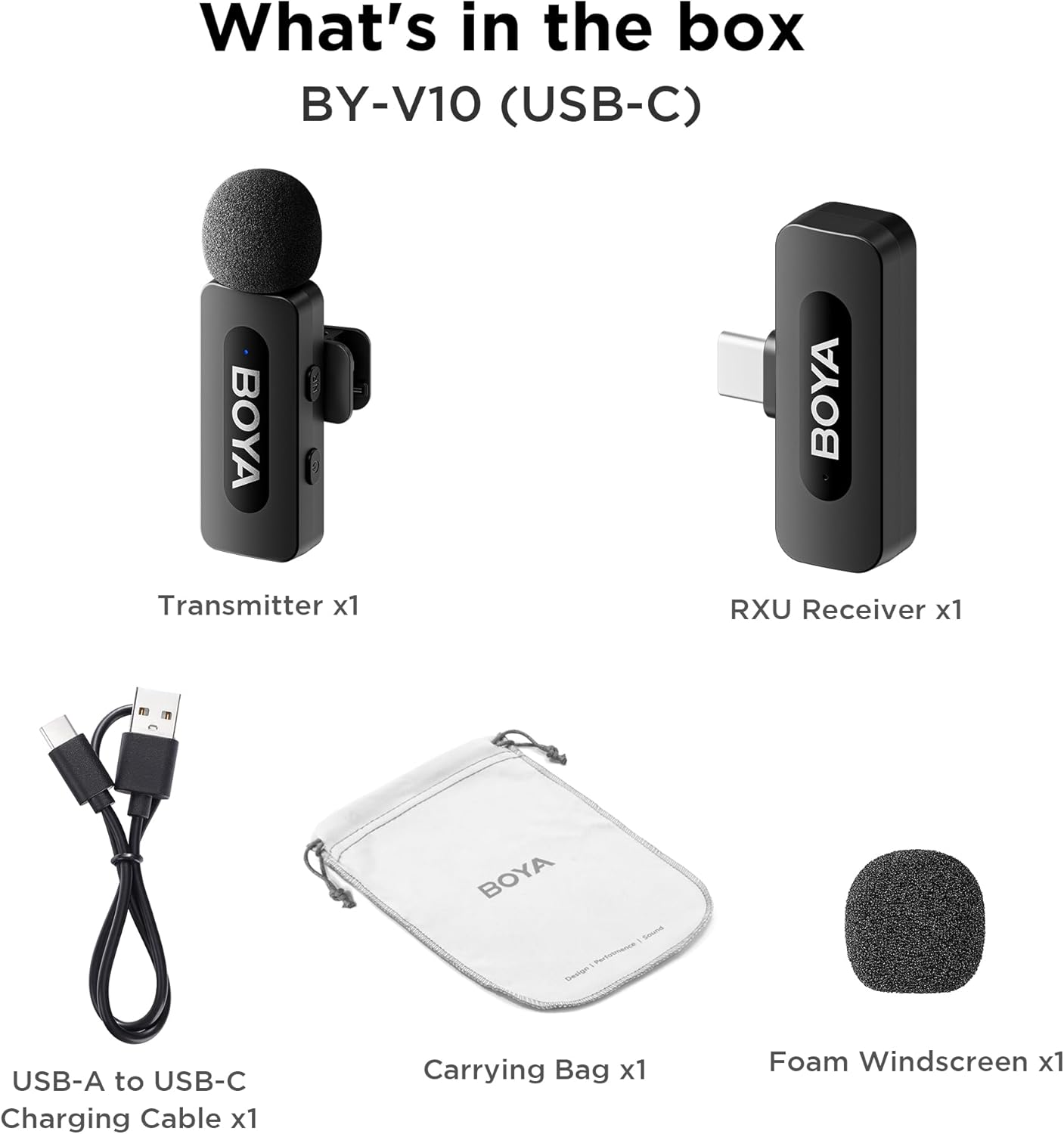
Image: The complete packing list for the BY-V10, showing all included accessories.
Video: An unboxing video demonstrating the contents of the BOYA BY-V Wireless Lavalier Microphone package.
3. Kurulum Kılavuzu
3.1 İlk Şarj
Before first use, ensure the transmitter is fully charged using the provided USB-A to USB-C charging cable. The receiver does not require charging as it draws power directly from your connected device.

Image: Battery life and charging details for the BY-V10 transmitter.
3.2 Cihazınıza Bağlanma
- Press and hold the power button on the Transmitter (TX) for 2 seconds to turn it on. The indicator light will blink.
- Plug the Receiver (RXU) directly into the USB-C port of your smartphone, iPad, or laptop.
- The Transmitter and Receiver will automatically pair within 10 seconds. The indicator light on both units will turn solid blue once successfully paired.
- Android kullanıcıları için not: Enable the "OTG" function in your device's settings before connecting the USB Type-C microphone.

Image: Visual instructions for the plug-and-play setup process.
3.3 Cihaz Uyumluluğu
The BY-V10 is compatible with devices featuring a USB-C port, including:
- Android Akıllı Telefonlar
- iPhone 15/16 modelleri
- iPads with USB-C
- Laptops with USB-C
Please ensure your device supports external USB-C audio input.

Image: Visual representation of compatible devices for the BY-V10 microphone.
4. Kullanım Talimatları
4.1 Mikrofonun Takılması
The transmitter features a 360° rotatable clip for easy attachment to your clothing. For optimal sound capture, clip the microphone approximately 6-8 inches from your mouth.

Image: The compact size and clip-on design of the BY-V10 transmitter.
4.2 Tek Tıkla Gürültü Engelleme
To activate or deactivate the noise reduction mode, press the 'NR' button on the side of the transmitter. The indicator light will change to static green when noise reduction is enabled, and blink blue slowly when muted.

Image: Visual comparison of audio with and without noise cancellation enabled.

Image: Detailed explanation of the noise cancellation button and indicator lights.
4.3 Sessize Alma İşlevi
To mute the microphone, briefly press the power button on the transmitter. The indicator light will blink blue slowly. Press again to unmute.
4.4 İletim Aralığı
The BY-V10 offers a stable audio signal transmission range of up to 100 meters (328 feet) in open environments without obstacles or interference.

Image: Demonstration of the microphone's long-distance transmission capability.

Image: Further illustration of the extended transmission range.
4.5 Kayıt Sırasında Şarj Etme
The receiver allows you to charge your phone or connected device while recording, ensuring uninterrupted long sessions for streaming or course recording.

Image: The receiver connected to a smartphone, illustrating the ability to charge the phone during recording.

Image: Another visual of the 'Support Using While Charging' feature.
5. Bakım
To ensure the longevity and optimal performance of your BOYA BY-V10 microphone, follow these maintenance guidelines:
- Temizlik: Mikrofonu ve alıcıyı temizlemek için yumuşak, kuru bir bez kullanın. Sıvı veya aşındırıcı temizleyiciler kullanmaktan kaçının.
- Depolamak: Store the microphone system in its carrying bag when not in use to protect it from dust, moisture, and physical damage.
- Pil Bakım: Fully charge the transmitter before long periods of storage to maintain battery health.
- Dikkatli Kullanın: Avoid dropping the devices or exposing them to extreme temperatures.
6. Sorun Giderme
If you encounter problems when using the unit, please refer to the following checklist. If the problem cannot be solved, please contact the seller for after-sales service.
- Cihaz eşleştirme işleminde başarısız oldu: Verici(ler)i mutlaka tek bir alıcıyla eşleştirin. Birden fazla alıcıyla eşleştirme yapılırsa, hangi alıcının verici(ler)le eşleştirileceği belirtilemez.
- Cihazdan ses gelmiyor veya harici bir cihaza bağlandığında ses gelmiyor:
- Alıcı üzerindeki konnektörün cihazınıza iyi bir şekilde bağlandığından emin olun.
- Vericinin(lerin) sessize alınmadığından emin olun. Göstergesi yavaşça mavi renkte yanıp sönüyorsa, kullanıcıların vericinin(lerin) sesini açmak için güç düğmesine bir kez basması gerekir.
- Cihazın çalışma aralığı sınırlıdır ve ses sıklıkla kesintilidir: Verici(ler) ve alıcı arasında herhangi bir parazit olmadığından emin olun. Kesintili ses sorunu sık sık devam ederse, lütfen satış sonrası servis için bizimle iletişime geçin.
- Cihaz otomatik olarak kapanır: Eşleştirilmediğinde, verici(ler) 10 dakika sonra otomatik olarak kapanacaktır.
- Cihaz açılmıyor: Ünitenin çalıştırılması için yeterli bataryaya sahip olduğundan emin olun. Devreyi etkinleştirmek için bir şarj kablosu takmayı deneyin.
- Şarj kutusu cihazı şarj etmiyor:
- Şarj kutusunun pilinin bitmemiş olduğundan emin olun. Şarj kutusunu şarj etmeyi deneyin.
- Cihazın şarj kontaklarını ve şarj kutusunun şarj pimlerini temiz bir bezle silin ve üzerlerinde toz olmadığından emin olun.
- Şarj kutusuna yerleştirilen cihazı, şarj kontakları tamamen temas edene kadar aşağı doğru bastırmayı deneyin. Bundan sonra cihaz hala şarj olmuyorsa, manyetik kuvvet eskimiş olabilir. Satış sonrası servis için lütfen bizimle iletişime geçin.

Image: A troubleshooting guide with solutions for common operational problems.
7. Özellikler
| Özellik | Detay |
|---|---|
| Marka | BOYA |
| Model Adı | BY-V10(USB-C) |
| Mikrofon Form Faktörü | Yakalı yaka |
| Bağlantı Teknolojisi | USB |
| Bağlayıcı Türü | USB Tip-C |
| Kutup Deseni | Çok yönlü |
| Ses Hassasiyet | 42 Desibel |
| Sinyal-Gürültü Oranı | 80 dB |
| Ürün Ağırlığı | 1.76 ons (0.05 Kilogram) |
| Ürün Boyutları | 3.27 x 4.45 x 1.38 inç |
| Güç Kaynağı | Pille Çalışır (Verici) |
| Pil Ömrü (Verici) | 9 saate kadar |
| Şarj Süresi (Verici) | Yaklaşık 2 saat |
| Özel Özellik | Mute Function, One-Click Noise Cancellation |
| Uyumlu Cihazlar | Dizüstü bilgisayar, Akıllı telefon (USB-C) |
8. Garanti ve Destek
For warranty information, technical support, or any inquiries regarding your BOYA BY-V10 microphone, please refer to the official BOYA website or contact the seller directly through your purchase platform. Keep your proof of purchase for warranty claims.


