giriiş
Thank you for choosing the Spigen SA-TW P20 True Wireless Earbuds. This manual provides essential information for setting up, operating, maintaining, and troubleshooting your new earbuds. Please read it carefully to ensure optimal performance and longevity of your device.
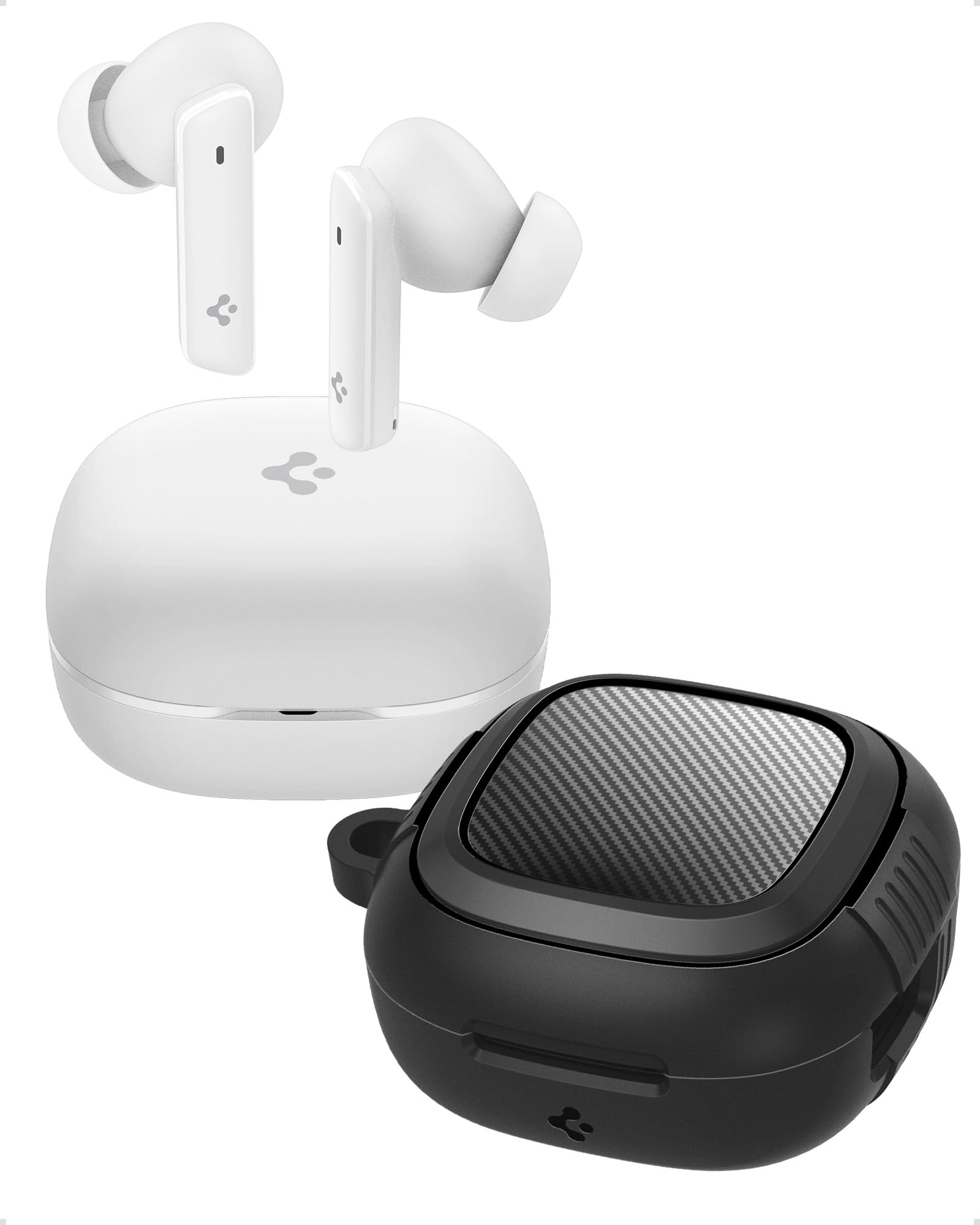
Image: Spigen SA-TW P20 True Wireless Earbuds in white, shown with their charging case.
Kutuda Neler Var?
The Spigen SA-TW P20 package includes the following items:
- 1 SA-TW P20 True Wireless Earbuds (White)
- 1 Charging Case for SA-TW P20
- 1 Rugged Armor Case for SA-TW P20
- 1 USB Şarj Kablosu
- 1 Set of Eartips (S/M - installed/L)

Image: The Spigen SA-TW P20 earbuds, their white charging case, and the included black Rugged Armor protective case.
Ürün Bittiview
The SA-TW P20 earbuds are designed for high-fidelity audio and clear communication. They feature 10mm LCP Graphene Dynamic Drivers for precise sound reproduction and 6 high-sensitivity microphones for clear calls. The included Rugged Armor case provides enhanced protection for your charging case.
Rugged Armor Case
The Rugged Armor case is designed to safeguard your charging case from daily drops and scratches. It incorporates Air-Cushion Technology, an advanced corner system that absorbs impacts, turning drops into harmless bumps. The case also features a carbon fiber accent and includes a strap for easy portability.

Resim: Ayrıntılı view of the Spigen Rugged Armor case, highlighting its Air-Cushion Technology for impact protection.

Image: An illustration showing the internal components of the 10mm LCP Graphene drivers, the touch control area on an earbud, and the Bluetooth v5.2 logo.
Kurmak
1. İlk Şarj
- Her iki kulakiçi de şarj kutusuna yerleştirin.
- USB şarj kablosunu kasanın üzerindeki şarj portuna ve bir güç kaynağına bağlayın.
- Allow the earbuds and case to fully charge before first use. The LED indicator on the case will show charging status.
2. Bluetooth Eşleştirme
- Şarj kutusunu açın. Kulaklıklar otomatik olarak eşleştirme moduna geçecektir.
- Cihazınızda (akıllı telefon, tablet, dizüstü bilgisayar) Bluetooth'u etkinleştirin.
- Arama "Spigen SA-TW P20" in the list of available devices.
- Select "Spigen SA-TW P20" to connect. A voice prompt will confirm successful pairing.
3. Spigen Audio App Installation
- Download the "Spigen Audio" app from your device's app store (Google Play Store for Android, Apple App Store for iOS).
- Uygulamayı yükleyip açın.
- Ensure your SA-TW P20 earbuds are connected via Bluetooth. The app will automatically detect and connect to your earbuds, allowing for customization.

Image: Screenshot of the Spigen Audio App interface, showing options for sound effects, noise change modes (Indoor, Commuting, Noisy), and channel balance.
Kullanım Talimatları
1. Dokunmatik Kontroller
The SA-TW P20 earbuds feature intuitive touch controls. Specific functions can be customized via the Spigen Audio App.
- Tek Dokunuş: Müzik çalma/duraklatma, Çağrı cevaplama/sonlandırma.
- Çift Dokunma (Sol Kulaklık): Önceki parça.
- Çift Dokunma (Sağ Kulaklık): Sıradaki parça.
- Üçlü Dokunma: Sesli asistanı etkinleştirin.
- Uzun basma: Switch between ANC modes (ANC On, Transparency, Normal).
2. Aktif Gürültü Önleme (ANC) Modları
The earbuds offer up to 40dB of active noise cancellation with 3 Multi-Mode Hybrid Adaptive ANC settings.
- ANC Pro: Ortam gürültüsünü 40 dB'e kadar azaltarak sürükleyici bir dinleme deneyimi sunar.
- Şeffaflık Modu: Sesli içerik dinlerken çevrenizi de duymanızı sağlayarak farkındalığınızı artırır.
- Normal Mod: Disables ANC and Transparency for standard audio playback.

Image: Black Spigen SA-TW P20 earbuds illustrating 40dB ANC Pro, Transparency Mode, 3 Multi-Mode Hybrid Adaptive ANC, and Clear Calls with 6 MICs.
3. Oyun Modu (Düşük Gecikme Süresi)
Activate Gaming Mode for crystal-clear, low-latency audio transmission, ensuring an uninterrupted and synchronized gaming experience. This mode minimizes audio delay between your device and the earbuds.

Image: Spigen SA-TW P20 earbuds positioned near a smartphone displaying a game, emphasizing low latency for gaming.
4. Fonksiyonları Çağır
Equipped with 6 high-sensitivity microphones, the SA-TW P20 ensures crystal-clear calls. Advanced noise-cancellation technology helps remove ambient noise, allowing your voice to be heard clearly in various environments.

Image: A close-up diagram of the Spigen SA-TW P20 earbuds, indicating the locations of the three microphones on each earbud (MIC 1, MIC 2, MIC 3).
5. Sound Customization (Spigen Audio App)
The Spigen Audio App allows you to personalize your listening experience. You can choose from 5 preset sound profiles or use the customizable equalizer to adjust audio settings to your preferences. The app also provides control over ANC modes and touch functions.
6. Pil Ömrü
Enjoy up to 7.5 hours of playtime on a single charge. The charging case extends the total playtime to a generous 30 hours, allowing for multiple recharges on the go.

Image: White Spigen SA-TW P20 earbuds and their open charging case, with a prominent display of "30 HRS" indicating total battery life.
Bakım
1. Temizlik
- Kulaklıklarınızı ve şarj kutusunu yumuşak, kuru ve tiftiksiz bir bezle hafifçe silin.
- Sert kimyasallar, temizleme solventleri veya güçlü deterjanlar kullanmayın.
- Remove eartips and clean them separately with water and mild soap if necessary, ensuring they are completely dry before reattaching.
- Kulaklıkların ve şarj kutusunun şarj temas noktalarını düzenli olarak kuru bir pamuklu çubukla temizleyerek düzgün şarj olmasını sağlayın.
2. Suya Dayanıklılık (IPX5)
The SA-TW P20 earbuds are IPX5 water-resistant, meaning they are protected against low-pressure water jets from any direction. This makes them suitable for workouts and light rain. However, they are not designed for submersion in water or exposure to heavy rain. Do not wear them while swimming or showering.
3. Pil Bakımı
- Pilin sık sık tamamen boşaltılmasından kaçının.
- Kullanmadığınız zamanlarda kulaklıklarınızı ve kutunuzu serin ve kuru bir yerde saklayın.
- Pil ömrünü korumak için, uzun süre kullanılmasa bile cihazı düzenli olarak şarj edin.
Sorun giderme
1. Kulaklıklar Eşleşmiyor
- Her iki kulaklığın da tam şarjlı olduğundan emin olun.
- Place earbuds back into the charging case, close the lid, wait a few seconds, then open it again to re-enter pairing mode.
- Cihazınızın Bluetooth özelliğini kapatıp açın.
- Forget "Spigen SA-TW P20" from your device's Bluetooth list and attempt to pair again.
2. Ses Yok veya Düşük Ses
- Hem cihazınızın hem de kulaklığınızın ses seviyesini kontrol edin.
- Kulaklıklarınızın kulağınıza tam oturduğundan emin olun.
- Clean any debris from the earbud nozzles and eartips.
- Try resetting the earbuds (refer to the Spigen Audio App or manufacturer's web(Belirli sıfırlama talimatları için siteye bakın).
3. Şarj Sorunları
- Şarj kablosunun hem kasaya hem de güç kaynağına güvenli bir şekilde bağlandığından emin olun.
- Farklı bir USB şarj kablosu ve güç adaptörü deneyin.
- Kulaklıkların ve kutunun içindeki şarj kontaklarını temizleyin.
- Şarj kutusunun yeterli güce sahip olduğundan emin olun.
Özellikler
| Model Adı | SA-TW P20 |
| Gürültü Kontrolü | Aktif Gürültü Önleme (40 dB'ye kadar) |
| Bağlantı Teknolojisi | Kablosuz (Bluetooth 5.2) |
| Ses Sürücüsü Türü | 10mm LCP Graphene Dynamic Driver |
| Mikrofonlar | 6 (net aramalar için) |
| Pil Ömrü (Kulaklıklar) | 7.5 Saate Kadar |
| Toplam Oynanma Süresi (Kılıflı) | 30 Saate Kadar |
| Suya Dayanıklılık | IPX5 (Ter geçirmez, Suya dayanıklı) |
| Kontrol Yöntemi | Dokunmak |
| Uyumlu Cihazlar | Cellphones, Tablets, Laptops, Gaming Consoles |
| Malzeme | Plastik, Silikon |
| Ürün Boyutları | 5.5x5.51x2.9 cm |
| Ürün Ağırlığı | 91.1 gr |
| Menşei ülke | Çin |
Güvenlik Bilgileri
- Kulaklıkları veya şarj kutusunu aşırı sıcaklıklara maruz bırakmayın.
- Cihazınızı düşürmekten veya üzerine aşırı kuvvet uygulamaktan kaçınınız.
- Çocukların ve evcil hayvanların erişemeyeceği yerde saklayınız.
- Ürünü sökmeye veya üzerinde değişiklik yapmaya çalışmayın. Bu, garantiyi geçersiz kılar.
- Yalnızca verilen şarj kablosunu veya sertifikalı bir eşdeğerini kullanın.
- Uzun süre yüksek seslere maruz kalmak işitme kaybına neden olabilir. Sesi güvenli bir seviyeye ayarlayın.
Garanti ve Destek
Garanti Politikası
Refunds or exchanges are not allowed after shrink wrap removal. For products with shrink wrapping already removed upon receipt, please request an immediate exchange.
Müşteri Desteği
For further assistance, technical support, or warranty inquiries, please contact Spigen customer support:
- E-posta: spigen.support@spigen.com
- Üretici: Spigen Kore Co.,Ltd.
- İthalatçı/Paketleyici (Hindistan): Spigen India Pvt. Ltd., No.295-296, Ecotech-1, Extension, Greater Noida, UP


