giriiş
This manual provides essential information for the safe and efficient operation of your Acekool DFL 50ED Dehumidifier. Please read these instructions thoroughly before using the appliance and retain them for future reference. This dehumidifier is designed to remove excess moisture from indoor air, helping to create a more comfortable and healthy environment in spaces up to 4,500 square feet.
Önemli Güvenlik Talimatları
Yangın, elektrik çarpması veya yaralanma riskini azaltmak için her zaman aşağıdaki temel önlemleri uygulayın:
- Cihazı kullanmadan önce tüm talimatları okuyun.
- Güç kaynağının ses seviyesiyle eşleştiğinden emin oluntagDerecelendirme etiketinde belirtilmiştir.
- Hasarlı bir kablo veya fiş ile nem alma cihazını çalıştırmayın.
- Always place the unit on a level, stable surface to prevent tipping.
- Uygun hava akışı için ünitenin etrafında en az 20 cm (8 inç) boşluk bırakın.
- Hava giriş veya çıkışına nesneler sokmayın.
- Cihazınızı temizlemeden veya herhangi bir bakım yapmadan önce fişini çekin.
- Nem alma cihazını yanıcı sıvıların veya gazların depolandığı alanlarda kullanmayın.
- Çalışma sırasında çocukları ve evcil hayvanları cihazdan uzak tutun.
Ürün Bittiview
Familiarize yourself with the components of your Acekool DFL 50ED Dehumidifier.
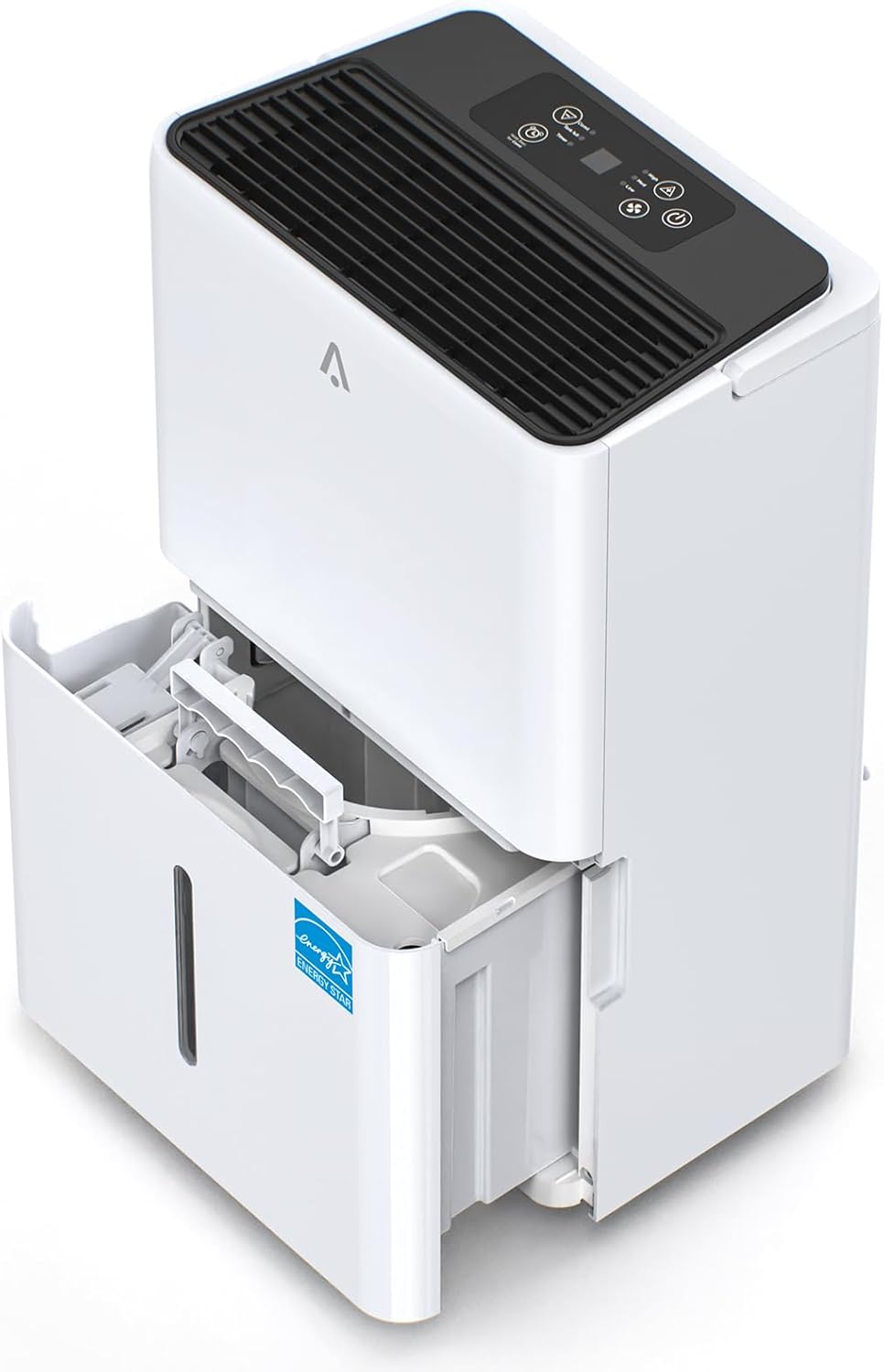
Şekil 1: Acekool DFL 50ED Dehumidifier with its water collection tank partially extended.

Şekil 2: Key features including dimensions (15.4"L x 10.6"W x 24.1"H), 2.18 Gallon water tank, washable filter, and drain hose connection.

Şekil 3: Ayrıntılı views of the hidden handle, continuous drain hose, 360-degree movable wheels, and the drainage outlet.
Kontrol Paneli
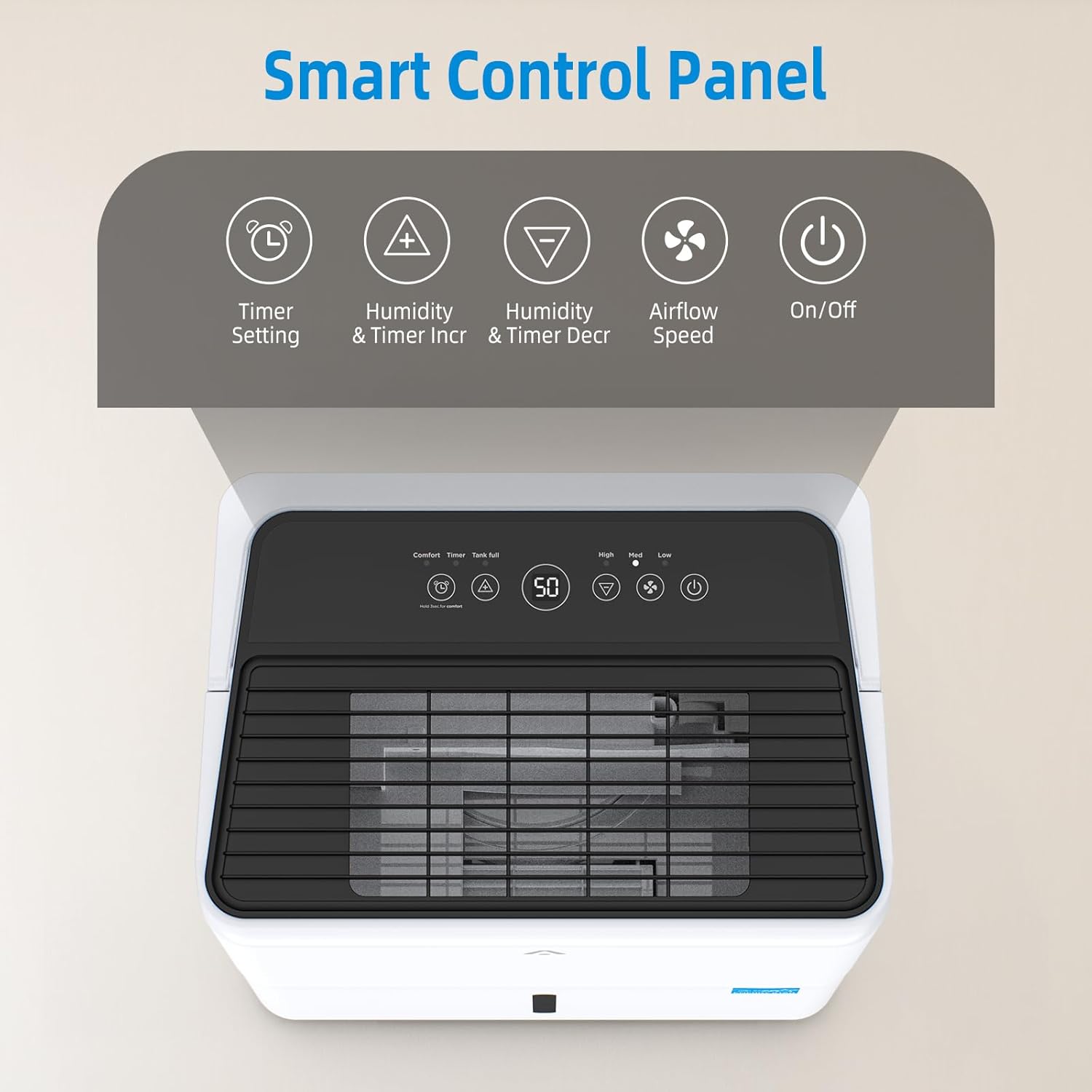
Şekil 4: The smart control panel located on the top of the unit.

Şekil 5: Detailed functions of the control panel buttons, including Timer Setting, Humidity/Timer Increment, Humidity/Timer Decrement, Airflow Speed, and On/Off.
- Güç Düğmesi: Üniteyi açar veya kapatır.
- Zamanlayıcı Düğmesi: Otomatik açma veya otomatik kapatma zamanlayıcısını ayarlar.
- Humidity Increase/Decrease Buttons: İstenilen nem seviyesini ayarlar.
- Fan Hızı Düğmesi: Selects between High, Medium, and Low fan speeds.
- Konfor Modu: Hold the Timer button for 3 seconds to enter/exit Comfort mode, which automatically sets humidity to an optimal level.
- Depo Dolu Göstergesi: Su deposu dolduğunda ve boşaltılması gerektiğinde yanar.
Kurmak
- Atama: Place the dehumidifier on a firm, level surface in an area where the temperature will not fall below 41°F (5°C). Ensure there is at least 8 inches (20 cm) of air space on all sides of the unit for proper air circulation. Avoid placing it near heat sources or in direct sunlight.
- Güç Bağlantısı: Güç kablosunu topraklı bir elektrik prizine takın.
- Drenaj Seçenekleri: Nem alma cihazınız iki farklı tahliye yöntemi sunmaktadır:
- Manual Emptying: The unit will collect water in the 8.3L (2.18 Gallon) removable water tank. When the tank is full, the unit will automatically shut off, and an indicator light will flash. Empty the tank and reinsert it properly to resume operation.
- Sürekli Drenaj: For extended operation without manual emptying, attach the included 16.4-foot drain hose to the continuous drainage outlet on the back of the unit. Ensure the hose is sloped downwards to allow gravity to drain water into a suitable floor drain or larger container.
Kullanım Talimatları
- Güç Açma/Kapatma: Basın Güç Nem gidericiyi açma veya kapatma düğmesi.
- İstenilen Nem Ayarı: Kullanın Nem Artışı or Azaltmak buttons to set your desired humidity level, ranging from 35% to 85% relative humidity (RH). The unit will operate until the set humidity is reached, then cycle on and off to maintain it. A recommended range for comfort is 45% to 55% RH.
- Fan Hızı: Basın Fan Hızı button to cycle through High, Medium, and Low fan speeds. Higher speeds remove moisture faster but may produce more noise. The unit operates at approximately 49 dB for quiet performance.
- Zamanlayıcı Fonksiyonu: Basın Zamanlayıcı button to set an auto-on or auto-off time from 1 to 24 hours. Use the Humidity Increase/Decrease buttons to adjust the time.
- Konfor Modu: Basılı tutun Zamanlayıcı button for 3 seconds to activate Comfort Mode. In this mode, the dehumidifier automatically adjusts its operation to maintain an optimal humidity level for comfort. Hold the button again for 3 seconds to exit.
- Otomatik buz çözücü: The unit features an Auto Defrost function that automatically activates when frost builds up on the evaporator coils, ensuring efficient operation in cooler environments and extending the unit's lifespan.
- Dry Clothes Function: This mode is designed to assist in drying clothes by continuously operating at a high fan speed to remove moisture from the air.
- Otomatik Kapanma Koruması: When the water tank is full, the dehumidifier will automatically shut off. An alarm will sound, and the "Tank Full" indicator light will flash. The unit will not resume operation until the water tank is emptied and correctly reinserted.

Şekil 6: The dehumidifier's control panel displaying the 'Tank full' warning, indicating automatic shutdown protection.
Bakım
Düzenli bakım, nem alma cihazınızın optimum performans göstermesini ve uzun ömürlü olmasını sağlar.
- Su Tankını Boşaltma: When the "Tank Full" indicator illuminates, carefully remove the water tank from the front of the unit. Dispose of the collected water and slide the tank back into place until it clicks securely.
- Hava Filtresinin Temizlenmesi: The washable, detachable filter should be cleaned every two weeks or more frequently depending on usage and air quality.
- Nem alma cihazını kapatın ve fişini çekin.
- Remove the filter from its slot (refer to Figure 2 for location).
- Filtreyi ılık sabunlu suyla yıkayın. İyice durulayın.
- Filtreyi tekrar üniteye takmadan önce tamamen kurumasını bekleyin. Kurutma makinesi veya doğrudan ısı kullanmayın.
- Dış Cephe Temizliği: Ünitenin dışını yumuşak bir bezle silin.amp bez. Sert kimyasallar veya aşındırıcı temizleyiciler kullanmayın.
- Depolamak: If storing the unit for an extended period, ensure the water tank is empty and clean, and the filter is clean and dry. Coil the power cord neatly and store the unit in an upright position in a cool, dry place.
Sorun giderme
Review the following common issues and their solutions before contacting customer support.
| Sorun | Olası Neden | Çözüm |
|---|---|---|
| Nem alma cihazı çalışmıyor. | No power; Water tank full or improperly inserted; Temperature too low. | Check power cord connection; Empty and reinsert water tank correctly; Ensure room temperature is above 41°F (5°C). |
| Cihaz çalışıyor ancak su toplamıyor. | Humidity setting too high; Room temperature too low; Air filter clogged; Air inlet/outlet blocked. | Lower the desired humidity setting; Ensure room temperature is adequate; Clean the air filter; Clear any obstructions around the unit. |
| Birim gürültülü. | Cihaz düz bir yüzeyde değil; Hava filtresi tıkalı; Fan engellenmiş. | Place on a firm, level surface; Clean the air filter; Check for any foreign objects near the fan. |
| Üniteden su sızıyor. | Water tank improperly seated; Continuous drain hose not connected securely or clogged. | Ensure water tank is fully inserted; Check continuous drain hose for secure connection and clear any blockages. |
Özellikler
Technical details for the Acekool DFL 50ED Dehumidifier.
| Özellik | Şartname |
|---|---|
| Marka | Acekool |
| Model Adı | DFL 50ED |
| Zemin Alanı Kapsamı | 4500 Metrekareye kadar |
| Nem Giderme Kapasitesi | 50 Pints/Day (65℉, 60% RH) |
| Su Tankı Kapasitesi | 8.3 Litre (2.18 Galon) |
| Ürün Boyutları (D x G x Y) | 17.09" x 12.91" x 25.67" |
| Ürün Ağırlığı | 42.9 Pound |
| Özel Özellik | Portable, Intelligent Humidity Control, Auto Defrost, Dry Clothes Function, 24H Timer |
| Enerji Verimliliği | ENERGY STAR Sertifikalı |
| UPC | 198723318578 |
Garanti ve Müşteri Desteği
For warranty information or technical assistance, please refer to the warranty card included with your product or visit the official Acekool website. You may also contact Acekool customer support directly for further assistance.


