giriiş
This manual provides essential information for the safe and efficient installation, operation, and maintenance of your GIGABYTE AORUS Elite P1000W Ice Power Supply. Please read this manual thoroughly before using the product and retain it for future reference.

Şekil 1: Açısal view of the GIGABYTE AORUS Elite P1000W Ice Power Supply, highlighting the 1000W rating.
Güvenlik Bilgileri
Yaralanmaları ve ekipmanınızın hasar görmesini önlemek için her zaman aşağıdaki güvenlik önlemlerine uyun:
- Kurulum veya kullanım öncesinde güç kaynağının AC prizinden bağlantısının kesildiğinden emin olun.
- Güç kaynağı ünitesini açmayın. Yüksek sestagİçeride herhangi bir arıza yok ve kullanıcı tarafından onarılabilecek parça bulunmuyor.
- Güç kaynağını iyi havalandırılan bir alana, ısı kaynaklarından ve doğrudan güneş ışığından uzak bir yere kurun.
- Yalnızca bu güç kaynağıyla birlikte verilen modüler kabloları kullanın. Uyumsuz kabloların kullanılması hasara neden olabilir.
- Güç kaynağının neme veya aşırı sıcaklıklara maruz kalmasından kaçının.
Paket İçeriği
Paketin içinde tüm öğelerin mevcut olduğundan emin olun:
- GIGABYTE AORUS Elite P1000W Ice Power Supply Unit
- Modular Cable Set (including ATX 24-pin, EPS/CPU 8-pin, PCIe 6+2-pin, 12VHPWR, SATA, Peripheral)
- AC Power Cord (EU Plug)
- Montaj Vidaları
- Kullanım Kılavuzu (bu belge)
Ürün Özellikleri
- ATX 3.0 and PCIe Gen 5.0 ready (ATX 3.1 compatible)
- Certified 80 PLUS Platinum efficiency
- 100% Japanese Capacitors for enhanced reliability
- 120mm Dynamic Fluid Ball Bearing (FDB) Fan for quiet and efficient cooling
- Compact design for easier installation
- Fully modular design for improved cable management
- Powerful single rail +12V output
- Comprehensive protection features: OVP (Over Voltage Koruma), OPP (Aşırı Güç Koruması), SCP (Kısa Devre Koruması), UVP (Düşük Voltaj Koruması ...)tage Koruma), OCP (Aşırı Akım Koruması), OTP (Aşırı Sıcaklık Koruması)
Kurulum ve Yükleme
Güç kaynağınızı takmak için şu adımları izleyin:
- Sisteminizi Hazırlayın: Ensure your computer case is open and all existing power supply cables are disconnected.
- Güç kaynağını monte edin: Carefully place the GIGABYTE AORUS Elite P1000W into the power supply bay of your computer case. Secure it with the provided mounting screws.

Şekil 2: Genel view of the GIGABYTE AORUS Elite P1000W Ice Power Supply. This image shows the main unit with its fan grill and modular cable ports.
- Modüler Kabloları Bağlayın: Identify the necessary cables for your motherboard and components (CPU, GPU, storage drives). Connect the appropriate modular cables to the power supply's output ports.

Şekil 3: Ayrıntılı view of the modular cable connectors on the GIGABYTE AORUS Elite P1000W Ice Power Supply. This image illustrates the clearly labeled ports for M/B, CPU/PCI-E, Peripheral, and 12VHPWR connections.
- 24 pinli ATX Kablosu: Anakartın ana güç konektörüne bağlayın.
- 8-pin EPS/CPU Cable: Connect to the motherboard's CPU power connector.
- PCIe 6+2-pin Cables: Connect to your graphics card(s) if they require additional power.
- 12VHPWR Cable: Connect to PCIe Gen 5.0 graphics cards that utilize this connector.
- SATA Kabloları: SSD'lere, HDD'lere ve optik sürücülere bağlanın.
- Çevresel (Molex) Kablolar: Connect to other components requiring Molex power.
- Bileşenlere Bağlan: Route the connected modular cables neatly to their respective components and plug them in securely.
- AC Gücünü Bağlayın: Ensure the power supply's main switch is in the OFF (0) position. Connect the AC power cord to the power supply and then to a wall outlet.
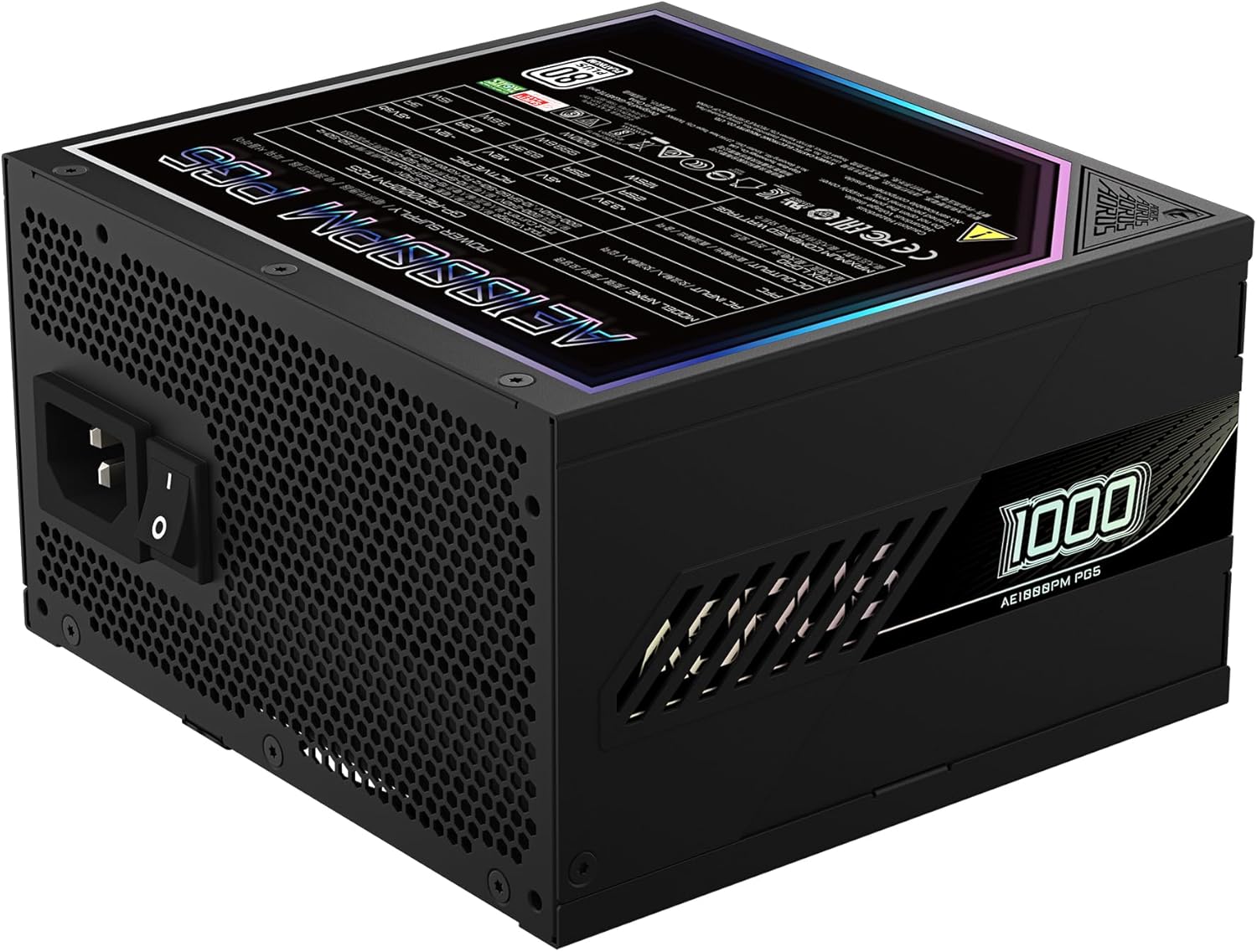
Figure 4: Rear panel of the GIGABYTE AORUS Elite P1000W Ice Power Supply, showing the AC power input and power switch. Ensure the switch is set to '0' before connecting the AC cord.
Kullanım Talimatları
After installation, follow these steps to power on your system:
- Güç Açık: Flip the main power switch on the rear of the power supply to the ON (I) position.
- Sistem Önyüklemesi: Sistemi başlatmak için bilgisayar kasasındaki güç düğmesine basın.
- Kapat: To shut down your system, perform a proper shutdown through your operating system. Once the system is off, you may flip the power supply's main switch to the OFF (0) position for complete power disconnection.

Şekil 5: Yukarıdan aşağıya view of the 120mm fan with the AORUS logo on the GIGABYTE AORUS Elite P1000W Ice Power Supply. The fan provides active cooling during operation.
Bakım
Düzenli bakım, güç kaynağınızın uzun ömürlü olmasını ve en iyi performansı göstermesini sağlar:
- Toz Temizleme: Periodically clean dust from the power supply's fan grill and vents using compressed air. Ensure the power supply is turned off and unplugged before cleaning.
- Kablo yönetimi: Ensure cables are neatly routed and do not obstruct airflow within the computer case.
- Çevresel Koşullar: Maintain a cool, dry, and well-ventilated environment for your computer system.
Sorun giderme
Sorunlarla karşılaşırsanız aşağıdaki genel sorun giderme adımlarına bakın:
- Güç Yok:
- AC güç kablosunun hem güç kaynağına hem de duvar prizine güvenli bir şekilde bağlı olup olmadığını kontrol edin.
- Ensure the power supply's main switch is in the ON (I) position.
- Verify that all modular cables are correctly seated in both the power supply and the components.
- Güç olduğunu doğrulamak için duvar prizini başka bir cihazla test edin.
- Sistem Beklenmedik Şekilde Kapandı:
- This could indicate an overload or overheating. Ensure your system's power requirements do not exceed the PSU's 1000W capacity.
- Yeterli havalandırma olduğundan emin olun ve toz birikintilerini temizleyin.
- Verify that all power connections are secure.
- Alışılmadık Sesler:
- A clicking sound might indicate a protective mechanism engaging. Disconnect power and recheck all connections.
- If the fan is making excessive noise, ensure it is free from obstructions.
If issues persist after following these steps, contact GIGABYTE customer support.
Özellikler

Figure 6: Product label on the GIGABYTE AORUS Elite P1000W Ice Power Supply, displaying electrical specifications and certifications. Refer to this label for detailed electrical ratings.
| Özellik | Detay |
|---|---|
| Model Adı | AORUS ELITE P1000W |
| Ürün Model Numarası | GP-AE1000PM PG5 EU |
| Çıkış Watttage | 1000 Watt |
| 80 PLUS Sertifikası | Platin |
| Form Faktörü | ATX |
| ATX Version Compatibility | ATX 3.0 (ATX 3.1 compatible) |
| PCIe Version Compatibility | PCIe Nesil 5.0 |
| Fan Boyutu | 120mm |
| Fan Tipi | Dynamic Fluid Ball Bearing (FDB) |
| Kapasitörler | %100 Japon Kapasitörler |
| Modüler Tasarım | Tamamen Modüler |
| Korumalar | OVP, OPP, SCP, UVP, OCP, OTP |
| Ürün Boyutları (U x G x Y) | 5.51 x 5.91 x 3.39 inç |
| Ürün Ağırlığı | 6.79 pound (3080 Gram) |
Garanti Bilgileri
The GIGABYTE AORUS Elite P1000W Ice Power Supply comes with a 10 yıllık garanti from the date of purchase. This warranty covers defects in materials and workmanship under normal use. Please retain your proof of purchase for warranty claims. For full warranty terms and conditions, refer to the official GIGABYTE website veya müşteri desteği ile iletişime geçin.
Destek
For technical assistance, troubleshooting beyond this manual, or warranty inquiries, please visit the official GIGABYTE support website or contact their customer service department. You can typically find contact information on the GIGABYTE websitede veya ürün ambalajında yer almamaktadır.
GIGABYTE Resmi Webalan: www.gigabyte.com