1. Giriş
This manual provides detailed instructions for the installation, operation, and maintenance of your GHome Smart Fingerprint Door Lock K10PRO. Please read this manual thoroughly before installation and use to ensure proper function and safety.

Image: GHome Smart Fingerprint Door Lock K10PRO, showcasing the exterior and interior knobs, mechanical keys, and smartphone app interface.
2. Kutuda Neler Var?
Kuruluma başlamadan önce tüm bileşenlerin mevcut olduğundan emin olun:
- Exterior Door Knob x 1
- Interior Door Knob x 1
- Mandal x 1
- Mekanik Tuşlar x 2
- Grev Plakası x 1
- Strike Box x 1
- Screws x 6 (various types)
- Kullanıcı Kılavuzu x 1
Video: Unboxing the GHome Smart Door Knob with Keypad, showing all included components.
3. Kurulum Gereksinimleri
Montajdan önce, kapınızın aşağıdaki özelliklere uygun olduğundan emin olun:
- Kapı Kalınlığı: 1-3/8" to 2-1/8" (35-55mm)
- Kapı Delik Çapı: 2-1/8" (55 mm)
- Kapı Kenarı Delik Çapı: 1" (25 mm)
- Arka set: 2-3/8" (60 mm) veya 2-3/4" (70 mm)
The lock is compatible with single cylinder doors. Mortise locks are NOT compatible.

Resim: Montaj için gerekli kapı boyutlarını ve uyumluluğunu gösteren şema.
4. Kurulum Kılavuzu
Follow these steps carefully to install your GHome Smart Fingerprint Door Lock K10PRO.
4.1. Prepare the Latch
- Adjust the latch size to match your door's backset (60mm or 70mm).
- Insert the latch into the door edge hole.
- Secure the latch with Screw A.
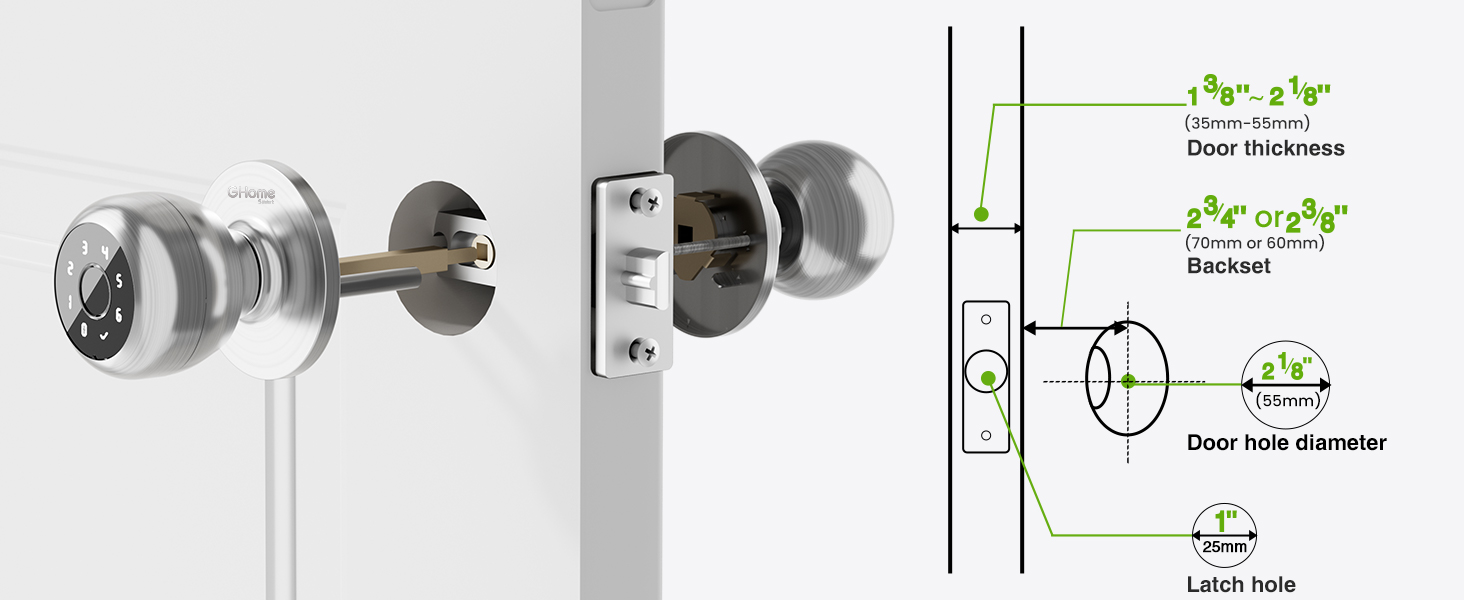
Image: Visual guide for checking door dimensions and installing the latch mechanism.
4.2. Install the Exterior Knob
- Remove the screen protector sticker from the exterior knob.
- Align the spindle bar of the exterior knob with the latch mechanism, ensuring the 'UP' arrow on the knob is facing upwards.
- Gently push the exterior knob into place.
4.3. İç Düğmeyi Takın
- Remove the interior knob cover by pulling it off.
- Remove Screw B from the interior knob assembly.
- Align the interior knob with the exterior knob's spindle bar, ensuring the 'UP' arrow is facing upwards and the knob is centered.
- Insert Screw B to secure the interior knob.
- Reattach the interior knob cover.
Video: Step-by-step installation guide for the GHome Smart Door Lock K10PRO, demonstrating latch and knob assembly.
5. Kullanım Talimatları
The GHome Smart Fingerprint Door Lock K10PRO offers multiple convenient ways to unlock your door.
5.1. Kilit Açma Yöntemleri
- Parmak İzi Kilidi: Place your registered fingerprint on the sensor for quick access. The lock features 0.2-second recognition and stores up to 20 fingerprints.
- Şifre Kilidi: Enter a personalized 6-10 digit password on the keypad. Up to 20 unique codes can be stored. The anti-peep security feature allows you to enter random digits before or after your code to protect your privacy.
- Uygulama Kontrolü: Use the GHome app (available for iOS and Android) to unlock the door via Bluetooth within range. With an optional Wi-Fi gateway (sold separately), you can control the lock remotely from anywhere.
- Mekanik Anahtar: Two mechanical backup keys are provided for emergency access.

Image: Visual representation of the four unlocking methods: fingerprint, password, app, and mechanical key.
5.2. Uygulama Yönetimi
The GHome app allows for comprehensive management of your lock:
- Kullanıcı yönetimi: Easily add or remove fingerprints and passwords for family members and guests.
- Geçici Erişim Kodları: Generate time-limited or one-time passwords for visitors, deliveries, or services.
- Erişim Günlükleri: Monitor detailed access logs to track who entered your home and when.
- Bildirimler: Receive smartphone notifications when your door is accessed (within Bluetooth range or via Wi-Fi gateway).
- Mod Değiştirme: Customize settings with silent mode for undisturbed rest or passage mode for continuous access.
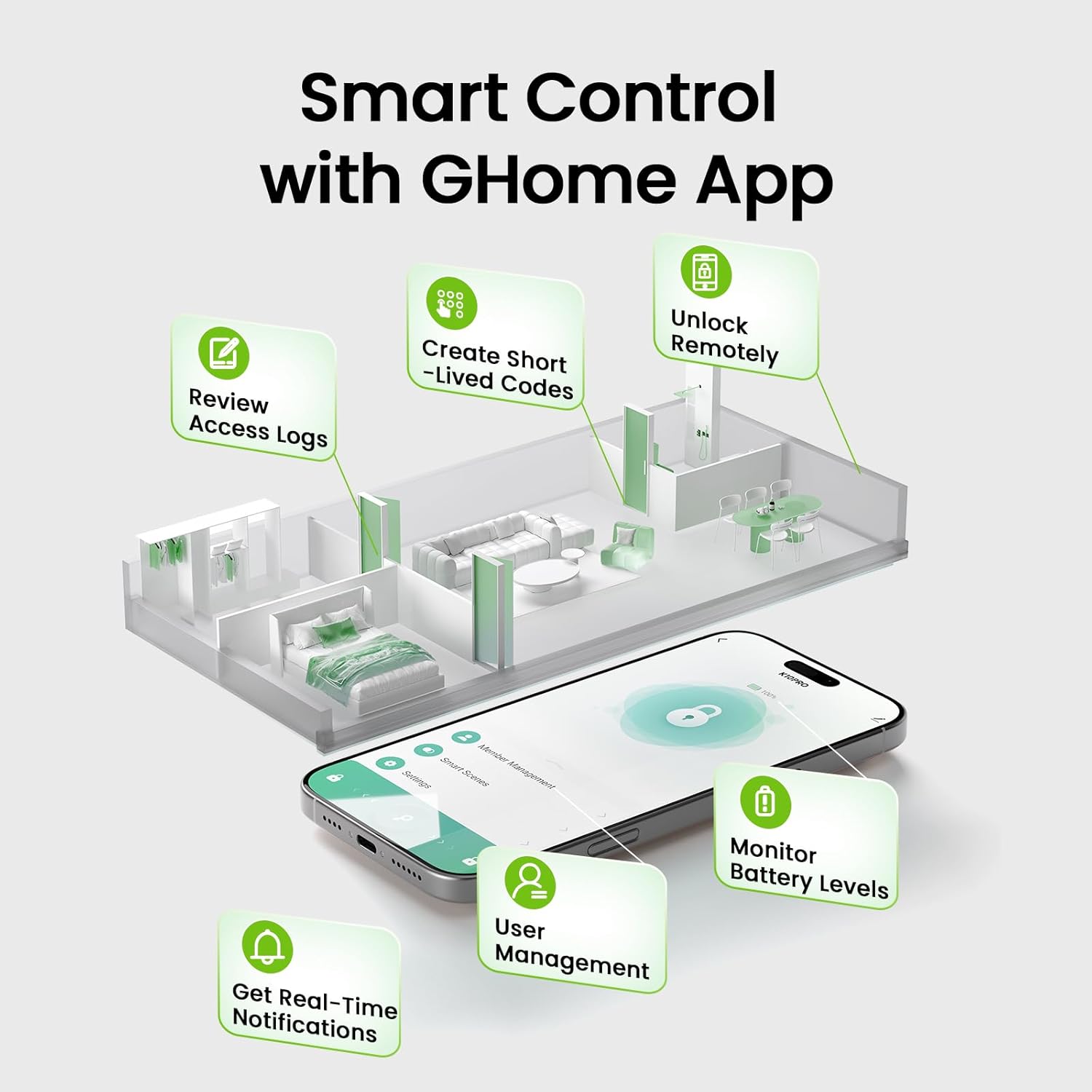
Image: Screenshot of the GHome app demonstrating various smart control features.
5.3. Otomatik Kilitleme Özelliği
The lock automatically engages after 5 seconds of unlocking. This feature can be customized within the app to auto-lock between 5 seconds and 30 minutes after unlocking, or set to passage mode for continuous access.
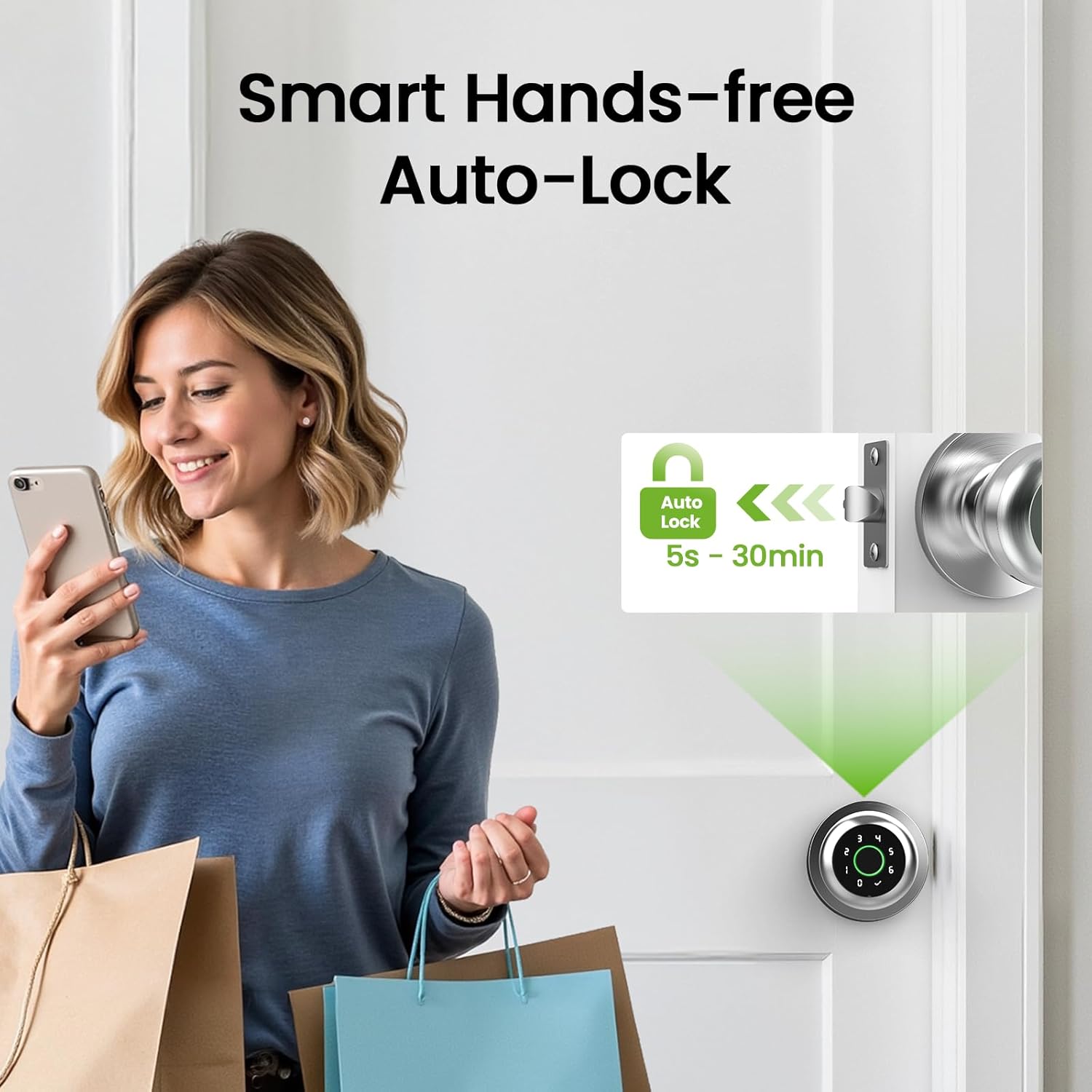
Image: Illustration of the smart hands-free auto-lock feature.
6. Bakım
6.1. Pil doldurma
The GHome Smart Fingerprint Door Lock K10PRO is equipped with a 400mAh rechargeable Lithium Polymer battery. A full charge takes 4-6 hours and provides power for approximately 10,000 unlocks or 300+ days, depending on usage frequency.
- Düşük Pil Göstergesi: The app will display a low battery warning when the battery level drops below 20%.
- Şarj: Use a Type-C cable (5V/2A required) to charge the lock. The charging port is located on the exterior knob.

Image: Visual guide to the USB Type-C charging port and low battery alert.
6.2. Temizlik
Kilidin yüzeyini yumuşak, kuru bir bezle silin. Yüzeye veya elektronik bileşenlere zarar verebilecek aşındırıcı temizleyiciler veya çözücüler kullanmaktan kaçının.
7. Sorun Giderme
- Parmak izi tanınmadı: Ensure your finger is clean and dry. Try re-registering your fingerprint or registering multiple angles of your finger. The self-learning AI improves recognition over time.
- Tuş takımı çalışmıyor: Ensure the battery is charged. If the keypad lights up but doesn't respond, try restarting the lock (refer to the app for specific instructions).
- Uygulama bağlantı sorunları: Ensure Bluetooth is enabled on your smartphone and you are within range of the lock. If using a Wi-Fi gateway, ensure it is properly configured and connected to your network.
- Kilit devreye girmiyor/çıkmıyor: Check for any obstructions in the door frame or latch mechanism. Ensure the installation was performed correctly, particularly the alignment of the spindle bar.
- Lost password/fingerprint access: Use the mechanical backup keys for immediate access. Reset passwords or re-register fingerprints via the GHome app.
8. Özellikler
| Özellik | Detay |
|---|---|
| Örnek | K10PRO |
| Malzeme | Alüminyum |
| Renk | Gümüş |
| Ürün Boyutları | 3.93"U x 9.05"G |
| Ürün Ağırlığı | 1.65 pound (0.75 Kilogram) |
| Kilidini Açma Yöntemleri | Fingerprint, Keypad, App Control, Mechanical Key |
| Parmak İzi Kapasitesi | 20'e kadar |
| Şifre Kapasitesi | 20'e kadar |
| Pil Türü | 1 Lithium Polymer (400mAh, included) |
| Şarj Portu | USB Tip-C (5V/2A) |
| Çalışma Sıcaklığı | 23°F ila 131°F (-5°C ila 55°C) |
| Özel Özellikler | Auto-Lock, Backup Keys, Fingerprint Access, Local Data Storage, Password Unlock |
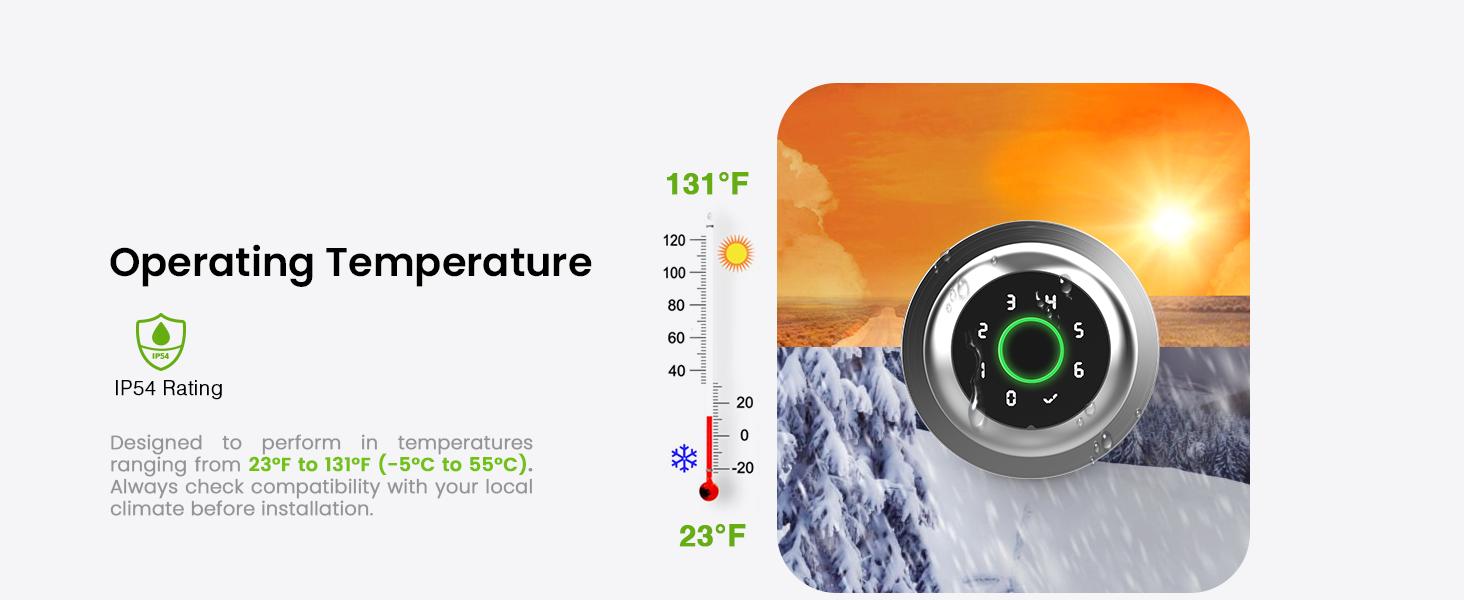
Image: Graphic illustrating the operating temperature range of the lock.
9. Garanti ve Destek
GHome Smart offers a 1-year warranty for the K10PRO Smart Fingerprint Door Lock. For any issues or inquiries, please contact GHome Smart customer support.
- Üretici: GHome Akıllı
- Müşteri Hizmetleri: Refer to your product packaging or the GHome Smart webEn güncel iletişim bilgileri için sitemizi ziyaret edin.