1. Giriş
Thank you for choosing the LEVN LM101 Wireless Microphone System. This system is designed to provide high-quality audio recording for various applications, including vlogging, live streaming, interviews, and content creation. It features dual wireless lavalier microphones, dual receivers (USB-C and Lightning), AI noise cancellation, and a portable charging case, offering extensive compatibility with iOS, Android, and PC devices.
2. Kutuda Neler Var?
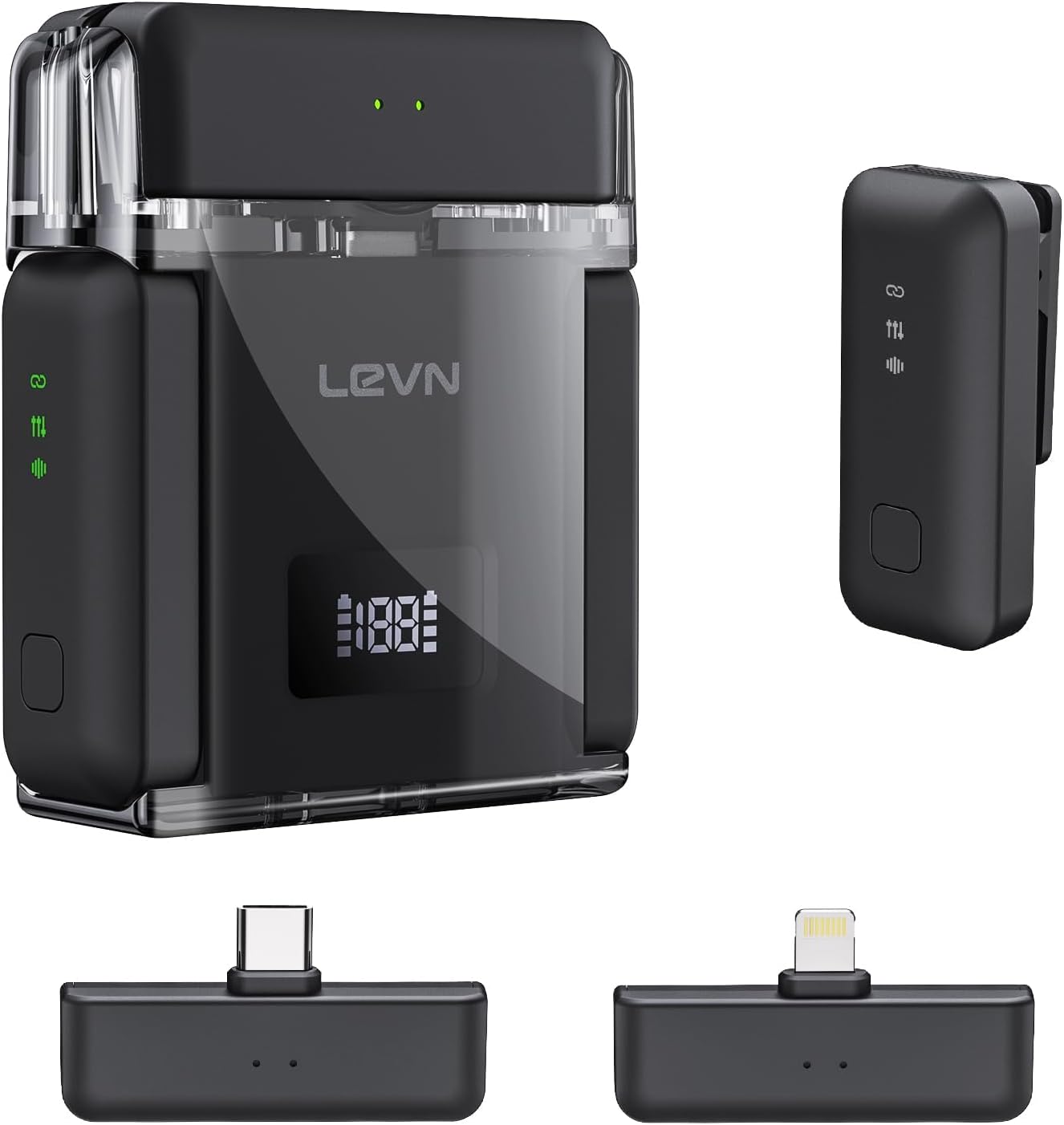
- 2 x Wireless Lavalier Microphones (Transmitters)
- 2 x Receivers (1 x USB-C, 1 x Lightning)
- 1 x Şarj Kutusu
- 1 x USB-C Şarj Kablosu
3. Ürün Bittiview
The LEVN LM101 system consists of two compact wireless lavalier microphones (transmitters), two receivers for broad device compatibility, and a portable charging case. Each microphone features a clip for easy attachment and an omnidirectional pickup pattern. The receivers are designed for direct connection to your recording device's port.
Temel Bileşenler:
- Kablosuz Mikrofonlar: Small, clip-on devices with built-in batteries and AI noise cancellation.
- Alıcılar: USB-C and Lightning connectors for compatibility with various smartphones, tablets, and computers.
- Şarj Kutusu: Stores and recharges the microphones, extending their operational time.
4. Kurulum Talimatları
4.1 Sistemin Şarj Edilmesi
Before first use, ensure all components are fully charged. Place the microphones into the charging case. Connect the charging case to a power source using the provided USB-C cable. The charging case provides up to 30 hours of extended battery life for the microphones, with approximately 6 hours of continuous recording per microphone on a single charge. The charging time for the case is less than 1.5 hours.

4.2 Alıcının Bağlanması
- Identify the correct receiver for your device: USB-C for Android phones, PCs, and newer iPhones/iPads; Lightning for older iPhones/iPads.
- Plug the appropriate receiver directly into your recording device's charging/data port.
- The receiver's green indicator light will illuminate, signifying it is ready to connect.

4.3 Otomatik Eşleştirme
Once the receiver is plugged in and powered on, simply take the microphones out of the charging case. The microphones will automatically power on and pair with the receiver. No manual pairing steps are required. The receiver's green light will remain steady, indicating a successful connection and readiness for recording.
5. Kullanım Talimatları
5.1 Ses Kaydetme
- Ensure the microphone is securely clipped to your clothing, ideally near your mouth for optimal sound capture.
- Confirm the receiver is connected to your device and the green indicator light is solid.
- Open your preferred recording application (e.g., camera app, voice recorder, streaming software) on your smartphone, tablet, or PC.
- Start recording. The system will automatically capture audio through the wireless microphone.

5.2 Yapay Zeka Destekli Gürültü Engelleme
The LEVN LM101 features 3-level AI noise cancellation (Weak/Medium/Strong) to reduce ambient noise. To activate or adjust the noise cancellation, press the dedicated noise reduction button on the microphone. A single press will cycle through the noise reduction levels. This feature is particularly useful in noisy environments to ensure clear voice capture.

5.3 Kablosuz Menzil
The system offers a stable wireless transmission range of up to 328 feet (100 meters) in open environments. This allows for flexible recording setups without compromising audio quality or signal stability.

5.4 Versatile Scenarios
The LEVN LM101 is suitable for a wide array of content creation scenarios, including:
- Vlogging and YouTube videos
- Live streaming on various platforms
- İçviews and podcasts
- Online meetings and presentations

6. Bakım
- Temizlik: Use a soft, dry cloth to clean the microphones, receivers, and charging case. Avoid using liquids or abrasive cleaners.
- Depolamak: Cihazı kullanılmadığı zamanlarda toz ve hasardan korumak için şarj kutusunda saklayın. Serin, kuru ve doğrudan güneş ışığından ve aşırı sıcaklıklardan uzak bir yerde muhafaza edin.
- Pil Bakım: Pil ömrünün en uzun olması için, pilleri sık sık tamamen boşaltmaktan kaçının. Sistem sürekli kullanılmasa bile düzenli olarak şarj edin.
7. Sorun Giderme
- Ses Yok/Düşük Ses:
- Alıcının cihazınızın bağlantı noktasına tamamen takıldığından emin olun.
- Check if the microphone is powered on and paired (solid green light on receiver).
- Verify your device's audio input settings are configured to use the external microphone.
- Adjust the recording volume within your recording application.
- Interference/Poor Audio Quality:
- Move closer to the receiver to reduce potential signal dropouts.
- Ensure there are no major obstructions (e.g., thick walls, large metal objects) between the microphone and receiver.
- Activate or adjust the AI noise cancellation feature on the microphone.
- Avoid using the system near other strong wireless signals (Wi-Fi routers, other 2.4Ghz devices).
- Mikrofon Şarj Olmuyor:
- Ensure the microphones are correctly seated in the charging case.
- Verify the charging case is connected to a working power source and the USB-C cable is functional.
- Şarj kutusunun pil seviyesini kontrol edin.
8. Özellikler
| Özellik | Detay |
|---|---|
| Model Adı | LM101 |
| Marka | LEVN |
| Mikrofon Form Faktörü | Yakalı yaka |
| Bağlantı Teknolojisi | Kablosuz (2.4G) |
| Bağlayıcı Türü | Lightning, USB Type-C |
| Uyumlu Cihazlar | Dizüstü bilgisayar, Akıllı telefon (iOS ve Android) |
| kablosuz Menzil | 328 ft'ye (100 m) kadar |
| Pil Ömrü (Mikrofon) | Up to 6 hours (continuous recording) |
| Toplam Pil Ömrü (Şarj Kutusuyla) | 30 saate kadar |
| Şarj Süresi (Kılıf) | 1.5 saatten az |
| Özel Özellikler | 1-Touch Recording, Battery Indicator Light, Clip, 3-Level AI Noise Reduction |
| Kutup Deseni | Çok yönlü |
| Ürün Ağırlığı | 0.11 Kilogram (3.87 ons) |
| Kanal Sayısı | 2 |
9. Garanti ve Destek
Specific warranty details and direct support contact information are not provided in the available product data. Please refer to the product packaging or the manufacturer's official website for warranty claims and customer support inquiries.


