1. Giriş ve Üzeriview
The MECHEER JK-PM07-US Watt Meter is designed to monitor the electricity usage of home appliances, helping users track power consumption and manage energy costs. This device offers multiple display modes and features for comprehensive energy monitoring.
- Various Monitoring Parameters: Monitors power (W), energy (kWh), volts, amps, hertz, power factor, cost, minimum and maximum power (W), and cumulative days and time.
- Birinci Sınıf Malzeme: Constructed from high-quality PC material for durability, heat resistance, and fall resistance. Features a standard US socket and plug.
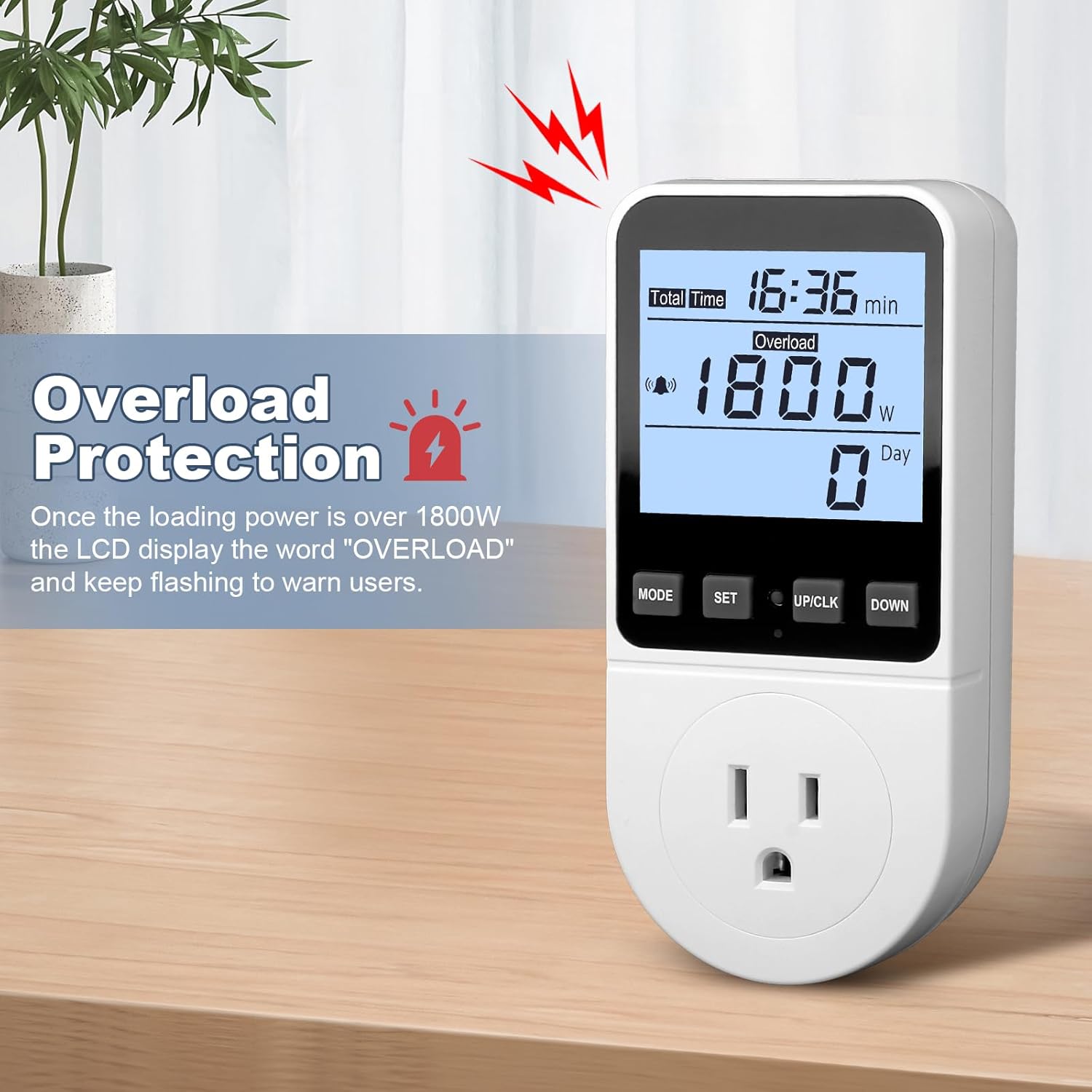
- Aşırı Yük Koruması: Alerts users with flashing display and a buzzer when appliance power exceeds the set overload limit. Adjustable from 0 to 3680W (default 3680W, recommended 1800W).
- KWH Alarm: Provides an alarm when accumulated power consumption reaches a user-defined threshold.
- Veri Hafıza Fonksiyonu: Automatically saves power consumption data, including setting data and cumulative data (electricity quantity, cost, unit price, time), even after removal from the socket or power failure.
- Arka Işık Ekranı: Features a white backlight with black text for clear readability in various lighting conditions. Backlight automatically turns off after 10 minutes of inactivity but can be manually controlled.
- Adjustable Backlight Time: Offers 5 options for backlight duration (10 minutes, 1 hour, 4 hours, 8 hours, normally on).
2. Ürün Özellikleri
| Şartname | Değer |
|---|---|
| Çalışma Hacmitage | 120V/60Hz |
| Power Display Range | 0.5W-2900W |
| İşlem Akımı | Maksimum 13A |
| Toplam Güç Göstergesi | 0.0kWh-9999kWh |
| Toplam Maliyet Görüntüleme | 0.0£-9999£ (Note: Currency symbol may vary based on region/firmware) |
| Cilttage Doğruluk | ±%1 |
| Güncel Doğruluk | ±%2 |
| Güç Doğruluğu | ±%2 |
| Electrical Cost Setting Range | 00.00£/kWh - 99.99£/kWh (Note: Currency symbol may vary based on region/firmware) |
| Ürün Ağırlığı | 13.4 ons |
| Ürün Boyutları | 5.2 x 2.7 x 2.4 inç |

3. Kurulum
- Unpack the MECHEER Watt Meter from its packaging.
- Plug the watt meter into a standard 120V/60Hz wall outlet.
- Plug the appliance you wish to monitor into the watt meter's socket.
- The display will illuminate, and the device is ready for use.
4. Kullanım Talimatları
4.1. 8 Display Modes
The watt meter features 8 display modes to show different measured data. Press the "MODE" button to cycle through the modes.
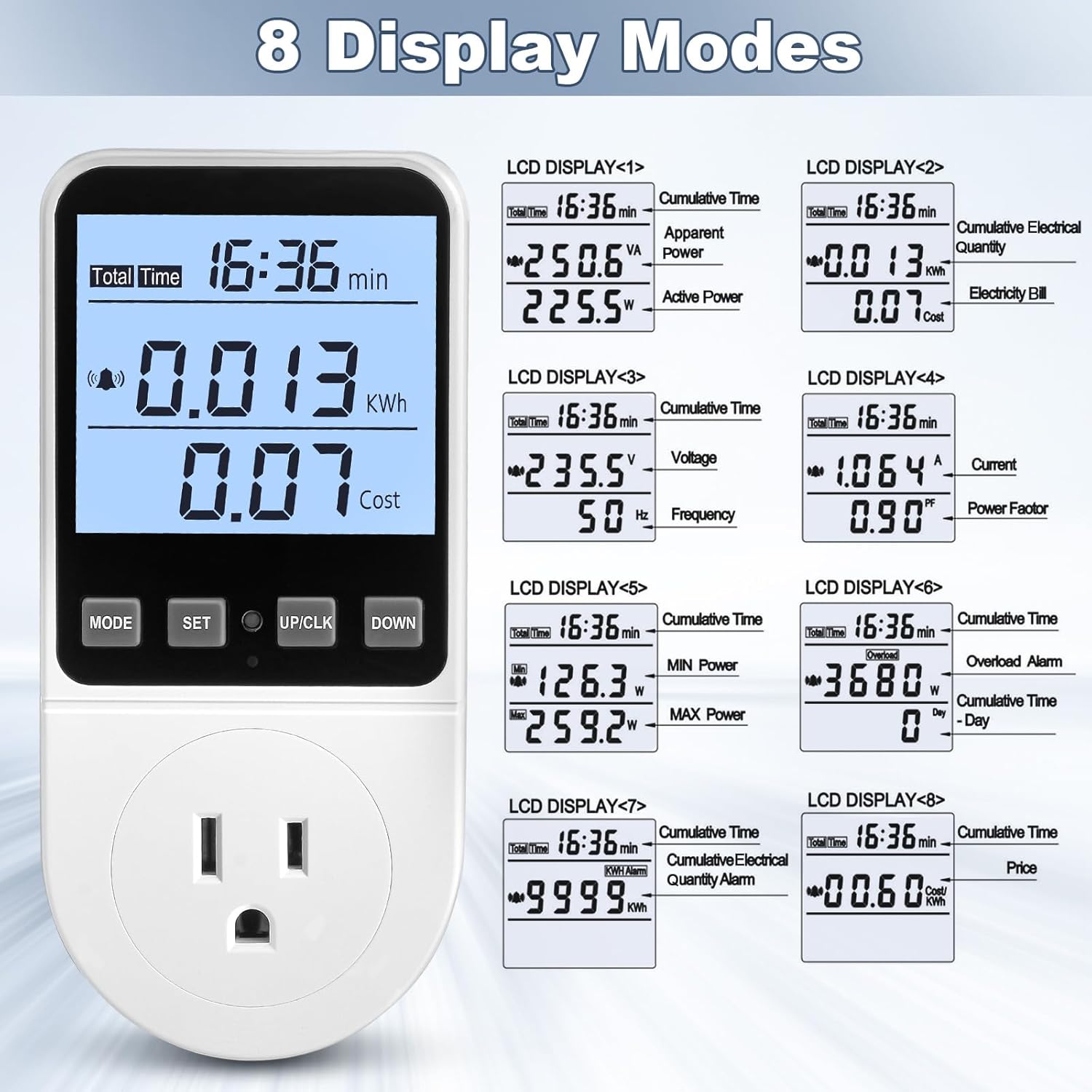
- Mod 1: Cumulative Time, Apparent Power (VA), Active Power (W)
- Mod 2: Cumulative Time, Cumulative Electrical Quantity (kWh), Electricity Bill (Cost)
- Mod 3: Cumulative Time, Voltage (V), Frequency (Hz)
- Mod 4: Cumulative Time, Current (A), Power Factor (PF)
- Mod 5: Cumulative Time, Minimum Power (W), Maximum Power (W)
- Mod 6: Cumulative Time, Overload Alarm (W), Cumulative Time (Day)
- Mod 7: Cumulative Time, KWH Alarm (kWh)
- Mod 8: Cumulative Time, Price (Cost/kWh)
4.2. Overload Settings
The default overload power is 3680W. It is recommended to set this to 1800W for typical US household use to prevent overloading circuits.
- Press and hold the "MODE" button for more than 3 seconds to enter the overload settings.
- Press the "MODE" button to select the digit location you wish to change.
- Use the "UP/CLK" and "DOWN" buttons to adjust the digits to the desired overload value (e.g., 1800W).
- Press the "SET" button to save the overload setting.
4.3. Electricity Price Settings
Set the cost per kilowatt-hour (kWh) to accurately calculate electricity bills.
- Press and hold the "SET" button for 3 seconds to enter the electricity price setting mode.
- Press the "MODE" button to select the digit location.
- Use the "UP/CLK" and "DOWN" buttons to set the numbers for your electricity cost per kWh.
- Press the "SET" button to save the price settings.

4.4. KWH Alarm Settings
Configure an alarm to be notified when a specific cumulative kWh consumption is reached.
- Press and hold the "DOWN" button for 3 seconds to enter the KWH alarm setting mode.
- Press the "MODE" button to select the digit location.
- Use the "UP/CLK" and "DOWN" buttons to set the desired KWH alarm value.
- Press the "SET" button to save the KWH alarm settings.
4.5. Button Sound Settings
Turn the button press sound on or off.
- Press the "MODE" button and the "DOWN" button simultaneously to toggle the button sound on or off.
4.6. Backlight On/Off and Time Settings
Control the backlight for better visibility and adjust its duration.
- Manuel Açma/Kapama: Press the "DOWN" button to manually turn the backlight on or off.
- Adjust Backlight Time: Press and hold the "UP/CLK" and "DOWN" buttons simultaneously to enter backlight time setting. Use "UP/CLK" and "DOWN" to select the duration (bL-0 = 10 minutes, bL-1 = 1 hour, bL-2 = 4 hours, bL-3 = 8 hours, bL-4 = normally on). Press "SET" to save.

4.7. Veri Hafıza Fonksiyonu
The device automatically saves all cumulative data and settings.
- When the meter is removed from the socket or the appliance is unplugged, all setting data and cumulative data (electricity quantity, cost, unit price, time) are saved.
- Upon reconnection, the last saved data will be displayed (excluding current, voltage, power, power factors, which are real-time readings).
- This function also protects data during sudden power failures.

4.8. Data Clear Function
Clear all cumulative data (kWh, cost, and total time data).
- Press and hold the "MODE" button and the "UP/CLK" button simultaneously for 3 seconds.
- All cumulative data will be cleared to zero.
4.9. Sıfırlama İşlevi
Reset the power meter to its default factory settings, clearing all data.
- Locate the small reset hole on the device.
- Insert a thin, pointed object (like a paperclip or the provided reset pin) into the hole and press gently.
- All data will be cleared, and settings will revert to default.
4.10. Kullanım Kılavuzu Videosu
For a visual guide on operating the MECHEER Watt Meter, please watch the official video below:
5. Bakım
- Cihazınızı kuru ve yumuşak bir bezle silerek temiz tutun.
- Aşındırıcı temizleyiciler veya solventler kullanmaktan kaçının.
- Cihazı aşırı sıcaklıklara veya neme maruz bırakmayın.
- Kullanmadığınız zaman serin ve kuru bir yerde saklayınız.
6. Sorun Giderme
- Ekran açılmıyor: Ensure the meter is securely plugged into a live outlet. Check if the outlet is functioning correctly with another device.
- Yanlış okumalar: Verify that the electricity price settings are accurate according to your utility bill. Ensure the appliance is fully plugged into the meter.
- Overload alarm constantly flashing: The connected appliance may exceed the set overload limit. Unplug the appliance, adjust the overload setting to a higher value if appropriate for your circuit, or use a lower-power appliance.
- Tuşlar tepki vermiyor: Try resetting the device using the reset pin. If the issue persists, ensure the device is not in an alarm state that locks button input.
- Data not saving: The data memory function is automatic. If data is not retained after power loss, perform a reset. If the problem continues, contact customer support.
7. Güvenlik Bilgileri
- Cihazı sökmeyin veya üzerinde değişiklik yapmayın.
- Islak ortamlarda veya su yakınında kullanmayınız.
- Ensure the total power of connected appliances does not exceed the maximum rated power (2900W or 13A) to prevent damage or fire hazards.
- Çocukların erişemeyeceği yerde saklayınız.
- If the device is damaged, discontinue use immediately and contact customer support.
8. Garanti ve Destek
MECHEER products are designed for reliability and performance. For warranty information, technical support, or service inquiries, please refer to the contact information provided with your purchase or visit the official MECHEER webalan.
Garanti talepleri için lütfen satın alma belgenizi saklayın.


