giriiş
Thank you for choosing the KLIM K7 Cassette Tape Player and MP3 Converter. This device allows you to enjoy your classic cassette tapes and convert them into digital MP3 files for modern playback. It features a built-in microphone for recording, an integrated speaker, and a rechargeable battery for portability. This manual provides detailed instructions for setup, operation, and maintenance of your KLIM K7.
Ürün Bittiview
Temel Özellikler
- Cassette to MP3 Converter: Effortlessly convert cassette tapes to digital MP3 files directly onto an SD card.
- Taşınabilir Tasarım: Lightweight and compact for on-the-go listening.
- Dahili Mikrofon: Record audio directly to the SD card.
- Dahili Hoparlör: Share your audio without external devices.
- Şarj Edilebilir Pil: Integrated 1000mAh battery provides extended playback.
- SD Card Player: MP3'ü oynat fileSD kartta saklanır.
- 3.5mm Kulaklık Jakı: For private listening with included earphones.
Cihaz Bileşenleri ve Kontrolleri
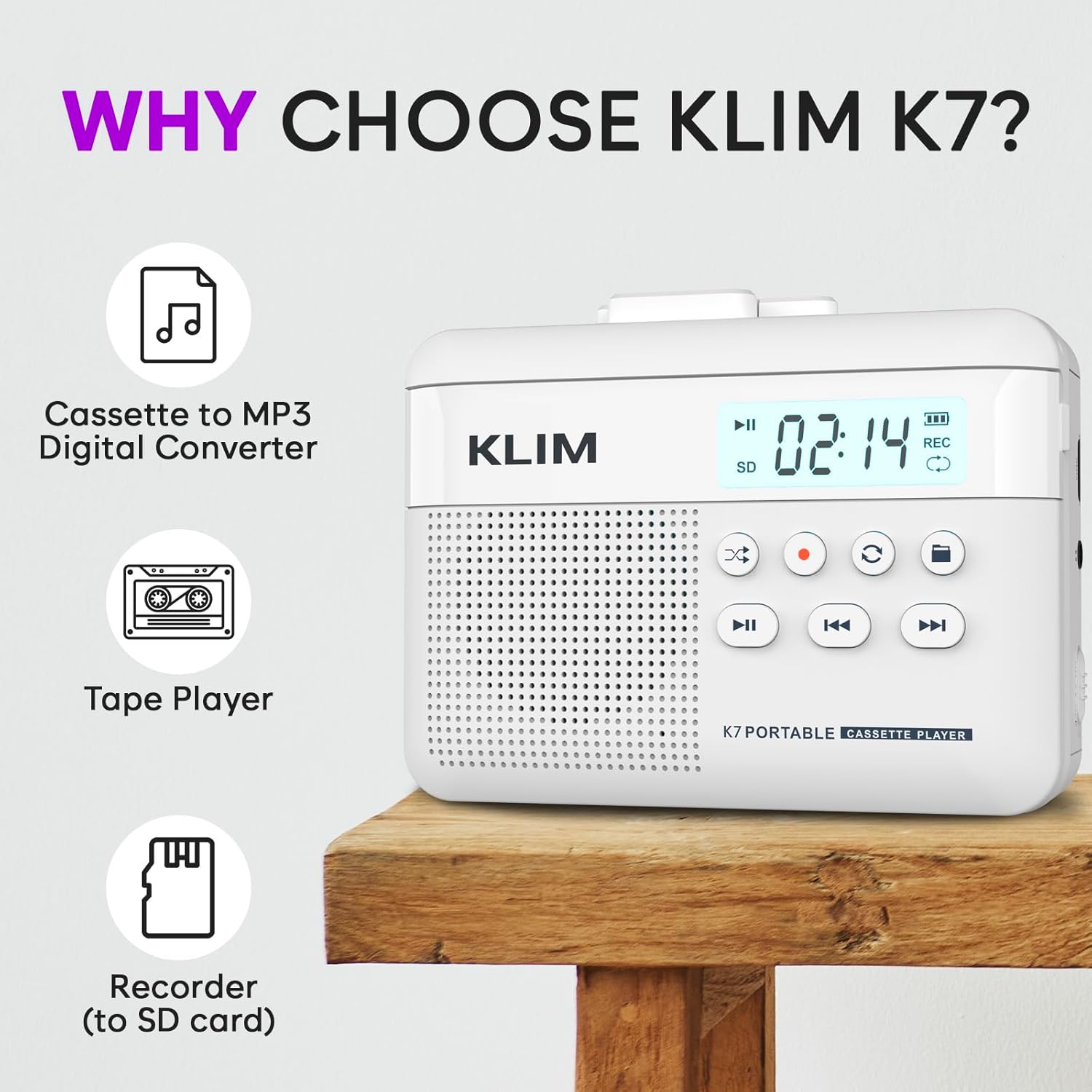
Şekil 1: Ön view of the KLIM K7 Cassette Player, showing the speaker grille, LCD display, and control buttons (Play/Pause, Rewind, Fast Forward, Stop, Record, Mode, Folder, Loop).
- LCD Ekran: Shows track number, recording status, and battery level.
- Konuşmacı: Ses çalma için entegre hoparlör.
- Oynat/Duraklat Düğmesi (►▮): Oynatmayı başlatır veya duraklatır.
- Rewind Button (◀◀): Rewinds the cassette tape or navigates backward through MP3 tracks.
- Fast Forward Button (►►): Fast forwards the cassette tape or navigates forward through MP3 tracks.
- Durdur Düğmesi (■): Oynatmayı veya kaydetmeyi durdurur.
- Record Button (●): Kaydı başlatır veya durdurur.
- Mod Düğmesi (↻): Switches between cassette playback and SD card MP3 playback.
- Folder Button (🖿): Navigates through folders on the SD card.
- Loop Button (⟳): Geçerli parçayı veya tüm parçaları tekrarlar.

Şekil 2: Taraf view of the KLIM K7 Cassette Player, highlighting the SD card slot, 3.5mm headphone jack, and On/Off switch.
- SD Kart Yuvası: Insert your Micro SD card here for recording and MP3 playback.
- 3.5 mm Kulaklık Girişi: Connect the included earphones or other standard headphones.
- Açma/Kapama Anahtarı: Cihazı açar veya kapatır.
- Ses Kontrolü: Ses çıkış seviyesini ayarlar.

Şekil 3: Tepe view of the KLIM K7 Cassette Player with the cassette compartment open, showing the tape mechanism.
- Kaset Bölmesi: Insert your cassette tapes here.
- Cassette Door Release: Opens the cassette compartment.
Kurmak
1. Pilin Şarj Edilmesi
Before first use, fully charge the KLIM K7. The device comes with a 1000mAh rechargeable battery.
- Locate the Type-C USB charging port on the side of the device.
- Connect the included Type-C USB cable to the charging port and the other end to a USB power adapter (not included) or a computer's USB port.
- The charging indicator on the LCD display will show charging status. A full charge typically takes approximately 2 hours.

Şekil 4: The KLIM K7 connected to a Type-C USB cable for charging.
2. SD Kart Takma
An SD card (16GB included) is required for converting tapes to MP3 and for recording with the built-in microphone.
- Locate the SD card slot on the side of the device (refer to Figure 2).
- Altın renkli kontaklar aşağı bakacak şekilde, Micro SD kartı yerine oturana kadar yavaşça yuvaya yerleştirin.
- To remove, push the SD card inward until it clicks, then release, and it will eject.

Şekil 5: Inserting the Micro SD card into the KLIM K7.
3. Inserting a Cassette Tape
- Press the Cassette Door Release button to open the cassette compartment.
- Insert your cassette tape with the open side facing upwards and the tape reels aligned with the player's mechanism.
- Kaset bölmesinin kapağını tık sesi duyana kadar sıkıca kapatın.
Kullanım Talimatları
1. Kasetleri Çalmak
- Ensure the device is powered on using the On/Off switch.
- Insert a cassette tape as described in the Setup section.
- Basın Play/Pause (►▮) oynatmayı başlatmak için düğmesine basın.
- Ses kontrolünü kullanarak ses seviyesini ayarlayın.
- Kullanın Rewind (◀◀) Ve Fast Forward (►►) Bant üzerinde gezinmek için düğmeler.
- Basın Dur (■) Oynatmayı sonlandırmak için düğme.
2. Converting Cassette Tapes to MP3
KLIM K7, kaset seslerini doğrudan MP3'e dönüştürmeye olanak tanır. fileTakılı SD karttaki verileri, bilgisayara veya ek yazılıma ihtiyaç duymadan kullanabilirsiniz.
- Ensure an SD card is inserted and the device is powered on.
- Insert the cassette tape you wish to convert.
- Basın Play/Pause (►▮) Kaseti oynatmaya başlamak için düğmeye basın.
- Uzun basış , Record (●) button. The 'REC' indicator on the LCD display will illuminate, indicating that recording has started.
- Kaydı durdurmak için Record (●) button again. The 'REC' indicator will turn off. The recorded audio will be saved as an MP3 file SD kartta.
- You can then remove the SD card and use the included SD card reader to transfer the MP3 fileBir bilgisayara veya başka bir cihaza.

Şekil 6: Visual guide for converting cassette audio to MP3 files.
3. Using the Built-in Microphone for Recording
The KLIM K7 can also record audio directly from its built-in microphone to the SD card.
- Ensure an SD card is inserted and the device is powered on.
- Basın Mode (↻) button until the device is in SD card mode (no cassette playing).
- Uzun basış , Record (●) button. The 'REC' indicator will light up, and the device will start recording audio from its microphone.
- Kaydı durdurmak için Record (●) button again. The 'REC' indicator will turn off, and the recording will be saved as an MP3 file.

Şekil 7: Using the KLIM K7's built-in microphone for recording.
4. Playing MP3 FileSD Karttan s
- Ensure an SD card with MP3 files is inserted and the device is powered on.
- Basın Mode (↻) button to switch to SD card playback mode. The LCD display will show track information.
- Basın Play/Pause (►▮) oynatmayı başlatmak için düğmesine basın.
- Kullanın Rewind (◀◀) Ve Fast Forward (►►) Parçaları atlamak için düğmeler.
- The Folder (🖿) button allows navigation through different folders on the SD card.
- The Loop (⟳) button can be used to repeat the current track or all tracks.
- Ses kontrolünü kullanarak ses seviyesini ayarlayın.
- Basın Dur (■) Oynatmayı sonlandırmak için düğme.

Şekil 8: Enjoying audio with the KLIM K7 and included earphones.
Bakım
Proper maintenance ensures the longevity and optimal performance of your KLIM K7.
- Temizlik: Cihazın dış yüzeyini temizlemek için yumuşak, kuru bir bez kullanın. Sıvı temizleyiciler veya çözücüler kullanmayın.
- Kaset Bölmesi: Bant başlıklarını ve sıkıştırma silindirlerini periyodik olarak pamuklu çubukla hafifçe temizleyin.ampened with isopropyl alcohol to prevent audio quality degradation. Ensure the device is off and dry before use.
- Depolamak: Cihazı serin, kuru ve doğrudan güneş ışığından ve aşırı sıcaklıklardan uzak bir yerde saklayın.
- Pil Bakım: For long-term storage, charge the battery to about 50% every few months to maintain battery health.
Sorun giderme
If you encounter any issues with your KLIM K7, please refer to the following common solutions:
| Sorun | Olası Neden | Çözüm |
|---|---|---|
| Cihaz açılmıyor. | Pil bitmiş. | Charge the device using the provided Type-C USB cable. |
| Kaset çalarken ses gelmiyor. | Volume is too low or headphones are not connected properly. | Increase the volume. Ensure headphones are fully plugged into the 3.5mm jack. |
| Recording to MP3 fails or produces no file. | SD card is full, not inserted correctly, or corrupted. | Check SD card insertion. Ensure sufficient space on the SD card. Try reformatting the SD card (this will erase all data). |
| Poor audio quality from cassette. | Dirty tape heads or worn-out cassette tape. | Clean the tape heads and pinch rollers. Try a different cassette tape to determine if the issue is with the tape itself. |
| Cihaz donuyor veya tepkisizleşiyor. | Geçici yazılım hatası. | Turn the device off and then on again. If the issue persists, allow the battery to fully discharge and then recharge. |
Özellikler
- Ürün Ölçüleri: 4.76 x 3.61 x 1.56 inç
- Ürün Ağırlığı: 9.9 ons
- Pil: 1 adet Lityum İyon pil (dahil), 1000 mAh
- Şarj Süresi: Yaklaşık 2 saat
- Depolamak: Supports Micro SD card (16GB included)
- Ses Çıkışı: Built-in speaker, 3.5mm headphone jack
- Kayıt Formatı: MP3

Şekil 9: Dimensions of the KLIM K7 Cassette Player.
Garanti ve Destek
KLIM is committed to producing quality electronics. The KLIM K7 Cassette Tape Player comes with a 5 yıllık garanti. If you encounter any problems with your device, please contact KLIM customer support for assistance.
Ek koruma planları satın alınabilir:
- 2 Yıllık Koruma Planı: $3.99 (one-time)
- 3 Yıllık Koruma Planı: $5.99 (one-time)
- NEW Complete Protect: $16.99 (monthly)
Daha fazla destek için şu adresi ziyaret edin: KLIM Mağazası Amazon'da.


