giriiş
This manual provides detailed instructions for the Cillso H97 Wireless Earbuds. Please read this manual carefully before using the product to ensure proper operation and to maximize your user experience. Keep this manual for future reference.

Image: The Cillso H97 Wireless Earbuds in their charging case, displaying the digital battery indicator.
Paket İçeriği
- Cillso H97 Wireless Earbuds (Left and Right)
- Şarj Kutusu
- USB-C Şarj Kablosu
- Kullanıcı Kılavuzu
Kurmak
1. Kulaklıkları ve Kutuyu Şarj Etme
Before first use, fully charge the earbuds and the charging case. Connect the provided USB-C cable to the charging port on the case and to a 5V/1A or 5V/2A power adapter. The digital display on the case will indicate the charging status.
- Şarj Süresi: Tam şarj için yaklaşık 1.5 saat.
- Pil Ömrü: Up to 8 hours of playback per charge, and up to 40 hours total with the charging case.
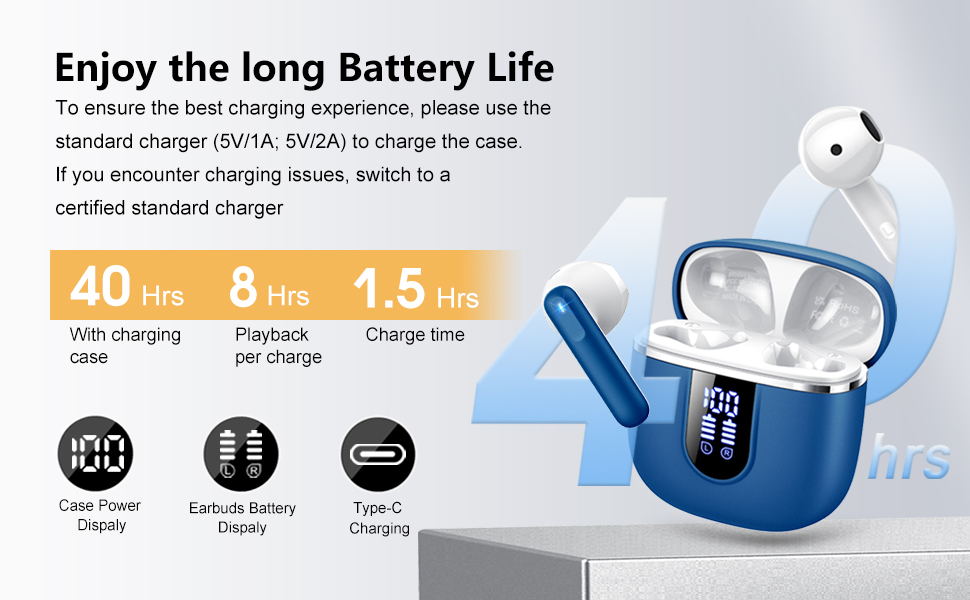
Image: Diagram illustrating the 40-hour total battery life, 8-hour single playback, and 1.5-hour charge time, along with the USB-C charging port and digital display.
The charging case is equipped with Over Current Protection (OCP) technology to prevent damage from prolonged high current. If the current exceeds the power limit, the power source will be cut off to protect the circuitry and device.

Image: Illustration explaining Over Current Protection (OCP) technology in the charging case.
2. Bluetooth Cihazıyla Eşleştirme
- Şarj kutusunu açın. Kulaklıklar otomatik olarak eşleştirme moduna geçecektir.
- Cihazınızda (akıllı telefon, tablet, dizüstü bilgisayar) Bluetooth'u etkinleştirin.
- Arama "H97" in the list of available Bluetooth devices and select it to connect.
- Bağlantı sağlandıktan sonra sesli bir onay duyacaksınız ve kulaklıklarınız kullanıma hazır hale gelecektir.
The H97 earbuds feature Bluetooth 5.4 for a more stable connection, longer transmission range, lower power consumption, and reduced latency.

Image: Visual representation of Bluetooth 5.4 technology, highlighting benefits like stable connection, longer range, lower power consumption, and lower latency.
3. Kulaklıkların Takılması
Gently insert the earbuds into your ears, ensuring a comfortable and secure fit. The rounded tips are designed for in-ear comfort. Adjust them until the sound quality is optimal and they feel stable.

Image: Diagram showing the recommended angle for inserting the earbud into the ear for a secure fit.
Kullanım Talimatları
Dokunmatik Kontroller
The H97 earbuds feature sensitive touch sensors for easy control of various functions:
| Aksiyon | İşlev |
|---|---|
| Double tap the left/right MFB button | Müzik Çal/Duraklat |
| One tap the left/right MFB button | Çağrıyı cevapla/sonlandır |
| Long press the right/left MFB button for 2s | Sonraki/Önceki parça |
| One tap the left/right MFB button (during call) | Volume Up/Down (specific mapping not detailed, typical for single tap) |
| Triple tap MFB button | Activate Voice Assistant (common function) |

Image: Visual guide to the smart touch controls on the earbuds for playback and call management.
Ses Özellikleri
The H97 earbuds deliver a high-quality audio experience:
- Hi-Fi Stereo Ses: Featuring 13mm diameter speakers with crystal clear treble, vibrant mid-range, and powerful bass.
- 3D Bass Stereo: Enhanced bass for an immersive listening experience.
- Kristal Netliğinde Çağrılar: Equipped with 4 ENC (Environmental Noise Cancelling) microphones to filter out background noise and suppress wind noise, ensuring clear communication.

Image: Diagram illustrating the 13mm speaker driver and triple-layer composite diaphragm for enhanced bass and sound quality.

Image: Illustration detailing the 4-microphone design for crystal-clear calls, including feedback and talk mics, and anti-wind noise features.
Uyumluluk
The Cillso H97 Wireless Earbuds are compatible with a wide range of Bluetooth-enabled devices, including:
- Akıllı telefonlar (Android, iOS)
- Tabletler
- Dizüstü bilgisayarlar
- Desktop Computers (with Bluetooth adapter)

Image: Icons representing compatibility with phones, tablets, laptops, and desktops, shown alongside the earbuds and a smartphone playing music.
Bakım
Temizlik ve Bakım
The H97 earbuds are IP7 waterproof, offering protection against water, sweat, and rain. However, proper care is still recommended:
- Wipe the earbuds and charging case with a soft, dry cloth after each use, especially after workouts.
- Aşındırıcı temizleyiciler veya solventler kullanmaktan kaçının.
- Şarj kablosunu bağlamadan önce şarj portunun kuru olduğundan emin olun.
- Kulakiçi kulaklıkları, kullanılmadığında onları korumak ve şarjlı halde tutmak için şarj kutusunda saklayın.

Image: A person wearing the earbuds with water splashing, illustrating the IPX7 waterproof feature, along with icons for dust prevention, sweatproof, and nano material.
Şarj En İyi Uygulamaları
- Always use the provided USB-C cable or a certified standard charger (5V/1A or 5V/2A) to charge the case.
- If you encounter charging issues, try switching to a different certified standard charger.
- Do not expose the charging case or earbuds to extreme temperatures.
Sorun giderme
Yaygın Sorunlar ve Çözümleri
| Sorun | Olası Çözüm |
|---|---|
| Kulaklıklar eşleşmiyor veya bağlanmıyor. |
|
| Sadece tek kulaklık çalışıyor |
|
| Düşük ses seviyesi veya zayıf ses kalitesi |
|
| Şarj kutusu şarj olmuyor |
|
Özellikler
| Özellik | Detay |
|---|---|
| Model Numarası | H97 |
| Marka | Cillso |
| Bluetooth Sürümü | 5.4 |
| Ses Teknolojisi | 3D Bass Stereo, Hi-Fi Stereo Sound |
| Hoparlör Boyutu | 13mm çap |
| Mikrofonlar | 4 ENC Gürültü Önleyici Mikrofon |
| Pil Ömrü (Kulaklıklar) | 8 saate kadar (tek şarj) |
| Toplam Oynanma Süresi | 40 saate kadar (şarj kutusu ile) |
| Şarj Portu | USB-C |
| Şarj Girişi | 5V/1A or 5V/2A recommended |
| Su Geçirmezlik Derecesi | IP7 |
| Uyumlu Cihazlar | Smartphones, Tablets, Laptops, Bluetooth Devices |
| Frekans Aralığı | 20 Hz - 20,000 Hz |
| Kulaklık Şekli | Yuvarlak uçlar |
| Ürün Boyutları | 0.79 x 0.79 x 0.79 inches (earbud dimensions, case dimensions are 48.9mm x 53.4mm) |
| Ürün Ağırlığı | 0.352 ons |

Image: Visual representation of the earbuds and charging case dimensions, emphasizing their lightweight and pocket-sized design.
Garanti ve Destek
Sağlanan verilerde ürün garantisi ve müşteri desteğiyle ilgili bilgi bulunmamaktadır. Lütfen ürün ambalajına veya üreticinin resmi talimatlarına bakın. webGaranti kapsamı ve müşteri desteğiyle nasıl iletişime geçileceği hakkında ayrıntılı bilgi için lütfen siteyi ziyaret edin.
Güvenlik Bilgileri
- Kulaklıkları veya şarj kutusunu sökmeyin veya üzerinde değişiklik yapmayın.
- Ürünü aşırı sıcaklıklardan, doğrudan güneş ışığından ve nemden uzak tutun.
- Ürünü düşürmekten veya güçlü darbelere maruz bırakmaktan kaçının.
- Çocukların ve evcil hayvanların erişemeyeceği yerde saklayınız.
- Ürünü yerel düzenlemelere uygun olarak sorumlu bir şekilde atın.


