1. Üzeriview
The Waveshare ESP32-S3-LCD-1.47 is a compact and powerful development board designed for a wide range of embedded applications. It integrates a high-performance dual-core processor with a vibrant 1.47-inch LCD display, offering robust connectivity options including Wi-Fi and Bluetooth 5. This board is ideal for projects requiring a small form factor, display capabilities, and wireless communication.

Image 1.1: Waveshare ESP32-S3-LCD-1.47 Development Board connected to a USB port, displaying a colorful interface.
2. Kutuda Neler Var?
Upon unboxing your Waveshare ESP32-S3-LCD-1.47 Development Board, you should find the following components:
- 1x ESP32-S3-LCD-1.47 Development Board
- 1x Black Header (for pin expansion)

Image 2.1: Contents of the Waveshare ESP32-S3-LCD-1.47 package, showing the development board and a black header.
3. Temel Özellikler
- Yüksek Performanslı İşlemci: Equipped with an Xtensa 32-bit LX7 dual-core processor, operating at up to 240MHz main frequency.
- Entegre Ekran: Features a 1.47-inch LCD display with 172×320 resolution and 262K colors, providing clear visual output.
- Kablosuz bağlantı: Supports 2.4GHz Wi-Fi (802.11 b/g/n) and Bluetooth 5 (LE) with an onboard antenna for versatile wireless applications.
- Hafıza: Includes 512KB SRAM, 384KB ROM, 16MB Flash, and 8MB PSRAM for ample program and data storage.
- Expandable I/O: Offers multiple IO interfaces and a full-speed USB port for flexible peripheral connections.
- Depolama Genişletme: An onboard TF card slot allows for external storage of pictures or files.
- Güç yönetimi: Supports flexible clock and multiple power modes for optimized low power consumption.
- RGB LED'i: Built-in RGB LED with a clear acrylic sandwich panel for customizable lighting effects.

Image 3.1: Visual representation of the ESP32-S3-LCD-1.47's core features, including its dual-core processor, Wi-Fi, BLE 5, onboard antenna, 1.47-inch display, resolution, color depth, and multiple interfaces.
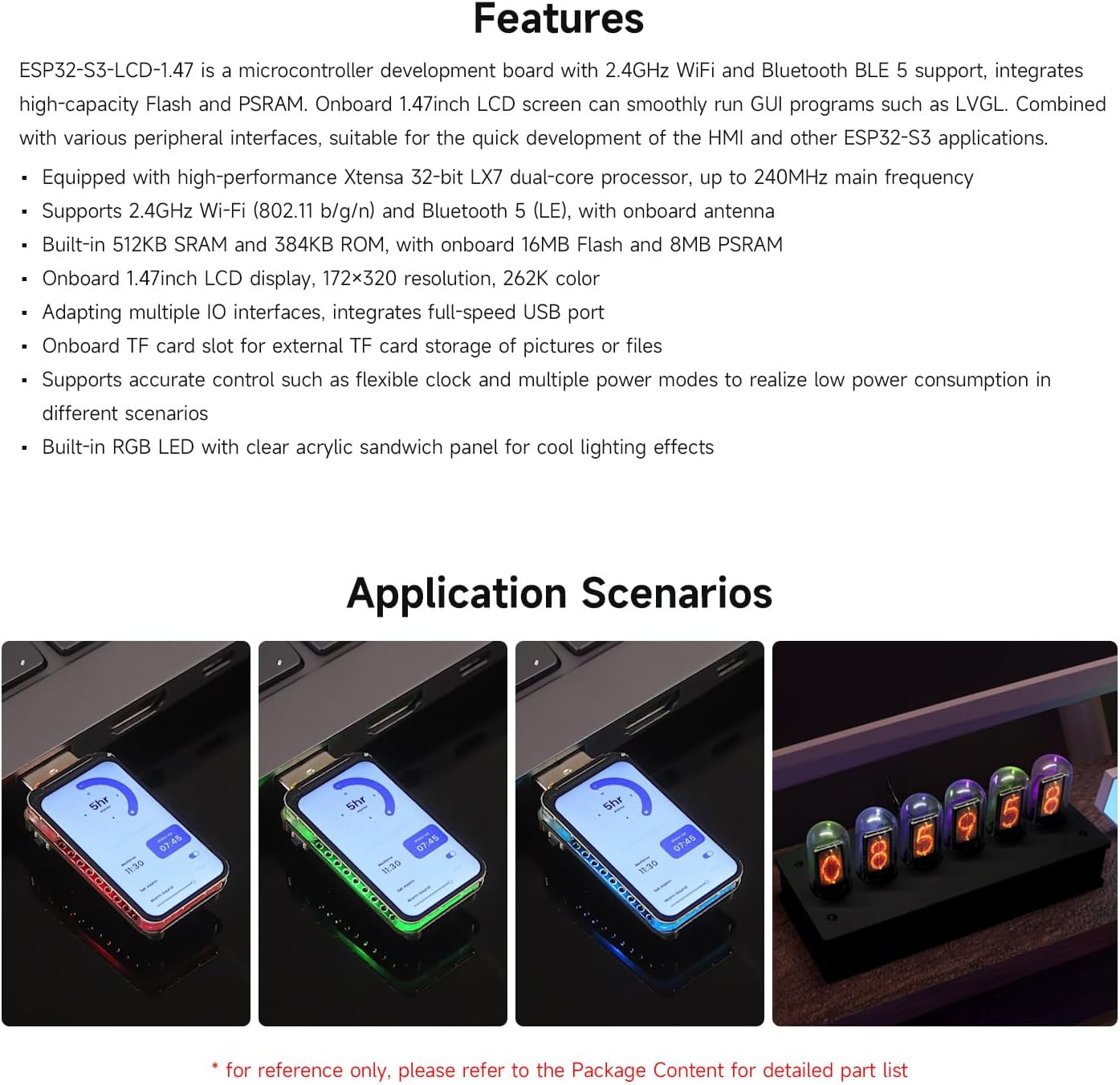
Resim 3.2: Örn.amples of application scenarios for the ESP32-S3-LCD-1.47, showcasing its versatility in various projects.
4. Özellikler
| Özellik | Detay |
|---|---|
| İşlemci | Xtensa 32-bit LX7 dual-core, up to 240MHz |
| Görüntülemek | 1.47-inch LCD, 172×320 resolution, 262K color |
| Kablosuz Bağlantı | 2.4GHz Wi-Fi (802.11 b/g/n), Bluetooth 5 (LE) |
| Veri deposu | 512KB SRAM, 8MB PSRAM |
| ROM | 384KB ROM'u |
| Flaş Bellek | 16MB Flaş |
| Harici Depolama | TF kart yuvası |
| I / O arabirimleri | Multiple IO interfaces, full-speed USB port |
| NEDEN OLMUŞ | Dahili RGB LED |
| Boyutlar | Approximately 2.83 x 2.09 x 0.67 inches (based on package dimensions, actual board is smaller) |
| Ağırlık | Yaklaşık 0.317 ons |

Resim 4.1: Ayrıntılı view of the ESP32-S3-LCD-1.47 board, highlighting key components like the ESP32-S3R8, Flash, TF card slot, and buttons, along with its outline dimensions.
5. Setup and Pinout
To begin using your Waveshare ESP32-S3-LCD-1.47 Development Board, follow these general setup guidelines. For detailed pin configurations and programming, refer to the official Waveshare documentation.
5.1 Pin Bağlantı Şeması

Image 5.1: GPIO pinout diagram for the ESP32-S3-LCD-1.47, indicating power, ground, and various GPIO pins for UART, PWM, I2S, ADC, I2C, and SPI communication.
The board features a standard GPIO header for connecting external peripherals. Ensure correct voltage levels (3.3V or 5V) when connecting components to avoid damage. The pinout diagram above illustrates the available pins and their primary functions.
5.2 İlk Kurulum
- Gücü bağlayın: Connect the development board to your computer using a USB-C cable. The board can also be powered via a lithium battery interface.
- Sürücü Kurulumu: Depending on your operating system, you may need to install USB-to-serial drivers. Refer to the ESP32-S3 documentation for specific driver requirements.
- Geliştirme Ortamı: Install a suitable Integrated Development Environment (IDE) such as Arduino IDE or ESP-IDF. These environments provide the necessary tools for programming and debugging.
- Board Selection: Within your chosen IDE, select the "ESP32-S3 Dev Module" or equivalent board from the board manager.
- Ürün Yazılımını Yükle: Use the IDE to upload your desired firmware or example code to the board.
6. Kullanım Talimatları
The ESP32-S3-LCD-1.47 is designed for flexibility in operation. Once programmed, the board will execute the uploaded code. The integrated 1.47-inch LCD can be used for displaying information, user interfaces, or graphics, depending on your application.
6.1 Display Interaction
- The LCD display can be programmed to show various data, sensor readings, or custom graphical user interfaces.
- If your board features a touch-enabled display (check your specific model), you can interact directly with the screen for input.
6.2 Kablosuz İletişim
- Wifi: Configure the Wi-Fi module in your code to connect to local networks, access online services, or create an access point.
- Bluetooth: Utilize Bluetooth 5 (LE) for low-energy communication with other Bluetooth-enabled devices, such as smartphones or sensors.
6.3 Using the TF Card Slot
- Insert a formatted TF card into the onboard slot to expand storage.
- Your firmware can be programmed to read from and write to the TF card for data logging, image storage, or configuration files.
7. Bakım
To ensure the longevity and optimal performance of your Waveshare ESP32-S3-LCD-1.47 Development Board, consider the following maintenance tips:
- Temiz tut: Regularly clean the board and display with a soft, dry cloth. Avoid using liquids or abrasive materials.
- Dikkatli Kullanın: The display is a delicate component. Avoid applying excessive pressure or dropping the board.
- Uygun Depolama: Kullanmadığınız zamanlarda kartı kuru ve anti-statik bir ortamda saklayın.
- Donanım Yazılımı Güncellemeleri: Waveshare'in resmi sayfasını düzenli olarak kontrol edin. website for firmware updates and new libraries to ensure you have the latest features and bug fixes.
8. Sorun Giderme
If you encounter issues with your Waveshare ESP32-S3-LCD-1.47 Development Board, consider the following troubleshooting steps:
- Güç/Ekran Yok:
- USB-C kablosunun güvenli bir şekilde bağlı olduğundan ve güç sağladığından emin olun.
- Verify that the power source (computer USB port, power adapter) is functional.
- If using a battery, ensure it is charged and correctly connected.
- Yükleme Hataları:
- Check that the correct board and COM port are selected in your IDE.
- Gerekli tüm sürücülerin yüklü olduğundan emin olun.
- Try pressing the BOOT button while uploading if instructed by your IDE or documentation.
- Display Issues (Garbled/Blank):
- Verify that the display initialization code in your firmware is correct.
- Check for loose connections if the display is connected via a ribbon cable.
- Wi-Fi/Bluetooth Bağlantı Sorunları:
- Ensure your code correctly initializes and configures the wireless modules.
- Diğer 2.4GHz cihazlardan kaynaklanan parazit olup olmadığını kontrol edin.
- Verify antenna connection if an external antenna is used.
For more advanced troubleshooting or specific technical support, visit the official Waveshare product page or community forums.
9. İlgili Videolar
Explore these official Waveshare videos for additional insights and demonstrations of the ESP32-S3 series development boards.
ESP32 S3 Touch LCD 2
Video 9.1: An introduction to the Waveshare ESP32-S3 2-inch LCD screen development board, highlighting its display capabilities, camera support, processor, and memory configuration.
ESP32 C6 LCD 1.47 en
Video 9.2: Bittiview of the ESP32-C6 1.47-inch LCD display development board, showcasing its compact design, RISC-V processor, Wi-Fi 6, Bluetooth 5, TF card slot, and RGB LEDs.
ESP32 S3 Touch LCD 1.69
Video 9.3: A detailed look at the ESP32-S3 1.69-inch Touch LCD development board, highlighting its compact size, touch interaction, processor, memory, wireless communication, and peripheral integration.
ESP32 S3/C6 LCD Touch 1.9 Series
Video 9.4: Comparison and features of the ESP32-S3 and ESP32-C6 1.9-inch LCD display development boards, emphasizing their low cost, high performance, and various functionalities.
ESP32-S3 1.8inch AMOLED Touch Display,368x448,AI Speech
Video 9.5: Introduction to a highly integrated ESP32-S3 1.8-inch AMOLED touch display development board, showcasing its high-performance processor, display quality, storage, audio processing, and motion sensing capabilities.
Lonely Binary ESP32-S3 IPEX Unboxing
Video 9.6: Kutudan çıkarma ve genel bakışview of the Lonely Binary ESP32-S3 IPEX Gold Edition, highlighting its PCB design, Wi-Fi and Bluetooth performance with an external antenna, and memory configuration.
10. Garanti ve Destek
Waveshare products are designed for reliability and performance. For warranty information, technical support, and additional resources, please visit the official Waveshare webalan:
You can also find extensive documentation, tutorials, and community forums on their website to assist you with your projects.


