1. Giriş
This manual provides detailed instructions for setting up, operating, and maintaining your Dell KB525C Wired Collaboration Keyboard. Designed for enhanced productivity and seamless communication, this keyboard integrates collaboration features for popular platforms like Zoom and Microsoft Teams, alongside versatile connectivity options.
2. Kutuda Neler Var?
- Wired Collaboration Keyboard - KB525C
- USB-C Kablosu ve USB-A Adaptörü
- Belgeleme
3. Kurulum Talimatları
Follow these steps to connect your Dell KB525C keyboard to your computer:
- Kabloyu bağlayın: Locate the USB-C cable with the attached USB-A adapter.
- Choose Your Port:
- If your computer has a USB-C port, connect the USB-C end of the cable directly to the computer.
- If your computer has a standard USB-A port, attach the USB-A adapter to the USB-C cable and then plug the USB-A adapter into your computer's USB-A port.
- Sürücü Kurulumu: The keyboard is plug-and-play. Your operating system (Windows) should automatically detect and install the necessary drivers.
- Dell Çevre Birimi Yöneticisi: For full functionality of collaboration keys and programmable shortcuts, ensure you have Dell Peripheral Manager (version 1.7.4 or later) installed on your Windows OS device.
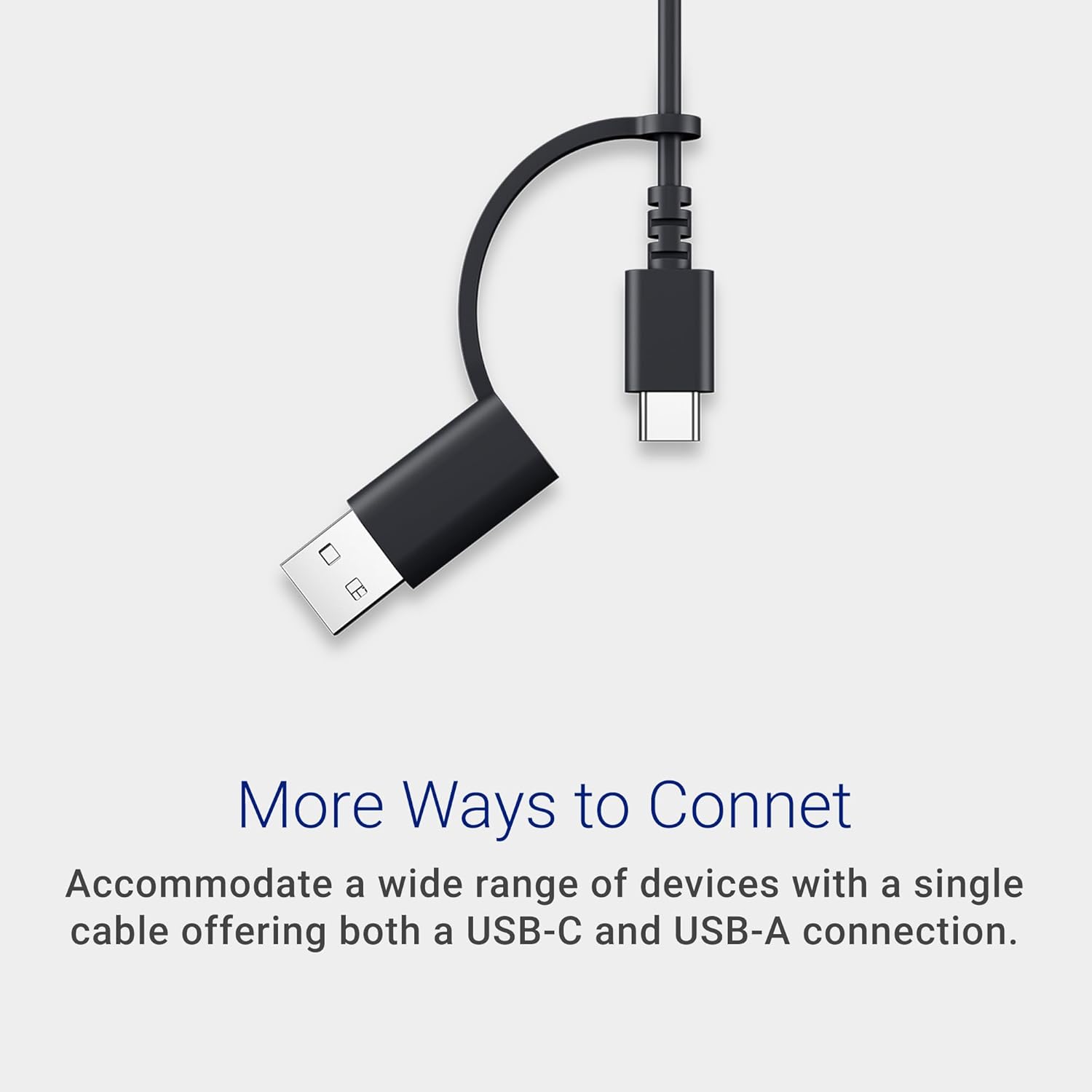
Image: USB-C cable with USB-A adapter for versatile connectivity.

Resim: Ayrıntılı view of the USB-C cable and its accompanying USB-A adapter.
4. Kullanım Talimatları
4.1 Collaboration Keys
The Dell KB525C keyboard features dedicated collaboration keys for seamless integration with Zoom and Microsoft Teams. These keys allow for quick control during virtual meetings:
- Mikrofonun Sesini Kapatın/Sesini Açın: Toggle your microphone on or off.
- Toggle Video: Kameranızı açın veya kapatın.
- Ekran Paylaşımı: Initiate screen sharing.
- Access Chat Panel: Open or close the chat window.
Note: Functionality requires Windows OS with Dell Peripheral Manager (version 1.7.4 or later) and compatible versions of Zoom (5.9.3 or later) or Microsoft Teams (1.6.00.24078 or later). Teams functionality is supported only on the Windows desktop application for work or school and requires Third-party App API to be enabled. Refer to dell.com/support for more information.

Image: The top row of the keyboard showing dedicated collaboration keys for quick meeting control.
4.2 Copilot Key
The built-in Copilot key provides quick access to Copilot in Windows, your everyday AI companion.
Note: Use the 'Copilot' key with supported Windows 11 devices; feature availability varies by device and market. See diğer adıyla.ms/KeySupport Ayrıntılar için.

Image: Close-up of the Copilot key on the keyboard, providing quick access to AI features.
Resim: Ayrıntılı view of the Copilot key and its icon.
4.3 Programmable Shortcut Keys
The keyboard features 15 programmable shortcut keys. These can be customized using the Dell Peripheral Manager software to access your most frequently used functions and applications instantly, boosting your workflow efficiency.

Image: The top row of the keyboard highlighting the 15 programmable shortcut keys.

Image: A visual representation of the programmable keys and their customization potential.
5. Özellikler
5.1 Silent Keys
düşük profesyonelfile keys are designed for silent operation, providing a quiet and comfortable typing experience. This feature is ideal for noise-conscious users and shared workspaces, minimizing distractions.

Resim: Yakın çekim view of the keyboard keys, illustrating their low-profile design for silent typing.

Resim: Patlamış bir view of a keycap and its underlying mechanism, highlighting the silent design.
5.2 Çok Yönlü Bağlantı
The keyboard offers both USB-C and USB-A connectors, ensuring broad compatibility with a variety of devices without needing additional adapters.
5.3 Ayarlanabilir Eğimli Ayaklar
Durable, rubber-padded, quick-flip tilt legs allow you to adjust the keyboard to your preferred typing angle for enhanced comfort and stability during use.

Resim: Yan view of the keyboard with its tilt legs extended, showing the ergonomic angle.

Image: Close-up of the keyboard's tilt legs, demonstrating their adjustability.
5.4 Spill-Resistant Design
The keyboard features a spill-resistant design, offering durability and protection against accidental liquid spills. Anti-fade keys ensure long-term preservation of appearance and legibility.

Image: Keyboard with leaves scattered over it, representing its spill-resistant properties.

Image: Water droplets on the keyboard surface, demonstrating its spill-resistant feature.
5.5 Sürdürülebilir Tasarım
Engineered with 65% post-consumer recycled plastic, this keyboard prioritizes user comfort while embracing environmental responsibility.

Image: The keyboard surrounded by green leaves, representing its sustainable and eco-friendly design.

Image: Keyboard with green leaves floating around it, emphasizing its construction from recycled materials.
6. Özellikler
| Özellik | Detay |
|---|---|
| Marka | Dell |
| Model Numarası | KB525C |
| Bağlantı Teknolojisi | USB (Kablolu) |
| Renk | Siyah |
| İşletim Sistemi | Pencereler |
| Donanım Platformu | PC |
| Ürün Ağırlığı | 1.01 pound |
| Ürün Boyutları (UxGxY) | 17.04 x 4.81 x 1.03 inç |
| Özel Özellikler | Lightweight, Programmable Keys, Spillproof |
| Güç Kaynağı | Pille Çalışır (Note: Product description states "Wired Collaboration Keyboard", but specifications list "Battery Powered". For this wired keyboard, power is supplied via USB connection.) |
7. Bakım
- Temizlik: Yumuşak, tiftiksiz bir bez kullanın ve hafifçe kurulayın.ampened with water or a mild cleaning solution to clean the keyboard surface. Avoid harsh chemicals or abrasive materials.
- Sızıntı Yönetimi: In case of a liquid spill, immediately disconnect the keyboard from your computer. Turn the keyboard upside down to drain any liquid and allow it to dry completely before reconnecting.
- Depolamak: Uzun süre kullanılmayacaksa klavyeyi serin, kuru ve doğrudan güneş ışığından ve aşırı sıcaklıklardan uzak bir yerde saklayın.
8. Sorun Giderme
If you encounter issues with your Dell KB525C keyboard, try the following steps:
- Klavye Yanıt Vermiyor:
- USB kablosunun hem klavyeye hem de bilgisayarınıza güvenli bir şekilde bağlandığından emin olun.
- Klavyeyi bilgisayarınızdaki farklı bir USB portuna bağlamayı deneyin.
- Bilgisayarınızı yeniden başlatın.
- Collaboration Keys Not Working:
- Verify that Dell Peripheral Manager (version 1.7.4 or later) is installed and running on your Windows OS.
- Check that Zoom (version 5.9.3 or later) or Microsoft Teams (version 1.6.00.24078 or later) are updated to compatible versions.
- For Microsoft Teams, confirm that Third-party App API is enabled in your Teams settings.
- Programmable Keys Not Functioning:
- Open Dell Peripheral Manager and ensure your custom shortcuts are correctly configured.
- Check for any software conflicts with other applications that might be using similar keybindings.
9. Resmi Ürün Videosu
Video: Resmi ürün video gösterimiasing the Dell KB525C Wired Collaboration Keyboard. This video provides a visual overview of the keyboard's design, features, and functionality, including its collaboration keys and connectivity options.
10. Garanti ve Destek
For warranty information, technical support, or to access additional resources, please visit the official Dell support webalan:
You may also refer to the documentation included in your product packaging for specific warranty terms and conditions applicable to your region.


