1. Giriş
This manual provides essential information for the installation, operation, and maintenance of your ZOTAC GAMING GeForce RTX 4070 Ti SUPER SOLID OC 16GB graphics card. Please read this manual thoroughly before installation to ensure proper functionality and to prevent damage.

Image 1.1: ZOTAC GAMING GeForce RTX 4070 Ti SUPER SOLID OC 16GB Graphics Card and its retail packaging.
2. Paket İçeriği
Paketin içinde tüm öğelerin mevcut olduğundan emin olun:
- ZOTAC GAMING GeForce RTX 4070 Ti SUPER SOLID OC 16GB Graphics Card
- GPU Destek Standı
- Kullanım Kılavuzu (bu belge)
- Power Adapter Cable (if applicable, check your specific model)
3. Sistem Gereksinimleri
- Bir adet çift genişlikli x16 grafik yuvasına sahip PCI Express uyumlu anakart
- Minimum 750W power supply with three available 8-pin PCIe power connectors (or equivalent 12VHPWR connector)
- Minimum 16GB system memory
- Microsoft Windows 10/11 64-bit veya Linux 64-bit işletim sistemi
- Internet connection for driver installation
4. Kurulum Kılavuzu
4.1. Hazırlık
- Bilgisayarınızı kapatın ve güç kablosunu çıkarın.
- Bilgisayarınızın kasasını açın.
- Statik elektriği boşaltmak için kendinizi topraklayın.
4.2. Grafik Kartının Takılması
- Anakartınızda kullanılabilir bir PCI Express x16 yuvası bulun.
- Bilgisayar kasanızdaki gerekli genişletme yuvası kapaklarını çıkarın.
- Carefully insert the graphics card into the PCIe x16 slot until it is fully seated. Ensure the retention clip locks into place.
- Ekran kartını vidalarla kasaya sabitleyin.
- Connect the required power cables from your power supply to the graphics card. This model typically requires three 8-pin PCIe power connectors or a single 12VHPWR connector. Ensure all connections are secure.
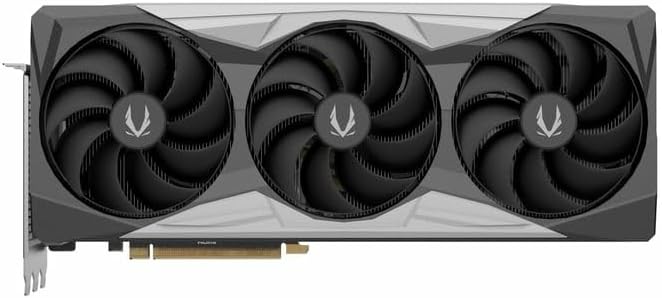
Resim 4.1: Ön view Ekran kartının üçlü fan tasarımını gösteren bir fotoğraf.
4.3. Installing the GPU Support Stand
The included GPU support stand helps prevent sag and provides additional stability for the graphics card. Follow the instructions provided with the stand for proper installation within your PC case.
4.4. Closing the Case and Connecting Peripherals
- Bilgisayar kasanızı kapatın.
- Connect your monitor(s) to the display outputs on the graphics card (DisplayPort or HDMI).
- Reconnect the power cable and other peripherals to your computer.

Resim 4.2: Arka view of the graphics card, showing three DisplayPort outputs and one HDMI output.
5. Kullanım Talimatları
5.1. Sürücü Kurulumu
- Bilgisayarınızı açın.
- Once the operating system loads, download the latest graphics drivers from the official NVIDIA webalan (www.nvidia.com/drivers) or the ZOTAC webalan (www.zotac.com/support).
- Sürücü kurulumunu tamamlamak için ekrandaki yönergeleri izleyin. Sistem yeniden başlatılması gerekebilir.
5.2. Yazılım Yardımcı Programları
ZOTAC provides utilities such as FireStorm for monitoring and adjusting graphics card settings, including fan speed control (Active Fan Control, FREEZE Fan Stop) and performance profiles. These can be downloaded from the ZOTAC webalan.
6. Bakım
- Toz Giderimi: Ekran kartı fanları ve soğutucularındaki tozu basınçlı hava kullanarak düzenli olarak temizleyin. Temizlemeden önce bilgisayarın kapalı ve fişinin çekilmiş olduğundan emin olun.
- Sürücü Güncellemeleri: Keep your graphics drivers updated to ensure optimal performance and compatibility.
- Sıcaklık İzleme: Use monitoring software to keep track of the graphics card's temperature during operation. Excessive temperatures can indicate poor airflow or dust buildup.

Resim 6.1: Açısal view of the graphics card, highlighting its robust cooling solution.
7. Sorun Giderme
- Görüntü Çıkışı Yok:
- Monitör kablosunun ekran kartına ve monitöre güvenli bir şekilde bağlı olduğundan emin olun.
- Grafik kartının PCIe yuvasına tam olarak oturduğundan emin olun.
- Check that all power cables are properly connected to the graphics card.
- Mümkünse farklı bir monitör veya kablo ile test edin.
- Sistem Kararsızlığı veya Çökmeleri:
- Ensure graphics drivers are correctly installed and up to date.
- Check for adequate power supply capacity.
- Aşırı ısınmayı önlemek için sıcaklıkları kontrol edin.
- Verify system memory (RAM) stability.
- Fan Sesi veya Arızası:
- Clean dust from the fans and heatsink.
- Kabloların fanın dönüşünü engellemediğinden emin olun.
- Use ZOTAC FireStorm utility to check fan speed settings.
8. Özellikler
| Özellik | Detay |
|---|---|
| Model Numarası | ZT-D40730R-10P |
| Grafik İşlemcisi | NVIDIA GeForce RTX 4070 Ti SUPER |
| Video Belleği | 16GB GDDR6X |
| Bellek Arayüzü | 256 bitlik |
| Bellek Saati | 21000 MHz (Effective) |
| Motor saati | Güçlendirme: 2640 MHz |
| Görüntü Çıktıları | 3 x DisplayPort 1.4a, 1 x HDMI 2.1a |
| HDCP Desteği | Evet |
| Maksimum Dijital Çözünürlük | Up to 4K (7680x4320 @60Hz) |
| PCI Ekspres | PCI Express 4.0 x16 |
| Önerilen Güç Kaynağı | 750W |
| Güç Konnektörleri | 1 x 12VHPWR (or 3 x 8-pin PCIe via adapter) |
| Boyutlar (UxGxY) | 16.73 x 11.54 x 3.94 inç (yaklaşık) |
| Ağırlık | 2.2 pound (yaklaşık) |
| Soğutma Sistemi | IceStorm 2.0 Advanced Cooling, Triple 100mm Fans, FREEZE Fan Stop, Active Fan Control |
| Özellikler | NVIDIA DLSS 3.5, Ray Tracing, Metal Backplate, GPU Support Stand |
9. Garanti ve Destek
Ayrıntılı garanti bilgileri için lütfen ürününüzle birlikte verilen garanti kartına bakın veya resmi ZOTAC web sitesini ziyaret edin. website's support section. ZOTAC provides technical support and resources for their products.
- ZOTAC Desteği Webalan: www.zotac.com/support
- Ürün kaydı: Ürününüzü ZOTAC'a kaydedin. webGaranti aktivasyonunuzu gerçekleştirmek ve ürün güncellemelerini almak için bu siteyi kullanın.


