1. Giriş
This manual provides essential information for the safe and efficient operation of your THOMSON 43FG2S14 43-inch Full HD Google Smart TV. Please read it thoroughly before using the television and retain it for future reference.

Şekil 1.1: Ön view of the THOMSON 43FG2S14 TV.
Temel Özellikler:
- Tam HD Çözünürlük: Experience clear and detailed images.
- Google TV: Personalized Smart TV experience with recommendations and multiple user profiles. Access content from various streaming services.
- Google Yayın: Wirelessly stream movies, music, and videos from compatible devices.
- Backlit Premium Remote Control: Easy navigation even in low light, with a customizable favorite button.
- Triple Tuner (DVB-T, DVB-S, DVB-C): Receive TV signals via terrestrial antenna, satellite, or cable without additional equipment.
- Dolby Ses: Enjoy a dynamic sound experience with clear dialogue and immersive surround sound.
- Bağlantı: Multiple HDMI and USB ports, Bluetooth 5.1, Wi-Fi.
2. Kurulum
2.1 Paketten Çıkarma ve Yerleştirme
Carefully remove the TV from its packaging. It is recommended to have two people for this process. Place the TV on a stable, flat surface or mount it on a wall using a compatible VESA mount (not included). Ensure adequate ventilation around the TV.

Figure 2.1: TV dimensions for placement planning.
2.2 Cihazları Bağlama
Connect your external devices such as set-top boxes, gaming consoles, or Blu-ray players to the TV's input ports. Refer to the diagram below for port locations.

Şekil 2.2: Arka view bağlantı portları ile.
- HDMI Bağlantı Noktaları (x3): For high-definition audio and video devices. One port supports ARC (Audio Return Channel).
- USB Bağlantı Noktaları (x2): Medya oynatmak veya yazılım güncellemeleri için USB depolama aygıtlarını bağlamak için.
- LAN Bağlantı Noktası: Kablolu internet bağlantısı için.
- Anten Girişi: Connect your terrestrial antenna for DVB-T reception.
- Uydu Girişi: Connect your satellite dish for DVB-S reception.
- CI+ Yuvası: For inserting a Conditional Access Module (CAM) and smart card for encrypted channels.
- Optik Ses Çıkışı: Harici ses sistemlerine bağlanmak için.
- AV GİRİŞİ: Kompozit video ve stereo ses kablolarını kullanarak eski cihazları bağlamak için.
2.3 İlk Çalıştırma ve İlk Kurulum
After connecting all necessary cables, plug the power cord into an electrical outlet. Press the power button on the remote control or the TV. The TV will guide you through the initial setup process, including language selection, network connection (Wi-Fi or LAN), Google account login, and channel scanning.
3. Kullanım Talimatları
3.1 Google TV Arayüzü
Your THOMSON TV features the Google TV operating system, which organizes content from your various streaming services and apps into a personalized interface. You can create multiple user profileKişiye özel öneriler için s.
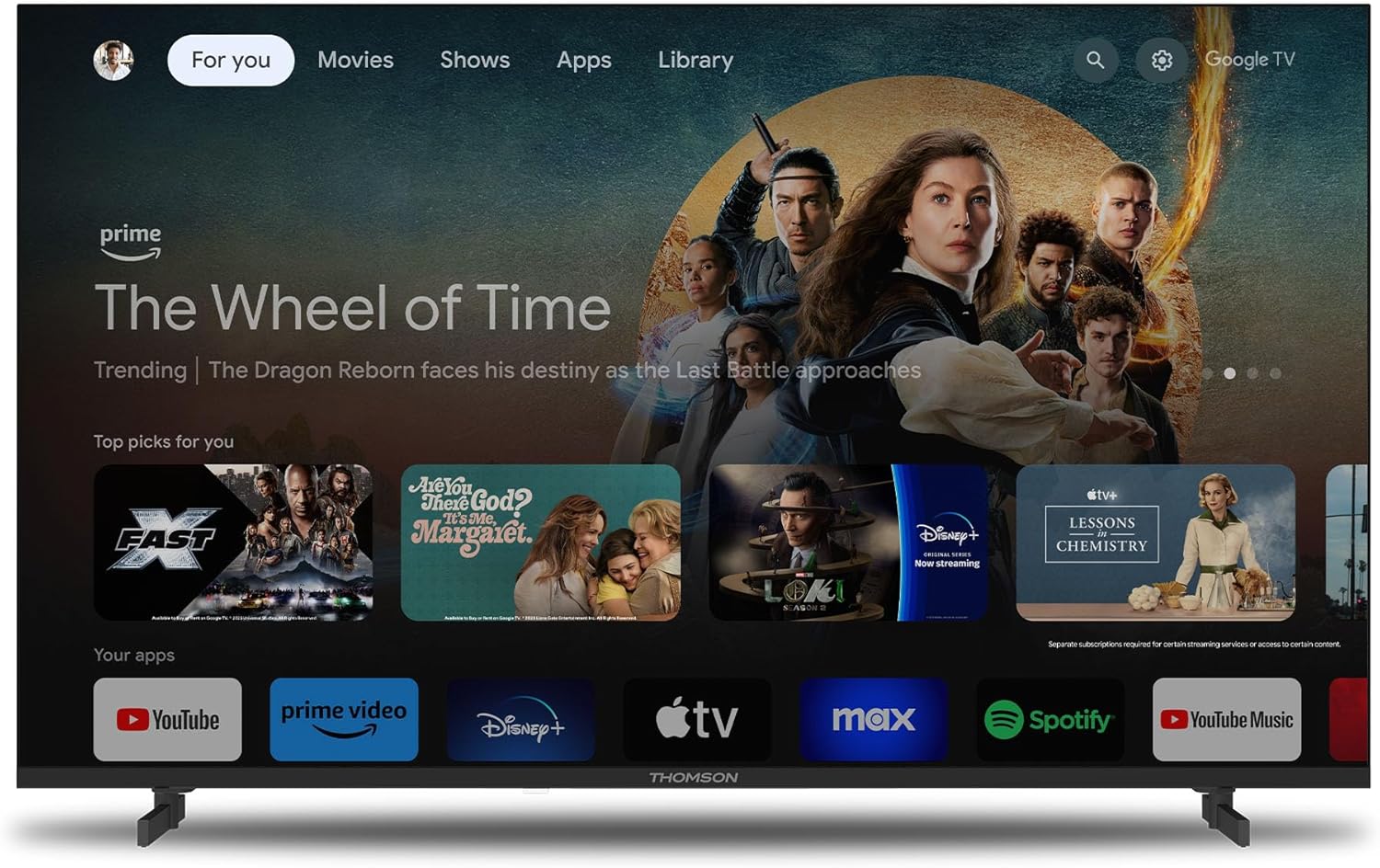
Şekil 3.1: Google TV ana ekranı.
3.2 Uzaktan Kumanda Kullanımı
The included remote control is backlit for easy use in dim lighting. It features dedicated buttons for popular streaming services and a customizable 'Favorite' button (star icon) to quickly access your preferred application.
3.3 Google Cast Functionality
Utilize Google Cast to wirelessly stream content from your compatible smartphone, tablet, or computer directly to your TV screen. Ensure both devices are connected to the same Wi-Fi network.

Figure 3.2: Google Cast in action.
3.4 Dolby Audio Experience
The TV integrates Dolby Audio technology to provide a rich and dynamic sound experience. This enhances dialogue clarity and creates an immersive audio environment for movies, music, and games.

Figure 3.3: Enhanced audio with Dolby Audio.
4. Bakım
4.1 TV'nin temizlenmesi
Temizlemeden önce televizyonu elektrik prizinden çıkarın. Ekranı ve kasayı yumuşak, kuru bir bezle silin. İnatçı lekeler için hafifçe silin.ampen the cloth with water or a mild, non-abrasive screen cleaner. Never spray liquid directly onto the screen or cabinet.
4.2 Yazılım Güncellemeleri
Your TV may receive software updates periodically to improve performance and add new features. Ensure your TV is connected to the internet to receive these updates automatically or check for them manually through the TV's settings menu.
5. Sorun Giderme
Televizyonunuzla ilgili sorunlarla karşılaşırsanız, destek ekibiyle iletişime geçmeden önce lütfen aşağıdaki yaygın sorunlar ve çözümlerine göz atın.
| Sorun | Olası Neden | Çözüm |
|---|---|---|
| TV açılmıyor. | Elektrik yok, uzaktan kumanda pilleri zayıf. | Check power cord connection. Ensure outlet has power. Replace remote control batteries. |
| Görüntü yok, ancak ses var. | Incorrect input source, loose HDMI cable. | Press the 'Source' button on the remote to select the correct input. Check HDMI cable connections. |
| Ses yok, ancak görüntü mevcut. | Volume muted, external audio system issue. | Televizyonun sesini açın veya ses seviyesini artırın. Harici ses sistemlerine olan bağlantıları kontrol edin. |
| Wi-Fi'ye bağlanılamıyor. | Incorrect password, router issue, TV too far from router. | Wi-Fi şifresini doğrulayın. Yönlendiriciyi yeniden başlatın. Televizyonu yönlendiriciye daha yakın bir yere taşıyın veya kablolu bağlantı kullanın. |
| Uzaktan kumanda yanıt vermiyor. | Batteries low, obstruction, pairing issue. | Replace batteries. Remove any obstructions between remote and TV. Re-pair the remote if it's a Bluetooth remote. |
6. Özellikler
Detailed technical specifications for the THOMSON 43FG2S14 TV:
- Marka: Thomson
- Model Numarası: 43FG2S14
- Ekran Boyutu: 43 inç (109 cm)
- Ekran Teknolojisi: NEDEN OLMUŞ
- Çözünürlük: 1080p Tam HD (1920 x 1080)
- Yenileme Hızı: 60 Hz
- Kontrast Oranı: 1000:1
- İşletim Sistemi: Google televizyon
- Ses Teknolojisi: Dolby Audio, 5.1 Surround Configuration
- Ayarlayıcılar: DVB-T (Terrestrial), DVB-S (Satellite), DVB-C (Cable)
- Bağlantı:
- 3 x HDMI ports (HDMI 1.4, one with ARC)
- 2 x USB bağlantı noktası
- Bluetooth 5.1
- Wifi
- LAN (Ethernet) bağlantı noktası
- Optik Ses Çıkışı
- AV In
- CI+ Yuvası
- En Boy Oranı: 16:9
- Montaj Tipi: Duvara monte edilebilir (VESA uyumlu)
- Ürün Ölçüleri (U x G x Y): 95.5x8.5x55.5 cm
- Ağırlık: 6 kilo
- Dahil Bileşenler: Uzaktan kumanda
7. Garanti ve Destek
7.1 Ürün Garantisi
Your THOMSON 43FG2S14 TV comes with a 3 yıllık garanti, ensuring the quality and reliability of the product. Please retain your proof of purchase for warranty claims.
7.2 Müşteri Desteği
For further assistance, technical support, or warranty inquiries, please refer to the contact information provided with your product packaging or visit the official Thomson support website. When contacting support, please have your model number (43FG2S14) and purchase details ready.